

About
AI-powered website automation via Telegram
README
SitePilot is a Telegram-controlled, AI-assisted static website maintenance system.
You send a request from Telegram, and the project uses an MCP-style operation loop to read/edit files in site/, then deploy changes through Git.
What this project does
- Accepts website change requests from Telegram (
/pilot ...) - Uses a local LLM (via Ollama) to generate structured file operations
- Executes file operations inside the
site/folder - Auto-commits and pushes updates for deployment (for example, GitHub Pages)
- Optionally sends Telegram deployment notifications
MCP role in this project
The file mcp_server.py is the core operation engine.
It works like an MCP-style controller by:
- receiving a user task
- exposing available project files to the model
- asking the model to return explicit commands only
- parsing and executing those commands deterministically
Supported operation commands
The model is instructed to return only these operations:
READ: <filename>- read a file fromsite/FILE: <filename>+ content block - create/update a file insite/DELETE: <filename>- delete a file fromsite/
This command-contract is the project's MCP-like interface between AI planning and actual file execution.
Architecture
telegram_bot.pyTelegram bot entrypoint and command handlers (/start,/pilot,/status).mcp_server.pyMCP-style operation server: model prompt, command parsing, filesystem operations, Git deploy, and notifications.site/The actual website files that the AI edits.requirements.txtPython dependencies.
End-to-end workflow
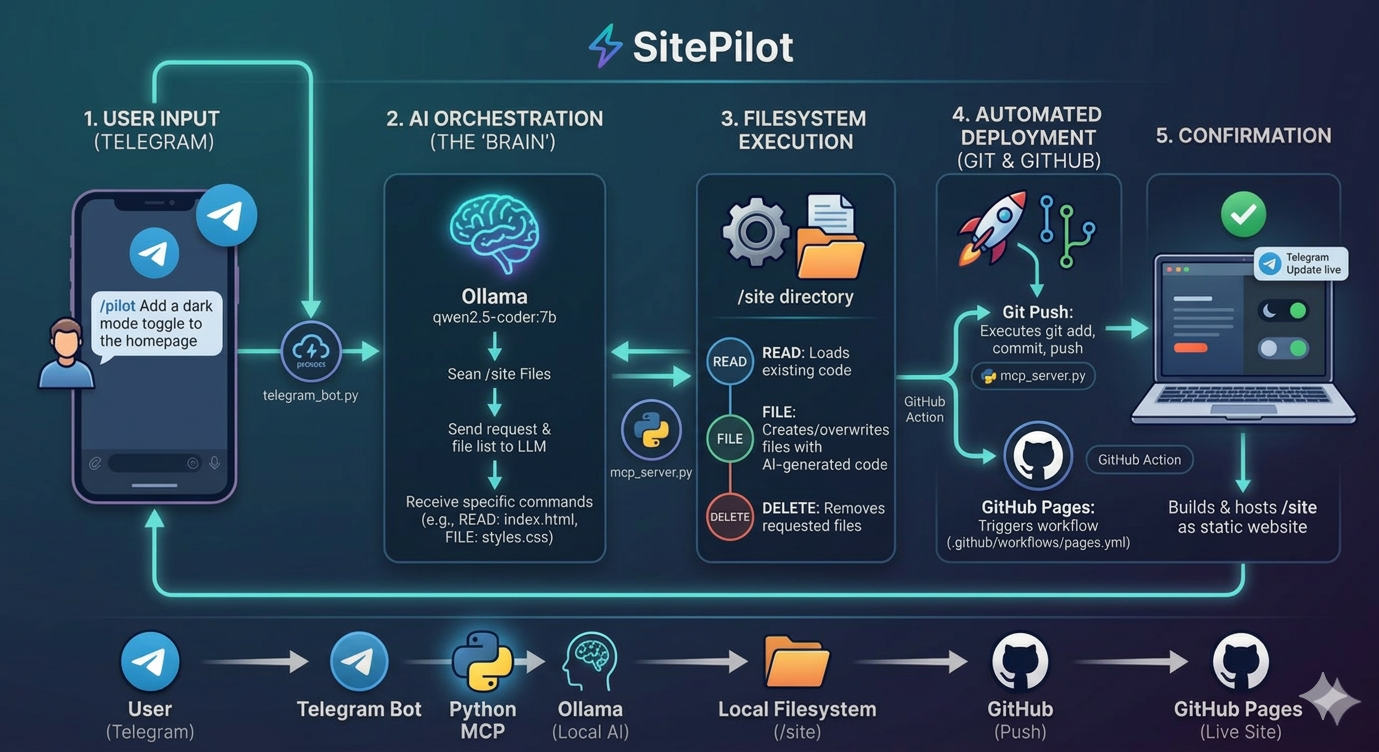
- User sends
/pilot <change request>in Telegram. - Bot launches:
python mcp_server.py "<change request>" mcp_server.pygathers currentsite/structure.- Ollama model returns operation commands (
READ,FILE,DELETE). - Server executes commands against
site/. - Server runs Git deploy steps (
add,commit,push). - Optional Telegram notification is sent.
Workflow Diagram
Prerequisites
- Python 3.12+
- Ollama installed locally
- Ollama model available locally:
qwen2.5-coder:7b - Telegram bot token from @BotFather
- Git remote configured (if you want automatic push/deploy)
Installation
git clone <your-repo-url>
cd MCP
pip install -r requirements.txt
Environment variables
Create a .env file in the project root:
TELEGRAM_TOKEN=your_bot_token_here
TELEGRAM_NOTIFY_IDS=your_chat_id
TELEGRAM_TOKEN: required for bot + notificationsTELEGRAM_NOTIFY_IDS: optional comma-separated chat IDs to notify after deploy
Run the bot
python telegram_bot.py
Then in Telegram:
/start- usage help/status- health check/pilot Add a dark mode toggle to the homepage
Direct MCP operation run (without Telegram)
You can run the MCP server directly:
python mcp_server.py "Update hero section text and CTA button"
Demo
Video: https://youtu.be/wWsGnYfuECk
Installing SitePilot
This server has no published package — it is built from source. Open the repository and follow its README.
▸ github.com/MUBENDIRAN/SitePilotFAQ
Is SitePilot MCP free?
Yes, SitePilot MCP is free — one-click install via Unyly at no cost.
Does SitePilot need an API key?
No, SitePilot runs without API keys or environment variables.
Is SitePilot hosted or self-hosted?
Self-hosted: the server runs locally on your machine via the install command above.
How do I install SitePilot in Claude Desktop, Claude Code or Cursor?
Open SitePilot on unyly.org, pick your client tab (Claude Desktop, Claude Code, Cursor) and press Install — the config is generated automatically, no JSON editing.
Related MCPs
Gmail
Read, send and search emails from Claude
 by Google
Slack
Send, search and summarize Slack messages
 by Slack
Runbear
No-code MCP client for team chat platforms, such as Slack, Microsoft Teams, and Discord.
Discord Server
A community discord server dedicated to MCP by [Frank Fiegel](https://github.com/punkpeye)
Compare SitePilot with
Not sure what to pick?
Find your stack in 60 seconds
Author?
Embed badge for your README
Browse similar
All communication MCPs