
Sourcey
FreeNot checkedPrecision documentation from OpenAPI, MCP, Doxygen, godoc, rustdoc, and Markdown. Static HTML you own.

About
Precision documentation from OpenAPI, MCP, Doxygen, godoc, rustdoc, and Markdown. Static HTML you own.
README
Docs straight from the source.
Sourcey turns OpenAPI, MCP, Doxygen XML, godoc, rustdoc, and Markdown into one static HTML site you own: reference, guides, changelog, roadmap, and llms.txt from the same build, deployable anywhere.
Everything renders at build time: no dashboard, no runtime, no API calls to render your own documentation.
npx sourcey init
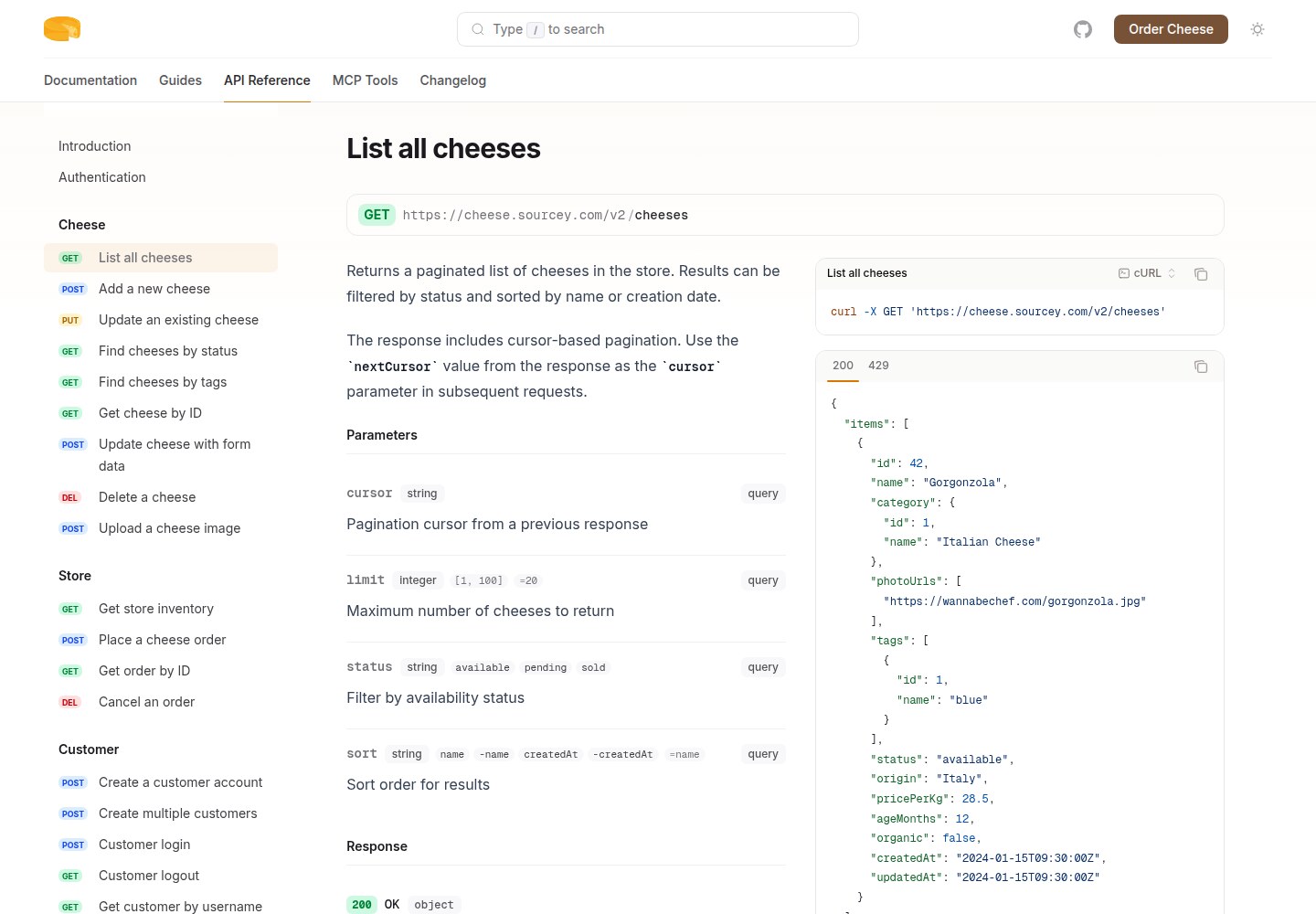
Live demo · Documentation · GitHub
Features
- OpenAPI 2.0, 3.0, 3.1, and 3.2: full spec coverage including
QUERYoperations, response summaries, hierarchical tags,deviceAuthorizationOAuth,querystringparameters, and$self-aware refs for multi-document APIs - API reference from OpenAPI: endpoints, parameters, request/response schemas, and auto-generated code samples across 10 supported languages. The default set is cURL, JavaScript, and Python; configure TypeScript, Go, Ruby, Java, PHP, Rust, and C# when you want them
- MCP server documentation: tools, resources, prompts rendered as browsable reference with JSON-RPC, TypeScript, and Python code samples. Color-coded method types, annotation badges, connection config cards
- Rich guides: markdown pages with steps, cards, accordions, syntax-highlighted code blocks, and prose alongside your API reference
- MkDocs source import: point a tab at
mkdocs.yml; Sourcey readsdocs_dirandnavso existing MkDocs markdown sites can render without hand-copying the sidebar structure - Product story pages: changelog, roadmap pages, examples, reference material, search, and portable context exports in one source-owned site
- C++ and Doxygen: feed Doxygen XML output, get modern searchable API docs with exact member search, source links, templates, qualifiers, examples, inherited members, and relationship sections. No new parser, no four-tool Breathe/Exhale/Sphinx pipeline
- Go and godoc: native package documentation extracted from Go source via the toolchain. Render Go modules as Sourcey tabs, generate standalone static Go docs sites, or commit
godoc.jsonsnapshots for JS-only docs hosts. No Doxygen detour - Rust and rustdoc: native API documentation from nightly rustdoc JSON, with doctests as a first-class extracted view. URL-encoded parametric impl anchors for deep-link parity with doc.rust-lang.org. Snapshot mode lets CI build on stable Rust toolchains. Aggregated doctests index across the workspace
- Context exports: auto-generate llms.txt and llms-full.txt alongside your HTML as alternate views of the same documentation graph
- TypeScript config:
sourcey.config.tswithdefineConfig()autocomplete; theme, navbar, CTA buttons, footer - Theme presets: default (sidebar + TOC), minimal (single column), api-first (Stripe-style three column); colors, fonts, layout dimensions, and custom CSS on top
- Vite dev server: SSR hot reload on every component and CSS change; spec and markdown changes trigger instant refresh
- Dark mode: semantic design tokens, light/dark logo variants, localStorage persistence
- Client-side search: instant fuzzy search across all pages and API operations; Cmd+K
- Static HTML output: no framework runtime, no vendor lock-in. Deploy to GitHub Pages, Vercel, Netlify, S3, anywhere
- Open source: AGPL-3.0. Self-host, fork, extend. Your docs, your infrastructure
Install
Sourcey CLI
The full Sourcey binary handles OpenAPI, MCP, Doxygen, godoc, rustdoc, MkDocs, and Markdown sources.
| Path | Command | Requires |
|---|---|---|
| npm | npm install -g sourcey |
Node 20+ |
| Homebrew | brew tap sourcey/tap && brew install sourcey |
macOS / Linuxbrew |
| Docker | docker run -v "$PWD":/docs sourcey/sourcey |
Docker |
| Nix | nix run github:sourcey/sourcey |
Nix (flakes) |
Then sourcey init to scaffold a new project, or sourcey build against an existing one. See docs/install.md for full Docker invocations (init / dev / build), the --host flag for containerized dev, Linuxbrew notes, and Nix profile install.
Standalone Go docs generator
For Go-only consumers without a JavaScript toolchain, sourcey-godoc ships as a separate native binary. It produces static Go docs sites or portable godoc.json snapshots.
| Path | Command |
|---|---|
| Go | go install github.com/sourcey/sourcey/go/sourcey-godoc/cmd/sourcey-godoc@latest |
| Homebrew | brew install sourcey/tap/sourcey-godoc |
| Scoop | scoop bucket add sourcey https://github.com/sourcey/scoop-bucket && scoop install sourcey-godoc |
Rust snapshot converter
The rustdoc() adapter consumes nightly rustdoc JSON through the sourcey companion crate and its sourcey-rustdoc converter, so CI can build Rust API docs from a committed snapshot on a stable toolchain. See docs/adapters/rustdoc.md.
Quick start
# Scaffold a project (detects OpenAPI specs and Doxyfiles)
npx sourcey init

# Dev server with hot reload
sourcey dev

# Build static HTML to dist/
sourcey build

# Quick build from a single OpenAPI spec
sourcey build api.yaml -o dist/
In CI, the sourcey/build-docs GitHub Action runs the build and deploys to GitHub Pages; see deploying.
Astro integration
Astro sites can mount Sourcey directly instead of running a separate docs CI job. The integration reads the same sourcey.config.ts, derives Sourcey's public siteUrl and baseUrl from Astro's site/base plus routeBase, serves docs in Astro dev, and writes docs into Astro's final build output.
// astro.config.ts
import { defineConfig } from "astro/config";
import sourcey from "sourcey/astro";

export default defineConfig({
  site: "https://sourcey.com",
  integrations: [
    sourcey({
      config: "./sourcey.config.ts",
      routeBase: "/docs",
    }),
  ],
});
You can also share an imported config object when you want one config module to feed both the CLI and Astro:
import { defineConfig } from "astro/config";
import sourcey from "sourcey/astro";
import docs from "./sourcey.config";

export default defineConfig({
  site: "https://sourcey.com",
  integrations: [sourcey({ config: docs, configDir: ".", routeBase: "/docs" })],
});
Configuration
Create sourcey.config.ts in your project root:
import { defineConfig, openapi } from "sourcey";

export default defineConfig({
  name: "My API",
  navigation: {
    tabs: [{ tab: "API Reference", source: openapi("./openapi.yaml") }],
  },
});
Each tab has one source, usually created with markdown(), mkdocs(), openapi(), mcp(), doxygen(), godoc(), or rustdoc(). Pages are referenced by slug (e.g. "quickstart" resolves to quickstart.md). See docs/configuration.md for theme, navbar, footer, logo, and full tab options.
Go documentation (godoc)
Render Go package docs as a tab inside your Sourcey site, branded and styled with the rest of your documentation. Native toolchain extraction (go list + go/parser + go/doc) feeds the same renderer as your OpenAPI, MCP, and Markdown tabs, so signatures, examples from *_test.go, and source links sit alongside your guides instead of bouncing readers to pkg.go.dev.
Live: scafld's Go API reference →
{ tab: "Go API", source: godoc(".") }
The shorthand expands to { module: ".", packages: ["./..."], mode: "auto", includeTests: true }. Live mode uses the host Go toolchain; snapshot mode reads a committed godoc.json and needs no Go on the build host. See docs/configuration.md for packages, mode, goEnv, sourceBasePath, and includeUnexported.
Markdown components
Guides support rich components in standard markdown:
<Steps>
  <Step title="Install">Run `npm install sourcey`</Step>
  <Step title="Configure">Create `sourcey.config.ts`</Step>
  <Step title="Build">Run `sourcey build`</Step>
</Steps>

<CardGroup cols={2}>
  <Card title="API Reference" icon="book" href="/api">Full endpoint docs</Card>
  <Card title="Guides" icon="map" href="/docs">Step-by-step tutorials</Card>
</CardGroup>

<AccordionGroup>
  <Accordion title="How does auth work?">We use API keys and OAuth2.</Accordion>
</AccordionGroup>
Theme
All visual configuration lives under theme. Colors, fonts, layout dimensions, and a preset that controls page structure:
theme: {
  preset: "api-first",
  colors: { primary: "#f59e0b", light: "#fbbf24", dark: "#d97706" },
  fonts: { sans: "'Lexend', sans-serif", mono: "'Fira Code', monospace" },
  layout: { sidebar: "16rem", content: "48rem" },
  css: ["./brand.css"],
}
Presets control layout structure: "default" (sidebar + TOC), "minimal" (single centered column), "api-first" (three-column with persistent code panels). Everything else applies on top.
CLI
sourcey dev                       Dev server (reads sourcey.config.ts)
sourcey build                     Build site (reads sourcey.config.ts)
sourcey build api.yaml            Quick build from a single spec
sourcey validate api.yaml         Validate a spec file
sourcey godoc --out godoc.json    Snapshot a Go module's docs to JSON
sourcey-godoc generate --out site Standalone Go CLI for static godoc sites
Run sourcey <command> --help for flags.
Development
git clone https://github.com/sourcey/sourcey.git
cd sourcey && npm install
npm run build && npm test
cd go/sourcey-godoc && go test ./... && go vet ./...

# Run the in-repo docs site against your working copy
cd docs && npx tsx ../src/cli.ts dev
License
AGPL-3.0. Free to use, self-host, and modify. If you run Sourcey as a hosted service, you open-source your stack.
Commercial licensing available; contact sourcey.com.
Install Sourcey in Claude Desktop, Claude Code & Cursor
unyly install sourceyInstalls into Claude Desktop, Claude Code, Cursor & VS Code — handles npx, uvx and build-from-source repos for you.
First time? Get the CLI: curl -fsSL https://unyly.org/install | sh
Or configure manually
Run in your terminal:
claude mcp add sourcey -- npx -y sourceyFAQ
Is Sourcey MCP free?
Yes, Sourcey MCP is free — one-click install via Unyly at no cost.
Does Sourcey need an API key?
No, Sourcey runs without API keys or environment variables.
Is Sourcey hosted or self-hosted?
Self-hosted: the server runs locally on your machine via the install command above.
How do I install Sourcey in Claude Desktop, Claude Code or Cursor?
Open Sourcey on unyly.org, pick your client tab (Claude Desktop, Claude Code, Cursor) and press Install — the config is generated automatically, no JSON editing.
Related MCPs
Notion
Read and write pages in your workspace
 by Notion
Linear
Issues, cycles, triage — from Claude
 by Linear
Google Drive
Search and read your Drive files
 by Google
mindsdb/mindsdb
Connect and unify data across various platforms and databases with [MindsDB as a single MCP server](https://docs.mindsdb.com/mcp/overview).
 by mindsdb
Compare Sourcey with
Not sure what to pick?
Find your stack in 60 seconds
Author?
Embed badge for your README
Browse similar
All productivity MCPs