
Spring Documentation
FreeNot checkedSpring Boot based MCP Server provide full Spring Ecosystem Documentation for LLMs

About
Spring Boot based MCP Server provide full Spring Ecosystem Documentation for LLMs
README
A comprehensive Spring Boot application that serves as a Model Context Protocol (MCP) Server, providing AI assistants with full-text searchable access to Spring ecosystem documentation via Server-Sent Events (SSE).
What is this?
This MCP server enables AI assistants (like Claude) to search, browse, and retrieve Spring Framework documentation, code examples, and API references. It includes:
- MCP Server: SSE-based protocol implementation using Spring AI
- Documentation Sync: Automated synchronization from spring.io
- Full-Text Search: PostgreSQL-powered search across all Spring documentation
- Web Management UI: Thymeleaf-based interface for managing projects, versions, and documentation
- Code Examples: Searchable repository of Spring code snippets
Screenshots

Login - Secure authentication with Spring Security |

Dashboard - Overview statistics and quick actions |

Spring Boot - Spring Boot project management |

Projects - All Spring projects overview |

Project Details - Spring Batch project details |

Versions - Version management and tracking |

Documentation - Full-text search and browse |

Code Examples - Searchable code snippets library with language and tag filters |

Settings - Application configuration, scheduler, and sync controls |

Documentation Markdown - Expanded Spring Batch documentation content |

MCP Inspector - MCP Inspector connected to Spring Documentation MCP Server |

Claude Code Integration - Claude Code console listing all Spring Boot versions via MCP |

Spring AI Compatibility - Claude using MCP to find compatible Spring AI version for Spring Boot 3.5.7 |
Current Status
✅ Fully Implemented Features
MCP Tools (10 tools available)
- searchSpringDocs - Full-text search across all Spring documentation with filters
- getSpringVersions - List available versions for any Spring project
- listSpringProjects - Browse all available Spring projects
- getDocumentationByVersion - Get all documentation for a specific version
- getCodeExamples - Search code examples with language/project/version filters
- listSpringBootVersions - List Spring Boot versions with state filtering
- getLatestSpringBootVersion - Get latest patch for major.minor version
- filterSpringBootVersionsBySupport - Filter by support status (OSS/Enterprise)
- listProjectsBySpringBootVersion - List compatible projects for Spring Boot version
- findProjectsByUseCase - Search projects by use case keywords
Web Management UI
- Dashboard - Overview statistics and recent updates
- Projects - Manage Spring projects (Spring Boot, Framework, Data, Security, Cloud, etc.)
- Versions - Version management with latest/default marking
- Documentation - Browse and search documentation links with full-text search
- Code Examples - Code snippet library with tagging
- Users - User management with role-based access
- Settings - Application configuration, feature toggles, and API Key Management
- Authentication - Spring Security with session management
- API Key Management - Secure token-based authentication for MCP endpoints
Documentation Sync Services
- Automated sync from spring.io/projects
- Version detection and tracking
- Spring Boot version synchronization
- Project relationship mapping
- Spring Generations support
- Scheduled updates (configurable cron)
- Bootstrap data loading
Database Features
- PostgreSQL 18 with full-text search (tsvector)
- Flyway migrations for version control
- Optimized indexes for search performance
- Support for relationships and metadata
Prerequisites
IMPORTANT: This project requires Java 25 (LTS).
Install Java 25
Option 1: SDKMAN (Recommended)
# Install SDKMAN
curl -s "https://get.sdkman.io" | bash

# Install Java 25
sdk install java 25.0.1-tem

# Use Java 25
sdk use java 25.0.1-tem
Option 2: Download from Adoptium
- Download from: https://adoptium.net/temurin/releases/?version=25
- Install and set JAVA_HOME
Option 3: Homebrew (macOS)
brew install openjdk@25
Verify Installation
java -version
# Should show: openjdk version "25"
Quick Start
1. Start PostgreSQL Database
docker-compose up -d postgres
2. Verify Database is Running
docker-compose ps
# You should see spring-mcp-db with status "Up" and "healthy"
3. Build the Application
./gradlew clean build
4. Run the Application
java -jar build/libs/spring-mcp-server-1.0.0.jar
Or using Gradle:
./gradlew bootRun
5. Access the Application
- Web UI: http://localhost:8080
- Login: Username:
admin, Password:admin - MCP SSE Endpoint: http://localhost:8080/mcp/spring/sse
- MCP Message Endpoint: http://localhost:8080/mcp/spring/messages
API Key Authentication
Creating an API Key
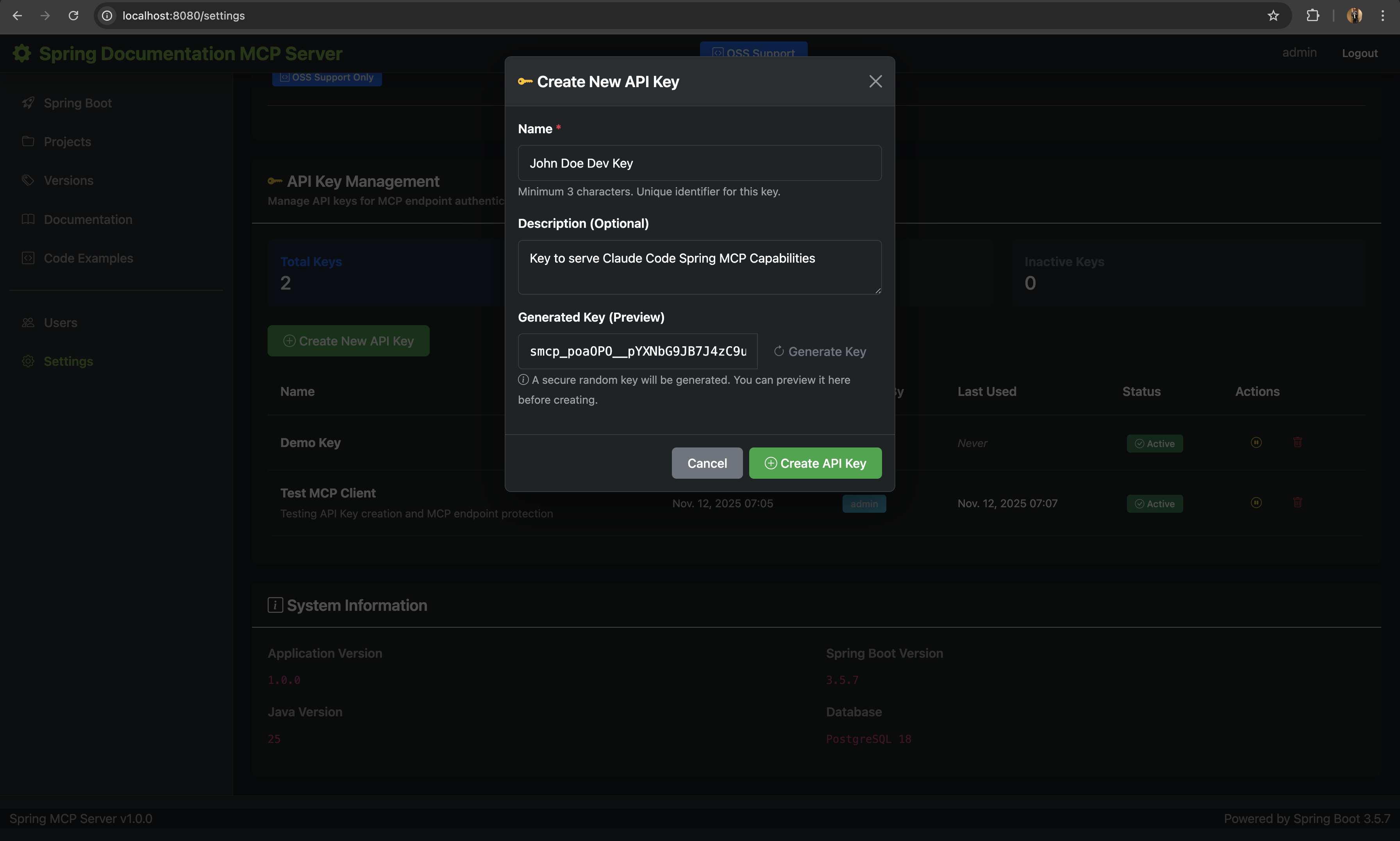 API Key Management interface with secure key generation, activation/deactivation controls, and confirmation modals
The MCP endpoints are protected by secure API key authentication. To create an API key:
- Log in to the Web UI at http://localhost:8080 (Username:
admin, Password:admin) - Navigate to Settings (
/settings) - Scroll to "API Key Management" section
- Click "Create New API Key" button
- Enter details:
- Name: Unique identifier for this key (minimum 3 characters)
- Description: Optional purpose description
- Click "Create API Key"
- ⚠️ IMPORTANT: Copy the API key immediately - it will only be shown once!
API Key Format: smcp_<secure-random-string> (256-bit cryptographically secure)
Security Features:
- Keys are hashed using BCrypt (cost factor 12) - never stored in plain text
- Support for activate/deactivate (soft delete)
- Last used timestamp tracking for auditing
Using API Keys
API keys can be provided in three ways (in order of preference):
X-API-Key Header (Recommended):
curl -H "X-API-Key: smcp_your_key_here" http://localhost:8080/mcp/spring/sseAuthorization Bearer Header:
curl -H "Authorization: Bearer smcp_your_key_here" http://localhost:8080/mcp/spring/sseQuery Parameter (Testing only - less secure):
curl "http://localhost:8080/mcp/spring/sse?api_key=smcp_your_key_here"
Testing the MCP Server
Option 1: MCP Inspector (Recommended for Testing)
MCP Inspector is an excellent tool for testing and debugging MCP servers. It provides a visual interface to test all MCP capabilities.
Install and Run MCP Inspector
npx @modelcontextprotocol/inspector
This will start the MCP Inspector and output something like:
Starting MCP inspector...
Proxy server listening on localhost:6277
Session token: 3c672c3389d66786f32ffe2f90d6d2116634bef316a09198fb6e933a5eeefe2b

MCP Inspector is up and running at:
http://localhost:6274/?MCP_PROXY_AUTH_TOKEN=3c672c3389d66786f32ffe2f90d6d2116634bef316a09198fb6e933a5eeefe2b
Configure MCP Inspector
- Open the MCP Inspector URL in your browser
- Select "SSE" as the Transport Type
- Enter the URL:
http://localhost:8080/mcp/spring/sse - Add Headers (click "Add Header"):
- Header Name:
X-API-Key - Header Value:
smcp_your_api_key_here(your actual API key)
- Header Name:
- Click "Connect"
Once connected, you can:
- List Tools: View all 10 available MCP tools
- Test Tools: Execute tools with parameters and see responses
- View Logs: See real-time communication between client and server
- Debug Issues: Inspect request/response payloads
Example: Testing searchSpringDocs Tool
In MCP Inspector:
- Navigate to the "Tools" tab
- Select "searchSpringDocs" tool
- Fill in parameters:
{ "query": "autoconfiguration", "project": "spring-boot", "version": "3.5.7" } - Click "Execute"
- View the typed response with all documentation results
Option 2: Claude Desktop/Claude Code
Add to your Claude Desktop or Claude Code MCP configuration (.mcp.json):
{
  "mcpServers": {
    "spring-documentation": {
      "type": "sse",
      "url": "http://localhost:8080/mcp/spring/sse",
      "headers": {
        "X-API-Key": "YOUR_API_KEY_HERE"
      }
    }
  }
}
Configuration Steps:
- Create or edit
.mcp.jsonin your project root or Claude Code configuration directory - Replace
YOUR_API_KEY_HEREwith your actual API key from the Settings page - Restart Claude Code to load the new MCP server
- The Spring Documentation tools will be available in your Claude Code session
Note: The API key format is smcp_<random-string>. Get your key from the Web UI Settings page.
Available MCP Tools
Once connected, the following 10 tools are available to AI assistants:
Documentation Tools
1. searchSpringDocs
Search across all Spring documentation with optional filters.
Parameters:
query(required): Search termproject(optional): Project slug (e.g.,spring-boot)version(optional): Version string (e.g.,3.5.7)docType(optional): Documentation type (e.g.,reference,api)
Example:
{
  "query": "autoconfiguration",
  "project": "spring-boot",
  "version": "3.5.7"
}
2. getSpringVersions
List all available versions for a Spring project.
Parameters:
project(required): Project slug
Example:
{
  "project": "spring-boot"
}
3. listSpringProjects
List all available Spring projects.
No parameters required.
4. getDocumentationByVersion
Get all documentation for a specific project version.
Parameters:
project(required): Project slugversion(required): Version string
Example:
{
  "project": "spring-framework",
  "version": "6.2.1"
}
5. getCodeExamples
Search code examples with filters.
Parameters:
query(optional): Search in title/descriptionproject(optional): Project slugversion(optional): Version stringlanguage(optional): Programming languagelimit(optional): Max results (default: 10, max: 50)
Example:
{
  "query": "REST controller",
  "project": "spring-boot",
  "language": "java",
  "limit": 20
}
Spring Boot Version Tools
6. listSpringBootVersions
List all Spring Boot versions with optional filtering.
Parameters:
state(optional): Filter by state ('GA', 'RC', 'SNAPSHOT', 'MILESTONE')limit(optional): Max results (default: 20, max: 100)
Example:
{
  "state": "GA",
  "limit": 10
}
7. getLatestSpringBootVersion
Get the latest patch version for a specific Spring Boot major.minor version.
Parameters:
majorVersion(required): Major version (e.g., 3)minorVersion(required): Minor version (e.g., 5)
Example:
{
  "majorVersion": 3,
  "minorVersion": 5
}
8. filterSpringBootVersionsBySupport
Filter Spring Boot versions by support status.
Parameters:
supportActive(optional): true for supported, false for end-of-lifelimit(optional): Max results (default: 20, max: 100)
Example:
{
  "supportActive": true,
  "limit": 20
}
9. listProjectsBySpringBootVersion
List all Spring projects compatible with a specific Spring Boot version.
Parameters:
majorVersion(required): Spring Boot major versionminorVersion(required): Spring Boot minor version
Example:
{
  "majorVersion": 3,
  "minorVersion": 5
}
10. findProjectsByUseCase
Search for Spring projects by use case keywords.
Parameters:
useCase(required): Use case keyword (e.g., 'data access', 'security', 'messaging')
Example:
{
  "useCase": "security"
}
Configuration
Environment Variables
# Database Configuration
export DB_HOST=localhost
export DB_PORT=5432
export DB_NAME=spring_mcp
export DB_USER=postgres
export DB_PASSWORD=postgres

# Security
export ADMIN_USER=admin
export ADMIN_PASSWORD=changeme

# Server
export SERVER_PORT=8080

# Documentation Bootstrap
export BOOTSTRAP_DOCS=false  # Set to true to load sample data on startup
Application Configuration
Key configuration in src/main/resources/application.yml:
spring:
  ai:
    mcp:
      server:
        name: "spring-documentation-server"
        type: "sync"
        version: "1.0.0"
        instructions: |
          Spring Documentation MCP Server provides comprehensive access...

        sse-endpoint: /mcp/spring/sse
        sse-message-endpoint: /mcp/spring/messages

        capabilities:
          tool: true
          completion: false
          prompt: false
          resource: false

mcp:
  documentation:
    fetch:
      enabled: true
      schedule: "0 0 2 * * ?"  # Daily at 2 AM

    bootstrap:
      enabled: ${BOOTSTRAP_DOCS:false}
      on-startup: false
      projects:
        - spring-boot
        - spring-framework
        - spring-data
        - spring-security
        - spring-cloud

    search:
      max-results: 50
      default-limit: 20
Technology Stack
Core Framework
- Spring Boot: 3.5.7
- Java: 25 (LTS)
- Build Tool: Gradle 9.2.0
MCP Protocol
- Spring AI MCP Server: 1.0.3
- Protocol: Server-Sent Events (SSE)
- Auto-discovery:
@Toolannotations
Data Layer
- Database: PostgreSQL 18
- ORM: Spring Data JPA / Hibernate 6.6
- Migrations: Flyway
- Full-Text Search: PostgreSQL tsvector + tsquery
UI Layer
- Template Engine: Thymeleaf 3.1
- Layout: Thymeleaf Layout Dialect
- CSS Framework: Bootstrap 5
- Security: Spring Security 6 (Spring Security Extras for Thymeleaf)
Documentation Fetching
- HTML Parsing: JSoup 1.21.2
- JavaScript Support: HtmlUnit 4.18.0
- HTML to Markdown: Flexmark 0.64.8
- HTTP Client: Spring WebFlux WebClient
Security & Monitoring
- Authentication: Spring Security Basic Auth
- Session Management: HTTP Session
- Health Checks: Spring Boot Actuator
- Logging: Logback
Project Structure
spring-mcp-server/
├── src/main/java/com/spring/mcp/
│   ├── config/                    # Spring configuration
│   │   ├── CacheConfig.java       # Caching configuration
│   │   ├── McpConfig.java         # MCP server tool registration
│   │   ├── McpHealthIndicator.java # Health check for MCP server
│   │   ├── SecurityConfig.java    # Security & authentication
│   │   ├── StartupSyncRunner.java # Startup sync initialization
│   │   ├── WebClientConfig.java   # WebClient for HTTP requests
│   │   └── WebMvcConfig.java      # Web MVC configuration
│   ├── controller/
│   │   ├── advice/                # Controller advice
│   │   │   └── GlobalModelAttributesAdvice.java # Global model attributes
│   │   ├── api/                   # REST API controllers
│   │   │   ├── DocumentationApiController.java
│   │   │   └── McpTestController.java
│   │   └── web/                   # Web UI controllers
│   │       ├── BootstrapController.java
│   │       ├── DashboardController.java
│   │       ├── DocumentationController.java
│   │       ├── ExamplesController.java
│   │       ├── ProjectsController.java
│   │       ├── SettingsController.java
│   │       ├── SpringBootController.java
│   │       ├── SyncController.java
│   │       ├── UsersController.java
│   │       └── VersionsController.java
│   ├── model/
│   │   ├── entity/                # JPA entities
│   │   │   ├── ApiKey.java
│   │   │   ├── CodeExample.java
│   │   │   ├── DocumentationContent.java
│   │   │   ├── DocumentationLink.java
│   │   │   ├── DocumentationType.java
│   │   │   ├── ExternalDoc.java
│   │   │   ├── McpConnection.java
│   │   │   ├── McpRequest.java
│   │   │   ├── ProjectRelationship.java
│   │   │   ├── ProjectVersion.java
│   │   │   ├── SchedulerSettings.java
│   │   │   ├── Settings.java
│   │   │   ├── SpringBootCompatibility.java
│   │   │   ├── SpringBootVersion.java
│   │   │   ├── SpringProject.java
│   │   │   └── User.java
│   │   └── dto/                   # Data Transfer Objects
│   │       ├── mcp/               # MCP response DTOs
│   │       │   ├── SearchDocsResponse.java
│   │       │   ├── VersionsResponse.java
│   │       │   ├── ProjectsListResponse.java
│   │       │   ├── DocumentationByVersionResponse.java
│   │       │   ├── CodeExamplesResponse.java
│   │       │   ├── SpringBootVersionsResponse.java
│   │       │   ├── LatestSpringBootVersionResponse.java
│   │       │   ├── FilteredSpringBootVersionsResponse.java
│   │       │   ├── ProjectsBySpringBootVersionResponse.java
│   │       │   └── ProjectsByUseCaseResponse.java
│   │       └── ... (other DTOs)
│   ├── repository/                # Spring Data JPA repositories
│   │   ├── ApiKeyRepository.java
│   │   ├── CodeExampleRepository.java
│   │   ├── DocumentationContentRepository.java
│   │   ├── DocumentationLinkRepository.java
│   │   ├── DocumentationTypeRepository.java
│   │   ├── ExternalDocRepository.java
│   │   ├── McpConnectionRepository.java
│   │   ├── McpRequestRepository.java
│   │   ├── ProjectRelationshipRepository.java
│   │   ├── ProjectVersionRepository.java
│   │   ├── SchedulerSettingsRepository.java
│   │   ├── SpringBootCompatibilityRepository.java
│   │   ├── SpringBootVersionRepository.java
│   │   ├── SpringProjectRepository.java
│   │   └── UserRepository.java
│   ├── service/
│   │   ├── tools/
│   │   │   └── SpringDocumentationTools.java  # MCP @Tool methods
│   │   ├── documentation/
│   │   │   ├── DocumentationFetchService.java
│   │   │   └── DocumentationService.java
│   │   ├── indexing/              # Content indexing services
│   │   │   ├── CodeExampleExtractor.java
│   │   │   └── DocumentationIndexer.java
│   │   ├── mcp/
│   │   │   └── McpRequestLoggerService.java
│   │   ├── scheduler/             # Scheduler services
│   │   │   └── SchedulerService.java
│   │   ├── sync/                  # Documentation sync services
│   │   │   ├── ComprehensiveSyncService.java
│   │   │   ├── DocumentationSyncService.java
│   │   │   ├── ProjectSyncService.java
│   │   │   ├── SpringBootVersionSyncService.java
│   │   │   ├── SpringGenerationsSyncService.java
│   │   │   └── SpringProjectPageCrawlerService.java
│   │   ├── version/
│   │   │   └── VersionDetectionService.java
│   │   ├── bootstrap/
│   │   │   └── DocumentationBootstrapService.java
│   │   ├── ApiKeyService.java
│   │   ├── CodeExampleService.java
│   │   ├── ExternalDocService.java
│   │   ├── ProjectRelationshipService.java
│   │   ├── ProjectService.java
│   │   ├── SettingsService.java
│   │   ├── SpringBootCompatibilityService.java
│   │   ├── SpringBootService.java
│   │   └── UserService.java
│   └── SpringMcpServerApplication.java
├── src/main/resources/
│   ├── db/migration/              # Flyway database migrations
│   │   └── V1__init.sql           # Consolidated initial schema
│   ├── templates/                 # Thymeleaf templates
│   │   ├── layouts/               # Page layouts
│   │   ├── fragments/             # Reusable fragments
│   │   ├── dashboard/
│   │   ├── projects/
│   │   ├── versions/
│   │   ├── documentation/
│   │   ├── examples/
│   │   ├── users/
│   │   └── settings/
│   ├── static/                    # CSS, JS, images
│   │   ├── css/
│   │   ├── js/
│   │   └── images/
│   └── application.yml            # Application configuration
├── docker-compose.yml             # PostgreSQL service
└── build.gradle                   # Gradle build configuration
Database Schema
Core Tables
- spring_projects - Spring ecosystem projects (Boot, Framework, Data, etc.)
- project_versions - Version tracking with state (STABLE, RC, SNAPSHOT)
- documentation_types - Types of documentation (Reference, API, Guide, Tutorial)
- documentation_links - Links to documentation resources
- documentation_content - Cached documentation with full-text search index
- code_examples - Code snippets with tags and metadata
- users - Application users with roles
- settings - Application-wide settings
Full-Text Search
PostgreSQL tsvector is used for efficient full-text search:
-- Search query example
SELECT dl.id
FROM documentation_content dc
JOIN documentation_links dl ON dc.link_id = dl.id
WHERE dc.indexed_content @@ plainto_tsquery('english', 'spring boot autoconfiguration')
ORDER BY ts_rank_cd(dc.indexed_content, plainto_tsquery('english', 'spring boot autoconfiguration')) DESC
Development
Running Tests
./gradlew test
Running with Dev Tools
./gradlew bootRun
# Dev tools will auto-reload on file changes
Database Migrations
View migration status:
./gradlew flywayInfo
Migrations are applied automatically on startup. Manual migration:
./gradlew flywayMigrate
Cleaning Build
./gradlew clean
./gradlew build --refresh-dependencies
API Endpoints
Web UI
GET /- DashboardGET /projects- Projects listGET /versions- Versions listGET /documentation- Documentation list with searchGET /examples- Code examplesGET /users- User management (Admin only)GET /settings- Application settings
REST API
GET /api/documentation/{id}/content- Get documentation contentGET /api/documentation/{id}/markdown- Get documentation as MarkdownPOST /api/sync/comprehensive- Trigger comprehensive syncPOST /api/sync/projects- Sync projectsPOST /api/sync/versions- Sync versions
MCP Protocol
- SSE Endpoint:
/mcp/spring/sse(connection endpoint) - Message Endpoint:
/mcp/spring/messages(messaging endpoint) - Authentication: API Key (X-API-Key header, Bearer token, or query parameter)
Health & Monitoring
GET /actuator/health- Health checkGET /actuator/info- Application infoGET /actuator/metrics- Metrics
Features in Detail
Documentation Synchronization
The system can automatically sync documentation from spring.io:
- Project Discovery: Crawls spring.io/projects to discover projects
- Version Detection: Detects available versions for each project
- Documentation Fetching: Downloads and parses documentation HTML
- Content Conversion: Converts HTML to searchable Markdown
- Indexing: Builds PostgreSQL full-text search index
- Scheduling: Runs daily updates (configurable)
Trigger manual sync via Web UI:
- Settings page → "Sync Documentation" button
- Or use REST API:
POST /api/sync/comprehensive
Full-Text Search
Search features:
- Natural language queries via
plainto_tsquery - Relevance ranking with
ts_rank_cd - Filter by project, version, documentation type
- Pagination support
- Highlighted snippets (planned)
Code Examples
The Code Examples feature provides a searchable repository of Spring code snippets that can be accessed both through the MCP server and the web UI.
Features:
- Rich Code Snippets: Store complete code examples with syntax highlighting
- Title & Description: Each example has a descriptive title and detailed explanation
- Language Support: Tag examples with programming language (Java, Kotlin, Groovy, XML, YAML, etc.)
- Category Organization: Organize examples into logical categories (Configuration, REST API, Data Access, Security, etc.)
- Tag System: Multiple tags per example for enhanced discoverability
- Version Association: Link examples to specific Spring project versions
- Source Tracking: Reference original source URLs for attribution
- Full-Text Search: Search across titles, descriptions, and code content
- MCP Integration: Available via
getCodeExamplestool for AI assistants
Use Cases:
- Quick reference for common Spring patterns
- Learning Spring best practices
- Sharing code snippets with team members
- Building a knowledge base of working examples
- AI-assisted code generation with real examples
Scheduler Configuration
The built-in scheduler allows you to automate documentation synchronization on a configurable schedule.
Configuration (Settings Page):
- Enable/Disable Sync: Toggle automatic synchronization on or off
- Sync Time: Set the daily sync time in 24-hour or 12-hour format (e.g., "03:00" or "3:00 AM")
- Time Format: Choose between 24-hour (military) or 12-hour (AM/PM) time display
- Next Sync Run: View when the next scheduled synchronization will occur
- Last Sync Run: Track when the last successful sync completed
- Manual Trigger: Run synchronization immediately via "Sync Now" button
How It Works:
- The scheduler runs a comprehensive documentation sync at the configured time
- Synchronization includes:
- Spring project metadata updates
- New version detection
- Documentation link discovery
- Spring Boot version compatibility mapping
- Spring Generations tracking
- All sync operations are logged for troubleshooting
- Failed syncs are reported in the application logs
Best Practices:
- Schedule syncs during low-traffic periods (e.g., 2-4 AM)
- Allow sufficient time between syncs (daily is recommended)
- Monitor logs after scheduling changes to ensure proper operation
- Use manual sync for immediate updates when needed
Troubleshooting
Java Version Issues
Error: "Unsupported class file major version"
Solution:
java -version  # Verify Java 25
echo $JAVA_HOME  # Ensure JAVA_HOME points to Java 25
Database Connection Issues
Check PostgreSQL:
docker-compose ps
docker-compose logs postgres
Verify connection:
psql -h localhost -U postgres -d spring_mcp
# Password: postgres
Build Issues
Clean and rebuild:
./gradlew clean build --refresh-dependencies
Port Already in Use
Kill process on port 8080:
lsof -ti :8080 | xargs kill -9
MCP Connection Issues
Verify application is running:
curl http://localhost:8080/actuator/healthCheck MCP endpoint with API key:
curl -H "X-API-Key: your_api_key" http://localhost:8080/mcp/spring/sseTest with MCP Inspector:
npx @modelcontextprotocol/inspectorThen configure with URL:
http://localhost:8080/mcp/spring/sseand your API key header.Review application logs:
tail -f logs/spring-mcp-server.logCheck registered tools:
grep "Registered tools" logs/spring-mcp-server.log
# Should show: Registered tools: 10
Roadmap
Completed ✅
- Spring Boot 3.5.7 project setup
- PostgreSQL database with Docker Compose
- Flyway migrations
- Entity models and repositories
- Spring Security with API Key authentication
- Thymeleaf UI with Bootstrap 5
- MCP Server with Spring AI (SSE-based)
- 10 MCP tools implemented with typed DTOs
- Full-text search with PostgreSQL
- Documentation sync services
- Version detection and tracking
- Web management UI (all pages)
- User management
- Settings management
- API Key management with BCrypt encryption
- Code examples repository
- Spring Boot version compatibility tracking
- Scheduler configuration for automated syncs
In Progress 🚧
- Comprehensive documentation coverage for all Spring projects
- Enhanced search with highlighting and snippets
- More code examples across Spring ecosystem
- Performance optimization for large result sets
Planned 📋
- Semantic search using embeddings
- Version comparison and diff
- Migration guides between versions
- Export features (PDF, Markdown)
- Analytics and usage tracking
- Multi-language documentation support
- Offline mode
- Air-Gapped Replication Mode for cascaded setups
- Additional MCP resources (prompts, completions)
- GitHub integration for code samples
- Spring Initializr integration
Contributing
This is a demonstration/reference MCP server implementation. Contributions are welcome!
Areas for contribution:
- Additional Spring project coverage
- Enhanced search algorithms
- UI/UX improvements
- Performance optimizations
- Documentation
- Test coverage
License
This project is licensed under the MIT License - see the LICENSE file for details.
Resources
- Spring AI MCP Server Docs: https://docs.spring.io/spring-ai/reference/api/mcp/mcp-overview.html
- MCP Protocol Specification: https://spec.modelcontextprotocol.io/
- Spring Documentation: https://spring.io/projects
Installing Spring Documentation
This server has no published package — it is built from source. Open the repository and follow its README.
▸ github.com/akvdevav/spring-documentation-mcp-serverFAQ
Is Spring Documentation MCP free?
Yes, Spring Documentation MCP is free — one-click install via Unyly at no cost.
Does Spring Documentation need an API key?
No, Spring Documentation runs without API keys or environment variables.
Is Spring Documentation hosted or self-hosted?
Self-hosted: the server runs locally on your machine via the install command above.
How do I install Spring Documentation in Claude Desktop, Claude Code or Cursor?
Open Spring Documentation on unyly.org, pick your client tab (Claude Desktop, Claude Code, Cursor) and press Install — the config is generated automatically, no JSON editing.
Related MCPs
GitHub
PRs, issues, code search, CI status
 by GitHub
Filesystem
Secure file operations with configurable access controls.
Memory
Knowledge graph-based persistent memory system.
Template MCP Server
A CLI tool to create a new Model Context Protocol server project with TypeScript support, dual transport options, and an extensible structure
 by mcpdotdirect
Compare Spring Documentation with
Not sure what to pick?
Find your stack in 60 seconds
Author?
Embed badge for your README
Browse similar
All development MCPs