
SQLite Tool
FreeNot checkedProvides SQLite database management with specialized delete functionality including safety controls and conditional filtering

About
Provides SQLite database management with specialized delete functionality including safety controls and conditional filtering
README
SQLite MCP 工具(仅删除功能)
该项目实现了一个基于 Python 的 MCP 工具,仅提供 删除 SQLite 表数据 的能力(delete_rows)。
调用方可以指定数据库路径、表名,以及简单的等值过滤条件来执行 DELETE 操作。
功能概览
delete_rows:从指定的 SQLite 数据库表中删除符合条件的记录。- 必填参数:
db_path(数据库路径)、table(表名) - 可选参数:
filters(简单等值条件字典)、allow_full_table(是否允许整表删除)
- 必填参数:
目录结构
agent-cli/README.md:项目说明requirements.txt:Python 依赖sqlite_mcp/:主源码目录__init__.pyserver.py:MCP 工具服务实现与入口delete_tool.py:核心删除逻辑
docs/delete_rows_spec.md:delete_rows方法需求与接口说明
tests/test_delete_rows.py:简单单测,可通过python tests/test_delete_rows.py运行
运行说明(示意)
- 安装依赖(建议在虚拟环境中):
cd agent-cli
pip install -r requirements.txt
- 启动 MCP 服务器(示意,具体看你的 Agent/宿主如何集成 MCP):
cd agent-cli
python -m sqlite_mcp.server
- 在支持 MCP 的 Agent 中注册该服务,并调用
delete_rows方法。
cursor 注册示例:
{
  "mcpServers": {
    "user-sqlite-delete-tool": {
      "command": "/Users/XXX/.mcp/sqlite-tool/.venv/bin/python",
      "args": [
        "-m",
        "sqlite_mcp.server"
      ],
      "env": {
        "PYTHONPATH": "/Users/XXX/.mcp/sqlite-tool/agent-cli"
      }
    }
  }
}
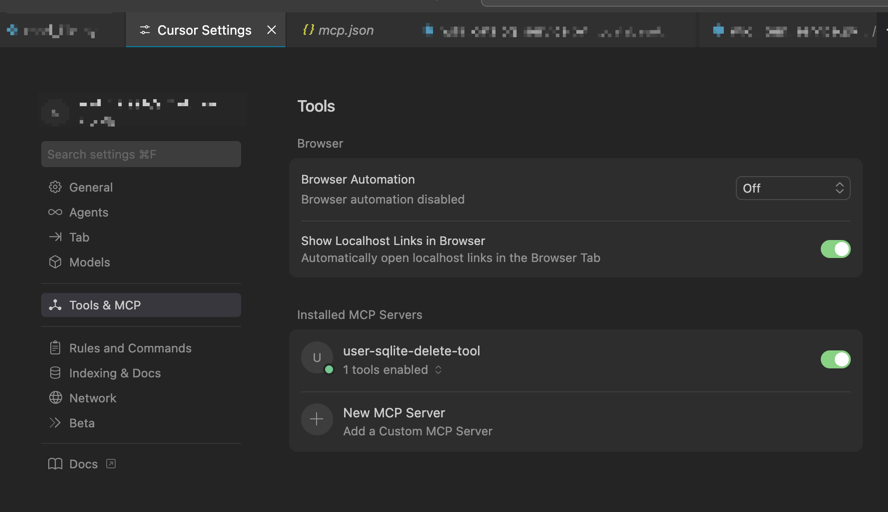
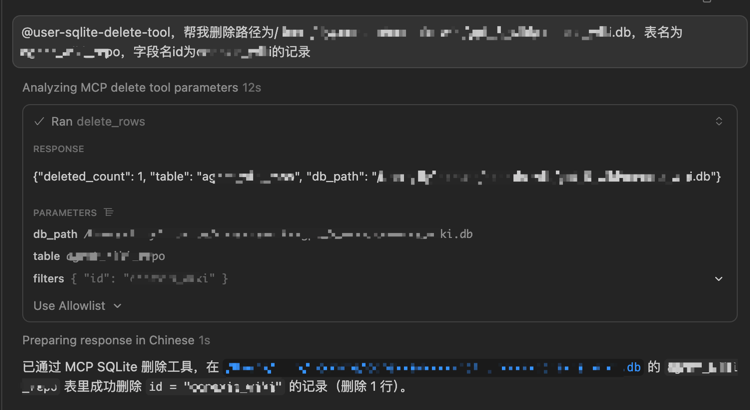
使用示例: @user-sqlite-delete-tool,帮我删除路径为/Users/XXX/XXX.db,表名为BBB,字段名id为CCC的记录
Installing SQLite Tool
This server has no published package — it is built from source. Open the repository and follow its README.
▸ github.com/cnzhangxy51/sqlite-toolFAQ
Is SQLite Tool MCP free?
Yes, SQLite Tool MCP is free — one-click install via Unyly at no cost.
Does SQLite Tool need an API key?
No, SQLite Tool runs without API keys or environment variables.
Is SQLite Tool hosted or self-hosted?
Self-hosted: the server runs locally on your machine via the install command above.
How do I install SQLite Tool in Claude Desktop, Claude Code or Cursor?
Open SQLite Tool on unyly.org, pick your client tab (Claude Desktop, Claude Code, Cursor) and press Install — the config is generated automatically, no JSON editing.
Related MCPs
Postgres
Query your database in natural language
 by Anthropic
wenb1n-dev/SmartDB_MCP
Connect to multiple databases at once (MySQL, PostgreSQL, SQL Server, MariaDB, Dameng, Oracle) for operations, health analysis and SQL optimization.
 by wenb1n-dev
Postgres Server
This server enables interaction with PostgreSQL databases through the Model Context Protocol, optimized for the AWS Bedrock AgentCore Runtime. It provides tools
 by madhurprash
PostgreSQL
Read-only database access with schema inspection.
by modelcontextprotocolRedis
Interact with Redis key-value stores.
by modelcontextprotocolSQLite
Database interaction and business intelligence capabilities.
by modelcontextprotocolmxcp
Open-source framework for building enterprise-grade MCP servers using just YAML, SQL, and Python, with built-in auth, monitoring, ETL and policy enforcement.
 by raw-labs
julien040/anyquery
Query apps with SQL from a single local-first binary; also connects to PostgreSQL, MySQL and SQLite-compatible databases.
 by julien040
drakonkat/wizzy-mcp-tmdb
Search and retrieve movie, TV show and person information from The Movie Database (TMDB) API.
 by drakonkat
longevity-genie/opengenes-mcp
Query the OpenGenes database for aging and longevity research.
 by longevity-genie
Compare SQLite Tool with
Not sure what to pick?
Find your stack in 60 seconds
Author?
Embed badge for your README
Browse similar
All data MCPs