
Squish Memory
FreeNot checkedConnect once. Remember everywhere. Squish gives ChatGPT, Claude Code, and every AI agent one shared memory. Stop re-explaining your project to every tool.

About
Connect once. Remember everywhere. Squish gives ChatGPT, Claude Code, and every AI agent one shared memory. Stop re-explaining your project to every tool.
README
npm version License: MIT GitHub stars Downloads
Connect your sources. Click ingest. Your AI remembers everything.
Squish is an AI memory system for coding agents. Local-first MCP runtime with connectors, knowledge graphs, and multi-tier deployment. Free locally, paid Cloud for sync and teams.

Get Started in 30 Seconds
npm install -g squish-memory && squish install --all
That is it. Squish installs the CLI, starts the MCP server, and configures hooks for every coding agent it finds on your machine. No API keys. No config files. No Docker.
Pick Your Agent
Squish works with any MCP-compatible agent. Choose yours for a tailored quick start:
Claude Code
npm install -g squish-memory && squish install --all
Squish detects Claude Code and adds plugin hooks automatically. Your next session starts with full memory context. To verify:
squish context    # See what your agent remembers
squish stats      # Check memory health
Codex CLI (OpenAI)
Add Squish to your Codex MCP config:
{
  "mcpServers": {
    "squish": {
      "command": "squish-mcp",
      "args": ["--http", "--port", "8767"]
    }
  }
}
Codex now has persistent memory across sessions. Ask it "what did we decide about the database?" and it will recall your past decisions.
Cursor / Windsurf / Cline
Add the same MCP server block to your editor's MCP settings. One memory server, shared across all your editors and CLI agents.
OpenCode
squish install --all
OpenCode gets both MCP tools and auto-capture hooks. Decisions, constraints, and preferences are captured as you work.
Any MCP Client
{
  "mcpServers": {
    "squish": {
      "command": "squish-mcp",
      "args": ["--http", "--port", "8767"],
      "env": {
        "SQUISH_DB_PATH": "./squish-data"
      }
    }
  }
}
What Just Happened
After install, Squish runs in the background. Here is what it does:
- Captures -- As you work, Squish watches for decisions, constraints, preferences, and context. It filters noise and stores what matters.
- Ingests -- Drop files into the inbox directory. Images, audio, video, and documents are automatically extracted, described, and stored as searchable memories.
- Stores -- Memories go into a local SQLite database with AES-256-GCM encryption. Nothing leaves your machine.
- Retrieves -- When your agent starts a new session, Squish injects only the relevant memories (50-200 tokens, not 2,000).
- Decays -- Old, low-value memories fade automatically. Your agent stays focused on what matters now.
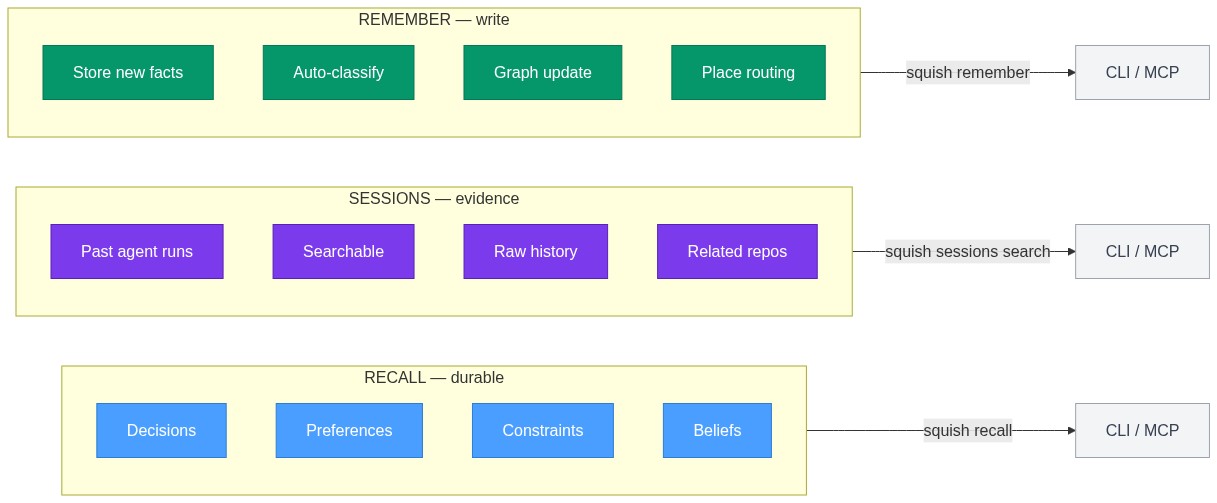
squish remember "We chose PostgreSQL for the main datastore" --type decision
squish recall "database decisions"
squish sessions search "postgres migration"
Works with Every Agent
| Agent | Integration | Auto-Capture |
|---|---|---|
| Claude Code | MCP server + plugin | Yes |
| Codex CLI | MCP server | No |
| Cursor | MCP server | No |
| GitHub Copilot | MCP server | No |
| Gemini CLI | MCP server | No |
| OpenCode | MCP server + hooks | Yes |
| Cline | MCP server | No |
| Goose | MCP server | No |
| Windsurf | MCP server | No |
| Roo Code | MCP server | No |
| Claude Desktop | MCP server | No |
| Aider | MCP server | No |
One memory server. Shared across all of them.
Why Squish
Most memory tools need a second LLM for embeddings and retrieval. That means extra API costs, latency, and infrastructure you have to manage.
Squish uses local embeddings by default. Zero LLM dependency. 1-5ms latency. $0 runtime cost in local mode.
| Feature | Squish | CLAUDE.md | agentmemory | mem0 |
|---|---|---|---|---|
| Auto-capture | Yes (hooks) | Manual | Yes (12 hooks) | Manual API |
| Local embeddings | Yes (default) | N/A | Yes | No (cloud) |
| External DB required | No (SQLite) | No | Yes (iii-engine) | Yes (Qdrant) |
| MCP tools | 7 | 0 | 53 | 9 |
| Knowledge graph | Yes | No | Yes | No |
| Cross-agent sync | Yes (Cloud) | No | No | API-based |
| Price | Free local / $9/mo cloud | Free | Free | $249/mo Pro |
| Setup time | 30 seconds | 5 minutes | 15 minutes | 30 minutes |
| Data ownership | Full (local SQLite) | Git repo | External DB | Cloud vendor |
Core Concepts
| Concept | What It Is |
|---|---|
| Recall | Durable memory -- decisions, preferences, constraints |
| Sessions | Evidence from past agent runs |
| Pinned | Stable facts that do not decay |
| Beliefs | Passive model of user/project |
| Strategies | Active operating rules |
| Media Memories | Ingested images, audio, video, and documents with extracted text |
| LLM Consolidation | Cross-connection finding via LLM-powered knowledge analysis |
| Decay | Stale weak traces fade automatically |
| Graph | Reinforced relationships from usage |
Features
Memory Intelligence
- Auto-captures decisions, constraints, and preferences as you work
- Restores relevant context when an agent restarts
- Handles contradictions and temporal facts with expiration
- Graph-boosted retrieval connects related memories across sessions
- Contradiction detection flags conflicting information
- Temporal reasoning tracks when facts were true vs. now
- Confidence scoring adjusts memory relevance over time
- Decay system automatically ages low-value memories
Multimodal Memory
- Ingest images, audio, video, and documents into searchable memories
- Automatic text extraction via OCR, speech-to-text, and document parsing
- 27+ supported file types: JPEG, PNG, GIF, WebP, TIFF, HEIC, MP3, WAV, OGG, FLAC, M4A, MP4, WebM, AVI, MOV, MKV, PDF, DOCX, XLSX, PPTX, TXT, MD, CSV, JSON, XML, YAML, HTML, RTF
- File watcher for automatic inbox monitoring and ingestion
- LLM-generated descriptions for each ingested file
- Cross-connection finding via LLM consolidation across memory clusters
Session Search
- Search previous Claude Code, Codex, and OpenCode sessions
- Find related sessions by project path or file overlap
- Inspect past decisions, errors, and commands as evidence
- Separate from long-term memory -- raw session history, not distilled facts
Interfaces
- CLI:
squish remember,recall,inspect,context,stats,search,sessions - MCP Server: 7 tools for any MCP client -- recall, graph, context, multimodal ingestion, LLM consolidation
- Web UI: Local dashboard at
localhost:37777for visualizing memories - Cloud Dashboard: Paid analytics and management at squishplugin.dev
Storage
- SQLite (local, default) or Squish Cloud team workspaces
- Hybrid retrieval: keyword + semantic similarity with RRF fusion
- AES-256-GCM encryption for sensitive memories
- Places routing: organize memories by project, feature, or context
- Full-text search with BM25 ranking
- Vector search with TF-IDF embeddings (768-dimensional)
Architecture
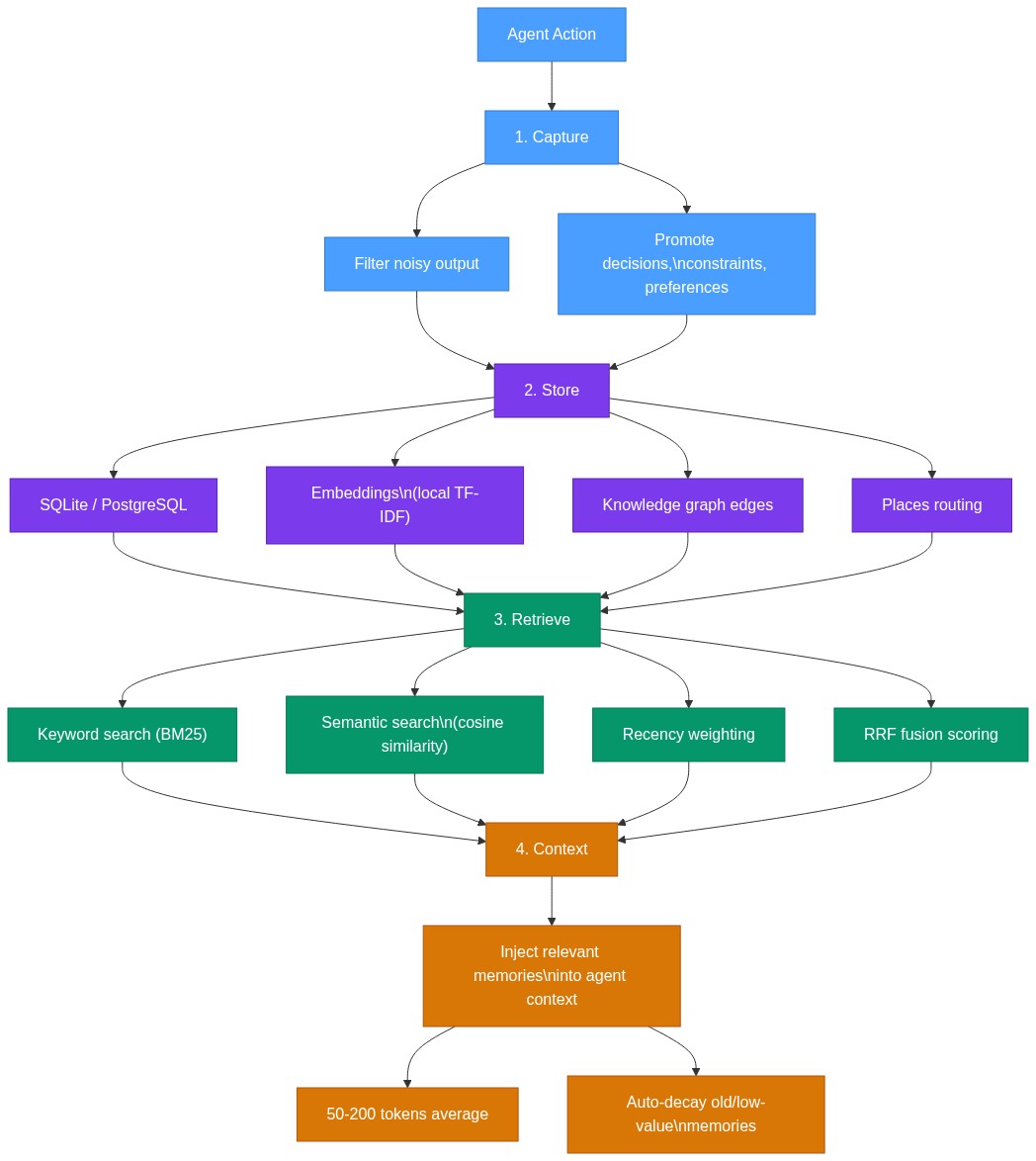
Three-Layer Memory Model
Connectors
Squish connects to your existing tools and ingests context automatically:
| Connector | What It Ingests |
|---|---|
| Google Drive | Documents, sheets, slides, and files |
| GitHub | Issues, PRs, discussions, code context, and repo metadata |
| Slack | Messages, threads, channel context, and decisions |
| Notion | Pages, databases, docs, and wikis |
Connectors are available on Cloud tiers. Install with:
squish connect google-drive
squish connect github
squish connect slack
squish connect notion
Squish Cloud
Persistent memory across ChatGPT, Claude Desktop, Claude Code, and local agents. One account, synchronized everywhere.
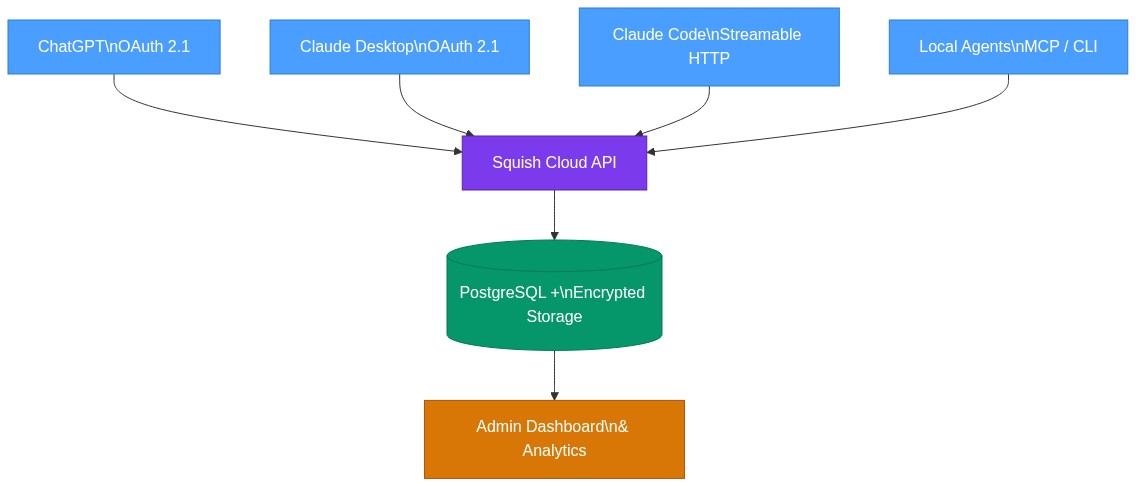
Cloud features: OAuth 2.1 + PKCE login, cross-platform sync, team workspaces, admin dashboard, priority support.
Pricing
| Tier | Price | Features |
|---|---|---|
| Local | Free forever | SQLite, 7 MCP tools, offline, knowledge graph, multimodal ingestion |
| Cloud Solo | $9/mo | Everything in Local + cloud sync, 1 connector, 10K requests/mo |
| Cloud Pro | $29/mo | Cross-tool sync, 3 connectors, 50K requests/mo, shared workspaces |
| Cloud Team | $99/mo | Unlimited seats, all connectors, 200K requests/mo, RBAC, audit logs |
Sign up at squishplugin.dev -- 30 seconds, no credit card needed.
Benchmarks
Squish is tested against real-world memory retrieval tasks and synthetic benchmarks.
| Metric | Result | Notes |
|---|---|---|
| Core Tests | 9/9 passed (100%) | All memory operations |
| LoCoMo Memory | 65% | 100 REAL questions from locomo10.json |
| Throughput | 39 ops/sec | With local embeddings |
| Total Time | 230ms | For 9 core tests |
| Package Size | 674 KB | Lightweight footprint |
| Latency (embed) | 6.6ms | Local TF-IDF embeddings |
| Latency (search) | 6.1ms | Hybrid retrieval |
Full benchmark details: docs/BENCHMARK.md
Documentation
| Document | Description |
|---|---|
| CLI Reference | All CLI commands and options |
| MCP Server | 7 MCP tools and configuration |
| Architecture | System design and data flow |
| Decay System | How memories age and lose relevance |
| Scoring | Importance and relevance scoring |
| Environment Config | Environment variables and settings |
| Plugin Architecture | Hook system and agent integration |
| Quick Start | Getting started guide |
| Agent Comparison | Squish vs other memory tools |
| Contributing | How to contribute |
| Release Notes | Changelog and version history |
FAQ
What is Squish?
Squish is a local-first memory runtime for AI coding agents. It gives your agents stable orientation, durable memory, and searchable session history across runs. Think of it as a brain that persists between sessions -- your agents remember decisions, constraints, preferences, and context without you having to re-explain everything.
Does Squish require an API key?
No. Squish works locally by default with zero API keys. It uses local embeddings (TF-IDF) and SQLite storage. You can optionally configure an external LLM for enhanced reasoning, but it is not required. An API key is only needed if you want to use the paid Squish Cloud for cross-device sync.
How does Squish compare to mem0 or agentmemory?
Squish is the only option that works locally with zero external dependencies. mem0 requires Qdrant (a vector database) and cloud API calls. agentmemory requires iii-engine. Squish uses SQLite and local embeddings by default. See the full comparison in the Why Squish section above.
Can I use Squish with multiple AI agents?
Yes. Squish works with any MCP-compatible agent. One memory server is shared across Claude Code, Cursor, Codex, Copilot, Gemini CLI, and any other agent that supports MCP. Memories are available to all connected agents.
Is my data private with Squish?
Yes. In local mode, all data stays on your machine in an encrypted SQLite database. Nothing is sent to any cloud service. AES-256-GCM encryption protects sensitive memories. In cloud mode, data is encrypted in transit and at rest.
What is the difference between recall and sessions?
squish recall searches your long-term memory -- distilled facts, decisions, and preferences that Squish has captured and organized. squish sessions search searches raw past agent runs -- the actual messages, commands, and file changes from previous Claude Code, Codex, or OpenCode sessions. Recall gives you what the system decided to remember. Sessions give you the evidence.
Contributing
See docs/CONTRIBUTING.md for guidelines on how to contribute to Squish.
License
MIT -- see LICENSE for details.
Star the Repo
If Squish helps your project, consider starring the repo. It helps other developers find memory tools for their AI agents.

Website · Cloud Dashboard · Documentation · GitHub · npm
Install Squish Memory in Claude Desktop, Claude Code & Cursor
unyly install squish-memoryInstalls into Claude Desktop, Claude Code, Cursor & VS Code — handles npx, uvx and build-from-source repos for you.
First time? Get the CLI: curl -fsSL https://unyly.org/install | sh
Or configure manually
Run in your terminal:
claude mcp add squish-memory -- npx -y squish-memoryFAQ
Is Squish Memory MCP free?
Yes, Squish Memory MCP is free — one-click install via Unyly at no cost.
Does Squish Memory need an API key?
No, Squish Memory runs without API keys or environment variables.
Is Squish Memory hosted or self-hosted?
Self-hosted: the server runs locally on your machine via the install command above.
How do I install Squish Memory in Claude Desktop, Claude Code or Cursor?
Open Squish Memory on unyly.org, pick your client tab (Claude Desktop, Claude Code, Cursor) and press Install — the config is generated automatically, no JSON editing.
Related MCPs
GitHub
PRs, issues, code search, CI status
 by GitHub
Filesystem
Secure file operations with configurable access controls.
Memory
Knowledge graph-based persistent memory system.
Template MCP Server
A CLI tool to create a new Model Context Protocol server project with TypeScript support, dual transport options, and an extensible structure
 by mcpdotdirect
Compare Squish Memory with
Not sure what to pick?
Find your stack in 60 seconds
Author?
Embed badge for your README
Browse similar
All development MCPs