
Ssh Rails Runner
БесплатноНе проверенMCP server that facilitates an SSH connection to a deployed Rails app so you can run Rails REPL commands

Описание
MCP server that facilitates an SSH connection to a deployed Rails app so you can run Rails REPL commands
README
An MCP server that enables secure remote execution of Rails console commands via SSH. This server provides tools for both read-only operations and carefully managed mutations in a deployed Rails environment.
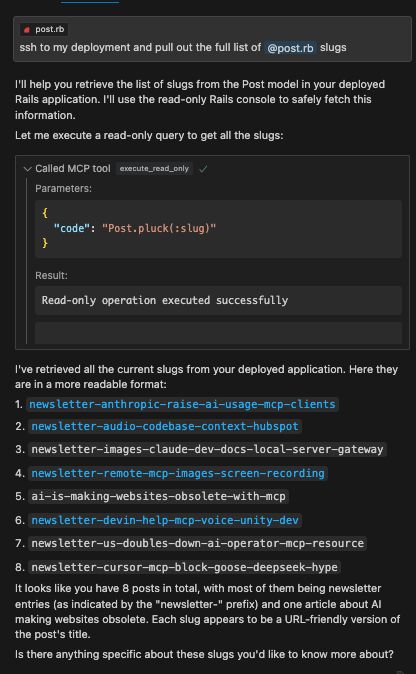
This works great with Cursor. You can use Cursor Composer to pull in your Rails model files as context and then use the execute_read_only, dry_run_mutate, and execute_mutate tools to make changes to the database. No need to trudge through complicated Admin UI's to get your data wrangling and analysis done.
Example
Features
- Remote Rails console execution over SSH
- Safe read-only operations
- Dry-run capability for mutations
- Execution of approved mutations
- Resource management for code snippets
Installation
npm install
npm run build
Configuration
Set the following environment variables:
SSH_HOST=your.remote.host
SSH_USER=your_ssh_user
SSH_PRIVATE_KEY_PATH=your_SSH_PRIVATE_KEY_PATH
RAILS_WORKING_DIR=/path/to/rails/app
Usage with Claude Desktop
Add to your Claude Desktop configuration:
{
  "mcpServers": {
    "ssh-rails-runner": {
      "command": "npx",
      "args": ["mcp-server-ssh-rails-runner"],
      "env": {
        "SSH_HOST": "your.remote.host",
        "SSH_USER": "your_ssh_user",
        "SSH_PRIVATE_KEY_PATH": "your_SSH_PRIVATE_KEY_PATH",
        "RAILS_WORKING_DIR": "/path/to/rails/app/root",
        "PROJECT_NAME_AS_CONTEXT": "Name that shows up in tool descriptions to help the LLM describe what kind of Rails project we're working with.",
        "CODE_SNIPPET_FILE_DIRECTORY": "/path/to/store/code/snippets/locally"
      }
    }
  }
}
If CODE_SNIPPET_FILE_DIRECTORY is not provided, snippets will be stored in a temporary directory (e.g., /tmp/mcp-ssh-rails-runner-code-snippets).
PROJECT_NAME_AS_CONTEXT is optional and helps identify the project context in tool descriptions.
Available Tools
The server now uses a Prepare -> Execute workflow:
mcp_ssh_rails_runner_prepare_code_snippet
- Arguments:
name(string, for filename),type(enum: "readOnly" | "mutate"),code(string, Ruby code),description(string, optional). - Function: Saves the provided Ruby code to a local file named
code_snippet_<name>.json, marks it as read-only or mutate, and opens the file for review. - Returns: The
file://URI of the created snippet.
mcp_ssh_rails_runner_execute_code_snippet_read_only
- Arguments:
uri(string,file://URI fromprepareCodeSnippet). - Function: Reads the code snippet from the URI, verifies it's marked as
readOnly, performs a safety check on the code, and executes it. - Returns: The output of the Rails command.
mcp_ssh_rails_runner_execute_code_snippet_mutate
- Arguments:
uri(string,file://URI fromprepareCodeSnippet). - Function: DANGER ZONE! Reads the code snippet, verifies it's marked as
mutate, and executes it directly. There is no dry run or further safety check within this tool. - Returns: The output of the Rails command.
- Usage: ONLY CALL THIS AFTER THE USER HAS REVIEWED the prepared code (via the opened file from
prepareCodeSnippet) AND EXPLICITLY CONFIRMED they want to execute the mutation.
Security Considerations
- Only use with trusted SSH endpoints from your own local machine that is (temporarily) provided access to the remote environment.
- Crucially, always review the code saved by
prepareCodeSnippetbefore executing any mutation withexecuteCodeSnippetMutate. The responsibility for confirming mutations lies with the user and the calling AI.
License
MIT
Установка Ssh Rails Runner
У этого сервера нет опубликованного пакета — он собирается из исходников. Открой репозиторий и следуй инструкции в README.
▸ github.com/tadasant/mcp-server-ssh-rails-runnerFAQ
Ssh Rails Runner MCP бесплатный?
Да, Ssh Rails Runner MCP бесплатный — установка в пару кликов через Unyly без оплаты.
Нужен ли API-ключ для Ssh Rails Runner?
Нет, Ssh Rails Runner работает без API-ключей и переменных окружения.
Ssh Rails Runner — hosted или self-hosted?
Self-hosted: сервер запускается локально на твоей машине командой из раздела установки.
Как установить Ssh Rails Runner в Claude Desktop, Claude Code или Cursor?
Открой Ssh Rails Runner на unyly.org, выбери вкладку своего клиента (Claude Desktop, Claude Code, Cursor) и нажми Install — конфиг сгенерируется автоматически, без правки JSON.
Похожие MCP
GitHub
PRs, issues, code search, CI status
 автор: GitHub
Filesystem
Secure file operations with configurable access controls.
Memory
Knowledge graph-based persistent memory system.

Unyly Deploy
Deploy sites and MCP servers to Unyly straight from your AI agent
 автор: Unyly
Amap Maps Mcp Server
MCP server for using the AMap Maps API
 автор: duxiaohui
PayMCP
Lightweight payments layer for MCP servers: turn tools into paid endpoints with a two-line decorator. [PyPI](https://pypi.org/project/paymcp/) · [npm](https://w
 автор: blustAI
Server For Power BI
Enables exploring Microsoft Fabric / Power BI workspaces and semantic models, and executing ad-hoc DAX queries.
 автор: Mitsubishi-Fuso
Gpt Image 2 Mcp
RunAPI GPT Image 2 MCP server for image generation: create tasks, poll results, and check pricing across 1 model from Claude Code, Codex, Cursor, and VS Code.
 автор: runapi-ai
Template MCP Server
A CLI tool to create a new Model Context Protocol server project with TypeScript support, dual transport options, and an extensible structure
 автор: mcpdotdirect
Supabase
Database, auth and storage
 автор: Supabase
Compare Ssh Rails Runner with
Не уверен что выбрать?
Найди свой стек за 60 секунд
Автор?
Embed-бейдж для README
Похожее
Все в категории development