
Sticky Notes Server
FreeNot checkedA MCP server for managing sticky notes with CRUD operations, search, tags, conversations, and a React UI.

About
A MCP server for managing sticky notes with CRUD operations, search, tags, conversations, and a React UI.
README
A MCP (Model Context Protocol) server for managing sticky notes. This project provides both an MCP interface and a fully-featured REST API to create, update, delete, search, and manage notes, tags, and sections. It also serves a React-based UI for interacting with your sticky notes.
UI Overview
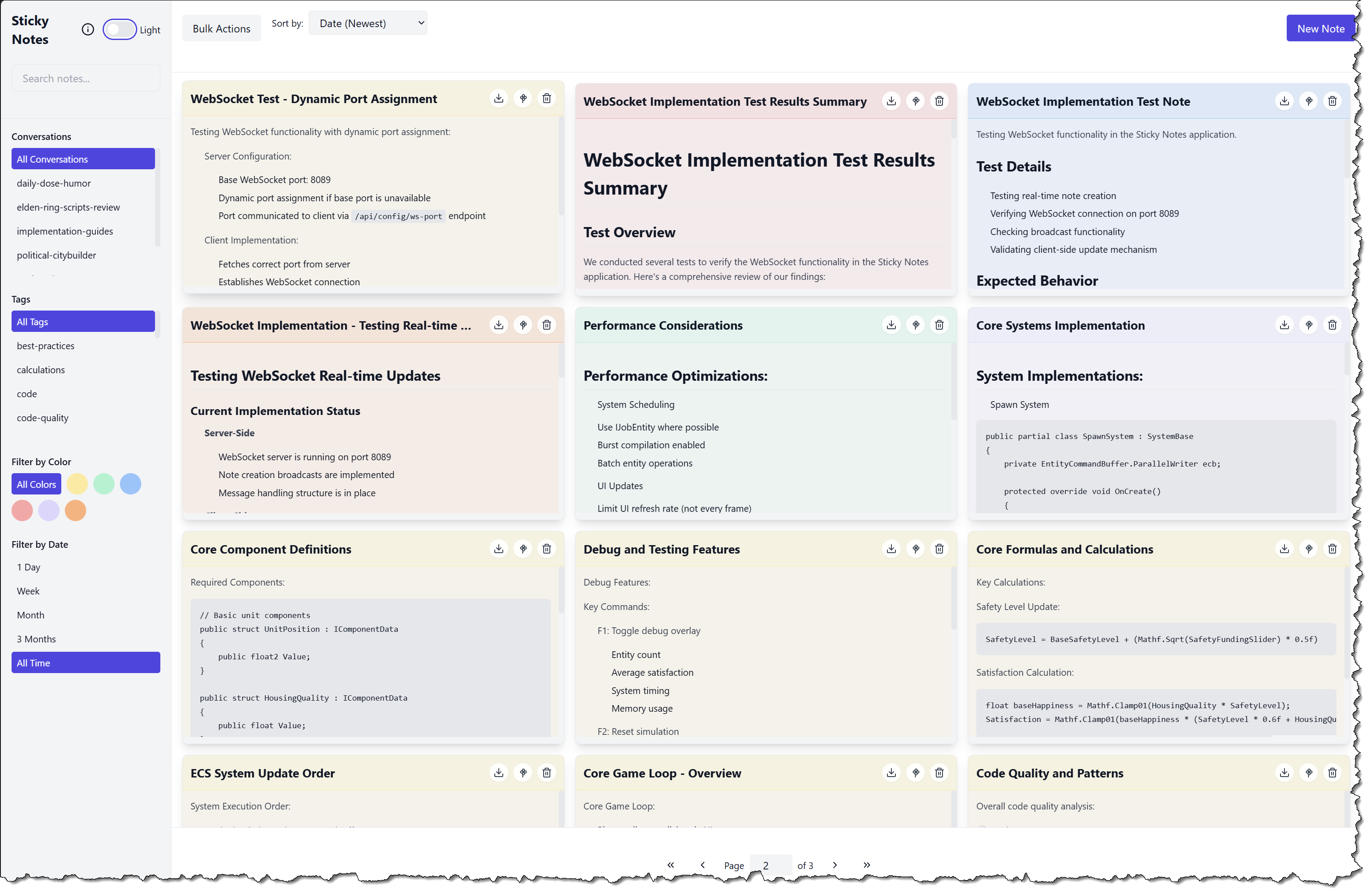
The Sticky Notes UI provides a modern, intuitive interface for managing your notes:
- Left Sidebar: Filter and organize notes by conversations, tags, colors, and dates
- Main Content: Grid view of notes with markdown rendering and real-time updates
- About Dialog: Access server configuration information (Web URL, WebSocket URL, Database location)
- Theme Support: Toggle between light and dark modes
- Bulk Actions: Select multiple notes for batch operations
Features
- Enhanced WebSocket Support:
- Real-time note synchronization
- Robust reconnection strategy
- Message queuing for offline handling
- Connection status management
- Server Configuration:
- About modal with server details
- Dynamic port assignment
- Configuration endpoint
- Theme System:
- Light/dark mode support
- Theme persistence
- Dynamic theme switching
- Advanced UI Features:
- Markdown preview in editor
- Bulk actions (delete, color, export)
- Enhanced filtering and sorting
- Improved pagination
- Automatic filter reset when deleting last note in a conversation/tag
- MCP Development: Implements MCP protocol endpoints and tool handlers (e.g., create-note, update-note, delete-note, search-notes, list-conversations).
- REST API: Supports full CRUD operations for notes, sections, and tags via Express.
- WebSocket Support: Optional real-time capabilities through a built-in WebSocket server.
- Full-Text Search: Optional SQLite FTS5 for efficient note searches.
- Tag Management: Hierarchical tag system with parent-child relationships and improved tag search capabilities.
- Section Organization: Group notes into customizable sections.
- Color Coding: Support for color-coded notes and bulk color operations.
- Persistency: Uses SQLite (via better-sqlite3) for local storage.
- UI Integration: Serves a React-based user interface from the
/publicfolder. - Port Scanning: Automatically finds available ports if configured ports are in use.
- Pagination: Client-side pagination with customizable items per page.
- Conversations Management: Enhanced conversation tracking with metadata (total notes, creation date, last update).
- Markdown Support: Full markdown rendering for note content with preview capabilities.
- Advanced Filtering: Combined filtering by tags, conversations, and text search.
- Export Capabilities:
- Single/multiple note export
- Markdown format support
- Custom filename options
Requirements
- Node.js (v16 or later recommended)
- npm (or pnpm)
- SQLite (no additional installation required since it uses better-sqlite3, which bundles SQLite)
Installation & Setup
Clone the Repository
git clone https://your.repo.url/sticky-notes-server.git
cd sticky-notes-server
Install Dependencies
npm installBuild the Project
npm run buildRun the Server
npm start
Configuration
The server supports a flexible configuration system with three levels of precedence (highest to lowest):
- Environment Variables
- Configuration File
- Default Values
Environment Variables
STICKY_NOTES_CONFIG: Path to custom config file locationDB_ROOT: The root directory for the database fileDB_PATH: The database file nameDB_TIMEOUT: Database operation timeout in millisecondsDB_VERBOSE: Enable verbose database logging ('true'/'false')WEB_UI_PORT: Port for the web UIWS_PORT: Port for WebSocket serverENABLE_WEBSOCKET: Enable/disable WebSocket support ('true'/'false')ENABLE_FTS: Enable/disable full-text search ('true'/'false')
Configuration File
The server looks for a configuration file in the following locations (in order):
- Path specified in
STICKY_NOTES_CONFIGenvironment variable .sticky-notes.config.jsonin the current working directory.sticky-notes.config.jsonin the user's home directory/etc/sticky-notes/config.json(non-Windows systems only)
Example configuration file:
{
    "db": {
        "root": "C:/Users/username/Documents",
        "path": "sticky-notes.db",
        "timeout": 10000,
        "verbose": false
    },
    "server": {
        "webUiPort": 3088,
        "wsPort": 8089
    },
    "features": {
        "enableWebsocket": false,
        "enableFTS": true
    }
}
Default Configuration
If no configuration is provided, the server uses these defaults:
{
    "db": {
        "root": "<user home directory>",
        "path": "sticky-notes.db",
        "timeout": 10000,
        "verbose": false (true in development)
    },
    "server": {
        "webUiPort": 3000,
        "wsPort": 8080
    },
    "features": {
        "enableWebsocket": true,
        "enableFTS": true
    }
}
Port Handling
If a configured port is in use, the server will:
- Attempt to find the next available port (scanning up to 100 ports higher)
- Log a message indicating the actual port being used
- Continue normal operation on the new port
For example, if port 3000 is in use, the server might use 3001 and log:
Web UI running at http://localhost:3001 (original port 3000 was in use)
Running the Server
To start the Sticky Notes MCP Server, run:
npm start
This will:
- Start the MCP server using a standard I/O transport
- Launch an Express web server serving the UI on http://localhost:3000
- Initialize the WebSocket server on port 8080
- Set up the SQLite database with all necessary tables and indexes
Press Ctrl+C to stop the server.
MCP Tools
The server provides several MCP tools for interacting with notes:
create-note
Creates a new note with optional tags.
{
  "name": "create-note",
  "arguments": {
    "title": "Meeting Notes",
    "content": "Discussed Q4 plans.",
    "conversationId": "conv123",
    "tags": ["meeting", "planning"],
    "color_hex": "#FFE999"
  }
}
Required Fields:
title: String (1-100 chars, Generally the name of the conversation)content: String (markdown supported)conversationId: String (unique identifier for the conversation, you provide this)
Optional Fields:
tags: Array of stringscolor_hex: String (hex color code). Available colors:- Yellow: "#FFE999" (default)
- Green: "#A7F3D0"
- Blue: "#93C5FD"
- Red: "#FCA5A5"
- Purple: "#DDD6FE"
- Orange: "#FFB17A"
Example response: Note created with id 123
update-note
Updates an existing note's content.
{
  "name": "update-note",
  "arguments": {
    "id": "123",
    "content": "Updated meeting notes content"
  }
}
delete-note
Deletes a specific note.
{
  "name": "delete-note",
  "arguments": {
    "id": "123"
  }
}
search-notes
Searches for notes based on various criteria. Supports combined filtering by tags, conversations, and text search.
{
  "name": "search-notes",
  "arguments": {
    "query": "meeting",
    "tags": ["important"],
    "conversationId": "conv123"
  }
}
list-conversations
Returns a list of all conversation IDs in the system with metadata.
{
  "name": "list-conversations",
  "arguments": {}
}
Response example:
[
  {
    "conversationId": "conv123",
    "totalNotes": 5,
    "firstCreated": 1707753600,
    "lastUpdated": 1707840000
  },
  {
    "conversationId": "meeting-2024",
    "totalNotes": 3,
    "firstCreated": 1707667200,
    "lastUpdated": 1707753600
  }
]
REST API Endpoints
The server exposes several REST endpoints:
Notes Endpoints
- GET /api/notes
Query parameters:
search: Text search querytags: Array of tag names (deduplication handled server-side)conversation: Conversation IDcolor: Color hex codestartDate: Filter by creation datepage: Page number (default: 1)limit: Items per page (default: 10)sort: Sort field and direction (e.g., "updated_at DESC")
Response includes pagination metadata:
{
  "notes": [...],
  "pagination": {
    "total": 100,
    "page": 1,
    "limit": 10,
    "totalPages": 10
  }
}
Sections Endpoints
- GET /api/sections
- POST /api/sections
- PUT /api/sections/:id
- DELETE /api/sections/:id
- GET /api/sections/:id/notes
Tags Endpoints
- GET /api/tags
- GET /api/tags/hierarchy
- PATCH /api/tags/:id/parent
Conversations Endpoints
- GET /api/conversations
Returns list of conversations with metadata:
{
  "conversations": [
    {
      "conversationId": "conv123",
      "totalNotes": 5,
      "firstCreated": 1707753600,
      "lastUpdated": 1707840000
    }
  ]
}
Integration with Claude Desktop
Method 1: Direct Integration
Add to your claude_desktop_config.json:
{
  "mcpServers": {
    "stickyNotes": {
      "command": "node",
      "args": ["path/to/sticky-notes-server/build/index.js"],
      "env": {
        "DB_ROOT": "desired/db/location",
        "WEB_UI_PORT": "3000",
        "WS_PORT": "8080"
      }
    }
  }
}
Method 2: NPX Integration
If published as an NPX package (Not implemented yet):
{
  "mcpServers": {
    "stickyNotes": {
      "command": "npx",
      "args": [
        "-y",
        "@modelcontextprotocol/sticky-notes-server"
      ],
      "env": {
        "DB_ROOT": "desired/db/location"
      }
    }
  }
}
Development
Project Structure
sticky-notes-server/
├── package.json
├── tsconfig.json
├── README.md
└── src/
    ├── index.ts            // MCP server main entry point
    ├── public/             // React-based UI
    │   ├── index.html
    │   ├── app.js
    │   ├── components/     // React components
    │   │   ├── Note.js    // Note component with markdown support
    │   │   ├── PaginationControls.js
    │   │   └── Sidebar.js // Enhanced sidebar with conversations
    │   └── utils/
    │       └── markdown.ts // Markdown rendering utilities
    └── migrations/         // Database migrations
Development Commands
Start in Development Mode:
npm run devBuild for Production:
npm run build
npm start
Database Schema
The server uses the following main tables:
notes: Stores note content and metadatasections: Manages note organizationtags: Stores tag hierarchynote_tags: Junction table for note-tag relationshipsnotes_fts: Full-text search virtual table
WebSocket Implementation
Client-Side Integration
The application includes a custom React hook for WebSocket management:
const { connectionStatus, sendMessage, lastMessage } = useWebSocket({
    url: `ws://localhost:${wsPort}`,
    onMessage: handleMessage,
    reconnectAttempts: 5,
    reconnectInterval: 1000
});
Message Types
Client Messages:
NOTE_CREATE: Create new noteNOTE_UPDATE: Update existing noteNOTE_DELETE: Delete noteSYNC_REQUEST: Request sync
Server Messages:
NOTE_CREATED: Broadcast new noteNOTE_UPDATED: Broadcast updateNOTE_DELETED: Broadcast deletionSYNC_RESPONSE: Sync dataERROR: Error information
Reconnection Strategy
The WebSocket implementation includes a sophisticated reconnection strategy:
- Exponential backoff
- Configurable retry attempts
- Connection status tracking
- Message queuing during disconnection
Theme System
The application includes a comprehensive theme system:
const ThemeProvider = ({ children }) => {
    const [theme, setTheme] = React.useState(() => {
        const savedTheme = localStorage.getItem('theme');
        return savedTheme ||
               (window.matchMedia('(prefers-color-scheme: dark)').matches
                ? 'dark' : 'light');
    });
    // ... theme logic
};
Theme Features
- System preference detection
- Local storage persistence
- Dynamic CSS class switching
- Smooth transitions
- Dark/light mode toggle
Bulk Actions
The application supports bulk operations:
- Selection: Multi-select notes
- Actions:
- Delete multiple notes
- Change color for multiple notes
- Export selected notes
- UI: Dedicated bulk actions toolbar
Export Functionality
Enhanced export capabilities:
const exportOptions = {
    format: 'md',
    includeMetadata: true,
    includeToc: false,
    filename: 'custom_name.md'
};
Export Features
- Single note export
- Multiple note export
- Custom filename support
- Markdown formatting
- Metadata inclusion options
Troubleshooting
Common issues and solutions:
Database Location Issues
- Ensure
DB_ROOTenvironment variable is set correctly - Check file permissions in the target directory
- Ensure
Port Conflicts
- Verify ports 3000 and 8080 are available
- Use
WEB_UI_PORTandWS_PORTto configure alternative ports
Performance Issues
- The server uses SQLite optimizations including WAL mode
- Indexes are automatically created for common queries
- Consider regular database maintenance (VACUUM) for large datasets
Contributing
- Fork the repository
- Create a feature branch
- Commit your changes
- Push to the branch
- Create a Pull Request
License
This project is licensed under the MIT License.
Support
For issues, questions, or contributions:
- Check the Issues section
- Create a new issue if needed
- Join our community discussions
Installing Sticky Notes Server
This server has no published package — it is built from source. Open the repository and follow its README.
▸ github.com/bsmi021/sticky-notes-serverFAQ
Is Sticky Notes Server MCP free?
Yes, Sticky Notes Server MCP is free — one-click install via Unyly at no cost.
Does Sticky Notes Server need an API key?
No, Sticky Notes Server runs without API keys or environment variables.
Is Sticky Notes Server hosted or self-hosted?
Self-hosted: the server runs locally on your machine via the install command above.
How do I install Sticky Notes Server in Claude Desktop, Claude Code or Cursor?
Open Sticky Notes Server on unyly.org, pick your client tab (Claude Desktop, Claude Code, Cursor) and press Install — the config is generated automatically, no JSON editing.
Related MCPs
LibreOffice Tools
Enables AI agents to read, write, and edit Office documents via LibreOffice with token-efficient design. Supports multiple formats including DOCX, XLSX, PPTX, a
 by passerbyflutter
dannote/figma-use
Full Figma control: create shapes, text, components, set styles, auto-layout, variables, export. 80+ tools.
 by dannote
Logo.dev
Search and retrieve company logos by brand or domain. Customize size, format, and theme to match your design needs. Accelerate design, prototyping, and content
 by NOVA-3951
PIX4Dmatic
Enables GUI automation for controlling PIX4Dmatic on Windows through MCP. Supports launching, focusing, capturing screenshots, sending hotkeys, clicking UI elem
 by jangjo123
Compare Sticky Notes Server with
Not sure what to pick?
Find your stack in 60 seconds
Author?
Embed badge for your README
Browse similar
All design MCPs