
Supabase Schema
БесплатноНе проверенAn MCP server that provides deep schema introspection for Supabase/Postgres, exposing tables, columns, views, enums, RLS policies, functions, and more.

Описание
An MCP server that provides deep schema introspection for Supabase/Postgres, exposing tables, columns, views, enums, RLS policies, functions, and more.
README
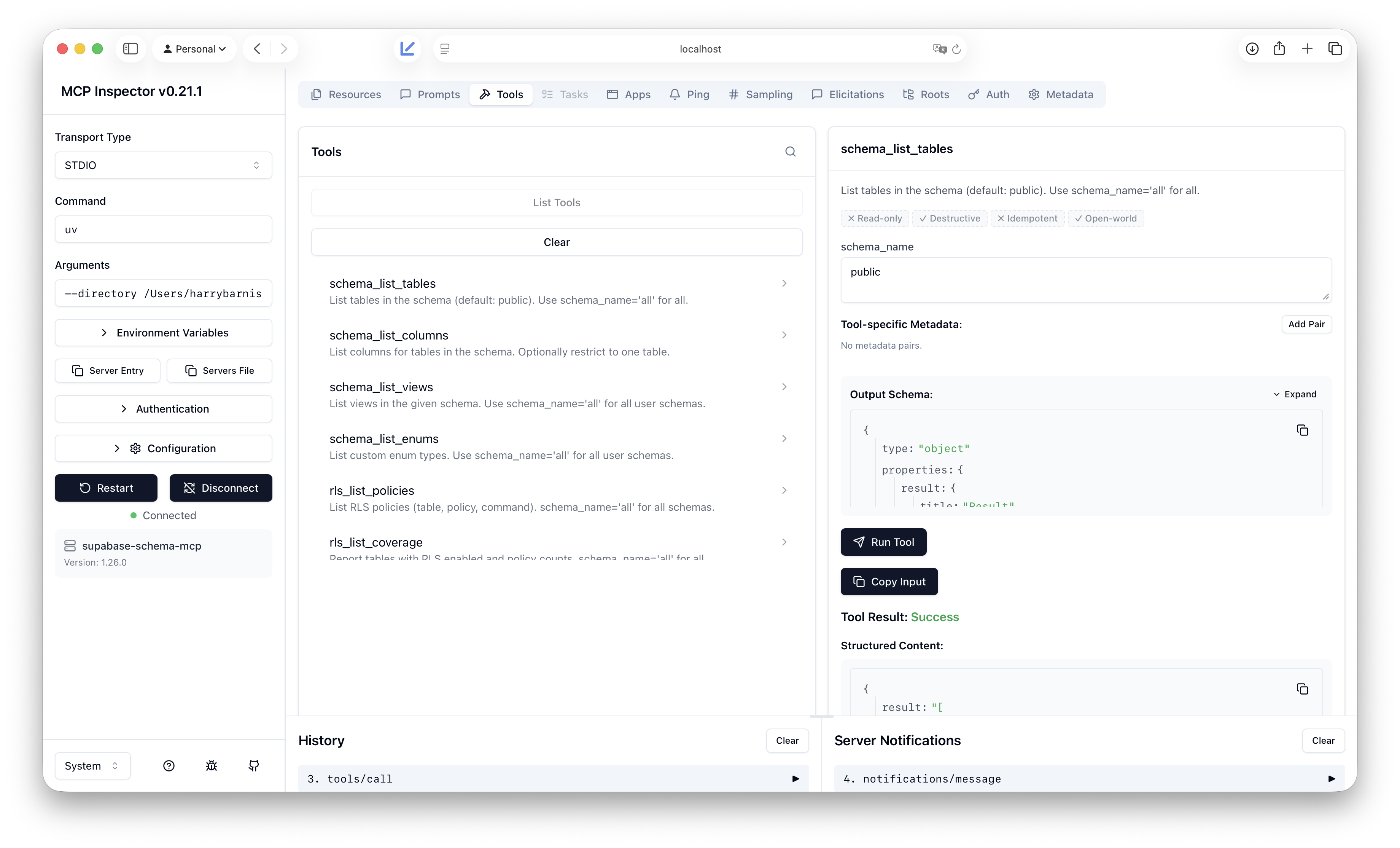
An MCP server that provides deep schema introspection for Supabase/Postgres. I built it because the official Supabase MCP focuses on project overview, branches, and API usage; it does not expose the kind of schema detail needed for migrations, RLS audits, relationship graphs, or RPC/trigger discovery.
Why this exists (limitations of Supabase’s MCP)
The official Supabase MCP is great for project-level and API workflows. It does not, however, give tools or agents fine-grained access to your database schema: tables, columns, views, enums, RLS policies, functions/RPCs, foreign keys, indexes, and triggers. If you want an AI or tool to reason about your schema (e.g. “which tables have RLS?”, “what does this RPC look like?”, “what FKs reference this table?”), you either run custom SQL yourself or use something that introspects the DB. This server fills that gap by connecting directly to your Supabase Postgres and exposing schema-only, read-only tools.
What this one does that Supabase’s doesn’t
- Schema introspection only: tables, columns, views, enums, RLS policies (and coverage), functions (including RPC candidates), foreign keys, indexes, triggers.
- No project/API scope: no branches, no API calls; just database structure. Use the official MCP for project management; use this one when you need schema metadata.
- Read-only: designed for introspection only; no writes or DDL. Suited to a read-only Postgres role.
Full tool list and parameters are in Tools reference.
Setup
- Clone the repo. All commands below must be run from the repo root (the directory that contains
pyproject.tomlandsrc/). - Create a virtual environment and install dependencies with uv:
uv sync --extra dev - Copy
.env.exampleto.envand set your Supabase Postgres connection:- Required:
SUPABASE_DB_HOST(e.g.db.<project_ref>.supabase.co),SUPABASE_DB_USER(usuallypostgres),SUPABASE_DB_PASSWORD(from Project Settings > Database) - Optional:
SUPABASE_DB_PORT,SUPABASE_DB_NAME
- Required:
- From the repo root, run the MCP server over stdio:
Or use the script entry point:uv run python -m supabase_schema_mcp.serveruv run supabase-schema-mcp
Adding as an MCP in Cursor
Open Cursor Settings (e.g. Cursor > Settings or
Cmd+,).Search for MCP or open Features > MCP.
Add this server via the JSON config. Edit
~/.cursor/mcp.json(or your project's.cursor/mcp.json) and add asupabase-schema-mcpentry undermcpServers. ReplacePATH_TO_SUPABASE_SCHEMA_MCPwith the full path to the repo root (the folder that containspyproject.tomlandsrc/):{ "mcpServers": { "supabase-schema-mcp": { "command": "uv", "args": [ "--directory", "PATH_TO_SUPABASE_SCHEMA_MCP", "run", "python", "-m", "supabase_schema_mcp.server" ] } } }Example with a real path (macOS):
{
  "mcpServers": {
    "supabase-schema-mcp": {
      "command": "uv",
      "args": [
        "--directory",
        "/Users/you/Developer/supabase-mcp",
        "run",
        "python",
        "-m",
        "supabase_schema_mcp.server"
      ]
    }
  }
}
Restart Cursor (MCP servers load at startup). When the server starts, you should see on stderr:
supabase-schema-mcp server started (stdio). Any config warnings appear in a yellow panel above that.You do not need to run the server in a terminal yourself. Cursor starts and manages the process when it needs to call the tools.
Read-only safety model
This MCP server is designed to read schema and metadata only. It does not execute arbitrary writes or DDL. Database access should use a read-only Postgres role where possible; the connection layer enforces that only introspection-style, read-only operations are performed. Management API usage is limited to reading project/config data as needed. Never put a role with write or DDL privileges into this server's configuration unless you explicitly require it for a future feature.
Установка Supabase Schema
У этого сервера нет опубликованного пакета — он собирается из исходников. Открой репозиторий и следуй инструкции в README.
▸ github.com/HarryB05/supabase-schema-mcpFAQ
Supabase Schema MCP бесплатный?
Да, Supabase Schema MCP бесплатный — установка в пару кликов через Unyly без оплаты.
Нужен ли API-ключ для Supabase Schema?
Нет, Supabase Schema работает без API-ключей и переменных окружения.
Supabase Schema — hosted или self-hosted?
Доступен hosted-вариант: Unyly запускает сервер в облаке, локальная установка не обязательна.
Как установить Supabase Schema в Claude Desktop, Claude Code или Cursor?
Открой Supabase Schema на unyly.org, выбери вкладку своего клиента (Claude Desktop, Claude Code, Cursor) и нажми Install — конфиг сгенерируется автоматически, без правки JSON.
Похожие MCP
wenb1n-dev/SmartDB_MCP
A universal database MCP server supporting simultaneous connections to multiple databases. It provides tools for database operations, health analysis, SQL optim
 автор: wenb1n-dev
Postgres Server
This server enables interaction with PostgreSQL databases through the Model Context Protocol, optimized for the AWS Bedrock AgentCore Runtime. It provides tools
 автор: madhurprash
Postgres
Query your database in natural language
 автор: Anthropic
PostgreSQL
Read-only database access with schema inspection.
автор: modelcontextprotocolRedis
Interact with Redis key-value stores.
автор: modelcontextprotocolSQLite
Database interaction and business intelligence capabilities.
автор: modelcontextprotocolmxcp
Open-source framework for building enterprise-grade MCP servers using just YAML, SQL, and Python, with built-in auth, monitoring, ETL and policy enforcement.
 автор: raw-labs
tadas-github/a2asearch-mcp
MCP server to search 4,800+ MCP servers, AI agents, CLI tools and agent skills. Install: npx -y a2asearch-mcp. Ask Claude: "Find MCP servers for database access
 автор: tadas-github
julien040/anyquery
Query more than 40 apps with one binary using SQL. It can also connect to your PostgreSQL, MySQL, or SQLite compatible database. Local-first and private by desi
 автор: julien040
drakonkat/wizzy-mcp-tmdb
A MCP server for The Movie Database API that enables AI assistants to search and retrieve movie, TV show, and person information.
 автор: drakonkat
Compare Supabase Schema with
Не уверен что выбрать?
Найди свой стек за 60 секунд
Автор?
Embed-бейдж для README
Похожее
Все в категории data