
Swing
FreeNot checkedMCP server for inspecting and automating Java Swing applications.

About
MCP server for inspecting and automating Java Swing applications.
README
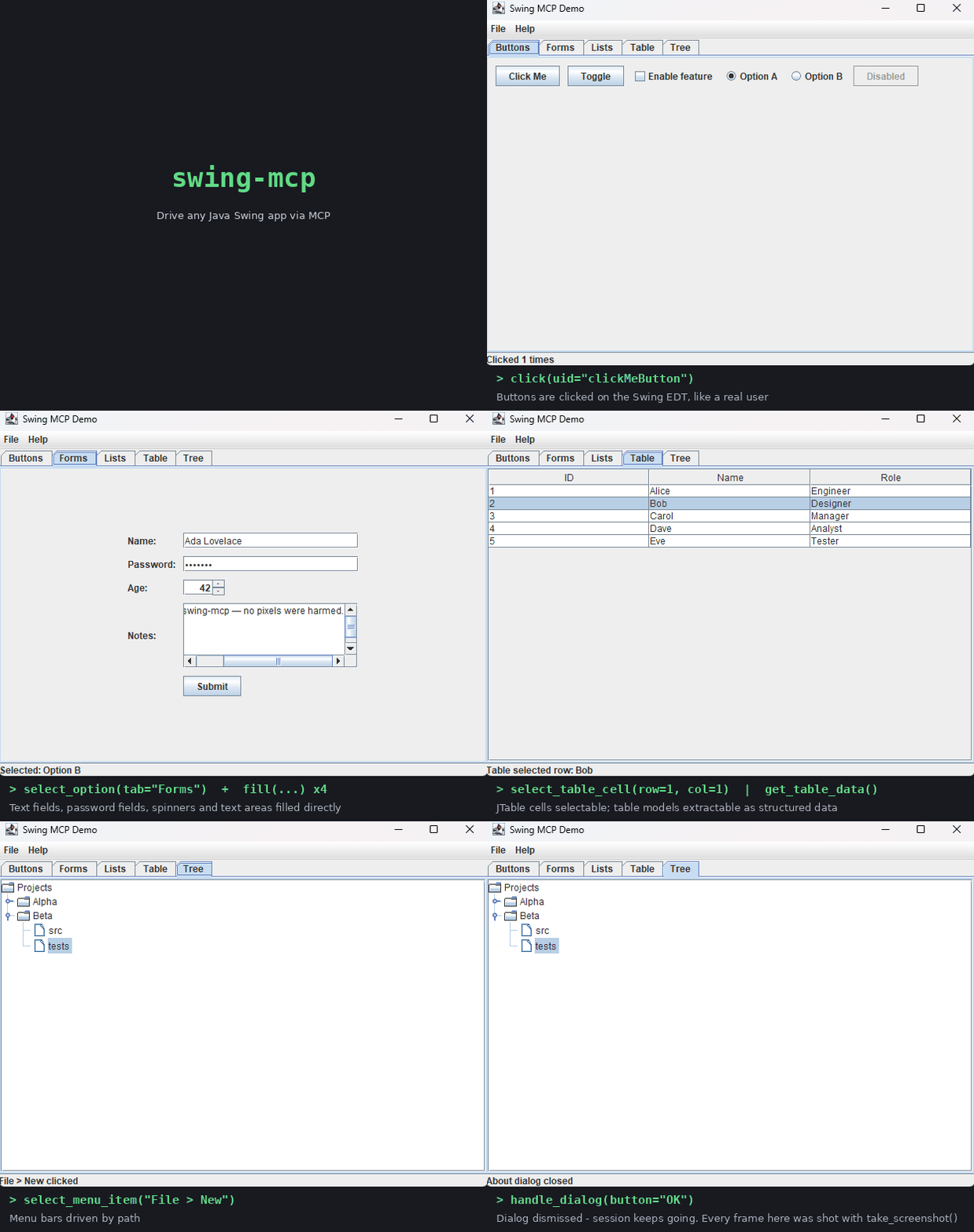
An MCP (Model Context Protocol) server for interacting with Java Swing applications — inspired by chrome-devtools-mcp, but targeting any Swing UI instead of HTML pages.
Modules
swing-mcp-server— Spring Boot MCP server (stdio transport) exposing Swing automation tools.swing-mcp-agent— Java agent loaded into the target Swing JVM (at launch via-javaagent, or dynamically by PID). Runs a localhost-only JSON line-protocol socket server that executes commands on the Swing EDT.swing-mcp-common— Shared command/DTO types between server and agent.swing-mcp-demo— Demo Swing application used for integration testing.
How it works
MCP client (stdio) ──▶ swing-mcp-server ──localhost socket──▶ swing-mcp-agent (inside target JVM) ──▶ Swing EDT
- The MCP client calls
launch_app(starts a JVM with the agent preloaded) orattach_to_app(loads the agent into a running JVM by PID). - The agent binds a loopback-only port in
swing.mcp.agent-port-min..maxand reports it back through a response file. - Tools such as
take_snapshot,click, andfillare forwarded as JSON line commands and executed on the Event Dispatch Thread.
See docs/tools for the full tool documentation (per-category pages), or docs/tool-reference.md for the single-page quick reference.
Skills
The skills directory contains agent skills (SKILL.md files) that teach AI coding agents how to use Swing MCP effectively — core workflows, UI testing patterns, and troubleshooting.
Building
Requires JDK 21+ and Maven.
mvn verify
GUI integration tests are skipped in headless environments; CI runs them under xvfb.
Running
Build everything, then register the server with your MCP client (see docs/installation.md for per-client instructions — IntelliJ IDEA, VS Code, Claude Desktop, Claude Code, Cursor, Windsurf):
{
  "mcpServers": {
    "swing": {
      "command": "java",
      "args": ["-jar", "/path/to/swing-mcp-server-1.0.0.jar"],
      "env": {
        "SWING_MCP_AGENT_JAR": "/path/to/swing-mcp-agent-1.0.0.jar"
      }
    }
  }
}
Try it against the demo app:
launch_appwithjava -jar swing-mcp-demo/target/swing-mcp-demo-1.0.0.jartake_snapshotto discover component UIDsclick,fill,select_option, … to interact
MCP Registry
This server is published to the MCP Registry as
io.github.TinusJ/swing-mcp, distributed as an MCPB bundle attached to GitHub releases.
See docs/registry-publishing.md for how publishing works.
Security notes
- The agent listens on the loopback interface only.
evaluate_java(arbitrary code execution in the target JVM) is disabled by default; enable withswing.mcp.evaluate.enabled=true.
Installing Swing
This server has no published package — it is built from source. Open the repository and follow its README.
▸ github.com/TinusJ/swing-mcpFAQ
Is Swing MCP free?
Yes, Swing MCP is free — one-click install via Unyly at no cost.
Does Swing need an API key?
No, Swing runs without API keys or environment variables.
Is Swing hosted or self-hosted?
Self-hosted: the server runs locally on your machine via the install command above.
How do I install Swing in Claude Desktop, Claude Code or Cursor?
Open Swing on unyly.org, pick your client tab (Claude Desktop, Claude Code, Cursor) and press Install — the config is generated automatically, no JSON editing.
Related MCPs
GitHub
PRs, issues, code search, CI status
 by GitHub
Filesystem
Secure file operations with configurable access controls.
Memory
Knowledge graph-based persistent memory system.
Template MCP Server
A CLI tool to create a new Model Context Protocol server project with TypeScript support, dual transport options, and an extensible structure
 by mcpdotdirect
Compare Swing with
Not sure what to pick?
Find your stack in 60 seconds
Author?
Embed badge for your README
Browse similar
All development MCPs