
Swiss Road Mobility
БесплатноНе проверенMCP Server for Swiss road mobility — shared vehicles, EV charging, traffic alerts, Park & Rail, and multimodal trip planning.

Описание
MCP Server for Swiss road mobility — shared vehicles, EV charging, traffic alerts, Park & Rail, and multimodal trip planning.
README
🇨🇭 Part of the Swiss Public Data MCP Portfolio
🚗 Swiss Road & Mobility MCP Server


MCP Server for Swiss road mobility — shared vehicles, EV charging, traffic alerts, Park & Rail, and multimodal trip planning
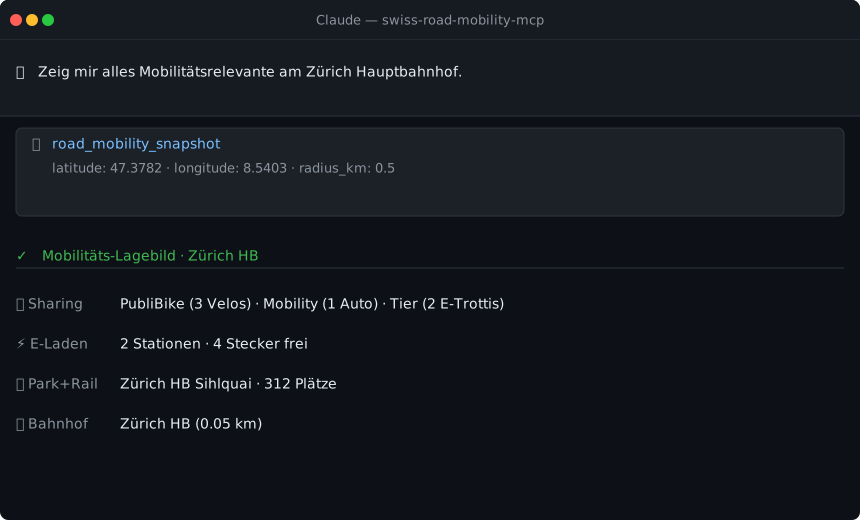
Demo
Overview
swiss-road-mobility-mcp provides AI-native access to Swiss road and mobility data sources:
| Source | Data | API | Auth |
|---|---|---|---|
| sharedmobility.ch | Bikes, e-scooters, cars (GBFS) | REST/JSON | None |
| ich-tanke-strom.ch | EV charging stations | GeoJSON | None |
| opentransportdata.swiss | Traffic events, counting stations | DATEX II / SOAP+XML | Free key |
| data.sbb.ch | Park & Rail facilities | REST/JSON (Opendatasoft) | None |
| transport.opendata.ch | Public transport connections | REST/JSON | None |
| geo.admin.ch | Address geocoding, road classification | REST/JSON | None |
If the Swiss Transport MCP is the GA pass for rail, this server is the vignette + Park & Rail card + sharing subscription for the road — together they paint the complete multimodal picture of Swiss mobility.
Anchor demo query: "I'm in Dietikon with my car. I need to get to Bern. Where can I park? Which train should I take?"
Features
- 15 tools across six data sources (Phase 1–4)
road_mobility_snapshot— aggregated mobility overview for any locationroad_multimodal_plan— car + Park & Rail + public transport in one plan- No API key required for 12 of 15 tools
- Dual transport — stdio (Claude Desktop) + SSE (cloud)
- Rate limiting + caching for all endpoints
Prerequisites
- Python 3.11+
- uv (recommended) or pip
Installation
# Clone the repository
git clone https://github.com/malkreide/swiss-road-mobility-mcp.git
cd swiss-road-mobility-mcp

# Install
pip install -e .
# or with uv:
uv pip install -e .
Or with uvx (no permanent installation):
uvx swiss-road-mobility-mcp
Quickstart
# stdio (for Claude Desktop)
swiss-road-mobility-mcp
# or:
python -m swiss_road_mobility_mcp.server

# Streamable HTTP (for cloud / Render.com) — serves MCP 2026-07-28 at /mcp
# and keeps the legacy SSE routes alongside.
MCP_TRANSPORT=http MCP_PORT=8001 swiss-road-mobility-mcp
Try it immediately in Claude Desktop:
"Show me everything mobility-related at Zurich HB." "Find shared bikes near Bern Bahnhof." "Where can I charge my EV near Lucerne?"
→ More use cases by audience →
Configuration
Claude Desktop
Edit ~/Library/Application Support/Claude/claude_desktop_config.json (macOS) or %APPDATA%\Claude\claude_desktop_config.json (Windows):
{
  "mcpServers": {
    "swiss-road-mobility": {
      "command": "uvx",
      "args": ["swiss-road-mobility-mcp"],
      "env": {
        "OPENTRANSPORTDATA_API_KEY": "<your-token>"
      }
    }
  }
}
Or with python:
{
  "mcpServers": {
    "swiss-road-mobility": {
      "command": "python",
      "args": ["-m", "swiss_road_mobility_mcp.server"],
      "env": {
        "OPENTRANSPORTDATA_API_KEY": "<your-token>"
      }
    }
  }
}
Shared mobility, EV charging, Park & Rail, and the multimodal planner work without an
OPENTRANSPORTDATA_API_KEY. The key is only required for the DATEX II traffic tools.
Config file locations:
- macOS:
~/Library/Application Support/Claude/claude_desktop_config.json - Windows:
%APPDATA%\Claude\claude_desktop_config.json
Cloud Deployment (SSE for browser access)
For use via claude.ai in the browser (e.g. on managed workstations without local software):
Render.com (recommended):
- Push/fork the repository to GitHub
- On render.com: New Web Service -> connect GitHub repo
- Set start command:
MCP_TRANSPORT=http MCP_PORT=8001 swiss-road-mobility-mcp - In claude.ai under Settings -> MCP Servers, add
https://your-app.onrender.com/mcp— or.../ssefor a client that still speaks the SSE transport;httpserves both.
SSE security (SEC-009)
A public SSE endpoint is reachable by anyone. To protect it (and your upstream API quota), configure these environment variables on the host:
| Variable | Effect |
|---|---|
MCP_AUTH_TOKEN |
When set, every SSE request must send Authorization: Bearer <token>. Unset = unauthenticated (the server logs a loud warning at startup). Strongly recommended for any public deployment. |
MCP_RATE_LIMIT |
Max requests per client IP per window (default 60, 0 disables). |
MCP_RATE_WINDOW |
Window length in seconds (default 60). |
ALLOWED_ORIGINS |
Comma-separated CORS origins for browser clients. Empty by default: no cross-origin access. * allows any origin and is logged as a warning. Does not affect stdio or other non-browser clients. |
The local stdio transport needs none of this — it runs in the user's trusted context.
Observability (OBS-003 / OBS-006)
| Variable | Effect |
|---|---|
MCP_LOG_LEVEL |
Log level: DEBUG / INFO (default) / WARNING / ERROR. |
MCP_LOG_FORMAT |
text (default) or json for structured logs. All logs go to stderr. |
MCP_TRACING_ENABLED |
true enables OpenTelemetry tracing (off by default). |
OTEL_EXPORTER_OTLP_ENDPOINT |
OTLP collector URL; setting it also enables tracing. Standard OTEL_* vars are honoured by the SDK. |
Tracing needs the optional extra: pip install 'swiss-road-mobility-mcp[tracing]'.
Once enabled, every upstream API call is traced automatically (httpx
instrumentation) and SSE requests get server spans with W3C trace-context
propagation.
Available Tools
Shared Mobility & EV Charging (no API key required)
| Tool | Description | Cache |
|---|---|---|
road_find_sharing |
Shared mobility nearby (bikes, e-scooters, cars) | 60s |
road_search_sharing |
Search sharing stations by name | 5min |
road_sharing_providers |
All sharing providers in Switzerland | 1h |
road_find_charger |
EV charging stations nearby | 5min |
road_charger_status |
Real-time availability of charging stations | 1min |
road_check_status |
Server & API health check | - |
Traffic (free API key required)
| Tool | Description | Cache |
|---|---|---|
road_traffic_situations |
Accidents, roadworks, congestion from ASTRA/VMZ-CH | 2min |
road_traffic_counters |
Vehicles/h + km/h at counting stations near a position | 1min |
road_counter_sites |
List counting stations nearby | 24h |
Park & Rail + Multimodal (no API key required)
| Tool | Description | Cache |
|---|---|---|
road_park_rail |
Find SBB Park+Rail facilities nearby | 5min |
road_mobility_snapshot |
Complete mobility overview for a location | - |
road_multimodal_plan |
Plan car -> Park+Rail -> public transport -> destination | - |
Geography & Addresses — Phase 4 (no API key required)
| Tool | Description | Cache |
|---|---|---|
road_geocode_address |
Swiss address -> GPS (official building address register) | - |
road_reverse_geocode |
GPS -> official address with EGID/EGAID (GWR) | - |
road_classify_road |
Road classification via swissTLM3D | - |
Example Use Cases
| Query | Tool |
|---|---|
| "Find shared bikes near Zurich HB" | road_find_sharing |
| "Where can I charge my EV near Bern?" | road_find_charger |
| "Any traffic incidents on the A1?" | road_traffic_situations |
| "Where can I park near Winterthur station?" | road_park_rail |
| "Plan my trip from Dietikon to Bern by car + train" | road_multimodal_plan |
API Key for Traffic Tools
- Register: https://api-manager.opentransportdata.swiss
- Create a new application -> subscribe to the "Strassenverkehr" API
- Copy the token
export OPENTRANSPORTDATA_API_KEY=<your-token>
Without a key, the traffic tools return a descriptive error message including the exact registration link — no crash.
Architecture
swiss_road_mobility_mcp/
├── server.py             # FastMCP server, 15 tools
├── api_infrastructure.py # Rate limiter, cache, HTTP client, geo utilities
├── shared_mobility.py    # sharedmobility.ch
├── ev_charging.py        # ich-tanke-strom.ch
├── traffic_situations.py # DATEX II traffic alerts (SOAP/XML)
├── traffic_counters.py   # DATEX II counting stations (SOAP/XML)
├── park_rail.py          # SBB Open Data Park & Rail
├── multimodal.py         # Snapshot + trip planner (cross-source)
└── geo_admin.py          # geo.admin.ch geocoding + road classification
Data Source Characteristics
| Source | Protocol | Coverage | Auth |
|---|---|---|---|
| sharedmobility.ch | REST/JSON (GBFS) | All CH sharing providers | None |
| ich-tanke-strom.ch | GeoJSON | All public EV chargers | None |
| opentransportdata.swiss | DATEX II / SOAP+XML | ASTRA traffic data | Free key |
| data.sbb.ch | REST/JSON (Opendatasoft) | SBB Park & Rail | None |
| transport.opendata.ch | REST/JSON | Public transport schedules | None |
| geo.admin.ch | REST/JSON | Official addresses, roads | None |
In-depth docs: docs/ARCHITECTURE.md (MCP primitives, tool namespacing, use-case catalogue, phase roadmap) · docs/SECURITY.md (credential model, egress allow-list, auth, MCP conformance table) · docs/OPERATIONS.md (resource limits, restart policy, health).
Project Structure
swiss-road-mobility-mcp/
├── src/swiss_road_mobility_mcp/
│   ├── __init__.py              # Package
│   ├── server.py                # FastMCP server, 15 tools
│   ├── api_infrastructure.py    # Rate limiter, cache, HTTP client
│   ├── shared_mobility.py       # Shared vehicles
│   ├── ev_charging.py           # EV charging stations
│   ├── traffic_situations.py    # Traffic events
│   ├── traffic_counters.py      # Vehicle counting
│   ├── park_rail.py             # Park & Rail
│   ├── multimodal.py            # Snapshot + trip planning
│   └── geo_admin.py             # Geocoding + roads
├── tests/
│   ├── test_integration.py      # Live API tests
│   └── test_phase3.py           # Park & Rail + multimodal tests
├── .github/workflows/ci.yml     # GitHub Actions (Python 3.11/3.12/3.13)
├── pyproject.toml
├── CHANGELOG.md
├── CONTRIBUTING.md               # Contribution guide (English)
├── CONTRIBUTING.de.md            # Contribution guide (German)
├── SECURITY.md                   # Security policy (English)
├── SECURITY.de.md                # Security policy (German)
├── LICENSE
├── README.md                    # This file (English)
└── README.de.md                 # German version
Known Limitations
- Shared Mobility: The
sharedmobility.chAPI does not enforce strict radius filtering; vehicles slightly outside the specified radius may appear - EV Charging: Station naming conventions vary between operators; some stations may appear without detailed names
- Traffic (DATEX II): Requires a free API key; without it, traffic tools return helpful error messages
- Park & Rail: SBB occasionally renames endpoints; the server includes a fallback chain
- Multimodal Planner: Response time depends on the slowest of the queried sources
MCP Protocol Version
This server speaks two protocol eras. The client's first request on a connection decides which one applies; a later claim from the other era is refused.
| Era | Revision | Who reaches it |
|---|---|---|
initialize handshake |
2024-11-05 … 2025-11-25 |
What today's clients speak. The server answers with the revision asked for, or with the 2025-11-25 ceiling when the request asks for something newer. |
| Per-request envelope | 2026-07-28 |
A request carrying the 2026-07-28 _meta envelope opens a modern connection. |
The era depends on the transport, not only on the request. An earlier
version of this section said "over the same endpoint", and that was wrong in a
way nothing caught: the modern single-exchange delivery lives behind
StreamableHTTPSessionManager, which only the Streamable HTTP app reaches.
The shipped transport was SSE, and SSE requires a session while a modern
request is session-less by construction.
MCP_TRANSPORT |
Endpoint | Handshake era | 2026-07-28 |
|---|---|---|---|
stdio (default) |
– | yes | yes |
http |
/mcp, plus /sse + /messages/ alongside |
yes | yes |
sse (legacy) |
/sse + /messages/ |
yes | no |
MCP_TRANSPORT=http serves both: the SSE routes run next to /mcp rather than
being replaced, so an existing client does not break because the server gained
a revision. Containers (Dockerfile, docker-compose.yml, render.yaml) ship
http.
Both revisions are pinned in
tests/test_protocol_version.py and asserted
against the installed SDK, so a Dependabot bump of mcp cannot move either one
silently. Since that gate can only read SDK constants,
tests/test_spec_2026_07_28.py sits next to it
and measures the wire instead: a real 2026-07-28 envelope against the
assembled ASGI app, with the same envelope against SSE as the counter-control.
Note that the SDK's LATEST_PROTOCOL_VERSION is an alias for the modern
era, not for the handshake era — pinning against it alone would leave the era
that current clients actually negotiate free to drift.
Update policy. When the gate fails, do not edit the constant blindly: read
the spec changelog between the two revisions, verify the server still behaves,
then move the constant, this section, README.de.md and
CHANGELOG.md together.
Testing
# All tests
pytest tests/ -v

# Quick check (without pytest)
python tests/test_phase3.py
Safety & Limits
- Read-only: All tools perform HTTP GET requests only — no data is written, modified, or deleted on any upstream system.
- No personal data: Location coordinates passed as tool inputs are not stored, logged, or forwarded beyond the immediate API request. API responses contain no PII — only vehicle counts, charger availability, traffic events, and geographic metadata.
- Rate limiting: The server enforces client-side rate limits (Shared Mobility: 30 req/60s; EV Charging: 10 req/60s) to protect upstream APIs. The DATEX II key is subject to opentransportdata.swiss fair-use terms.
- Caching: Responses are cached in-process (Sharing: 60s · EV: 5 min · Park+Rail: 5 min · Traffic: 1–2 min). Real-time data reflects the cache age, not necessarily the current second.
- Terms of service: Data is subject to the ToS of each upstream source — sharedmobility.ch, ich-tanke-strom.ch, opentransportdata.swiss, data.sbb.ch (CC BY), geo.admin.ch (BGDI).
- No guarantees: This server is an independent community project, not affiliated with SBB, ASTRA, sharedmobility.ch, or any API provider. Availability depends on upstream services.
Changelog
See CHANGELOG.md
Contributing
See CONTRIBUTING.md
Security
See SECURITY.md for the security posture and vulnerability reporting.
License
MIT License — see LICENSE
Author
Hayal Oezkan · malkreide
Credits & Related Projects
- sharedmobility.ch: sharedmobility.ch — Swiss shared mobility platform
- ich-tanke-strom.ch: ich-tanke-strom.ch — Swiss EV charging network
- ASTRA / opentransportdata.swiss: opentransportdata.swiss — Federal traffic data
- SBB Open Data: data.sbb.ch — Swiss Federal Railways
- geo.admin.ch: geo.admin.ch — Federal geospatial services
- Protocol: Model Context Protocol — Anthropic / Linux Foundation
- Related: swiss-transport-mcp — Public transport (trains, buses, trams)
- Related: zurich-opendata-mcp — 900+ datasets from the City of Zurich
- Portfolio: Swiss Public Data MCP Portfolio
Installation
Run via uv's uvx — no clone or manual install needed. Add to your MCP client config (mcpServers for Claude Desktop, Cursor and Windsurf; use a top-level servers key for VS Code in .vscode/mcp.json):
{
  "mcpServers": {
    "swiss-road-mobility-mcp": {
      "command": "uvx",
      "args": [
        "swiss-road-mobility-mcp"
      ]
    }
  }
}
Установка Swiss Road Mobility
У этого сервера нет опубликованного пакета — он собирается из исходников. Открой репозиторий и следуй инструкции в README.
▸ github.com/malkreide/swiss-road-mobility-mcpFAQ
Swiss Road Mobility MCP бесплатный?
Да, Swiss Road Mobility MCP бесплатный — установка в пару кликов через Unyly без оплаты.
Нужен ли API-ключ для Swiss Road Mobility?
Нет, Swiss Road Mobility работает без API-ключей и переменных окружения.
Swiss Road Mobility — hosted или self-hosted?
Доступен hosted-вариант: Unyly запускает сервер в облаке, локальная установка не обязательна.
Как установить Swiss Road Mobility в Claude Desktop, Claude Code или Cursor?
Открой Swiss Road Mobility на unyly.org, выбери вкладку своего клиента (Claude Desktop, Claude Code, Cursor) и нажми Install — конфиг сгенерируется автоматически, без правки JSON.
Похожие MCP
GitHub
PRs, issues, code search, CI status
 автор: GitHub
Filesystem
Secure file operations with configurable access controls.
Memory
Knowledge graph-based persistent memory system.

Unyly Deploy
Deploy sites and MCP servers to Unyly straight from your AI agent
 автор: Unyly
Amap Maps Mcp Server
MCP server for using the AMap Maps API
 автор: duxiaohui
PayMCP
Lightweight payments layer for MCP servers: turn tools into paid endpoints with a two-line decorator. [PyPI](https://pypi.org/project/paymcp/) · [npm](https://w
 автор: blustAI
Server For Power BI
Enables exploring Microsoft Fabric / Power BI workspaces and semantic models, and executing ad-hoc DAX queries.
 автор: Mitsubishi-Fuso
Template MCP Server
A CLI tool to create a new Model Context Protocol server project with TypeScript support, dual transport options, and an extensible structure
 автор: mcpdotdirect
Supabase
Database, auth and storage
 автор: Supabase
Everything
Reference / test server with prompts, resources, and tools.
Compare Swiss Road Mobility with
Не уверен что выбрать?
Найди свой стек за 60 секунд
Автор?
Embed-бейдж для README
Похожее
Все в категории development