
Syntheticbrew
FreeNot checkedEmbed an AI chat widget on your website from your coding agent: provision, configure, get snippet.

About
Embed an AI chat widget on your website from your coding agent: provision, configure, get snippet.
README
Build License Go Version Go Report Card Release Docker Pulls
SyntheticBrew is an open-source, self-hosted AI agent runtime with a no-code dashboard. Describe what you need in plain English and it builds, deploys, and orchestrates the agents for you — grounded in your business data, not guesswork, and wired to the tools, memory, and knowledge specific to your business. One Docker command, any LLM provider, your infrastructure.
AI is now a baseline expectation for modern software. Customers expect products that understand context, automate work, answer questions, and act on your business logic — and a company without AI is falling behind the ones that have it. But shipping reliable AI isn't just picking a model. It takes infrastructure: RAG and vector search, knowledge bases and knowledge graphs, tool integration, multi-agent orchestration, memory, permissions, and observability. Building that yourself is hard, slow, expensive, and demands expertise most teams don't have to spare.
That's the gap SyntheticBrew closes. The usual options all fall short — build it from scratch (months before the first useful feature), rent a closed cloud platform (per-token markup, vendor lock-in, your data on someone else's servers), or cobble a dozen frameworks together (glue code you now own forever). SyntheticBrew ships the whole runtime in the box instead: self-hosted, no lock-in, and you pay only your own LLM provider. Everything is included — see Features.
Your agents answer grounded in your business data, not guesswork — knowledge-graph taxonomy gives typed, grounded retrieval so they don't make things up. Feed in your data three ways: upload documents (RAG over PDFs/DOCX/URLs), define a knowledge graph for structured records, or connect live systems via MCP tools.
No in-house AI team to wire it up? Synthetic AI Inc also builds custom AI integrations on SyntheticBrew — see Custom integrations.
Dashboard
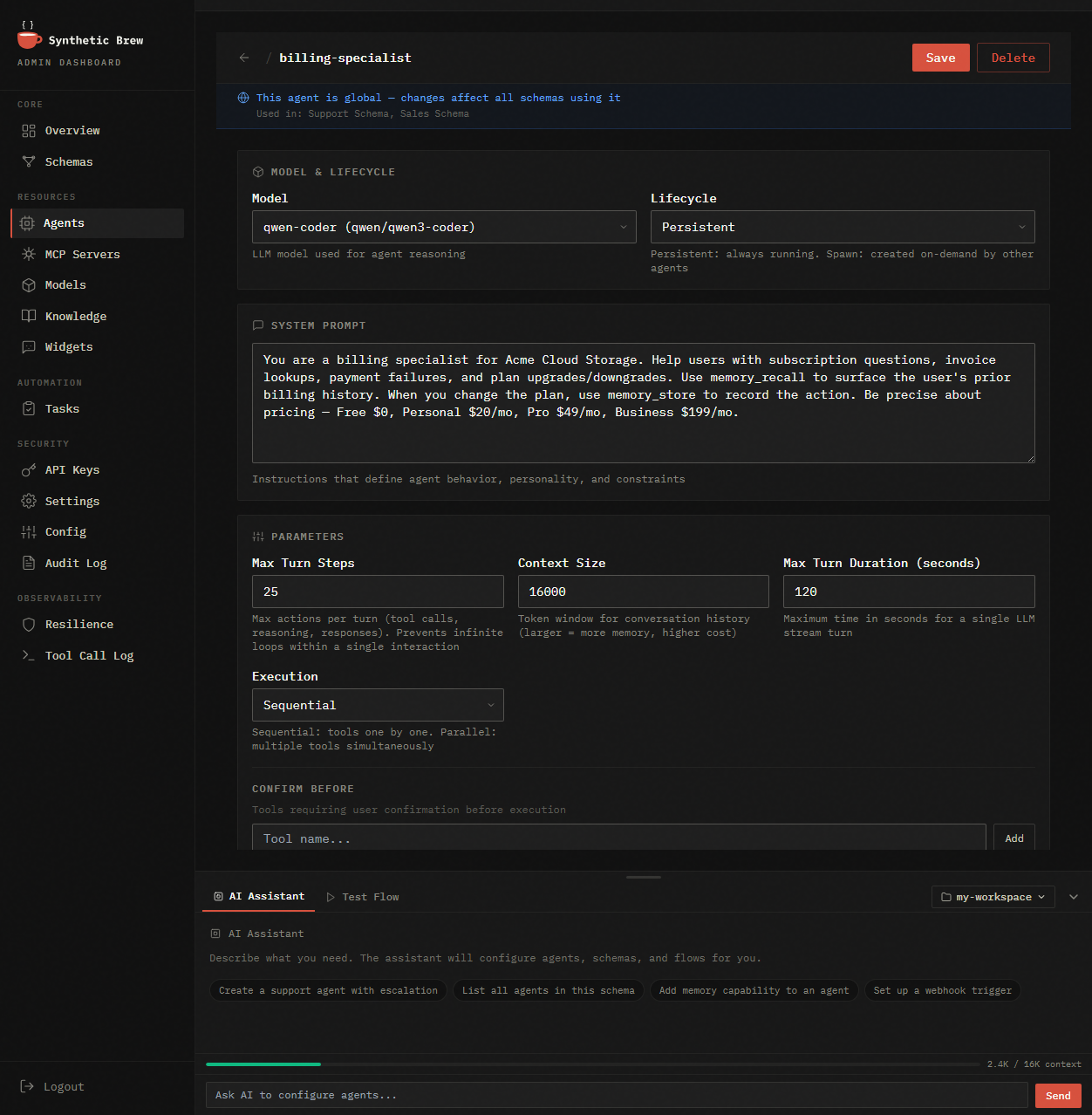
Everything runs from a no-code admin dashboard — no config files required. Build and configure agents (model, system prompt, tools, memory), connect LLM providers and MCP tool servers, and load knowledge bases (RAG) and knowledge graphs. Test agents in a live chat playground, schedule tasks and cron triggers, manage API keys and multi-tenant settings, import/export config for GitOps, and watch every run with full session tracing and an immutable audit log.
Features
- Multi-Agent Orchestration — agents spawn and coordinate with each other via ReAct framework
- MCP Tool Ecosystem — connect any Model Context Protocol server (stdio, SSE, HTTP, WebSocket, Docker)
- Visual Admin Dashboard — configure agents, models, schemas, and tools from a web UI
- Task System — async background tasks with priorities, dependencies, and approval gates
- Knowledge Base / RAG — vector search over uploaded documents with pgvector
- Knowledge Graphs — typed, grounded retrieval over your structured data via auto-generated
list_/get_MCP tools (exact answers, not fuzzy similarity) - Agent Memory — cross-session persistent memory per agent
- Headless API — REST + SSE chat for any frontend (web, mobile, CLI). No proprietary clients.
- BYOK — bring your own keys for any OpenAI-compatible LLM provider
- Self-Hosted — deploy on your infrastructure with Docker, Kubernetes, or bare metal
Quick Start
# Start with Docker Compose
curl -fsSL https://syntheticbrew.ai/releases/docker-compose.yml -o docker-compose.yml
docker compose up -d

# Open admin dashboard
open http://localhost:8443/admin/
# Default credentials: admin / changeme
Or build from source:
cd engine
go build -o syntheticbrew ./cmd/ce
./syntheticbrew
Configuration
SyntheticBrew can be configured via:
| Method | Use Case |
|---|---|
| Environment variables | Docker, Kubernetes, CI/CD |
| config.yaml | Local development, bare metal |
| Admin Dashboard | Visual configuration at /admin/ |
Key environment variables:
DATABASE_URL=postgresql://user:pass@host:5432/syntheticbrew
ADMIN_USER=admin
ADMIN_PASSWORD=changeme
LLM provider, model and API key are configured through the onboarding wizard on first launch (or later via Admin → Models). Engine does not read LLM credentials from env or config files.
Architecture
SyntheticBrew follows Clean Architecture with strict layer separation. All Go code lives under engine/:
engine/
  cmd/ce/              Community Edition entry point
  internal/
    domain/            Pure domain entities
    usecase/           Business logic + consumer-side interfaces
    service/           Task worker, scheduler, completion hooks
    infrastructure/    DB, LLM, MCP, agents, tools
    delivery/          HTTP handlers
    app/               Application bootstrap
  admin/               React/TypeScript admin dashboard
  widget/              Embeddable chat widget
  deploy/              Docker, Helm, systemd assets
Deployment
| Method | Guide |
|---|---|
| Docker Compose | See Quick Start above |
| Kubernetes | Helm chart in engine/deploy/helm/ |
| Bare Metal | Binary + systemd + PostgreSQL + Caddy/nginx |
Documentation
- Website: https://syntheticbrew.ai
- Docs: https://syntheticbrew.ai/docs/
- API Reference: https://syntheticbrew.ai/docs/api/
Custom integrations
Don't have the in-house expertise to build it yourself? Synthetic AI Inc designs, builds, and deploys custom AI integrations on SyntheticBrew — your data, your tools, your workflows, taken all the way into production. Whether your AI is internal-facing or customer-facing, we make it speak your business.
Get in touch at syntheticbrew.ai or [email protected].
Contributing
We welcome contributions! Please read CONTRIBUTING.md before submitting a PR.
License
Licensed under Business Source License 1.1. Contact [email protected] for alternative licensing.
Installing Syntheticbrew
This server has no published package — it is built from source. Open the repository and follow its README.
▸ github.com/syntheticinc/syntheticbrewFAQ
Is Syntheticbrew MCP free?
Yes, Syntheticbrew MCP is free — one-click install via Unyly at no cost.
Does Syntheticbrew need an API key?
No, Syntheticbrew runs without API keys or environment variables.
Is Syntheticbrew hosted or self-hosted?
A hosted option is available: Unyly runs the server in the cloud, no local setup required.
How do I install Syntheticbrew in Claude Desktop, Claude Code or Cursor?
Open Syntheticbrew on unyly.org, pick your client tab (Claude Desktop, Claude Code, Cursor) and press Install — the config is generated automatically, no JSON editing.
Related MCPs
Gmail
Read, send and search emails from Claude
 by Google
Slack
Send, search and summarize Slack messages
 by Slack
Runbear
No-code MCP client for team chat platforms, such as Slack, Microsoft Teams, and Discord.
Discord Server
A community discord server dedicated to MCP by [Frank Fiegel](https://github.com/punkpeye)
Compare Syntheticbrew with
Not sure what to pick?
Find your stack in 60 seconds
Author?
Embed badge for your README
Browse similar
All communication MCPs