
Teamxray
FreeNot checkedHuman discovery through code analysis - VS Code extension that reveals team expertise.

About
Human discovery through code analysis - VS Code extension that reveals team expertise.
README
"Feeling like a stranger on my own team, surrounded by brilliant minds whose talents hide in code and commits."
Transform your repository into a team expertise map. Discover who knows what, reveal hidden collaboration patterns, and get AI-powered management insights — all from your git history.
Features
- 🔍 File Expert Discovery — Right-click any file to find who knows it best
- 🧠 Team Expertise Analysis — AI-powered profiles with communication styles, specializations, and collaboration patterns
- 📊 Management Insights — Actionable recommendations: bus factor risks, growth opportunities, efficiency gaps
- 🤖 GitHub Copilot SDK Integration — Uses the Copilot SDK with custom tools for deep, context-aware analysis
- ⚙️ Flexible AI Provider Settings — Default
copilot, optionalbyok-openai,byok-anthropic,byok-azure, orgithub-models - 🤖 Agent & Bot Detection — Automatically identifies bot/agent contributors (Dependabot, Copilot, Renovate) with visual distinction
- 📄 Dark-themed Reports — Exportable HTML reports with SVG charts and an X-Ray visual identity
- 🛟 Git-Backed Fallback Analysis — If AI analysis is unavailable, Team X-Ray can still assemble a reduced view from local git history
How It Works
Team X-Ray reads your local git history — commits, contributors, file ownership — and feeds that data into the GitHub Copilot SDK when available. If Copilot is unavailable, it falls back to GitHub Models with your GitHub token; if AI output still fails, it produces a reduced git-based analysis. Set teamxray.aiProvider to github-models to use the GitHub Models path directly.
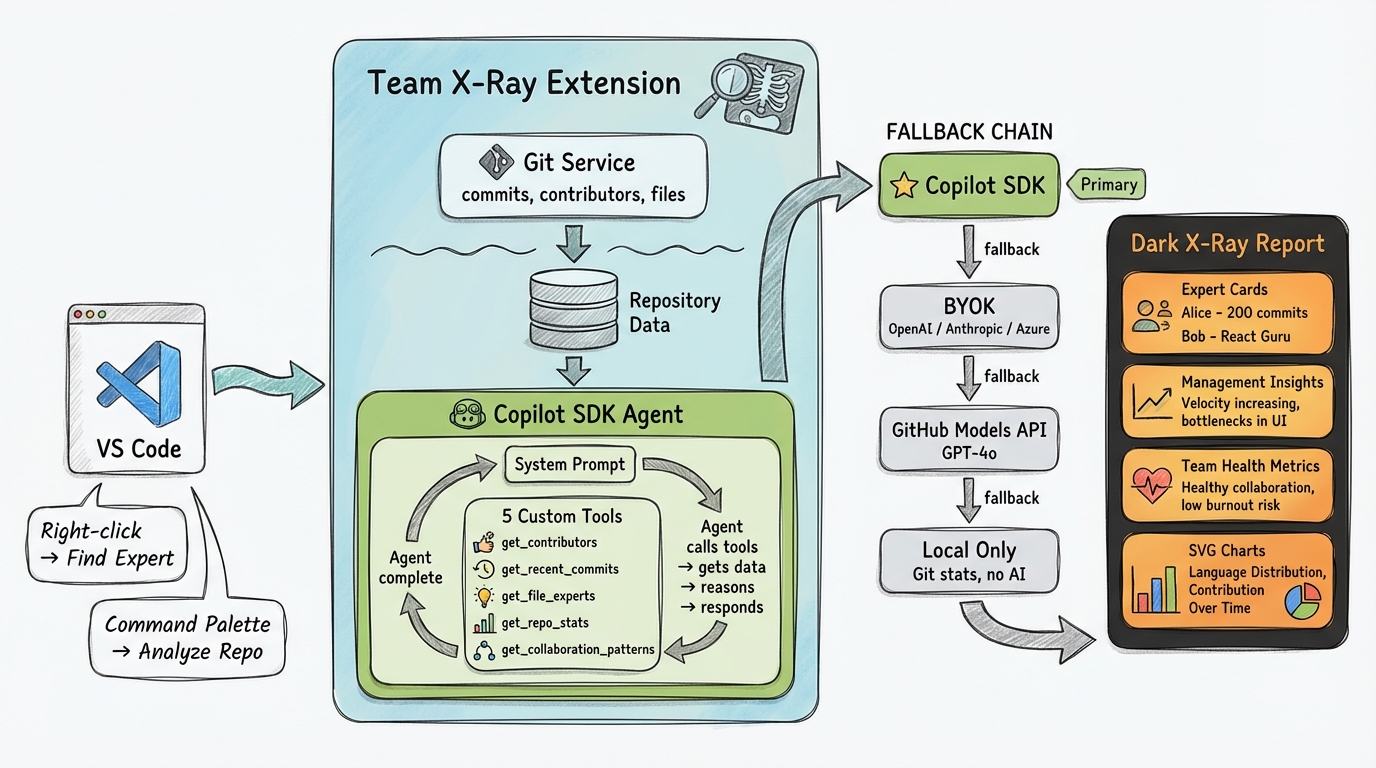
AI Provider Flow
| Flow | Mode | Requirements |
|---|---|---|
| 1 | Copilot SDK (copilot) |
Copilot CLI installed + authenticated; set teamxray.cliPath if the CLI is not on your PATH |
| 2 | BYOK via Copilot SDK | teamxray.aiProvider = byok-openai, byok-anthropic, or byok-azure; run Team X-Ray: Set BYOK API Key (Secure); set teamxray.byokBaseUrl and teamxray.byokModel |
| 3 | GitHub Models | Run Team X-Ray: Set GitHub Token; choose a catalog ID with teamxray.githubModelsModel if needed |
| 4 | Reduced local fallback | No extra setup; basic git-derived analysis only if AI output cannot be produced |
Installation
ext install AndreaGriffiths.teamxray
Or install from the VS Code Marketplace.
Requirements: VS Code 1.100.0+, Node.js 20+, and a trusted workspace with git history.
Usage
| Command / Action | How |
|---|---|
Team X-Ray: Analyze Repository Expertise |
Command Palette |
Team X-Ray: Show Team Expertise Overview |
Command Palette |
Team X-Ray: Analyze This File |
Command Palette |
Team X-Ray: Find Expert for This File |
Right-click a file or open editor context menu |
Team X-Ray: Set GitHub Token |
Command Palette |
Team X-Ray: Set BYOK API Key (Secure) |
Command Palette |
| Export report | Click the export button in the analysis webview |
Documentation
| Doc | Description |
|---|---|
| Setup | Installation & AI provider configuration |
| Architecture | Components, tools, worker threads, bot detection |
| AI Providers | Copilot SDK, BYOK provider overrides, GitHub Models, and reduced local fallback |
| Reports | Webview, HTML export, dark X-Ray theme |
| Troubleshooting | Common issues & fixes |
Links
Stop being a stranger on your own team. 🔬
Installing Teamxray
This server has no published package — it is built from source. Open the repository and follow its README.
▸ github.com/AndreaGriffiths11/teamxrayFAQ
Is Teamxray MCP free?
Yes, Teamxray MCP is free — one-click install via Unyly at no cost.
Does Teamxray need an API key?
No, Teamxray runs without API keys or environment variables.
Is Teamxray hosted or self-hosted?
Self-hosted: the server runs locally on your machine via the install command above.
How do I install Teamxray in Claude Desktop, Claude Code or Cursor?
Open Teamxray on unyly.org, pick your client tab (Claude Desktop, Claude Code, Cursor) and press Install — the config is generated automatically, no JSON editing.
Related MCPs
GitHub
PRs, issues, code search, CI status
 by GitHub
Filesystem
Secure file operations with configurable access controls.
Memory
Knowledge graph-based persistent memory system.
Template MCP Server
A CLI tool to create a new Model Context Protocol server project with TypeScript support, dual transport options, and an extensible structure
 by mcpdotdirect
Compare Teamxray with
Not sure what to pick?
Find your stack in 60 seconds
Author?
Embed badge for your README
Browse similar
All development MCPs