
Testforge Mcp
FreeMaintainedTestForge MCP Server — AI-powered testing in your IDE. Analyzes code for security, unit tests, load, accessibility, vision alignment, scope coverage, and stack

About
TestForge MCP Server — AI-powered testing in your IDE. Analyzes code for security, unit tests, load, accessibility, vision alignment, scope coverage, and stack quality.
README
22-dimension AI-powered testing. Drop any repo URL. Get a full report in under 2 seconds.
🚀 Try It
Web (managed): https://testforge.run — drop any public GitHub repo URL, get a 22-dimension report.
Local (MCP) — one command, no cloud, no sign-up:
npx -y @whitenoisenpm/testforge-mcp@latest
open http://localhost:33221
Dashboard accepts a local project path or a GitHub URL. The npm package ships better-sqlite3 prebuilt for macOS/Linux/Windows, so the SQLite engine that backs ~/.testforge/history.db installs with zero native-build steps. Your source code never leaves the machine.
🎬 30-second walkthrough — fully offline
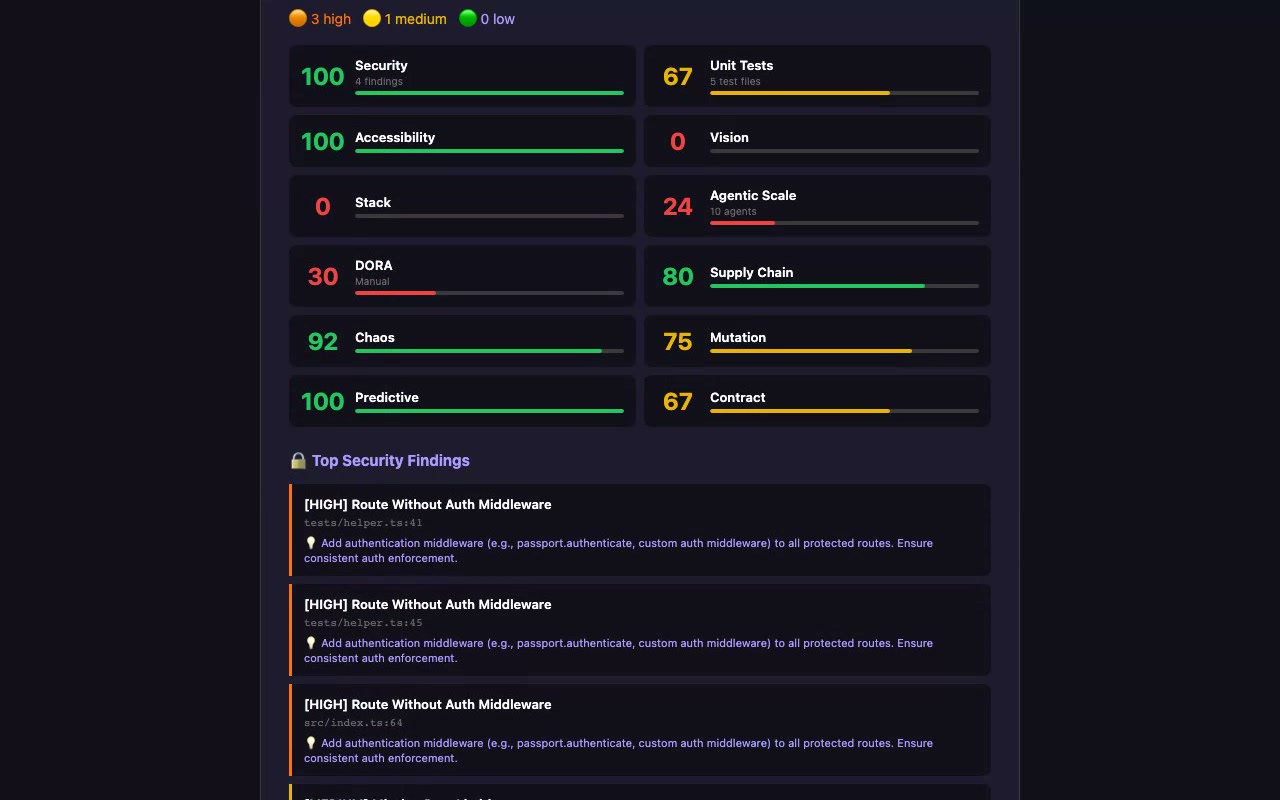
One npx command installs the package + bundled SQLite engine. Paste a local path or GitHub URL, click Run Full Analysis, get a 22-dimension report. Every byte stays on your machine — results persist to ~/.testforge/history.db.
📊 What We Analyze (22 dimensions)
| Category | Dimensions | Detection method |
|---|---|---|
| Code Quality | Security (SAST), Unit Tests, Load/Perf, Accessibility | Babel AST + taint tracking |
| Infrastructure | Kubernetes (manifests + Helm: securityContext, RBAC, probes, limits, NetworkPolicy) | js-yaml + Helm-template stubbing |
| API | Contract testing (OpenAPI cross-ref), Visual regression | AST + YAML parsing |
| Advanced | Edge cases, Property-based, Chaos, Mutation, Predictive | AST + cross-signal aggregation |
| Strategic | Vision & goals, Scope coverage, Stack analysis | Strict dep-name sets + tsconfig parse |
| Enterprise | Agentic-scale, DORA, Supply chain (live OSV), N+1 queries, Dead code, License (SPDX), OWASP | AST + lockfile→OSV.dev + node_modules walk |
Tier-1 analyzers are deterministic — same input always produces the same output. No LLM calls, no Math.random(). Every dimension shipped substantive AST-based depth in v0.6.0 → v0.24.0 (16 deepening passes; see the mcp-server changelog). Tier 2 (v0.25.0) layers LLM-generated Vitest tests + sandbox execution on top — separate path, optional, BYOK on self-host. v0.26.0 closes the polyglot blind spot: Python (FastAPI / Flask / Django / pytest) is now native alongside JS/TS, and the dashboard surfaces a languageCoverage banner instead of pretending "0 endpoints" means "no endpoints" on repos written in languages we don't parse yet. Tier-2 now grounds generated tests in your real source (and imports & executes your real code where it safely can). Simulate (POST /simulate) boots the app and exercises the running system across opt-in lanes — load, chaos, agent, wired (real-code unit tests inside the booted image), and e2e (a Playwright crawl + LLM-authored user journeys). See the mcp-server README.
🆕 Recent work
The dated, authoritative history is the changelog
(src/data/changelog.ts). The narrative — the arcs and the why — lives in the
knowledge graph (docs/knowledge/, open as
an Obsidian vault). Recent arcs (0.30 → 0.36.x):
- Real simulation engine (
0.30) — load / agent / chaos actually run against the booted app (autocannon + docker faults), not static guesses. See docs/knowledge/Simulation-Engine.md. - Kubernetes dimension (
0.31) — the 22nd dimension: parses manifests + Helm and checks securityContext / RBAC / probes / limits / NetworkPolicy. Reports become grouped-by-dimension with per-dimension method + coverage + N/A. - No cry-wolf scoring (
0.32 → 0.33) — diminishing-returns scoring replaces linear cliffs;0/100andnullare gone, generated/vendored files and polyglot deps no longer trigger false flags. See docs/knowledge/Scoring.md. - Self-host UX (
0.34 → 0.35) — setup wizard, local-AI (point Tier-2 at Ollama/LM Studio), in-dashboard Settings panel, Docker preflight, always-@latestinstall. - Managed BYOK + Tier-2 sandbox fixes (
0.36.x) — hosted Tier-2 with your own (encrypted) OpenRouter key; the0/0 ERROREDsandbox bug fixed; multi-arch + version-pinned runner images + build-locally fallback; full-detail Markdown report download. See docs/knowledge/Tier2-Sandbox.md.
🏗️ Architecture
┌──────────────────────────────────────────────────────────┐
│  Vercel — Frontend + 22 API routes (testforge.run)      │
│  React 19 + Vite + Tailwind + shadcn/ui                  │
│                                                          │
│  Auth:  GitHub OAuth → tf_session JWT cookie (httpOnly)  │
│  Edge:  CORS allowlist, X-Request-Id, Upstash rate-limit │
│  Data:  Neon Postgres via Drizzle ORM                    │
└────────────────────────────┬─────────────────────────────┘
                             │
                             │  /api/analyze passes through
                             ▼
┌──────────────────────────────────────────────────────────┐
│  Managed MCP — mcp.testforge.run (a VPS, behind nginx)   │
│  Fastify + TypeScript. Same analyzers as the npm package.│
│  Tier-2 sandbox via a locked-down docker socket-proxy.   │
│  /api/* proxies inject the run-secret + forward BYOK keys.│
└──────────────────────────────────────────────────────────┘

┌──────────────────────────────────────────────────────────┐
│  Local MCP (npm package, default port 33221)             │
│  npx -y @whitenoisenpm/testforge-mcp@latest              │
│  SQLite at ~/.testforge/history.db                       │
│  🔒 No outbound calls except git clone + your AI provider│
└──────────────────────────────────────────────────────────┘
See docs/knowledge/Architecture.md for the full picture (endpoints, request flow, the shared analyzer core).
🔐 Security model
- Auth: GitHub OAuth only. The callback mints a 30-day HS256 JWT and sets it as an
httpOnly,secure,sameSite=Laxcookie namedtf_session. Frontend never sees the token. Anonymous requests to user-scoped routes return401, not seed data. - CORS: Allowlist enforced via
Vary: Origin+ origin reflection. Allowed:https://testforge.run,*.vercel.apppreview deployments, andlocalhostdev ports. Anything else gets403 "Origin not allowed". - Rate limit: Sliding window via Upstash Redis (
@upstash/ratelimit). Default 60 req/min/IP. Falls back to in-memory with a console warning when Upstash isn't configured. - Request id: Every API response carries
X-Request-Id(echoes Vercel's id when present). Logged with every line via the structured JSON logger — search Vercel logs byrid:for correlation. - Stripe webhook: Signature verified against the raw request body (
bodyParser: false). Idempotent — duplicate event IDs return200 {duplicate:true}via astripe_eventsPK conflict. - Secrets posture: all credentials live in Vercel project env.
.gitignorecovers.env,.env*,.vercel,.secure/.
📦 Quick Start
Use the managed service
open https://testforge.run
Sign in with GitHub. Click "Managed", paste a repo URL.
Run the MCP locally (self-host)
# Start the server — dashboard at http://localhost:33221
npx -y @whitenoisenpm/testforge-mcp@latest

# Configure the AI provider for Tier-2 (OpenRouter or local Ollama/LM Studio)
npx -y @whitenoisenpm/testforge-mcp@latest setup

# Full env-var reference
npx -y @whitenoisenpm/testforge-mcp@latest --help
Tier-1 (22 dimensions) needs no config; Tier-2 needs an AI provider + Docker.
No database to install — history auto-stores in SQLite at ~/.testforge/history.db.
For IDE integration (Cursor / Claude / VS Code), add it as an MCP server — see
docs/knowledge/Self-Host-and-BYOK.md.
🛠️ Local Development
git clone https://github.com/t4tarzan/testforge && cd testforge
npm install
npm run dev     # frontend + api on http://localhost:9999

# In another terminal:
cd mcp-server && npm install && npm run dev   # analyzer on :33221
Environment variables: copy .env.example to .env. The required ones to run anything authenticated are DATABASE_URL, SESSION_SECRET, GITHUB_CLIENT_ID, GITHUB_CLIENT_SECRET. See RUNBOOK.md for the full launch checklist.
💰 Pricing
| Plan | Price | Tests/Month | Repos | Key Features |
|---|---|---|---|---|
| Free | $0 | 5 | 1 | All 22 dimensions, public repos |
| Pro | $29/mo | 100 | 10 | Private repos, CI/CD webhooks, Slack/Discord |
| Enterprise | $199/mo | Unlimited | Unlimited | SSO, SLA, dedicated support, custom integrations |
🔌 API Reference
Full API docs at testforge.run/#/docs. Quick reference:
| Method | Endpoint | Auth | Notes |
|---|---|---|---|
| GET | /api/health |
none | DB ping + version |
| GET | /api/status |
none | All-services rollup (parallel checks) |
| GET | /api/badge?score=N |
none | SVG badge for README embedding |
| GET | /api/auth/callback |
none | OAuth start + callback; sets tf_session cookie |
| GET | /api/auth/me |
cookie | Current user; 401 if not signed in |
| POST | /api/auth/logout |
cookie | Clears tf_session |
| POST | /api/analyze |
none | Proxies to Fly.io MCP; 502/504 on upstream failure (no fake fallback) |
| GET | /api/projects |
cookie | User's projects |
| GET | /api/history |
cookie | User's test runs |
| GET | /api/reports/:id |
cookie | One report; 404 (not seed) when missing |
| POST | /api/save-results |
cookie | Persist an analysis run |
| GET/POST/DELETE | /api/keys |
cookie | API key CRUD |
| GET/POST | /api/gate |
cookie | Plan quota — usage from real test_runs counts |
| GET/POST | /api/stripe |
cookie (POST) | Checkout session |
| POST | /api/stripe-webhook |
Stripe signature | Idempotent via stripe_events table |
| POST | /api/webhook |
none | GitHub CI/CD webhook (notify/Slack/Discord) |
All responses include X-Request-Id and rate-limit headers (X-RateLimit-Remaining, X-RateLimit-Reset).
🧪 Tests & CI
# Frontend + API E2E (Playwright)
npx playwright test
# Set BASE_URL=https://<preview>.vercel.app to run against a preview.

# Analyzer integration tests (vitest, against fixture projects)
cd mcp-server && npm test
CI runs on every PR via .github/workflows/ci.yml:
- Lint + build — blocking.
tsc -b && vite build. - Analyzer tests — blocking.
vitest runagainstmcp-server/tests/fixtures/{vulnerable,clean}-app. - Playwright (preview URL) — blocking. Pulls the PR's Vercel preview URL, sends requests with the
x-vercel-protection-bypassheader so Vercel's SSO doesn't gate the run.
The bypass requires VERCEL_AUTOMATION_BYPASS_SECRET set as a GitHub Actions secret (mirroring Vercel's project-level "Protection Bypass for Automation"). See .github/workflows/ci.yml for the full setup steps.
📁 Project Structure
testforge/
├── api/                    # Vercel serverless functions
│   ├── _security.js        # withSecurity wrapper: CORS allowlist, rate limit, security headers, request-id, error catch
│   ├── _session.js         # jose-based HS256 JWT cookie, requireSession helper
│   ├── _env.js             # requireEnv() — typed env contract with clear missing-var errors
│   ├── _log.js             # JSON-line structured logger with per-request rid
│   ├── auth/               # callback, me, logout
│   ├── reports/[id].js     # single report; 404 (not seed) when missing
│   └── ...                 # analyze, projects, history, keys, gate, stripe, …
├── mcp-server/             # Fly.io / npm-published MCP server
│   ├── src/
│   │   ├── analyzers/      # 8 modules covering 22 dimensions
│   │   ├── local-db.ts     # SQLite via better-sqlite3
│   │   ├── mcp-server.ts   # /test, /quick-scan with SQLite persistence
│   │   └── index.ts        # Fastify app, port 33221
│   └── tests/
│       ├── analyzers.test.ts   # vitest against real fixtures
│       └── fixtures/{vulnerable,clean}-app/
├── src/                    # React 19 frontend (Vite)
│   ├── pages/              # 15 page components (HashRouter)
│   ├── context/AuthContext.tsx  # Hydrates from /api/auth/me cookie
│   └── db/schema.ts        # Drizzle ORM (8 tables, FK cascade)
├── drizzle/                # Generated migration baseline
├── scripts/
│   ├── migrate-to-v1.sql   # Idempotent one-shot to bring an existing Neon DB up to v1
│   ├── wrap-handlers.js    # Codemod that wraps every api/*.js with withSecurity
│   └── smoke.sh            # 10-assertion post-deploy smoke test
├── e2e/                    # Playwright E2E suite
├── RUNBOOK.md              # Pre-launch checklist + incident playbooks
└── LOG.md                  # Original build log
🏆 Built With
React 19 · TypeScript · Vite · Tailwind · shadcn/ui · Fastify · Neon Postgres · Drizzle ORM · Fly.io · Vercel · Stripe · Upstash Redis · jose · Playwright · Vitest · GSAP · Recharts · Framer Motion · better-sqlite3
📄 License
BUSL-1.1 — Free for non-production use and self-hosting. Commercial managed service requires a paid plan at testforge.run.
Install Testforge Mcp in Claude Desktop, Claude Code & Cursor
unyly install testforge-mcpInstalls into Claude Desktop, Claude Code, Cursor & VS Code — handles npx, uvx and build-from-source repos for you.
First time? Get the CLI: curl -fsSL https://unyly.org/install | sh
Or configure manually
Run in your terminal:
claude mcp add testforge-mcp --env API_KEY="" --env OPENROUTER_API_KEY="" --env TESTFORGE_MCP_PORT="" -- npx -y @whitenoisenpm/testforge-mcpFAQ
Is Testforge Mcp MCP free?
Yes, Testforge Mcp MCP is free — one-click install via Unyly at no cost.
Does Testforge Mcp need an API key?
Yes, it requires environment variables: API_KEY, OPENROUTER_API_KEY, TESTFORGE_MCP_PORT. Unyly injects them into the config during install.
Is Testforge Mcp hosted or self-hosted?
Self-hosted: the server runs locally on your machine via the install command above.
How do I install Testforge Mcp in Claude Desktop, Claude Code or Cursor?
Open Testforge Mcp on unyly.org, pick your client tab (Claude Desktop, Claude Code, Cursor) and press Install — the config is generated automatically, no JSON editing.
Related MCPs
GitHub
PRs, issues, code search, CI status
 by GitHub
Filesystem
Secure file operations with configurable access controls.
Memory
Knowledge graph-based persistent memory system.
Template MCP Server
A CLI tool to create a new Model Context Protocol server project with TypeScript support, dual transport options, and an extensible structure
 by mcpdotdirect
Compare Testforge Mcp with
Not sure what to pick?
Find your stack in 60 seconds
Author?
Embed badge for your README
Browse similar
All development MCPs