
Textarttools
FreeNot checkedUnicode text styling and ASCII art generation with 23 styles and 322+ figlet fonts

About
Unicode text styling and ASCII art generation with 23 styles and 322+ figlet fonts
README
License: MIT MCP Cloudflare Workers
🌐 Live Server: https://mcp.textarttools.com
Transform text with Unicode styles and create ASCII art banners. A production-ready Model Context Protocol (MCP) server deployed globally on Cloudflare Workers.
📺 Demo
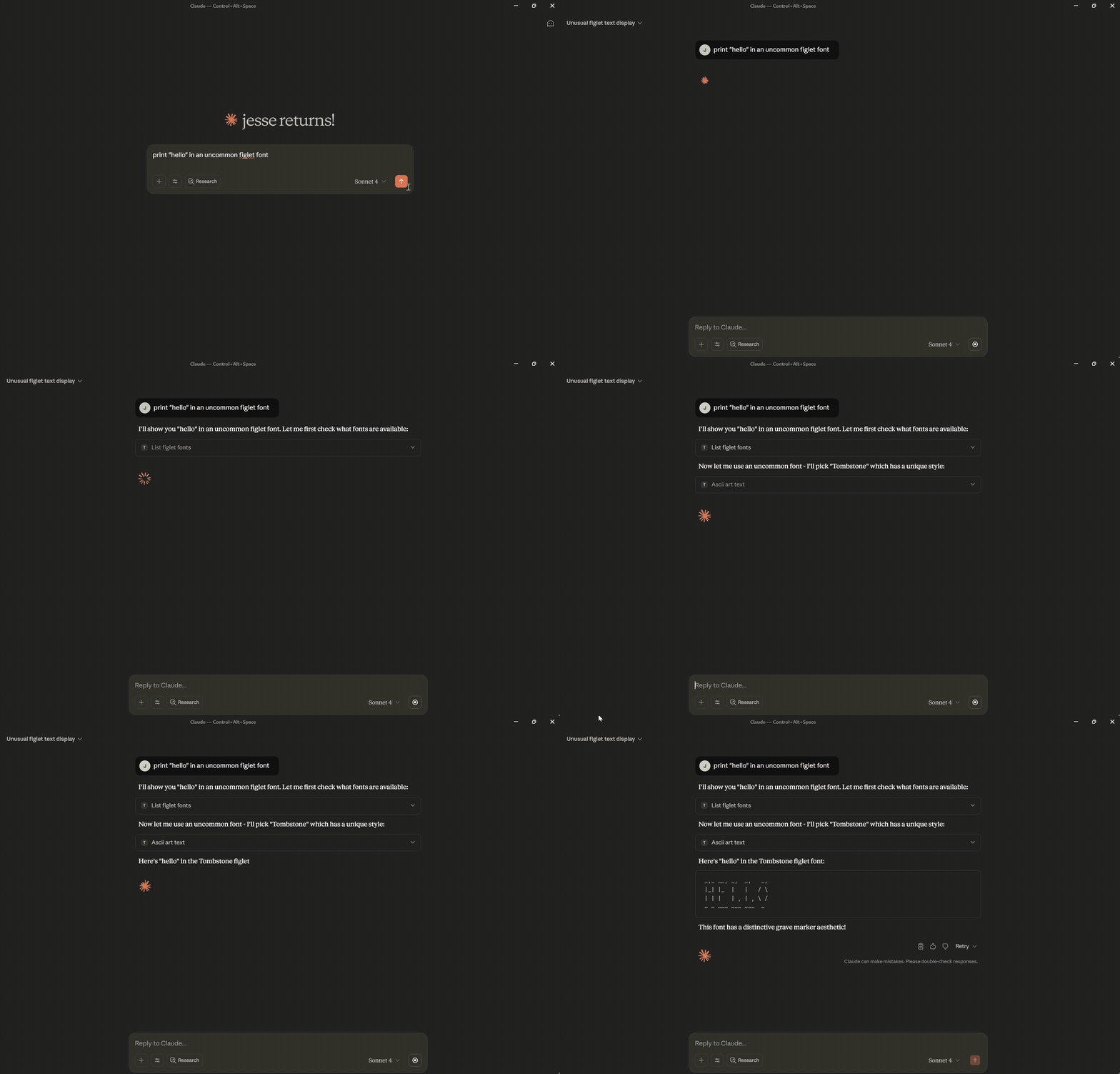
✨ Features
- 23 Unicode Text Styles - Transform text to 𝗯𝗼𝗹𝗱, 𝘪𝘵𝘢𝘭𝘪𝘤, 𝒸𝓊𝓇𝓈𝒾𝓋𝓮, 𝔣𝔯𝔞𝔨𝔱𝔲𝔯, and more
- 322+ ASCII Art Fonts - Create stylized text banners for headers and decorations
- No Authentication - Public server ready to use immediately
- Global Performance - Deployed on Cloudflare Workers edge network
- Rate Limited - 100 requests per minute with burst protection
- Secure - Input validation, XSS prevention, and comprehensive security headers
🚀 Quick Start
Install with Claude Desktop
Install the MCP remote proxy:
npm install -g @anthropic/mcp-remoteAdd to your Claude Desktop config (
claude_desktop_config.json):{ "mcpServers": { "textarttools": { "command": "mcp-server", "args": ["https://mcp.textarttools.com/sse"] } } }Restart Claude Desktop and start using text styling tools!
💡 Example Usage
Try the live API directly:
# Transform text to bold Unicode style
curl -X POST https://mcp.textarttools.com/sse \
  -H "Content-Type: application/json" \
  -d '{
    "jsonrpc": "2.0",
    "id": 1,
    "method": "tools/call",
    "params": {
      "name": "unicode_style_text",
      "arguments": {
        "text": "Hello World",
        "style": "bold"
      }
    }
  }'

# Create ASCII art banner
curl -X POST https://mcp.textarttools.com/sse \
  -H "Content-Type: application/json" \
  -d '{
    "jsonrpc": "2.0",
    "id": 2,
    "method": "tools/call",
    "params": {
      "name": "ascii_art_text",
      "arguments": {
        "text": "Hello",
        "font": "Big"
      }
    }
  }'
🛠️ Available Tools
The server provides 7 MCP tools:
Unicode Text Styling:
unicode_style_text- Transform text with any of 23 Unicode styleslist_available_styles- Get all available styles with examplespreview_styles- Preview text in multiple stylesget_style_info- Get detailed style information and compatibility
ASCII Art Banners:
ascii_art_text- Generate stylized text banners with 322+ fontslist_figlet_fonts- Get all available fonts from R2 storagepreview_figlet_fonts- Preview text in multiple fonts
Visit https://mcp.textarttools.com/ for complete API documentation.
🏗️ Local Development
Want to run your own instance or contribute?
# Clone the repository
git clone https://github.com/humanjesse/textarttools-mcp.git
cd textarttools-mcp

# Install dependencies
npm install

# Create local environment file
cp .dev.vars.example .dev.vars
# Edit .dev.vars with your development values

# Start development server
npm run dev

# Test locally (server runs at http://localhost:8788)
curl -X POST http://localhost:8788/sse \
  -H "Content-Type: application/json" \
  -d '{"jsonrpc":"2.0","id":1,"method":"tools/list"}'
Development Commands
npm run dev        # Start development server
npm run build      # Build for production
npm run deploy     # Deploy to Cloudflare Workers (requires auth)
npm run lint       # Check code quality
npm run typecheck  # Validate TypeScript
📖 Documentation
- Live Server: https://mcp.textarttools.com
- API Documentation: https://mcp.textarttools.com/ (AI-friendly)
- Health Check: https://mcp.textarttools.com/health
- MCP Protocol: Model Context Protocol Spec
🤝 Contributing
Contributions are welcome! Please see CONTRIBUTING.md for guidelines.
📝 License
MIT License - see LICENSE file for details.
Built with Model Context Protocol • Deployed on Cloudflare Workers
Installing Textarttools
This server has no published package — it is built from source. Open the repository and follow its README.
▸ github.com/humanjesse/textarttools-mcpFAQ
Is Textarttools MCP free?
Yes, Textarttools MCP is free — one-click install via Unyly at no cost.
Does Textarttools need an API key?
No, Textarttools runs without API keys or environment variables.
Is Textarttools hosted or self-hosted?
A hosted option is available: Unyly runs the server in the cloud, no local setup required.
How do I install Textarttools in Claude Desktop, Claude Code or Cursor?
Open Textarttools on unyly.org, pick your client tab (Claude Desktop, Claude Code, Cursor) and press Install — the config is generated automatically, no JSON editing.
Related MCPs
GitHub
PRs, issues, code search, CI status
 by GitHub
Filesystem
Secure file operations with configurable access controls.
Memory
Knowledge graph-based persistent memory system.
Template MCP Server
A CLI tool to create a new Model Context Protocol server project with TypeScript support, dual transport options, and an extensible structure
 by mcpdotdirect
Compare Textarttools with
Not sure what to pick?
Find your stack in 60 seconds
Author?
Embed badge for your README
Browse similar
All development MCPs