
Textrig
FreeNot checkedAnimate a single flat PNG with your AI agent — MCP server that cuts, rigs, animates and renders 2D DragonBones characters

About
Animate a single flat PNG with your AI agent — MCP server that cuts, rigs, animates and renders 2D DragonBones characters
README
Animate a single flat PNG with your AI agent. No PSD layers required, no pre-cut parts, no Spine license. You hand your agent an image and a sentence ("make the character breathe", "a sleepy idle"). Using TextRig's MCP tools, the agent cuts the image into pieces, places bones, writes keyframes, renders the result, checks its own work against a checklist and iterates.
The output is a standard DragonBones rig (_ske.json + _tex.json +
_tex.png). DragonBones runtimes exist for Pixi, Phaser, Cocos, Egret, Unity
and others.
One flat drawing, no layers. The source is a single 896×1200 PNG. The
markup draws 10 polygons over it; build_rig cuts the pieces, fills the art
hidden behind moving joints and binds everything to 12 bones (clips below play
at 2× the authored speed, as in our game):
| Source PNG | idle |
idle_2 |
|---|---|---|
 |
 |
 |
Already have layers? TextRig uses them as pieces. This character came as
a hand-separated layered export. Its 21 layer PNGs became 17 pieces plus 4
swap variants (closed eyelids, cigarette positions), with no cutting and no
fill ("fill": "none", --underlap 0):
| Layers | idle |
|---|---|
 |
 |
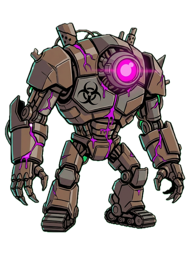
A smaller multi-piece example with rigid limbs and a deform hose:
| Source PNG | idle |
|---|---|
 |
 |
Every animation above was built by the tools in this repo from the markup in
examples/ (manager/,
character-layers/,
robot/). The GIFs were rendered by the same render tool
the agent uses to check its own work.
What it does
TextRig is a local MCP server. The agent (Claude Code, Cursor, or any MCP client with image input) does the creative work. The code handles the math and the rendering:
- Look. The agent reads the PNG and decides what should move.
- Author. It writes three small JSON documents: a skeleton (bones in image pixels), optionally a pieces manifest (polygon cuts, draw order, swap variants, deform meshes) and animations (keyframe tracks).
- Build.
build_rigvalidates the markup and cuts the pieces. It fills the areas that were hidden behind moving parts, generates meshes and weights, packs the atlas and writes the DragonBones rig. Validation errors come back verbatim and name the fix. - Inspect.
renderreturns a filmstrip image, with optional zoomed close-ups. The agent judges it against a 7-point checklist: static zones, joint separation, revealed holes, draw order, swap timing, loop seam and amplitude. - Iterate. The agent makes one change per round, for up to 4 rounds, then delivers the result or reports what is still wrong.
Supported rig features:
- Whole-image deform rigs: one mesh with bones and heat-diffusion weights, for sway, breathing and bobbing.
- Multi-piece rigs:
rigidpieces on bones,swappieces for blinks and glows,deformpieces for hoses and capes, animated draw order and automatic occlusion fill. - Path constraints and wave tracks for hair, tails and ribbons.
- Morph pieces: optical-flow FFD between prepared keyframe images.
- Background removal for inputs without alpha, either border keying or the rembg neural cutout.
- A human-in-the-loop markup editor (
open_markup_review) where you can drag joints and cut boundaries in a browser before the build.
Quick start
git clone https://github.com/blackoutbuild/textrig.git
cd textrig
./install.sh
install.sh is idempotent. It creates pipeline/.venv, installs the Python
dependencies, downloads the background-removal weights (u2net, ~176 MB, to
~/.u2net/), runs pnpm install in renderer/ and installs Playwright's
headless Chromium.
Claude Code
claude mcp add textrig -- /absolute/path/to/textrig/mcp/serve.sh
Any other MCP client (Cursor, Claude Desktop, ...)
TextRig is a stdio server with no arguments and no environment variables:
{
  "mcpServers": {
    "textrig": {
      "command": "/absolute/path/to/textrig/mcp/serve.sh"
    }
  }
}
Then ask your agent something like:
Rig ~/art/robot.png and give it a heavy idle loop. Use the textrig tools.
The agent should call rigging_guide first. Every tool description points it
there.
Tools
| Tool | What it does |
|---|---|
rigging_guide(topic="core") |
The rigging guide, split into topics: core (conventions, choosing a rig type, skeleton archetypes, animation vocabulary, the checklist, JSON formats), pieces (polygon-cutting rules, binding types, draw-order tracks, path constraints, error → knob map), example (the complete robot rig) and all. |
build_rig(name, image_path, skeleton, animations, pieces?, ...knobs) |
Validates the markup and builds the DragonBones rig. The markup is passed as JSON values, not file paths. Piece builds also return a debug image of the cuts and bones. Optional knobs: bg, bg_tolerance, fill_blur, fill_mode, underlap, cols, power, weights_algo. |
render(name, animation="idle", frames=8, size=256, gif=false, zoom?, fx?, fy?) |
Renders a built rig to a filmstrip that comes back as an image. With gif=true it also writes a GIF. zoom/fx/fy render a close-up. Limits: frames ≤ 12, size ≤ 512. |
preview(name) |
Starts the local preview server (if it isn't running) and returns a URL where a human can watch the rig live at 60 fps, with animation, speed and background switches. |
open_markup_review(name, image_path, skeleton, pieces?) |
Opens a browser editor for the human: drag joints and polygon vertices, split pieces with a cut stroke, leave a note for the agent. |
await_markup_review(name, timeout_s=50) |
Collects the human's edits from the review page. It returns "still editing" until the human presses Done. |
More detail (workspace layout, limits, timeouts) is in mcp/README.md.
Output formats
out/<name>_ske.json+out/<name>_tex.json+out/<name>_tex.png: the DragonBones 5.x JSON rig and texture atlas. This is the product. It is tested againstpixi-dragonbones-runtime8.0.3 on Pixi 8, and the exact emitted shape is documented in docs/dragonbones-format-contract.md.out/mcp-<name>.filmstrip.png: the inspection filmstrip.out/mcp-<name>.gif: a full-loop GIF, 30 fps (whengif=true).out/<name>.debug.png: piece cuts and bones drawn over the source (piece builds only).
out/ is disposable and gitignored. The inputs for each build are saved to
out/mcp/<name>/.
Using it without MCP
The same pipeline runs from the shell:
pipeline/build_rig.sh robot examples/robot/source.png \
  examples/robot/skeleton.json examples/robot/animations.json \
  --pieces examples/robot/pieces.json
(cd renderer && pnpm render out:robot idle robot --match-runtime --frames 8 --size 256 --gif --out-repo)
(cd renderer && pnpm preview robot)   # live preview at http://localhost:3020
Requirements
- macOS or Linux. Development and testing were done on macOS; Linux should work but is less tested.
- Python 3.10+. Tested on 3.14.
- Node.js 18+ and pnpm. Tested on Node 22 and pnpm 9.
- Disk: about 1.2–1.6 GB in total. That is ~640 MB for the Python venv
(onnxruntime and OpenCV), ~210 MB for
node_modules, ~176 MB for the u2net weights in~/.u2net/and ~350–550 MB for Playwright's Chromium in its shared cache. The repo itself is under 20 MB. - An MCP client whose model can see images, because the self-check loop depends on reading filmstrips.
Tests
pipeline/.venv/bin/pytest pipeline/tests -q     # Python pipeline + MCP server
cd renderer && pnpm test                        # markup editor geometry
Limitations
- The agent is the rigger. The quality of the result depends on the model's visual judgement: where it places joints, how it cuts polygons and how it reads a filmstrip. Strong vision models do well. Weak ones produce sloppy cuts. The markup review editor lets a human fix placement by hand.
- No generative inpainting. Areas revealed behind a moving piece are filled by extending or diffusing the neighbouring pixels. That works for joint seams but cannot draw a limb that the image never showed. For large reveals, cut the polygons differently or supply a separate layer PNG.
- 2D bone and mesh animation only. There is no 3D turnaround and no pose that the source drawing can't support. Large rotations of rigid pieces look like cut-out animation, because that is what they are.
- DragonBones is the only export target. There is no Spine export. The
legacy
*.rig.jsonformat informat/README.mdis a reference/debug format and has no player in this repo. - Morph pieces allow only one animation per manifest.
previewandopen_markup_reviewrun a local Vite dev server on port 3020 and are meant for a human with a browser on the same machine.
License
MIT © 2026 Blackout Interactive
Built by Blackout Interactive — https://blackout.build
Installing Textrig
This server has no published package — it is built from source. Open the repository and follow its README.
▸ github.com/blackoutbuild/textrigFAQ
Is Textrig MCP free?
Yes, Textrig MCP is free — one-click install via Unyly at no cost.
Does Textrig need an API key?
No, Textrig runs without API keys or environment variables.
Is Textrig hosted or self-hosted?
Self-hosted: the server runs locally on your machine via the install command above.
How do I install Textrig in Claude Desktop, Claude Code or Cursor?
Open Textrig on unyly.org, pick your client tab (Claude Desktop, Claude Code, Cursor) and press Install — the config is generated automatically, no JSON editing.
Related MCPs
GitHub
PRs, issues, code search, CI status
 by GitHub
Filesystem
Secure file operations with configurable access controls.
Memory
Knowledge graph-based persistent memory system.
Template MCP Server
A CLI tool to create a new Model Context Protocol server project with TypeScript support, dual transport options, and an extensible structure
 by mcpdotdirect
Amap Maps Mcp Server
MCP server for using the AMap Maps API
 by duxiaohui
Supabase
Database, auth and storage
 by Supabase
Everything
Reference / test server with prompts, resources, and tools.
Git
Tools to read, search, and manipulate Git repositories.
Sequential Thinking
Dynamic and reflective problem-solving through thought sequences.
Time
Time and timezone conversion capabilities.
Compare Textrig with
Not sure what to pick?
Find your stack in 60 seconds
Author?
Embed badge for your README
Browse similar
All development MCPs