

About
Lightweight 3D, WebXR, and procedural Three.js runtime
README
Disclaimer: This is not an officially supported Google product.
Three-Live
AI-First Native 3D, CAD & Spatial Computing: On-device JIT compiler turning live, AI-generated Three.js into native Android (Google Filament & Jetpack XR), iOS & visionOS (Apple RealityKit), and WebXR.
⚡ Quickstarts (Android • iOS • CLI • Web) • 📦 Install (JitPack • SwiftPM • Cargo • npm) • ▶ Live 3D Studio • 🥽 Live Spatial XR Studio • 📚 Docs
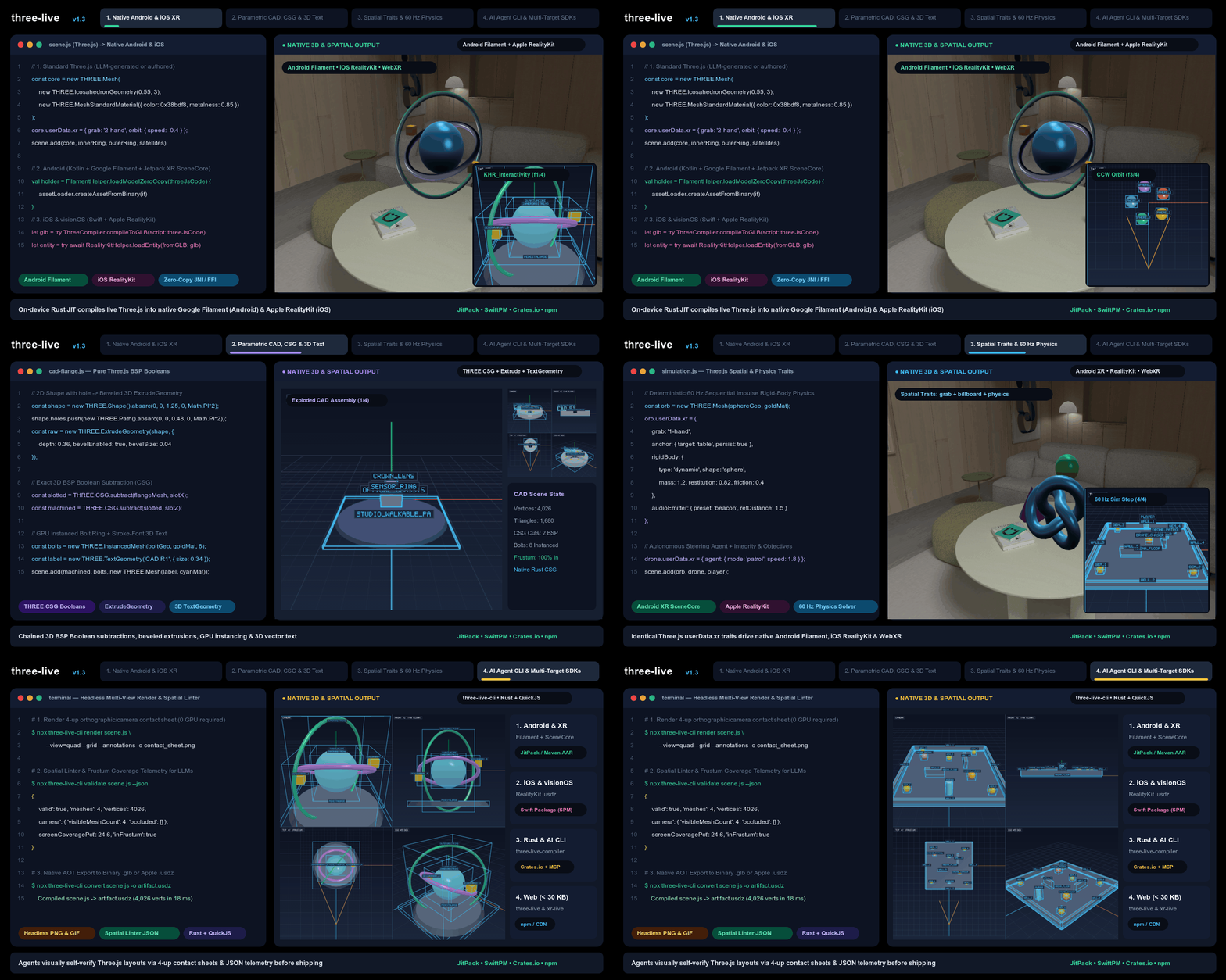
LLMs and developers excel at writing concise Three.js code—not hundreds of
lines of platform-specific native 3D, shader, and AR boilerplate. Three-Live
compiles standard Three.js (THREE.Mesh, THREE.CSG, userData.xr,
KHR_interactivity) on-device in a sandboxed Rust VM and renders natively in
Google Filament and Jetpack XR SceneCore on Android, Apple RealityKit and
Quick Look on iOS and visionOS, headless 4-up PNG contact sheets
(three-live-cli) for AI coding agents, and WebGL2 / WebXR on the Web.
Quickstarts
1. Run Three.js natively on Android (Google Filament & Jetpack XR SceneCore)
Compile standard Three.js code over zero-copy JNI and drive native Google Filament rendering, 60 Hz physics, and Jetpack XR SceneCore spatial entities:
import com.google.threelive.FilamentHelper
import com.google.threelive.XRLiveRuntimeSession
import com.google.threelive.XRLiveSceneCoreHelper

val threeJsCode = """
  const core = new THREE.Mesh(
    new THREE.IcosahedronGeometry(0.55, 3),
    new THREE.MeshStandardMaterial({ color: 0x38bdf8, metalness: 0.85, roughness: 0.15 })
  );
  core.userData.xr = { grab: '2-hand', orbit: { speed: -0.4 } };
  scene.add(core);
""".trimIndent()

// Compile Three.js to a zero-copy GLB ByteBuffer and load directly into Google Filament
val holder = FilamentHelper.loadModelZeroCopy(threeJsCode) { buffer ->
    assetLoader.createAssetFromBinary(buffer)
}

// Step live KHR_interactivity graphs, 60 Hz rigid-body physics, and spatial traits per frame
val runtime = XRLiveRuntimeSession.fromGlb(holder.byteBuffer)
runtime.step(dtSeconds = 1.0 / 60.0)

// Or attach interactive spatial traits (grab, scale, billboard, anchor) in Android XR SceneCore
XRLiveSceneCoreHelper.attachTraitsFromGlb(xrSession, entity, holder.byteBuffer)
2. Run Three.js natively on iOS, macOS, and visionOS (Apple RealityKit)
Compile the exact same Three.js code into Apple RealityKit (ARView /
RealityView) or .usdz:
import ThreeLiveCompiler
import RealityKit

@MainActor
func loadSpatialScene(from threeJsCode: String, into arView: ARView) async throws -> XRLiveRealityKitSession? {
    let glb = try ThreeCompiler.compileToGLB(script: threeJsCode)
    let entity = try await RealityKitHelper.loadEntity(fromGLB: glb)
    XRLiveRealityKit.installTraits(on: entity, in: arView)

    // Bind live KHR_interactivity, 60 Hz physics, and spatial traits to RealityKit SceneEvents.Update
    let session = XRLiveRealityKitSession(glbData: glb, root: entity)
    session?.installInputTargets()
    session?.start()
    return session
}
3. Verify & compile Three.js headlessly for AI agents (three-live-cli & MCP server)
Render a 4-up orthographic/camera contact sheet (zero GPU required), run the
spatial linter for JSON frustum/overlap telemetry, compile scene.js to .glb
/ .usdz, generate a scene from a reference image (from-image), or attach
three-live-cli mcp as a zero-dependency Model Context Protocol (MCP) stdio
server (three_live_validate, three_live_render, three_live_convert,
three_live_from_image, three_live_bake_textures, three_live_sim,
three_live_link, and the
three_live_gym_reset / three_live_gym_step / three_live_gym_close agent
gym) in Gemini CLI, Google Antigravity, Claude Code, or any MCP client. The
agent gym lets an agent play a scene step by step (act, observe, react) to check
a level is winnable; "gym" is the reinforcement-learning term for such a
reset/step environment, and no ML is involved. Not using MCP?
three-live-cli gym reset level.js --session ep.json and
three-live-cli gym step --session ep.json --actions '[...]' do the same, one
command per step. three-live-cli link scene.js --qr prints a playground link
(and a terminal QR code) that opens the scene on a phone, one tap from AR.
Building from a photo, mockup, sketch, or blueprint? Pass --reference (or
reference in MCP) to get a side-by-side + aligned-overlay + silhouette-diff
sheet with IoU and proportion guidance, or run from-image to synthesize and
verify a procedural Three.js scene directly from an image:
$ npx three-live-cli render scene.js --view=quad --grid --annotations -o contact_sheet.png
$ npx three-live-cli render scene.js --reference=blueprint.png --view=front -o compare.png
$ npx three-live-cli from-image photo.jpg -o scene.js --render compare.png
$ npx three-live-cli validate scene.js --json
$ npx three-live-cli link scene.js --qr
$ npx three-live-cli convert scene.js -o model.usdz
$ npx three-live-cli textures bake scene.js -o scene.textures.json   # AI textures (needs THREE_LIVE_AI_IMAGE_ENDPOINT)
$ npx three-live-cli convert scene.js --texture-pack scene.textures.json -o model.glb

# Or register the built-in MCP server for closed-loop visual + spatial AI verification:
$ claude mcp add three-live -- npx -y -p three-live three-live-cli mcp
4. Run on the Web (<three-live> and <xr-live>)
On the web, <three-live> (< 31 KB gz viewer, < 77 KB gz with the live
Three.js compiler) and <xr-live> (< 89 KB gz) render the same Three.js
scenes in WebGL2 and 6DoF WebXR with 1-tap mobile AR handoff:
// Standard Three.js scene (runs identically in Android, iOS, CLI, and Web)
const mesh = new THREE.Mesh(
  new THREE.TorusKnotGeometry(0.4, 0.14, 64, 16),
  new THREE.MeshStandardMaterial({ color: 0x38bdf8, metalness: 0.8, roughness: 0.15 })
);
mesh.userData.xr = { grab: '1-hand', billboard: 'capsule' };
scene.add(mesh);
Add three-live-ai.min.js (< 29 KB gz; built into the full bundles) to let
users reshape a scene with any LLM: every edit is compiled in the sandbox
first, auto-repaired once on failure, and only then hot-swapped, so a bad
generation never breaks the live scene.
<three-live allow-client-scripts
    ai-endpoint="https://your-backend.example/chat"  ai-model="gemini-2.5-flash">
  <script type="text/three">/* your scene */</script>
</three-live>
<script type="module">
  const el = document.querySelector('three-live');
  const result = await el.editScene('make the roof red and add a chimney');
  if (!result.applied) console.warn(result.error);  // live scene unchanged
  // el.undoEdit() reverts; el.aiProvider = { complete: async ({messages}) => '...' } plugs in any model.
</script>
ai-endpoint speaks the widely supported Chat Completions protocol
(ai-provider="ai-chat"): your own backend proxy, Ollama or LM Studio
(http://localhost:..., no account needed), vLLM, OpenRouter, or Gemini's
compatibility endpoint. Keep API keys on your server; never put them in pages.
Tap & Speak: let users tap a mesh and say what to change. The voice model
talks, and your code model writes the edit through an edit_scene tool, so edit
quality never depends on the voice model.
<three-live allow-client-scripts ai-endpoint="https://your-backend.example/chat"
    ai-select-on-tap ai-voice-button
    ai-voice-url="wss://your-backend.example/realtime">
  <script type="text/three">/* your scene */</script>
</three-live>
ai-select-on-tap: tapping a mesh setsselected-mesh(tap again to clear), so "make this red" knows what "this" is.ai-voice-button: a mic button. Withai-voice-urlit toggles a realtime voice conversation (ai-voice-provider="ai-realtime", the default, for any server speaking the Realtime WebSocket protocol, or"gemini-live"). Without it, it runs push-to-talk with the browser's speech recognizer (el.startVoiceEdit()).- From code:
await el.connectVoice({provider: 'gemini-live', url})orawait el.startVoiceEdit(). Progress arrives asthree-live-voiceevents (listening,editing, transcripts, results).
Talk-to-Select: users can select by voice instead of tapping, so they can check that the right objects are highlighted before an edit.
- Say "select the two red chairs on the left", "also select the lamp", "deselect the small one", or "clear the selection". References are resolved locally with no model call: names (with synonyms and plurals), material colors, left / right / front / back from the current camera, top / bottom, size, ordinals ("the second mug"), counts ("both"), "all … except …", and lists ("the lamp and the sofa").
- "Select the lamp and make it blue" selects first, then edits right away when the reference was unambiguous. When it isn't, it asks ("Which one: Chair Left or Chair Right?") and changes nothing.
- References the local matcher can't resolve ("the cup next to the sofa", other languages) go to your code model, which picks from a compact scene index or asks a question.
- Shift / Ctrl / Cmd-tap or a long press adds to the selection.
el.selectedMeshesholds it;three-live-selectevents report it. - Push-to-talk shows confirmation chips: each selected mesh with ×, buttons
for the candidates of a question, and Apply for an edit that is waiting on
a model-resolved selection. Set
ai-select-chips="off"to hide them. Realtime voice sessions read the selection back instead, using theselect_meshestool. - From code:
await el.selectByVoice('the red chairs', {mode: 'add'}).
Image to Scene (compileFromImage): turn a photo, sketch, or blueprint into
a live procedural Three.js scene across Web
(await el.compileFromImage(image, {prompt, priors})), Android
(editor.compileFromImage(bitmap, prompt, priors)), iOS
(await editor.compileFromImage(imageData: ...)), CLI
(three-live-cli from-image), and MCP (three_live_from_image). Images are
automatically downscaled and JPEG-normalized, compiled in the sandbox, verified
against spatial quality gates (minimum 2 meshes, finite bounds, non-empty
frustum coverage, and zero critical overlap errors) with one-turn auto-repair,
and hot-swapped into the scene (el.undoEdit() reverts). Optional metric
spatial priors (userHeight, floorNormal, and 3D detected object bounding
boxes from ARCore / ARKit / world-understanding, or a whole RoomPlan scan on
iOS via AISpatialPriors.fromCapturedRoom(room), or any room scan via
AISpatialPriors.fromRoomScan on Android) anchor real-world scale and
placement.
AI textures (userData.xr.material.prompt): add a texture prompt next to a
material preset. The preset is the offline fallback, so the scene always
renders the same way without a network:
<three-live allow-client-scripts texture-pack="scene.textures.json"
    ai-image-endpoint="https://your-backend.example/v1/images/generations">
  <script type="text/three">
    const wall = new THREE.Mesh(new THREE.BoxGeometry(4, 2.5, 0.2),
        new THREE.MeshStandardMaterial());
    wall.name = 'TempleWall';
    wall.userData.xr = {material: {preset: 'brick',
        prompt: 'weathered Kyoto temple stone with moss', size: 512}};
    scene.add(wall);
  </script>
</three-live>
- The compiler never calls an image model. Textures come from a texture
pack (
texture-pack="…json",el.texturePack = json, or an inline<script type="application/three-live-texture-pack">), keyed by the prompt, size (256, 512, or 1024), and seed. Normal and roughness maps (up to 512) are derived on-device. - With an OpenAI-compatible Images endpoint configured (
ai-image-endpoint/ai-image-model, orel.aiImageProvider), missing textures are generated, cached in IndexedDB, and hot-swapped in. Setai-textures="manual"to generate only when you callawait el.generateTextures(). - Runtime generation gives each visitor different textures. For consistent
results, save
await el.exportTexturePack()and ship it with the scene. Exported.glb/.usdzfiles already contain the final textures; GLB nodes showing an AI texture carry its pack key inextras.xr.material.textureKey. - Android (
ThreeLiveAITextures), iOS (AITextures), the CLI (three-live-cli textures bake), and MCP (three_live_bake_textures) use the same packs and give the same pixels. On Android and iOS, auto generation works like the Web once a provider is set (sceneLoaded, oreditor.textures).
Install packages and bundles
Package installation
1. Android (JitPack, GitHub Packages Maven, prebuilt release AAR, or source):
JitPack (
https://jitpack.io, no authentication required): Addmaven("https://jitpack.io")tosettings.gradle.kts, then add:dependencies { implementation("com.github.google.three-live:compiler:v1.4.0") // Optional adapters: :filament, :firebase-ai, :detect-mlkit, :hands-androidxr, :hands-mediapipe }GitHub Packages Maven (
https://maven.pkg.github.com/google/three-live): Configure the repository insettings.gradle.ktsand addimplementation("com.google.threelive:compiler:1.4.0")(plus optional:filament,:firebase-ai,:detect-mlkit,:hands-androidxr,:hands-mediapipe).Prebuilt AAR: Download
three-live-compiler-release.aar(includesarm64-v8a,armeabi-v7a, andx86_64JNI.solibraries) and optional adapter AARs (three-live-filament-release.aar, etc.) from GitHub Releases intoapp/libs/and addimplementation(files("libs/three-live-compiler-release.aar")).Maven Local (
com.google.threelive:compiler:1.4.0): Run./gradlew :mobile:android:publishReleasePublicationToMavenLocaland addimplementation("com.google.threelive:compiler:1.4.0").From source: Run
make android(orbash scripts/build_android_aar.sh).
2. iOS, macOS, and visionOS (Swift Package Manager):
.package(url: "https://github.com/google/three-live.git", from: "1.0.0")Swift Package Manager automatically resolves the prebuilt, checksum-pinned
ThreeLiveCompiler.xcframework.ziparchive from GitHub Releases—no local Rust or Node.js toolchain is required.3. Rust CLI (
three-live-cli) and library crate (Crates.io, prebuilt binaries, or source):Crates.io (library & CLI):
cargo add three-live-compiler
# Or install the standalone CLI binary from Crates.io:
cargo install three-live-compiler --bin three-live-cli
Prebuilt binaries: Download standalone binaries for macOS (
arm64andx86_64), Linux (x86_64andaarch64), and Windows (x86_64.exe) from GitHub Releases.From source: Run
make rust(npm run build && cargo build --manifest-path compiler/Cargo.toml --release --bin three-live-cli).
4. Web (npm, CDN, prebuilt release, or source):
npm:
npm install three-live xr-liveHosted ES module (
jsDelivror GitHub Pages CDN): Loadhttps://cdn.jsdelivr.net/npm/three-live/dist/three-live.min.jsorhttps://google.github.io/three-live/dist/three-live.min.js.Prebuilt bundle archive: Download
three-live-web-dist.zipfrom GitHub Releases.From source: Run
git clone https://github.com/google/three-live.git && cd three-live && npm install && npm run build.
Why Three-Live and XR-Live
Native mobile and headset AR/XR from Three.js
In practice, browser WebXR (navigator.xr) only covers part of the device
landscape:
- Android System
WebView, iOS Safari, and iOSWKWebViewdon't support WebXR. A WebXR-only app can't run inside an embeddedWebVieworWKWebViewin a native Android or iOS app, and can't enter AR in Safari on iPhone or iPad. - Static OS handoffs (
Scene ViewerandAR Quick Look) strip interactivity. Exporting a static.glbor.usdzfile to the OS previewer works for viewing a model, but drops Three.jsanimate()loops, 60 Hz physics, custom state, and interactive plugins. - Browser WebXR doesn't use native spatial compositors. On Android,
browser WebXR renders WebGL2 in the browser process rather than using Google
Filament or Jetpack XR SceneCore's
HomeSpaceshared space. On visionOS, browser WebXR runs in an isolated fullscreen VR session without camera passthrough or SwiftUI Shared Space integration.
Three-Live solves this by compiling the same Three.js code on-device and running it natively on each platform's own engine:
| Target environment | What happens with browser WebXR or static AR handoff | What you can do with Three-Live and XR-Live |
|---|---|---|
| Android phones and tablets (native Compose or View app) | android.webkit.WebView has no WebXR; Scene Viewer only shows static .glb files |
Compile Three.js over JNI and render natively in Google Filament and ARCore (XRLiveRuntimeSession) inside your app UI. |
| Android XR and Apple Vision Pro headsets | Browser WebXR is isolated in a fullscreen WebGL session | Attach native Jetpack XR SceneCore (GltfEntity, MovableComponent, Anchor) or RealityKit entities that live in the system shared space alongside native panels. |
| iPhone and iPad (native SwiftUI app) | WKWebView has no WebXR; AR Quick Look only shows static .usdz files |
Run live Three.js scenes, animate() loops, KHR_interactivity, and spatial plugins natively in ARKit and RealityKit (ARView and RealityView). |
| Mobile and headset web browsers | Standard WebXR works on Android Chrome and headsets; iOS Safari has no WebXR | Run 6DoF WebXR where supported, with automatic Stereo SBS, gyroscope, and in-memory .usdz and .glb AR handoff on iOS Safari. |
Compare <three-live> and <xr-live>
The following table compares the two runtime tiers across Android, iOS, and Web:
| Capability | three-live (Core 3D, CAD & Animation) |
xr-live (Spatial Computing & Simulation) |
|---|---|---|
| Primary use case | 3D product viewers, parametric CAD/CSG, skeletal animation, and 1-tap AR handoff | Interactive 6DoF XR, native mobile AR/XR, spatial UI cards, depth physics, hand tracking, and 60 Hz simulations |
| Three.js JIT compiler | Yes (sandboxed Rust Boa/QuickJS VM on Android/iOS/CLI, Web Worker on Web) |
Yes (inherits three-author JIT compiler plus userData.xr spatial traits) |
| Android & iOS runtime | Google Filament (FilamentHelper), Apple RealityKit (RealityKitHelper), and .glb/.usdz export |
Native Android (Filament + Jetpack XR SceneCore + XRLiveRuntimeSession) and native iOS/visionOS (RealityKit + XRLiveRealityKitSession) |
| Spatial interaction | Orbit controls, mesh picking, 3D surface hotspots, KHR_interactivity |
Declarative userData.xr traits (grab, scale, billboard, anchor, handles, snapTo, gaze, explode, navigable, sync, audioEmitter), 15 spatial plugins, 6 xr-live-sim simulation plugins, 25-joint hands, and KHR_interactivity |
| Web bundle budget | < 31 KB gz (viewer), < 77 KB gz (three-live.min.js), < 219 KB gz (three-live-full.min.js) |
< 56 KB gz (viewer), < 89 KB gz (xr-live.min.js), < 328 KB gz (xr-live-full.min.js) |
HTML attribute compatibility with <model-viewer>
On the web, <three-live> supports the core HTML attributes used by
src, poster,
camera-controls, camera-orbit, camera-target, min-camera-orbit,
max-camera-orbit, field-of-view, auto-rotate, auto-rotate-delay,
rotation-per-second, ar, ar-modes, ar-scale, ar-placement, exposure,
shadow-intensity, shadow-softness, shadow-maps, tone-mapping,
environment-image, skybox-image, autoplay, animation-name,
variant-name, and slot="hotspot-*").
If you have existing <model-viewer> HTML markup and want to add procedural
Three.js scripts, native Android/iOS runtime targets, or CLI/MCP scene
validation without renaming tags, call ThreeLiveElement.defineModelViewer()
(or defineModelViewer()) to register <three-live> under the <model-viewer>
custom element name when @google/model-viewer is not loaded.
Modular plugins across Android, iOS, and Web
Every capability works on both prebuilt .glb, .usdz, and .spz assets and
live Three.js scenes:
- Compact core (
< 31 KBto< 89 KB gzon Web): The 3D viewer (three-live-viewer.min.js) is< 31 KB gz(< 77 KB gzwith the live Three.js compiler inthree-live.min.js), and the WebXR viewer (xr-live-viewer.min.js) is< 56 KB gz(< 89 KB gzwith the live Three.js compiler inxr-live.min.js). - Core 3D, CAD, procedural, animation, and WebGPU plugins (
three-live, 19 plugins): Optional domain bundles (three-live-studio.min.jsat< 35 KB gz,three-live-cad.min.jsat< 10 KB gz,three-live-procedural.min.jsat< 31 KB gz,three-live-animation.min.jsat< 11 KB gz,three-live-ai.min.jsat< 29 KB gz,three-live-webgpu.min.jsat< 23 KB gz, andthree-live-tsl.min.jsat< 19 KB gz, or< 219 KB gzcombined inthree-live-full.min.js) addKHR_interactivitybehavior graphs, PBR Next materials,KHR_materials_variants,EXT_meshopt_compression, HDRI and spherical-harmonics lighting, contact shadows, multi-light depth shadow maps (shadow-maps/shadowMapsPlugin), 3D hotspots, post-processing (bloomandoutline), automatic multi-tier Level-of-Detail (lod/THREE.LOD/MSFT_lod), 2DShape/ExtrudeGeometry, 3DCSGBooleans, 3D vectorTextGeometry, 64-joint GPU skeletal skinning, morph targets, keyframe cross-fading, two-bone / FABRIK inverse kinematics (ik), loop-freeTHREE.TSLprocedural node materials (tslPlugin/GOOGLE_material_tsl), LLM scene editing, andGPURenderBundleWebGPU scene acceleration (renderer="auto | webgpu | webgl2"). - Hardware XR sensors (
xr-live-sensors.min.js,< 10 KB gz): Adds hardware XR depth occlusion (XRDepthManager), analytical heightfield physics (XRHeightfieldPhysics), 25-joint hand gesture classification (XRHandGestureClassifier), the desktop 6DoF keyboard/mouse simulator (XRDesktopSimulator), HRTF spatial audio earcons, and WebMCP agent tools. - Spatial computing plugins (
xr-live-spatial.min.js, 15 plugins,< 63 KB gz): Each advanced spatial capability inxr-live-spatial.min.jsis a standalone, zero-dependency plugin (~2 to 5 KB gzeach) with a matching native implementation in the Android and iOS SDKs. - Simulation and scenario plugins (
xr-live-sim.min.js, 6 plugins,< 31 KB gz): Six plugins for games, training drills, and safety walkthroughs add a controllable character, autonomous steering agents, deterministic 60 Hz rigid-body physics and mechanical joints (rigid-body/joint:hinge,slider,spring,ball), integrity and trigger zones, checklist objectives with scoring and timers, and procedural audio cues across Android, iOS, and Web. - Opt-in WebGPU Gaussian Splatting accelerator (
xr-live-webgpu.min.js,< 12 KB gz): Offloads.splat/.spzdepth sorting (deterministic 2-pass 8-bit tiled radix sort) and Degree 1–3 fp16 Spherical Harmonics to WGSL@computeshaders, rendering oriented anisotropic eigenvector quads viadrawIndirect(splat-renderer="auto | webgpu | hybrid | webgl2") and automatically switching to a double-bufferedmapAsyncWebGL2 coprocessor during WebXR stereo sessions or mixed glTF + splat Z-occluded scenes.
Core 3D, CAD, TSL, and animation plugins (three-live)
The following table lists the modular 3D, CAD, TSL, AI, WebGPU, and animation plugins:
| Plugin | Attribute or Three.js API | What it adds |
|---|---|---|
interactivity |
userData.interactivity, KHR_interactivity |
Compiles and executes glTF KHR_interactivity behavior graphs (onSelect, onHoverIn, onStart, toggleTransform, interpolate, cycleMaterialColor, and sendEvent) with step and tween budgets. |
materials |
MeshPhysicalMaterial, variant-name |
PBR Next material properties (clearcoat, transmission, ior, thickness, attenuationColor, sheen, iridescence, and anisotropy). |
variants |
variant-name, userData.variants |
KHR_materials_variants multi-colorway configurators and USDZ VariantSet export. |
meshopt |
EXT_meshopt_compression |
Zero-WASM decoder and encoder for EXT_meshopt_compression vertex, index, and animation buffers (OCTAHEDRAL, QUATERNION, EXPONENTIAL). |
envmap |
environment-image, skybox-image, exposure |
Procedural studio environment lighting, HDRI skyboxes, and 9-band spherical-harmonics diffuse irradiance. |
shadows |
shadow-intensity, shadow-softness |
Soft ground-plane contact shadows and dynamic shadow-map updates matching scene bounds. |
shadow-maps |
shadow-maps, light.castShadow, mesh.castShadow, mesh.receiveShadow |
Real-time multi-light depth shadow maps (up to 4 directional, spot, and point lights in a DEPTH_COMPONENT24 / depth24plus 2D array with rotated Vogel-disk PCF, scale-invariant normal-offset bias, and static-orbit digest caching) across WebGL2, WebGPU, Android Filament, iOS/visionOS RealityKit, and .usdz (UsdLuxShadowAPI). |
hotspots |
slot="hotspot-*", data-position, data-normal |
3D surface-anchored annotations with normal-facing visibility culling and SVG leader lines. |
webxr |
ar, ar-modes, ar-scale, ar-placement |
Zero-server runtime .glb and .usdz packaging for 1-tap mobile AR handoff across Android Scene Viewer, iOS Quick Look, and WebXR. |
postprocessing |
bloom, outline, tone-mapping, xr.bloom, xr.outline |
Dual-Kawase mipmap bloom, selection/hover silhouette outlines, and neutral, aces, agx, reinhard, and none tone mapping. |
lod |
THREE.LOD, xr.lod, MSFT_lod |
Distance-based multi-tier Level-of-Detail switching with hysteresis, far-distance culling, automatic vertex-clustering mesh decimation (decimateGeometry), and MSFT_lod / KHR_node_visibility export. |
cad |
THREE.Shape, THREE.ExtrudeGeometry, THREE.CSG, THREE.TextGeometry |
2D Path/Shape with ear-clipping hole triangulation, ExtrudeGeometry with beveling, 3D BSP CSG Booleans (union, subtract, intersect), and stroke-font TextGeometry. |
procedural |
THREE.Box3, THREE.Sphere, THREE.CanvasTexture, THREE.ProceduralTexture, THREE.SimplexNoise, THREE.ImprovedNoise, THREE.Sprite, THREE.SplineCurve, THREE.GridHelper |
Extended 3D bounding-volume helpers (Box3, Sphere, setFromObject, expandByObject, InstancedMesh bounds), CanvasTexture with a zero-DOM headless 2D <canvas> rasterizer (document.createElement('canvas').getContext('2d')), deterministic ImprovedNoise and SimplexNoise heightmap/field generators, camera-facing Sprite / SpriteMaterial billboards, 2D curves (LineCurve, QuadraticBezierCurve, CubicBezierCurve, SplineCurve, EllipseCurve, ArcCurve, CurvePath), and exportable scene helpers (GridHelper, AxesHelper, ArrowHelper, BoxHelper, Box3Helper). |
skinning |
animation-name, autoplay |
64-joint GPU vertex skinning and skeletal hierarchy evaluation. |
morph |
morphTargetInfluences |
GPU morph-target vertex displacement and weight blending. |
keyframes |
animationCrossfadeDuration |
Linear, step, and cubic-spline (CUBICSPLINE) TRS keyframe interpolation with smooth clip cross-fading. |
ik |
THREE.IKSolver, xr.ik |
Analytic two-bone (arm/leg with pole vector) and multi-joint FABRIK inverse kinematics chains. |
tsl |
THREE.TSL, THREE.MeshStandardNodeMaterial, el.setMaterialUniform(), GOOGLE_material_tsl |
Loop-free procedural node materials (<= 128 SSA nodes, <= 16 60 Hz uniforms, 45 math/noise/Fresnel/triplanar/Voronoi/bump ops, TL501–TL504 validator) compiled natively to WebGL2 GLSL ES 300, WebGPU WGSL GPURenderBundles, Apple RealityKit USDZ UsdShade / MaterialX NodeGraphs, Android Filament (filamat-android + CPU fallback), and the Rust headless PBR rasterizer. |
ai |
el.editScene(), el.compileFromImage(), el.connectVoice(), xr.material.prompt |
Bring-your-own-LLM sandboxed scene editing, image-to-scene reconstruction with spatial priors, Tap & Speak / Talk-to-Select, and content-addressed AI PBR texture packs. |
webgpu |
renderer="auto|webgpu|webgl2" |
GPURenderBundle + storage-buffer WebGPU scene accelerator with depth24plus shadow maps, custom TSL WGSL pipelines, and 1×1-scissor GPU picking. |
Spatial perception, splat, audio, and multimodal AI plugins (xr-live)
The following table lists the eight perception, rendering, audio, and AI plugins across Android Filament, iOS RealityKit, and WebXR:
| Plugin | Attribute or userData.xr trait |
What it adds across Android Filament, iOS RealityKit, and WebXR |
|---|---|---|
head-follow |
xr.follow, xr.orbit |
Lazy HUD head or hand follow with an angular deadzone and critically damped spring, plus 3D satellite orbits. |
manipulation-handles |
xr.handles |
Four top-corner uniform scale handles and a bottom pedestal yaw-rotation bar that emit xr-handles-change events. |
world-understanding |
world-understanding="planes reticle" |
Real-world plane and mesh tracking, surface-normal gaze reticle, XRTapeMeasure, and 2D-to-3D bounding-box unprojection (detectObjects). |
gemini-live |
connectGeminiLive(), xr.holdToAsk |
Real-time bidirectional WebSocket vision and 16/24 kHz PCM voice streaming, barge-in cancellation, live transcription, and press-and-hold mesh queries. |
spatial-paint |
spatial-paint="#38bdf8" |
Pinch-to-paint 3D Catmull-Rom spline strokes extruded as twist-free parallel-transport tubes with undo() and clear(). |
depth-particles |
xr.particles |
GPU-friendly rain, snow, sparks, and confetti emitters (up to 2,000 particles per emitter) that collide with floors and real-world depth maps. |
splat-loader |
xr.splatUrl, allow-remote-splats |
Streams .splat and .spz (v2 and v3) 3D Gaussian Splats (up to 1,000,000 splats) with per-frame 16-bit counting sort. |
spatial-audio |
xr.audioEmitter, xr.audio, KHR_audio_emitter |
3D positional and directional spatial audio emitters with 8 zero-asset ambient loop presets (hum, reactor, wind, beacon, geiger, chimeLoop, machinery, water), inverse/linear/exponential distance falloff, directional cones, and KHR_audio_emitter / USDZ SpatialAudio export. |
CAD review, spatial layout, locomotion, and co-presence plugins (xr-live)
The following table lists the seven CAD, layout, locomotion, and multi-user plugins across Android Filament, iOS RealityKit, and WebXR:
| Plugin | Attribute or userData.xr trait |
What it adds across Android Filament, iOS RealityKit, and WebXR |
|---|---|---|
spatial-measure |
spatial-measure="bounds|tape|all", xr.dimensions |
Live W × H × D bounding-box dimension callout bars with 3D vector-glyph labels (m, cm, mm, in, and ft-in) and point-to-point AR tape measure. |
magnetic-snap |
magnetic-snap, xr.snapTo, xr.snapSocket |
Magnetic socket snapping with 1.25× breakaway hysteresis and pulsing preview rings, plus Cartesian grid, yaw angle, and surface snapping. |
gaze-dwell |
gaze-dwell, xr.gaze |
Hands-free eye and head gaze raycasting with EMA smoothing, 1.5° micro-saccade grace cone, and radial dwell progress ring (select or ask). |
exploded-view |
explode="0..1", section-plane, xr.explode |
Multi-part CAD assembly explosion with staggered layers, dashed leader lines, two-hand spread gesture, and GPU cross-section slicer. |
persistent-anchors |
persistent-anchors, persist-url-hash, xr.anchor.persist |
Three-tier pose persistence across reloads and sessions via shareable #xr-state=<base64url> URLs, localStorage, and native anchors. |
spatial-locomotion |
locomotion="teleport snap-turn", xr.navigable |
Ballistic parabolic teleport arc with walkable and blocked surface validation, thumbstick snap-turn or smooth glide, and a 120ms FOV comfort vignette. |
shared-room |
shared-room="<id>|wss://...", xr.sync |
Zero-dependency multi-user co-presence (20 Hz quantized avatars and laser rays, optimistic grab locks with deterministic tie-breaking, and synced explode and paint). |
Interactive simulation, agent, and scenario plugins (xr-live-sim)
The following table lists the six simulation plugins across Android Filament, iOS RealityKit, and Web:
| Plugin | Attribute or userData.xr trait |
What it adds across Android Filament, iOS RealityKit, and Web |
|---|---|---|
character-controller |
character-controller, xr.character |
Capsule kinematics with floor and slope stepping, jump with coyote time, keyboard, gamepad, and touch-joystick input, and third-person, first-person, top-down, or fixed-camera rig follow. |
steering-agents |
steering-agents, xr.agent |
Autonomous kinematic agents (patrol, chase, flee, follow, and wander) with vision-cone target acquisition, obstacle avoidance, and agentstatechange and agentreach events. |
rigid-body |
xr.physics, xr.rigidBody, xr.joint |
Deterministic 60 Hz Sequential Impulse rigid-body solver (dynamic, static, kinematic; box, sphere, cylinder, auto; mass, restitution, friction, damping, sleeping, and xrcollision / xrsleep events), mechanical joint constraints (hinge, slider, spring, ball with limits, motors, and damped springs), and USDZ PhysicsRigidBodyAPI / PhysicsMassAPI / Physics*Joint export. |
hit-zones |
hit-zones, xr.integrity, xr.zone, xr.spawner |
Part and target integrity with world-space bars, hit flashes, projectile, hitscan, and contact interactions, burst fragments, colored trigger zone volumes, and timed template spawner pooling. |
objectives |
objectives, scenario-timer, target-score, attempts, xr.objective |
Ordered or unordered checklist objectives (reach, clear, collect, activate, and hold), score, attempt counter, countdown timer, HUD overlay (sim-hud), and scenario-reset-key resets. |
synth-audio |
synth-audio, synth-volume, xr.audioCues |
Zero-asset procedural audio synthesis (beep, chime, buzz, thud, sweep, click, alarm, and whoosh) bound to simulation events via Android AudioTrack, iOS AVAudioEngine, and Web Audio. |
JavaScript bundles and enforced size budgets (Web)
Every web bundle targets es2020, strips full license blocks
(--legal-comments=none), and emits a single four-line SPDX header:
| Family | Bundle file | Enforced budget (.min.js.gz) |
Included capabilities |
|---|---|---|---|
three-live |
three-live-viewer.min.js |
< 31 KB gz |
Lean .glb and .usdz WebGL2 PBR viewer, TRS animations, orbit controls, and AR packager. |
three-live.min.js |
< 77 KB gz |
Standard <three-live> + three-author (live Three.js compiler, InstancedMesh GPU instancing, KHR_interactivity compiler, 5 tone-mapping modes, contact shadows) + AR packager. |
|
three-live-studio.min.js |
< 35 KB gz |
Add-on plugin: PBR Next extensions, HDRI and SH irradiance, multi-light depth shadow maps (shadow-maps / shadowMapsPlugin), bloom/outline post-processing, KHR_materials_variants, EXT_meshopt_compression, KHR_interactivity VM, lod (THREE.LOD / MSFT_lod), 3D hotspots, and WebXR AR. |
|
three-live-cad.min.js |
< 10 KB gz |
Add-on plugin: 2D Path/Shape with ear-clipping hole triangulation, ExtrudeGeometry with beveling, 3D CSG BSP Booleans (union, subtract, intersect), and 3D stroke-font TextGeometry. |
|
three-live-procedural.min.js |
< 31 KB gz |
Add-on plugin: Box3 & Sphere bounding-volume helpers, CanvasTexture + headless 2D <canvas> rasterizer, ImprovedNoise, SimplexNoise, MathUtils.seededRandom, ProceduralTexture PBR material presets (wood, marble, brick, rust, …), Sprite billboards, 2D curves (SplineCurve, EllipseCurve, CurvePath), and exportable scene helpers (GridHelper, AxesHelper, ArrowHelper, BoxHelper, Box3Helper). |
|
three-live-ai.min.js |
< 29 KB gz |
Opt-in bring-your-own-LLM scene editing & image-to-scene synthesis: el.editScene(instruction) and el.compileFromImage(image, {prompt, priors}) with sandbox validation, spatial lint checks, one-turn auto-repair, hot-swap, and el.undoEdit(); ai-chat (Chat Completions-compatible) or custom providers. Tap & Speak and Talk-to-Select voice editing: tap/voice selection, push-to-talk, and ai-realtime / gemini-live voice sessions. AI textures (userData.xr.material.prompt) from texture packs or an OpenAI-compatible Images endpoint. Also included in the full bundles. |
|
three-live-animation.min.js |
< 11 KB gz |
Add-on plugin: 64-joint GPU skeletal skinning, morph targets, animation cross-fading, and two-bone / FABRIK inverse kinematics (ik / THREE.IKSolver). |
|
three-live-webgpu.min.js |
< 23 KB gz |
Opt-in WebGPU GPURenderBundle scene accelerator (renderer="auto|webgpu|webgl2"): compiles multi-thousand-part CAD and glTF assemblies into pre-recorded render bundles backed by storage buffers, with depth24plus 2D-array shadow depth passes + 16-tap Vogel-disk PCF, 1×1-scissor pickMeshGPU, Loop-Free TSL GPURenderBundle WGSL compilation, and automatic WebGL2 fallback for WebXR, bloom/outline, transmission, and custom shaders. |
|
three-live-tsl.min.js |
< 19 KB gz |
Opt-in Loop-Free THREE.TSL & MeshStandardNodeMaterial shader graph compiler (GOOGLE_material_tsl): compiles bounded 45-op node materials across WebGL2 GLSL ES 300, WebGPU WGSL GPURenderBundles, and .usdz MaterialX / UsdShade with 60 Hz setMaterialUniform updates and TSL.time animation. |
|
three-live-full.min.js |
< 219 KB gz |
All-in-one 3D bundle (three-live + studio + cad + procedural + animation + ai + webgpu + tsl, all 20 plugins auto-registered). |
|
xr-live |
xr-live-viewer.min.js |
< 56 KB gz |
Lean .glb and .usdz WebXR viewer + spatial traits (grab, scale, billboard, anchor), <div slot="spatial">, and mobile AR bridge. |
xr-live.min.js |
< 89 KB gz |
Standard <xr-live> + three-author (live Three.js compiler) + runtime USDZ and GLB compiler. |
|
xr-live-sensors.min.js |
< 10 KB gz |
Add-on plugin: Hardware XR sensors (XRDepthManager, XRHeightfieldPhysics, 25-joint XRHandGestureClassifier), XRDesktopSimulator, Spatial Audio, Skybox, and WebMCP tools. |
|
xr-live-spatial.min.js |
< 63 KB gz |
Add-on plugin bundle registering all 15 spatial plugins (head-follow, manipulation-handles, world-understanding, gemini-live, spatial-paint, depth-particles, splat-loader, spatial-measure, magnetic-snap, gaze-dwell, exploded-view, persistent-anchors, spatial-locomotion, shared-room, spatial-audio). |
|
xr-live-sim.min.js |
< 31 KB gz |
Add-on simulation plugin bundle registering all six simulation plugins (character-controller, steering-agents, rigid-body + mechanical joint constraints, hit-zones, objectives, synth-audio). |
|
xr-live-webgpu.min.js |
< 12 KB gz |
Opt-in WebGPU Gaussian Splatting compute and render accelerator (splat-renderer="auto|webgpu|hybrid|webgl2"): WGSL 2-pass tiled radix sort, fp16 SH degrees 1–3, drawIndirect anisotropic quads, and WebXR / mixed-scene mapAsync coprocessor fallback. |
|
xr-live-full.min.js |
< 328 KB gz |
All-in-one 3D, XR, simulation, TSL, and WebGPU bundle (three-live-full + xr-live + xr-live-sensors + all 15 spatial plugins + all 6 simulation plugins + xr-live-webgpu). |
Safe execution for live, AI-generated Three.js
Because LLMs already know Three.js, an agent or backend can generate a complete
interactive 3D or XR scene in 15 to 30 lines of JavaScript without external
binary assets. Three-Live executes Three.js scripts inside a sandboxed Rust
Boa/QuickJS VM on Android and iOS, and inside a dedicated Web Worker or
opaque-origin <iframe sandbox="allow-scripts"> (connect-src 'none') on the
web—with network and storage globals removed, Object.prototype frozen, CPU
instruction fuel limits, and scene geometry memory quotas.
Project status
Three-Live is in Beta. Its core 3D, mobile AR/XR, and spatial computing
runtime, versioned userData.xr trait schema (schemaVersion: 1), sandboxed
JIT compiler, and three-target parity across Android XR, Apple RealityKit, and
Web are feature-complete and ready for integration and evaluation.
- Prebuilt distributions: The Android release AAR
(
three-live-compiler-release.aar), the Apple XCFramework (ThreeLiveCompiler.xcframework.zip), nativethree-live-clibinaries for macOS, Linux, and Windows, and standalone web JavaScript bundles (three-live-web-dist.zip) are published on GitHub Releases. - Package registries: Published on JitPack / GitHub Packages Maven, Swift Package Manager, Crates.io (three-live-compiler), npm (three-live), npm (xr-live), GitHub Releases, and the jsDelivr / GitHub Pages CDNs (see Install packages and bundles).
- Release notes: See CHANGELOG.md for release history and architectural notes.
Documentation guide
The following guides cover the native mobile SDKs, spatial plugins, web components, and LLM authoring workflows:
| Guide | Audience | Contents |
|---|---|---|
| docs/xr-live.md | Android, iOS, and XR developers | Complete spatial and native SDK guide: Android (Filament + Jetpack XR SceneCore), iOS/visionOS (RealityKit), canonical userData.xr traits, all 15 spatial plugins, the six xr-live-sim simulation plugins, depth and physics, 25-joint hands, and WebMCP. |
| docs/three-live.md | Mobile and web developers | Complete 3D reference: Three.js authoring, KHR_interactivity, PBR Next and HDRI, CAD/CSG/Text, animations, 3D hotspots, and sandboxing. |
| docs/cookbook.md | All developers | Copy-pasteable Three.js recipes for e-commerce configurators, precision manipulation handles, Gemini Live spatial assistants, 3D spatial paint, CAD exploded views and measurements, magnetic snapping and persistent anchors, multi-user co-presence, and interactive training and simulation drills (xr-live-sim). |
| docs/llm-guide.md | LLMs and agents | Copy-paste system prompt snippet, canonical userData.xr and userData.interactivity schemas, strict THREE.* allowlist, scene quotas, and few-shot templates. |
| AGENTS.md | Coding agents | Repository rules, three-target cross-platform parity contract, build and test commands, bundle budgets, and security invariants. |
| skills/ | Agent skills | Progressive-disclosure SKILL.md skills for authoring scenes (three-live-authoring) and developing plugins (xr-live-plugin-dev). |
| llms.txt and llms-full.txt | LLM context feeds | Single-file concise index (llms.txt) and complete concatenated reference (llms-full.txt) for LLM context windows. |
| CHANGELOG.md | All users | Release notes and architectural summary for Three-Live releases. |
Build and run demos
Run make (or make help) from the repository root to build packages, run tests, or open the interactive studio demos:
$ make doctor        # Check installed toolchains (Android NDK, Xcode, Rust, Node)
$ make android-demo  # Build JNI .so slices and debug Compose APK, and open Android Studio
$ make ios-demo      # Build XCFramework, generate .xcodeproj, and open in Xcode (macOS)
$ make test          # Run full Android, iOS, Rust compiler, and Web parity test suites
$ make web           # Compile all <three-live> and <xr-live> JS bundles and embedded engine
$ make web-demo      # Launch web playgrounds at http://localhost:8888/three/ and /xr/
Security
Untrusted client Three.js script execution is disabled by default on the web
(allow-client-scripts required) and always runs inside an isolated QuickJS/Boa
VM on Android and iOS or a sandboxed Worker / opaque-origin <iframe>
(connect-src 'none') on Web—with network and storage globals stripped,
Object.prototype frozen, CPU instruction fuel limits, and geometry memory
quotas.
To report a vulnerability, please follow the instructions in SECURITY.md.
Contributing
Contributions are welcome! Please read CONTRIBUTING.md and CODE_OF_CONDUCT.md before submitting a pull request.
License
Licensed under the Apache License, Version 2.0.
Install Three Live in Claude Desktop, Claude Code & Cursor
unyly install three-liveInstalls into Claude Desktop, Claude Code, Cursor & VS Code — handles npx, uvx and build-from-source repos for you.
First time? Get the CLI: curl -fsSL https://unyly.org/install | sh
Or configure manually
Run in your terminal:
claude mcp add three-live -- npx -y three-liveStep-by-step: how to install Three Live
FAQ
Is Three Live MCP free?
Yes, Three Live MCP is free — one-click install via Unyly at no cost.
Does Three Live need an API key?
No, Three Live runs without API keys or environment variables.
Is Three Live hosted or self-hosted?
Self-hosted: the server runs locally on your machine via the install command above.
How do I install Three Live in Claude Desktop, Claude Code or Cursor?
Open Three Live on unyly.org, pick your client tab (Claude Desktop, Claude Code, Cursor) and press Install — the config is generated automatically, no JSON editing.
Related MCPs
GitHub
PRs, issues, code search, CI status
 by GitHub
Filesystem
Secure file operations with configurable access controls.
Memory
Knowledge graph-based persistent memory system.
Template MCP Server
A CLI tool to create a new Model Context Protocol server project with TypeScript support, dual transport options, and an extensible structure
 by mcpdotdirect
Server Sequential Thinking
MCP server for sequential thinking and problem solving
 by GitHub Actions

Unyly Deploy
Deploy sites and MCP servers to Unyly straight from your AI agent
 by Unyly
Amap Maps Mcp Server
MCP server for using the AMap Maps API
 by duxiaohui
PayMCP
Lightweight payments layer for MCP servers: turn tools into paid endpoints with a two-line decorator. [PyPI](https://pypi.org/project/paymcp/) · [npm](https://w
 by blustAI
Server For Power BI
Enables exploring Microsoft Fabric / Power BI workspaces and semantic models, and executing ad-hoc DAX queries.
 by Mitsubishi-Fuso
Gpt Image 2 Mcp
RunAPI GPT Image 2 MCP server for image generation: create tasks, poll results, and check pricing across 1 model from Claude Code, Codex, Cursor, and VS Code.
 by runapi-ai
Compare Three Live with
Not sure what to pick?
Find your stack in 60 seconds
Author?
Embed badge for your README
Browse similar
All development MCPs