
Thrift
FreeNot checkedCost-first memory layer for MCP-capable agents that stores memories cheaply and recalls relevant slices under a hard token budget, logging receipts for every re

About
Cost-first memory layer for MCP-capable agents that stores memories cheaply and recalls relevant slices under a hard token budget, logging receipts for every recall.
README
The MCP memory server that proves how many tokens you saved. (npm: thrift-memory)
🌐 thrift-memory landing page → · npm
Not affiliated with Apache Thrift, the RPC framework. This project is always referred to as Thrift Memory — an MCP memory layer for coding agents.
Thrift Memory is a cost-first MCP memory server for coding agents that stop reloading large
MEMORY.md, AGENTS.md, and project context files every session. It recalls only
task-relevant memory under a hard token budget and returns a savings receipt:
baselineTokens vs injectedTokens vs savedTokens.
savedTokens = baselineTokens - injectedTokens
If your coding agent re-loads the same large context file at every session start, that reload is pure, repeated token cost. Thrift Memory caps it and — uniquely — logs a receipt on every recall so you can see the token usage you avoided, not just trust that you avoided it.
Budgeted recall, in one line: Thrift Memory recalls only task-relevant memory under a hard token budget and logs a receipt showing baselineTokens vs injectedTokens vs savedTokens.
Status: early
0.0.x. APIs are useful but still allowed to change beforev0.1.
What It Does
Thrift has three surfaces:
| Surface | Purpose |
|---|---|
| MCP server | Agent memory tools: remember, recall, search_memory |
| Local dashboard | Savings UI backed by the meter JSONL, plus owner controls (pin/disable, budgets, kill-switch) |
| Proxy | Optional HTTP gateway that trims live LLM requests and retries rate limits |
Be precise about the split:
- MCP manages memory recall and token receipts.
thrift-proxymanages live request trimming and rate-limit retries.
How It Compares
The right comparison for Thrift Memory is not recall-quality / knowledge-graph layers like Mem0, Zep, or Graphiti — those optimize how smart recall is. Thrift Memory competes with the growing set of MCP memory servers for coding agents, and it differs from all of them on one axis: cost visibility.
Every recall returns a savings receipt — baselineTokens, injectedTokens,
savedTokens — so you can see how many tokens you avoided. No other server in this
category positions itself around proving the saving.
| Server | What it optimizes | Hard token budget on recall? | Emits a savings receipt (baseline vs injected vs saved)? |
|---|---|---|---|
| Thrift Memory | Cost-first recall — cap the tokens and prove the saving | Yes | Yes — every recall |
| Official Memory MCP | Knowledge-graph memory (entities / relations) | No | No |
| Context Mode | Context sandboxing — keep large tool/file outputs out of context (SQLite FTS5) | No (sandbox, not a recall budget) | No |
| Agent Memory MCP | Returns a small index via memory_read, then memory_search by topic |
No | No |
| @provos/memory-mcp-server | memory_context / task recall inside a token budget |
Yes | No |
| memento-memory-mcp | Memory for coding agents — imports CLAUDE.md, SQLite, git sync, local UI |
No | No |
| MCP Context Server | Thread-scoped storage, full-text / semantic / hybrid search, reranking | No | No |
| smart-claude-memory-mcp | Claude-oriented memory store | No | No |
The closest competitor, @provos/memory-mcp-server, also recalls under a token budget —
but it does not surface what the budget saved you. Thrift Memory's differentiator is
not "I do memory"; it is "I do memory with a cost accounting." The
savedTokens = baselineTokens - injectedTokens receipt is the thing no one else in this
category leads with.
Honest summary: if you need the smartest possible recall, use a knowledge-graph layer
like Mem0 or Zep. If your coding agents keep re-paying to reload large MEMORY.md /
AGENTS.md / project context files at every session start and you want to measure
and cap that cost with no extra infrastructure, that gap is what Thrift Memory fills.
The two are not mutually exclusive — Thrift Memory can sit in front of a heavier store
as the budget/metering layer.
For the full head-to-head — including how Thrift Memory differs from Mem0, Zep, and Graphiti on the cost-vs-recall-quality axis — see docs/COMPARISON.md. Common questions are answered in docs/FAQ.md. For a narrative walkthrough of the whole memory field — recall-quality layers vs. the cost-first MCP memory servers — read the Mem0 vs Zep vs Graphiti blog post.
MCP Tools
remember(scope, text, agentId?, sessionId?, tags?)
  Store a memory in org, agent, or session scope.

recall(agentId, tokenBudget, task?, tags?)
  Return relevant memories under a hard token budget.
  Also returns { injectedTokens, baselineTokens, savedTokens }.

search_memory(agentId, task?, tags?, limit?)
  Browse matching memories without applying a small recall budget.
See Your Own Waste (10 seconds, nothing installed)
Before adopting anything, measure what your agents already reload every session:
npx -y thrift-memory audit
It scans the current repo for agent memory / instruction files — CLAUDE.md,
CLAUDE.local.md, MEMORY.md, AGENTS.md, GEMINI.md, .cursorrules,
.cursor/rules/, .windsurfrules, .clinerules,
.github/copilot-instructions.md, plus your user-global ~/.claude/CLAUDE.md —
and prints the bill:
Thrift Memory audit — D:\myrepo

  File                               Tokens
  CLAUDE.md                           3,000
  .cursor/rules/api.mdc                 900
  AGENTS.md                             800
  .github/copilot-instructions.md       300
  TOTAL reloaded per session          5,000

At 10 sessions/day (--sessions): ~50,000 tokens/day, ~1,500,000/month
≈ $22.50/month at $15/M input tokens (an assumption — adjust: --price-per-mtok)

With recall capped at 2,000 tokens/session (--budget): projected saving ~60%
Every number is computed from your files with the same estimator the meter uses —
nothing is phoned home, nothing is installed. Flags: --path=, --sessions=,
--budget=, --price-per-mtok=.
Quick Start
Option A — Claude Code plugin (one command, automatic memory)
If you use Claude Code, install the whole thing — MCP server, a memory-aware
agent, and /thrift-recall / /thrift-remember commands — in one step:
/plugin marketplace add YohadH/thrift-memory
/plugin install thrift-memory@thrift
That registers the thrift MCP server automatically (via npx thrift-memory),
so recall / remember / search_memory are available with no config editing.
See plugins/thrift-memory/ for what the plugin bundles.
Automatic memory (plugin v0.2.0): the plugin ships a SessionStart hook that runs
thrift-memory session-context and injects a budgeted memory slice (default
1,500 tokens) directly into context at every session start, resume,
/clear, and post-compaction. Your durable memories survive context
loss with zero tool calls — and each auto-injection is metered (agent
session-start), so the dashboard shows what the automatic path costs and
saves too. An empty store injects nothing.
Option B — MCP config (any MCP client)
npm install -g thrift-memory
Add Thrift to an MCP-capable client:
{
  "mcpServers": {
    "thrift": {
      "command": "npx",
      "args": ["thrift-memory"]
    }
  }
}
Or run the MCP server directly:
npx thrift-memory \
  --store-path=~/.thrift/memories.jsonl \
  --meter-path=~/.thrift/meter.jsonl \
  --default-budget=2000
File-Backed Recall + JSONL Overlay
By default, the MCP server also scans the current working directory for existing
agent context files: MEMORY.md, AGENTS.md, CLAUDE.md, GEMINI.md,
.cursorrules, .windsurfrules, .clinerules, .cursor/rules/*.md|*.mdc,
.windsurf/rules/*.md|*.mdc, .github/copilot-instructions.md, and
agent-specific folders matching memory/<agentId>/*.md.
Those files are treated as read-only recall sources. remember() still writes
new durable memories to the JSONL store at --store-path, so the runtime model is:
MEMORY.md / AGENTS.md / rules files / memory/<agentId>/*.md  +  ~/.thrift/memories.jsonl
                       read-only sources                     +       writable overlay
Files under memory/<agentId>/*.md are loaded as agent-scoped memories, so
memory/takshi/crm.md is visible to agentId: "takshi", while
memory/qa-manager/smoke.md is visible to agentId: "qa-manager". Shared
folders such as memory/reports, memory/feed, and memory/advice are not
treated as agent IDs.
File edits are picked up on the next recall/search. To scan a different project
root, pass --file-root=/path/to/repo or set THRIFT_FILE_ROOT. To disable
file-backed recall and use only JSONL memories, pass --file-memory=false or set
THRIFT_FILE_MEMORY=0.
60-Second Demo
No agent required — prove the remember → recall → receipt loop with the library.
Save as demo.mjs after npm install thrift-memory, then node demo.mjs:
import { JsonlStore, ScopedRetriever } from "thrift-memory";

const store = new JsonlStore({ path: "./demo.jsonl" });
const now = Date.now();

// 1. remember — store a few org memories (cheap, no LLM enrichment)
store.add({ scope: "org", text: "All money values are stored as integer cents, never floats." }, now);
store.add({ scope: "org", text: "We deploy only on green CI; no Friday-evening releases." }, now);
store.add({ scope: "org", text: "Postgres is the system of record; Redis is cache-only." }, now);

// 2. recall — load only what the task needs, under a hard token budget
const r = new ScopedRetriever().recall(store, {
  agentId: "dev",
  task: "how should I store money values?",
  tokenBudget: 40,
});

// 3. receipt
for (const m of r.memories) console.log("•", m.text);
console.log(`injected ${r.injectedTokens} / baseline ${r.baselineTokens} (saved ${r.savedTokens})`);
• All money values are stored as integer cents, never floats.
injected 15 / baseline 43 (saved 28)
Only the relevant memory is injected — the deploy-cadence and Postgres notes are
dropped because they don't match the task, not merely because of the budget
(recall applies a relevance floor). That gap, baseline - injected, is exactly
what you stop paying for on every run. Relevance here is lexical overlap, so phrase
the task with words your memories actually use; an empty result means nothing
in scope was relevant — which is the honest answer, not noise to pad the budget.
Dashboard
The optional dashboard is local. It shows whether Thrift is really saving tokens
across real agent runs, and (as of 0.0.3) exposes a small write surface for owner
controls — pin/disable a memory, set per-agent budgets, mute an agent, and a
fleet-wide kill-switch — over local POST/DELETE endpoints. The same controls
are available from the thrift-panel CLI.
npx thrift-panel serve \
  --store-path=~/.thrift/memories.jsonl \
  --meter-path=~/.thrift/meter.jsonl \
  --control-path=~/.thrift/control.json \
  --port=8585
Open http://127.0.0.1:8585.
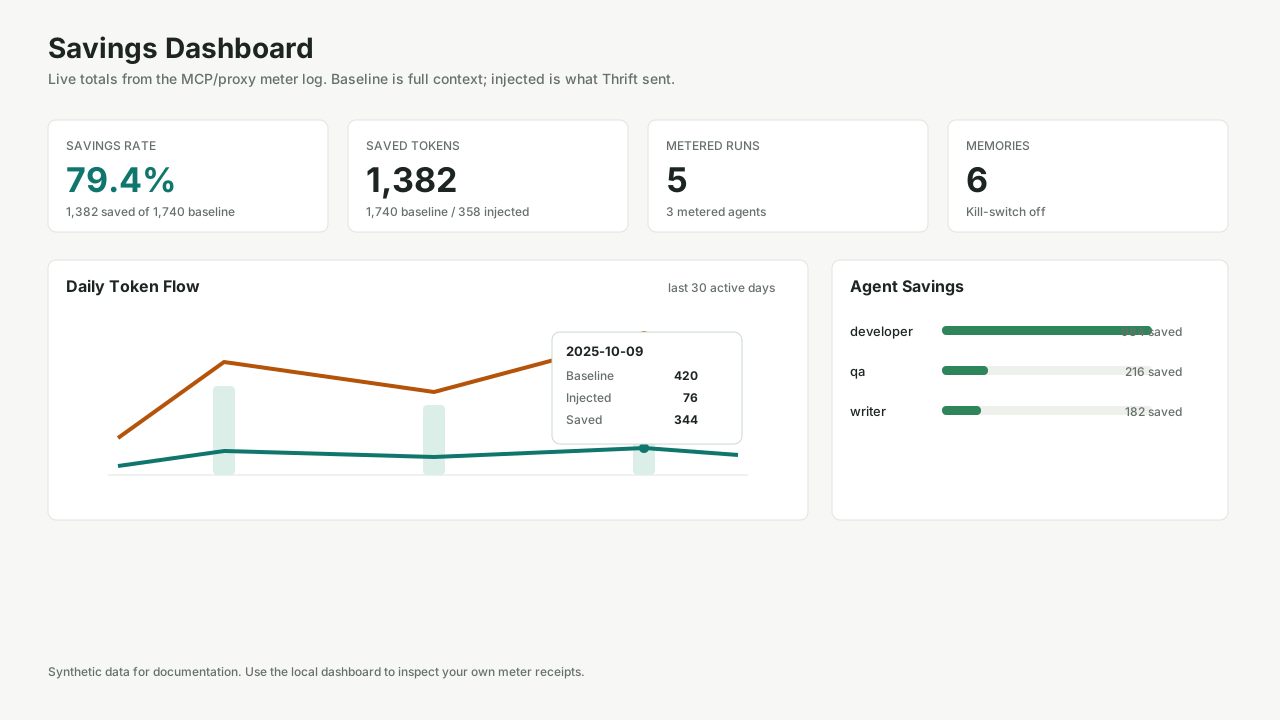
The dashboard shows:
| View | What it proves |
|---|---|
| Fleet summary | Total baseline, injected, saved tokens, and savings rate |
| Daily token flow | Whether savings persist across real days |
| Agent savings | Which agents are expensive and which save the most |
| Recent receipts | The latest metered recall/proxy events |
| Audit paths | The local files backing the numbers |
CLI equivalents:
npx thrift-panel summary --store-path=~/.thrift/memories.jsonl --meter-path=~/.thrift/meter.jsonl
npx thrift-panel agents --store-path=~/.thrift/memories.jsonl --meter-path=~/.thrift/meter.jsonl
npx thrift-panel memories --store-path=~/.thrift/memories.jsonl --scope=org
Measuring Performance
Every recall writes a receipt to THRIFT_METER_PATH when a meter path is
configured:
{"at":1760000000000,"agentId":"dev","injectedTokens":420,"baselineTokens":2100,"savedTokens":1680}
Definitions:
| Field | Meaning |
|---|---|
baselineTokens |
The no-Thrift counterfactual: all in-scope memory that would have been loaded |
injectedTokens |
The slice Thrift actually returned under budget |
savedTokens |
baselineTokens - injectedTokens |
| Savings rate | savedTokens / baselineTokens |
Recommended measurement loop:
- Seed memories from your own markdown files or use
remember. - Let real agents call
recallduring normal work. - Review
thrift-panel summaryandthrift-panel agents. - Validate quality separately by comparing task outcomes with full memory vs Thrift recall.
For a credible public report, publish both token reduction and quality evidence. For example: "saved 72% of memory tokens across 200 real recalls, with 19/20 paired tasks producing the same outcome."
Safe token saver — budget-pressure signals
Cutting tokens is only safe if the agent can tell "I got everything relevant"
apart from "I got a fraction of it." So every recall result also reports how
much relevant memory the budget forced it to leave behind:
{
  "injectedTokens": 492,
  "baselineTokens": 14000,
  "savedTokens": 13508,
  "relevantTokens": 2100,
  "skippedForBudget": 12,
  "skippedTokensForBudget": 1608,
  "hasMoreRelevantMemory": true,
  "budgetPressure": "high"
}
| Field | Meaning |
|---|---|
relevantTokens |
Tokens of memory that cleared the relevance filter — what was worth injecting before the budget applied |
skippedForBudget |
Count of relevant memories dropped only because they didn't fit the budget |
skippedTokensForBudget |
relevantTokens - injectedTokens |
hasMoreRelevantMemory |
true when relevant memory was left out for budget |
budgetPressure |
none (everything relevant fit) · low · high (as much relevant memory skipped as injected) |
These count only memory that passed the relevance filter, so hasMoreRelevantMemory
never fires on noise the recall correctly dropped. The intended loop is
progressive recall, done by the agent (not the end user): start with a small
budget, and if budgetPressure is high, do one more focused recall before
acting — never exceeding a total task budget. That is what turns Thrift from a
token saver into a safe token saver: you never silently act on a starved slice.
The bundled Claude Code plugin's memory-keeper agent and /thrift-recall command
already follow this loop.
Account for the MCP overhead. Registering any MCP server adds its tool-schema load to each agent's context (often several thousand tokens). The honest figure is net:
savings = recall reduction − MCP schema/tool-call overhead. On a context-heavy agent that reloads broad memory every run, recall usually wins by a wide margin — but confirm it with the meter on your own workload before going fleet-wide, rather than assuming. The receipts exist precisely so you don't have to guess.
Synthetic Benchmark
This repo includes a small synthetic fixture so users can verify the measurement pipeline without any private data:
npm run build
node benchmark/run.mjs
It reads:
benchmark/fixtures/memories.jsonlbenchmark/fixtures/meter.jsonl
See docs/case-study.md for a sanitized example of how to interpret the numbers.
Context Watch
The plugin's UserPromptSubmit hook runs thrift-memory context-watch on every
prompt. It tracks context usage against the model's window and, when usage
crosses a step boundary, injects an instruction telling the agent to save
durable facts via remember and suggests running /compact — so decisions
survive compaction instead of being silently dropped.
Step size is clamped between a floor and a ceiling so it neither fires too often on small windows nor too rarely on huge ones:
step = clamp(stepPct% × window, minStepTokens, maxStepPct% × window)
| Flag | Default | Meaning |
|---|---|---|
--step-pct= |
20 |
Target step size, as a percent of the window |
--min-step-tokens= |
80000 |
Floor on step size, in tokens |
--max-step-pct= |
50 |
Ceiling on step size, as a percent of the window |
--window-tokens= |
(auto) | Override the detected model window size |
--state-path= |
~/.thrift/context-watch/ |
Where step-crossing state is persisted |
The save → compact → reload loop: context-watch prompts a save before a
step boundary is crossed, PreCompact prints compaction guidance as a safety
net, and the pre-existing SessionStart hook reloads a budgeted memory slice
immediately after — closing the loop so no durable fact is lost to compaction.
Delta saves, not re-saves: each crossing now tags its guidance with a
session-specific marker, session:<sessionId>, so the agent isn't just told
to "save facts" blind every time. The injected instruction has the agent call
search_memory for that tag first to see what it already stored this
session, then save only genuinely new facts, tagging them the same way. That
keeps later crossings in the same session from re-remembering the same fact
over and over, and stops the agent from wrongly assuming something was
already saved.
Opt out by removing the UserPromptSubmit (and optionally PreCompact)
entries from plugins/thrift-memory/hooks/hooks.json.
Measured savings: node benchmark/context-watch.mjs shows ~72.5% fewer tokens
reloaded across simulated windows (37,744 baseline vs. 10,367 injected, saving
27,377 tokens) — see Synthetic Benchmark above for
methodology.
Verified
Unit tests. npm test — 157 tests across 12 files, including a dedicated
test/contextWatch.test.ts that covers the clamp table (1M→200k, 200k→80k,
128k→64k, 32k→16k step sizes), the step-crossing state machine (first
crossing fires, same step doesn't re-fire, the next step fires again,
per-session isolation), transcript-tail parsing (real message.usage, a
bounded tail-read for large transcripts, fallback to fileSize / 4), model →
window inference, session-ID path-traversal rejection, and malformed/missing
input. All green.
Manual hook-contract run. The built CLI (node dist/mcp/bin.js context-watch) was driven directly with hook-shaped stdin JSON against a
synthetic transcript: it fires with the exact hookSpecificOutput JSON on a
crossing, stays silent on a repeat of the same step, fires again on the next
step, and stays silent (exit 0) on garbage stdin, empty stdin, and a missing
transcript path — confirming the "never break the prompt" contract holds
under every failure mode, not just the happy path.
Real end-to-end run, against this feature's own development session.
Rather than only a synthetic fixture, context-watch was replayed against
the actual, live Claude Code transcript that was generated while building
this feature — a genuinely long session (963 KB, 410 lines, real
claude-sonnet-5 / claude-fable-5 usage data, no window override). Four
real snapshots were cut from that transcript at increasing points in the
session's actual history and fed through the CLI in chronological order,
each as a fresh hook invocation:
| Turn | Real usage (tokens) | % of 200k window | Result |
|---|---|---|---|
| T1 | 31,686 | ~16% | silent (below the first step) |
| T2 | 94,821 | ~47% | fires — crosses the 40% step |
| T3 | 135,227 | ~68% | silent (same step as T2, no re-fire) |
| T4 | 182,661 | ~91% | fires — crosses the 80% step |
This matches the documented "200k window → saves at ~40% and ~80%" behavior exactly, using genuine per-turn token growth instead of hand-picked numbers. The full 963 KB transcript (well above the 64 KB bounded tail-read threshold) was also run standalone and returned in well under a second (~0.3–0.6s wall time, dominated by Node process startup, not transcript parsing) — confirming the bounded tail-read keeps the hook cheap even against a large, real, long-running session.
Proxy And Rate Limits
The proxy is optional. Use it when an agent can point its LLM base_url at a
local HTTP gateway.
Security — run it locally only. The proxy forwards your real provider API key upstream unchanged. It binds to
127.0.0.1by default (enforced in code, not just docs), so it is not reachable off-host unless you deliberately opt in with--host=0.0.0.0/THRIFT_PROXY_HOST. Never expose it on a public interface or share the port. It is a single-tenant developer tool, not a hardened multi-tenant gateway. Responses are also buffered, so SSE streaming is not passed through yet.
npx thrift-proxy \
  --upstream=https://api.anthropic.com \
  --host=127.0.0.1 \
  --port=8787 \
  --budget=4000 \
  --meter-path=~/.thrift/meter.jsonl
Then configure the agent's LLM base URL as http://localhost:8787 and keep using
the real provider API key.
The proxy:
- trims live request context under a hard token budget,
- writes the same savings receipts as the MCP surface,
- retries upstream
429and503 Retry-Afterresponses, - throttles concurrent upstream requests per provider.
Rate-limit defaults:
| Setting | Default | Env var |
|---|---|---|
| Max concurrency | 5 |
THRIFT_MAX_CONCURRENCY |
| Max retries | 5 |
THRIFT_MAX_RETRIES |
| Backoff base | 1000ms |
THRIFT_BACKOFF_BASE_MS |
| Max backoff | 60000ms |
THRIFT_MAX_BACKOFF_MS |
thrift-proxy buffers responses in this version; streaming passthrough is a
future improvement.
Import Existing Memories
The import script is generic and local-only. It can import markdown files into a JSONL store:
node scripts/import-memories.mjs \
  --source=./memory \
  --scope=org \
  --store-path=~/.thrift/memories.jsonl \
  --dry-run
For agent-scoped memories, put markdown files under project directories and use
--scope=agent:
memory/
  checkout-service/
    dev.md
    qa.md
  docs-site/
    writer.md
node scripts/import-memories.mjs --source=./memory --scope=agent
Library Usage
import { JsonlStore, ScopedRetriever, InMemoryMeter, ThriftMcpServer } from "thrift-memory";

const server = new ThriftMcpServer({
  store: new JsonlStore({ path: "./memories.jsonl" }),
  retriever: new ScopedRetriever(),
  meter: new InMemoryMeter(),
  defaultTokenBudget: 2000,
});

await server.runStdio();
Development
npm install
npm run typecheck
npm run build
npm test
Layout
| Path | Purpose |
|---|---|
src/mcp/ |
MCP stdio server and tool definitions |
src/store/ |
JSONL memory store |
src/retrieval/ |
Scoped budget-bounded recall |
src/meter/ |
Token meter and rollups |
src/control/ |
CLI and local dashboard |
src/proxy/ |
HTTP proxy, context trimming, rate-limit retries |
benchmark/fixtures/ |
Synthetic public benchmark data |
docs/ |
Public docs, screenshot, sanitized case study |
test/ |
Unit and integration tests |
License
Install Thrift in Claude Desktop, Claude Code & Cursor
unyly install thriftInstalls into Claude Desktop, Claude Code, Cursor & VS Code — handles npx, uvx and build-from-source repos for you.
First time? Get the CLI: curl -fsSL https://unyly.org/install | sh
Or configure manually
Run in your terminal:
claude mcp add thrift -- npx -y thrift-memoryFAQ
Is Thrift MCP free?
Yes, Thrift MCP is free — one-click install via Unyly at no cost.
Does Thrift need an API key?
No, Thrift runs without API keys or environment variables.
Is Thrift hosted or self-hosted?
Self-hosted: the server runs locally on your machine via the install command above.
How do I install Thrift in Claude Desktop, Claude Code or Cursor?
Open Thrift on unyly.org, pick your client tab (Claude Desktop, Claude Code, Cursor) and press Install — the config is generated automatically, no JSON editing.
Related MCPs
GitHub
PRs, issues, code search, CI status
 by GitHub
Filesystem
Secure file operations with configurable access controls.
Memory
Knowledge graph-based persistent memory system.
Template MCP Server
A CLI tool to create a new Model Context Protocol server project with TypeScript support, dual transport options, and an extensible structure
 by mcpdotdirect
Compare Thrift with
Not sure what to pick?
Find your stack in 60 seconds
Author?
Embed badge for your README
Browse similar
All development MCPs