
Timermcp
FreeNot checkedA millisecond-precision MCP timer server that lets you start, stop, and split timers via natural language, with a live dashboard, personal bests, and race mode.

About
A millisecond-precision MCP timer server that lets you start, stop, and split timers via natural language, with a live dashboard, personal bests, and race mode.
README
A millisecond-precision MCP timer server. Say "start the timer" to Claude — the clock starts on the server's monotonic nanosecond clock, a live wall display lights up in your browser, and when you say "stop," Claude announces the official time like a track announcer.
🏁 STOP THE CLOCK! 'ship the landing page' finishes in 4:07.312!
🏆 NEW PERSONAL BEST — 18.455 faster than the old record!
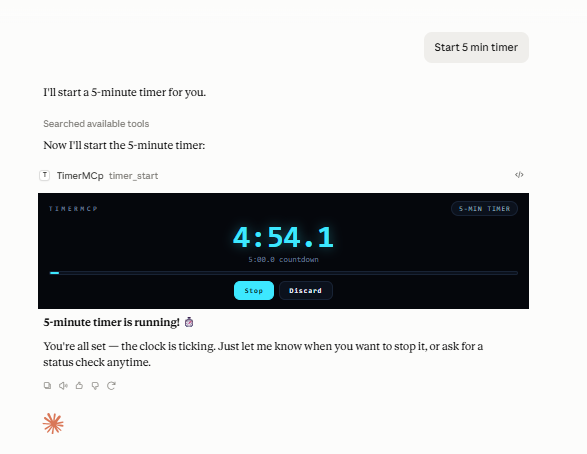
With the free cloud connector (timermcp.com), countdowns render as a live ticking card right in the chat — desktop and mobile:
Why the milliseconds are honest (the latency math)
You say "start" at t₀; the command reaches the server after delay d₁ (typing + model + transport). Server stamps S₁ = t₀ + d₁. You say "stop" at t₁, stamped S₂ = t₁ + d₂.
reported = S₂ − S₁ = (t₁ − t₀) + (d₂ − d₁)
Both timestamps are taken server-side, so the constant part of the pipeline delay cancels. Only the difference between start-side and stop-side latency can leak in — and for symmetric calls that's small. All math runs on process.hrtime.bigint() (monotonic nanoseconds), immune to NTP jumps and DST.
If you believe your pipeline is asymmetric, bias it out: timer_config accepts start_offset_ms / stop_offset_ms, subtracted from every result. raw_elapsed_ms (pure monotonic) is always returned alongside the adjusted elapsed_ms.
Setup
Prerequisite: Node.js ≥ 18 (node --version).
TimerMCP is on npm — no clone or build needed.
Claude Code (one command):
claude mcp add timermcp -- npx -y timermcp
claude mcp list   # should show timermcp ✓ connected
Claude Desktop — edit claude_desktop_config.json:
- macOS:
~/Library/Application Support/Claude/claude_desktop_config.json - Windows:
%APPDATA%\Claude\claude_desktop_config.json - Linux:
~/.config/Claude/claude_desktop_config.json
{
  "mcpServers": {
    "timermcp": {
      "command": "npx",
      "args": ["-y", "timermcp"]
    }
  }
}
Running from a clone instead (for development)
git clone https://github.com/julanbasnet/timermcp.git
cd timermcp
npm install && npm run build
node dist/index.js --version   # prints banner and exits
npm run smoke                  # full 18-assertion suite
claude mcp add timermcp -- node /absolute/path/to/timermcp/dist/index.js
On Windows use forward slashes or escaped backslashes in config paths: "C:/tools/timermcp/dist/index.js".
After adding, fully quit and reopen the client (Desktop: quit from the menu/tray, not just close the window). Say "start the timer" and open http://localhost:5717 — the wall display.
Inspector (optional): npx @modelcontextprotocol/inspector npx -y timermcp for an interactive tool console.
Talk to it
| You say | Tool | What happens |
|---|---|---|
| "start the timer" | timer_start |
Monotonic start stamp + announcer call |
| "start a 25-minute pomodoro" | timer_start (target_ms) |
Countdown mode; stop reports over/under |
| "race me vs the build: start alice and bob" | timer_start ("alice,bob") |
Both start on the same nanosecond |
| "split — hero section done" | timer_split |
LiveSplit-style lap, delta vs PB pace 🟢🔴 |
| "how long so far?" | timer_status |
Live server-side reading |
| "stop the clock" | timer_stop |
Official ms, PB check, SVG result card |
| "false start, cancel it" | timer_cancel |
Discards without touching history |
| "what's my record?" | timer_history |
PBs, recent runs, lifetime totals |
| "switch announcer to drill sergeant" | timer_config |
hype · zen · sergeant · sports · minimal |
The viral bits
- Live wall display — electric-cyan timing console at
localhost:5717, streams every millisecond over SSE. Put it on a second monitor or your phone; it reacts the instant Claude acts. Buttons + keyboard (space = split, enter = start/stop) work from the browser too, including a countdown-target field for browser-started pomodoros. - Countdown chime — flip the 🔔 Sound toggle on the wall and every countdown rings out loud the moment it hits zero. (Off by default; browsers require one click before a page may play audio.)
- XP, levels & achievements — every finished run and tracked minute earns XP. Ten ranks from ROOKIE to TIME LORD, a day-streak counter, and a 12-medal achievement shelf (PHOTO FINISH, RECORD BREAKER, BULLSEYE, MIDNIGHT OIL, RACE DAY…), all derived from your local history. Level-ups and unlocks fire toasts + confetti on the wall.
- Personal bests & speedrun splits — every named timer keeps a PB. Splits compare against the same checkpoint on your PB run, LiveSplit-style: "1.204 AHEAD of PB pace 🟢". Confetti on new records.
- Race mode — comma-separated names start on one shared nanosecond stamp (measured Δ in tests: 0.003ms).
- Result cards — every stop writes a 1200×630 SVG finish card (
~/.timermcp/cards/, also served at/card/{id}). Screenshot-ready for X/LinkedIn. - Announcer personalities — hype race-caller by default; zen, drill sergeant, broadcast, or minimal.
- Crash-safe — state persists to
~/.timermcp/state.json; timers running across a restart recover on wall-clock precision (flagged asrecovered).
Environment
| Var | Default | |
|---|---|---|
TIMERMCP_PORT |
5717 |
Dashboard port |
TIMERMCP_HOST |
127.0.0.1 |
Set 0.0.0.0 to view from other devices on your LAN (no auth — trusted networks only) |
TIMERMCP_HOME |
~/.timermcp |
State + cards directory |
TIMERMCP_NO_DASHBOARD |
unset | 1 disables the HTTP server |
Troubleshooting
- Tools don't appear in Claude → the config path must be absolute; fully quit and relaunch the client. Server logs (stderr) land in the client's MCP logs — macOS:
~/Library/Logs/Claude/mcp-server-timermcp.log, Windows:%APPDATA%\Claude\logs\. - Dashboard won't load / "port taken" in logs → another TimerMCP instance owns 5717. Claude Desktop and Claude Code each spawn their own server process; timers still work in both, but give the second one
TIMERMCP_PORT=5718(and its ownTIMERMCP_HOMEif you want separate PBs — otherwise state.json is last-write-wins between them). node dist/index.jsseems to hang → normal; stdio servers wait for a client. Use--versionto sanity-check.- Times look ~equal but off by a constant → that's differential latency; set
start_offset_ms/stop_offset_msviatimer_config(see latency math above).
Test
npm run smoke # 19 assertions: protocol, timing accuracy, offsets, race Δ, dashboard, cards
MIT.
Install Timermcp in Claude Desktop, Claude Code & Cursor
unyly install timermcpInstalls into Claude Desktop, Claude Code, Cursor & VS Code — handles npx, uvx and build-from-source repos for you.
First time? Get the CLI: curl -fsSL https://unyly.org/install | sh
Or configure manually
Run in your terminal:
claude mcp add timermcp -- npx -y timermcpFAQ
Is Timermcp MCP free?
Yes, Timermcp MCP is free — one-click install via Unyly at no cost.
Does Timermcp need an API key?
No, Timermcp runs without API keys or environment variables.
Is Timermcp hosted or self-hosted?
Self-hosted: the server runs locally on your machine via the install command above.
How do I install Timermcp in Claude Desktop, Claude Code or Cursor?
Open Timermcp on unyly.org, pick your client tab (Claude Desktop, Claude Code, Cursor) and press Install — the config is generated automatically, no JSON editing.
Related MCPs
GitHub
PRs, issues, code search, CI status
 by GitHub
Filesystem
Secure file operations with configurable access controls.
Memory
Knowledge graph-based persistent memory system.
Template MCP Server
A CLI tool to create a new Model Context Protocol server project with TypeScript support, dual transport options, and an extensible structure
 by mcpdotdirect
Compare Timermcp with
Not sure what to pick?
Find your stack in 60 seconds
Author?
Embed badge for your README
Browse similar
All development MCPs