
TokenKnows
FreeNot checkedDistills AI coding sessions into weekly reports, ADRs, incident reviews, and a knowledge graph from Claude Code, Codex, and Cursor.

About
Distills AI coding sessions into weekly reports, ADRs, incident reviews, and a knowledge graph from Claude Code, Codex, and Cursor.
README

TokenKnows
Distill AI coding sessions into living knowledge — weekly reports, ADRs, incident reviews, books, agent skills, and a knowledge graph.





English | 简体中文

What is TokenKnows?
You spend hours pair-programming with Claude Code, Codex, and Cursor. The decisions, bug hunts, and design trade-offs from those sessions evaporate the moment the terminal closes. TokenKnows captures them automatically and distills them into structured, evidence-linked knowledge assets:
capture (6 collectors) → distill (5-stage LLM pipeline) → assets (7 document types) → review / redact / publish
- 📡 Captures everything — Claude Code, Codex, Cursor, VS Code, GitHub PRs/commits/issues, and local docs, all via local file watchers and API polling. No webhooks, no tunnels.
- 📝 Seven asset types — weekly reports, tech designs, ADRs, incident reviews, long-form books, reusable agent skills (SKILL.md), and an entity knowledge graph.
- 🔗 Evidence-linked — every paragraph traces back to the original PR / conversation / commit, ranked by
cosine × trust × recencyacross ≥2 sources. - 🔒 Local-first, zero egress by default — a three-layer LLM egress gate (instance ∧ project ∧ task) with full audit logging. Pair it with Ollama and run the whole pipeline with zero cloud keys.
Demo
| Workbench | Document page |
|---|---|
| Evidence drawer | Publish receipt + version diff |
▶ Full walkthrough: engineering_handoff/walkthrough.mp4 (5 min, Chinese narration + subtitles)
All 12 screens
| 1 Workbench | 2 Event drawer | 3 Document list | 4 Document page |
|---|---|---|---|
| 5 Evidence drawer | 6 Regenerate dialog | 7 Review | 8 Redaction |
| 9 Publish dialog | 10 Publish receipt + diff | 11 LLM egress | 12 Admin |
Install the plugin
Prerequisite: the TokenKnows backend at http://localhost:8001 and the web UI at http://localhost:5173 (see Quick start), plus uv (the plugin pulls the MCP server from PyPI via uvx). All plugin env vars have working local defaults — export TOKENKNOWS_API_BASE / TOKENKNOWS_API_TOKEN / TOKENKNOWS_DEFAULT_PROJECT / TOKENKNOWS_WEB_BASE only for non-default setups. Register/login in the web UI and create an API token under Project Settings → MCP 接入 when your backend requires auth.
| Platform | How |
|---|---|
| Claude Code | /plugin marketplace add johnnywuj81/tokenknows → /plugin install tokenknows@tokenknows — full walkthrough in tokenknows-plugin/README.md (5-minute quickstart) |
| Codex | codex plugin marketplace add johnnywuj81/tokenknows → codex plugin add tokenknows@tokenknows (loads skills, commands and the MCP server; local-clone alternative in codex-plugin/README.md) |
| Cursor | Add the tokenknows MCP block to ~/.cursor/mcp.json (uvx config example in code/tokenknows-mcp/README.md) |
| VS Code | Download the .vsix from Releases → code --install-extension tokenknows-vscode-*.vsix |
The plugin gives your AI tool MCP tools (submit_session_events, distill_document, list_assets, get_asset, get_asset_chapters, search_entity) plus slash commands like /tokenknows:weekly and /tokenknows:adr.
Quick start
# 1. (Optional but recommended) Ollama — fully local inference, zero cloud keys
ollama serve &
ollama pull minimax-m2:cloud          # or gpt-oss:20b, qwen2.5, ...

# 2. Backend (FastAPI + SQLite persistence + 3-layer LLM egress gate)
cd code/tokenknows-api
python3 -m venv .venv && .venv/bin/pip install -e ".[dev]"
cp .env.local.example .env.local      # defaults to Ollama; edit to add cloud providers
.venv/bin/uvicorn app.main:app --host 127.0.0.1 --port 8001

# 3. Frontend (React 19 + Vite)
cd code/tokenknows-web
npm install
npm run dev
# open http://localhost:5173 — talks to the real backend (mocks are opt-in via ?msw=1)

# (Optional) seed demo data
./engineering_handoff/demo-seed.sh
Platform support: macOS — full experience (collectors auto-start via launchd). Linux — backend, frontend, and collectors all run manually (python3 plugins/<x>/sync.py --watch); the launchd scripts don't apply. Windows — untested; WSL2 recommended.
Data collectors
All local — no ngrok, no public webhooks. On macOS they restart on crash and on reboot (launchd).
| Collector | Source | Mode |
|---|---|---|
| claude-code | ~/.claude/projects/*.jsonl |
30s polling, incremental offsets |
| codex | ~/.codex/sessions/**/rollout-*.jsonl |
30s polling, incremental offsets |
| cursor | Cursor's state.vscdb (read-only SQLite) |
60s polling |
| github | GitHub REST API · PRs / issues / commits | 5min polling (gh auth token) |
| vscode | VS Code extension onDidSaveTextDocument |
buffered, 10s flush |
| local-docs | ~/Documents .md .txt .pdf (watchdog) |
realtime, 2s debounce |
./scripts/launchd/install.sh          # macOS: install all 5 Python collectors as LaunchAgents
launchctl list | grep com.tokenknows
tail -f ~/Library/Logs/tokenknows/*.log
Every event carries a trust score (0.6 × source_authority + 0.4 × extraction_confidence); the evidence stage ranks citations by 0.6 × cosine + 0.25 × trust + 0.15 × recency and enforces ≥2 distinct sources.
Architecture
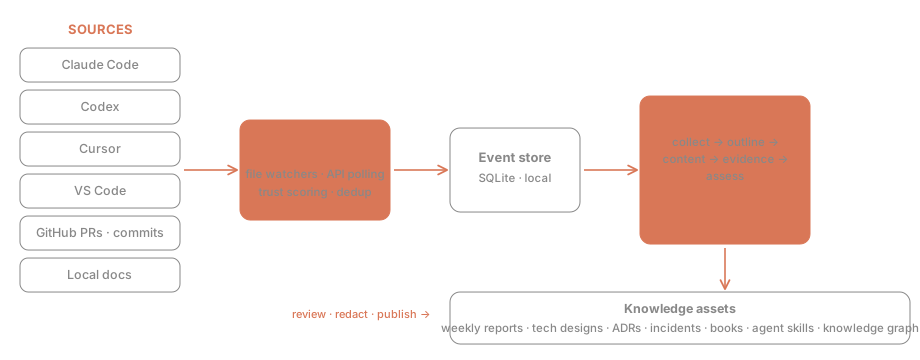
Collectors feed an event store (SQLite). A five-stage pipeline (collect → outline → content → evidence → assess) turns events into assets. The LLM Gateway unifies four providers (Anthropic / OpenAI / MiniMax / Ollama) with per-task routing and fallback chains — and refuses any cloud call unless all three egress switches are on.
CI
| Workflow | Runner | Trigger |
|---|---|---|
| ci.yml | ubuntu-latest (GitHub-hosted) | push to main + every PR |
| ci-macos.yml | self-hosted macOS ARM64 | maintainer pushes to main only — never runs external PR code |
Privacy & local-first
- Zero egress by default — cloud LLM calls require the instance and project and task switches all on
- Bring your own keys; the audit log never leaves your machine
- One-click kill switch drops the instance into fully-offline mode
Details: PRD §6.7 data residency & egress control (Chinese).
Documentation
| Topic | Doc |
|---|---|
| Product requirements, user journeys | PRD (zh) |
| Technical design, API, schema | TDD (zh) |
| Macro architecture & milestones | Architecture (zh) |
| Per-screen engineering decisions | TaskTechDesign (zh) |
| Pixel-level UI mockups | mockups/ — open in a browser |
Most in-depth docs are in Chinese (the project's working language). Code comments are predominantly Chinese too; issues and PRs in English or Chinese are both welcome.
Community
CONTRIBUTING · Roadmap · Code of Conduct · Security policy · Issues
License
MIT © 2026 johnnywuj81
Installing TokenKnows
This server has no published package — it is built from source. Open the repository and follow its README.
▸ github.com/johnnywuj81/tokenknowsFAQ
Is TokenKnows MCP free?
Yes, TokenKnows MCP is free — one-click install via Unyly at no cost.
Does TokenKnows need an API key?
No, TokenKnows runs without API keys or environment variables.
Is TokenKnows hosted or self-hosted?
Self-hosted: the server runs locally on your machine via the install command above.
How do I install TokenKnows in Claude Desktop, Claude Code or Cursor?
Open TokenKnows on unyly.org, pick your client tab (Claude Desktop, Claude Code, Cursor) and press Install — the config is generated automatically, no JSON editing.
Related MCPs
GitHub
PRs, issues, code search, CI status
 by GitHub
Filesystem
Secure file operations with configurable access controls.
Memory
Knowledge graph-based persistent memory system.
Template MCP Server
A CLI tool to create a new Model Context Protocol server project with TypeScript support, dual transport options, and an extensible structure
 by mcpdotdirect
Compare TokenKnows with
Not sure what to pick?
Find your stack in 60 seconds
Author?
Embed badge for your README
Browse similar
All development MCPs