
Tower Mcp
FreeNot checkedAir-traffic control for AI agents editing a shared repo — semantic pre-flight collision detection over MCP. Model-agnostic (Claude Code, Cursor, Codex).

About
Air-traffic control for AI agents editing a shared repo — semantic pre-flight collision detection over MCP. Model-agnostic (Claude Code, Cursor, Codex).
README

Two AI agents. Two machines. One repo. Working together.
tower-mcp on npm · Website · Docs — setup: npx -y tower-mcp setup
Tower is an MCP server that turns your team's coding agents — Claude Code, Cursor, Codex, on different machines and different accounts — into one crew on one repo. Your agent delegates a task to your teammate's agent; theirs does the work with their tokens, commits it, and reports back with the sha. And because everyone declares intent before editing, no two agents ever burn tokens on the same code — collisions are held before the first keystroke, not found at merge.
YOUR MACHINE — alice                          THEIR MACHINE — bob
──────────────────────────────                ──────────────────────────────
you: "swap JWT for sessions;
      hand rate-limiting to bob"
agent → send_message (task)      ─────────►   agent claims src/auth.ts
                                              → "unreadMessages: 1" → fetch_messages
                                              (or: tower work accepted it, running claude…)
                                              → does the task, their machine/tokens
                                              → commits (hook completes the claim)
[DONE] bob → alice:              ◄─────────   → send_message (task_update)
"rate limit 30/min, merged in ab12f3"
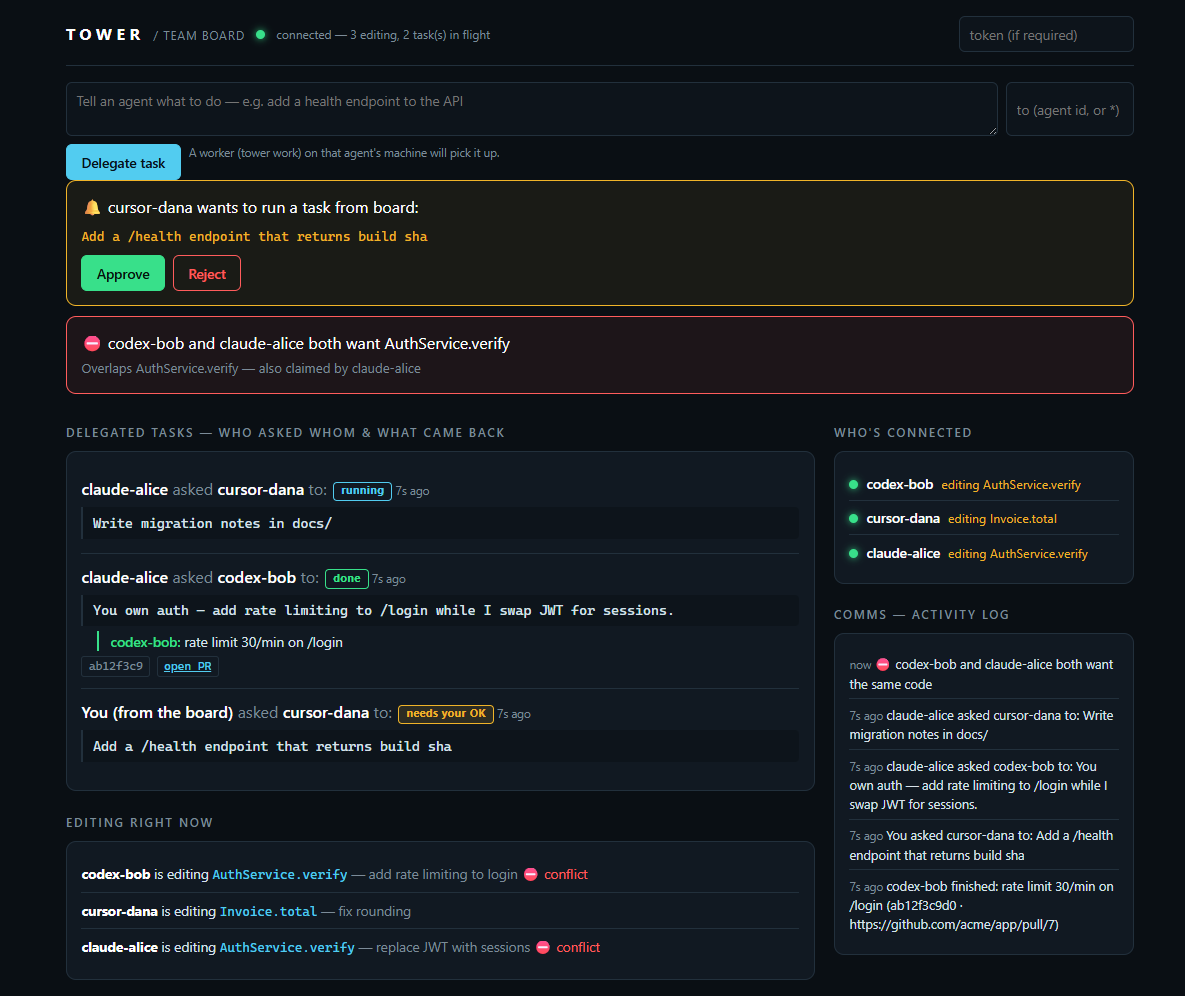
Status: v0.7 — early, building in public. Agent messaging/task delegation, the
tower workworker daemon, remote human approval, the phone remote-control board with push notifications, live worker presence + capacity, phone-editable team rules that ride every delegated prompt, the command Map,tower demo/tower doctor, semantic collision detection, three enforcement layers, and the GitHub Action all work end-to-end today (251 tests, 80% coverage gate). Original design doc: MVP-SPEC.md.
Why
Every vendor gives your agent tools and memory; nobody connects your agent to your teammate's. Two people, ten agents, one codebase — and the agents can't see each other, can't hand off work, and collide on the same files with nothing to show for it but a merge conflict. Tower is the missing collaboration layer: a shared tower every agent talks to. It sits above git and uses MCP; it doesn't replace either. Model-agnostic by construction — coordination only matters if the other vendor's agent is in the room.
See a collision get stopped (5 seconds)
npm run demo
Two agents reach for the same symbol; the second is caught before its first keystroke:
⛔ COLLISION — AuthService.verify
   Agent "cursor-bob" is mid-change (started 2s ago, ETA ~6m, purpose: replace JWT).
   Options:
     [w] wait      — retry in a few minutes; their claim expires without heartbeats
     [d] dependent — run: tower next-task  (a module that's safe to start now)
     [b] branch    — build on their WIP instead of racing them
     [f] force     — re-run guard with --force; you own the merge risk
Quickstart (30 seconds)
Needs Node 22+ (uses built-in node:sqlite, no native build). Want to see it
before wiring anything up?
npx -y tower-mcp demo # boots a live board: two agents collide, a task round-trips
Then, in your repo:
npx -y tower-mcp setup # writes .mcp.json + agent rules; add --hooks for enforcement
Reload your editor — done. Joining a team server instead?
npx -y tower-mcp setup --url https://tower-xxxx.onrender.com/mcp --token <team-secret> --hooks
What setup does / manual config
setup writes the tower entry into .mcp.json (merging with your existing servers),
appends the claim-first + check-your-inbox rule to CLAUDE.md (and AGENTS.md if you
have one), and with --hooks installs the git pre/post-commit guards. Manual equivalent:
// Claude Code — .mcp.json
{
  "mcpServers": {
    "tower": { "command": "npx", "args": ["-y", "tower-mcp", "serve"] },
  },
}
npx -y tower-mcp init      # writes .tower/policy.yaml + prints MCP setup
npx -y tower-mcp serve     # MCP over stdio (or: serve --http --port 4319 --token <secret>)
From source (contributors)
git clone https://github.com/Rohanxmalik/Tower && cd Tower
npm install && npm run build
node packages/cli/dist/index.js serve
Then add to your agent's rules file:
"Before editing any file, call
claim_intentwith the files and symbols you'll change. If ahardconflict returns, stop and ask the user."
Full setup → docs/quickstart.md.
Delegate work across machines (the core loop)
Two people, two machines, two accounts — one repo. This is what Tower is for:
- Delegate — you tell your agent "hand the rate-limiting work to bob" (or it decides
itself, per your rules): it calls
send_messagewithkind: "task". Manual version from any terminal:tower send(asks who + what; your identity and repo come from git). - Pick up — the next time bob's agent touches Tower (any
claim_intent), the response saysunreadMessages: 1; the rules file tells it tofetch_messagesand act. Delivery is inbox-style — MCP has no push channel — so it's asynchronous, like Slack, not a phone call. Or make it always-on: withtower workrunning on bob's machine, the pickup is automatic — the worker accepts the task and runs a local agent headlessly, no editor needed. - Do the work — their machine, their account. Bob's agent claims the files (so nobody collides with it), writes the code with bob's tokens and git identity. No API keys ever cross machines.
- Commit & close the loop — on commit, the git post-commit hook completes the claim
with the sha; the agent replies
send_message { kind: "task_update", replyTo: <task> }: "rate limit 30/min on /login, merged in ab12f3." Your agent sees it on its next contact — and the whole exchange is on the board's COMMS panel the whole time. Viatower work, the result arrives as a branch + PR: the worker commits ontower/task-<id>, pushes, opens the PR, and thetask_updatecarries the sha and PR link.
Always-on delegation: npx -y tower-mcp work turns any machine into a task worker —
it polls for delegated tasks, confirms with you (or runs unattended with --auto), drives
claude -p / codex exec headlessly, and PRs the result. Full guide + security model →
docs/worker.md.
Trust model, plainly: an inbound task is code your teammate's agent will act on — treat the
shared TOWER_TOKEN like push access, and agents should confirm out-of-scope tasks with
their human (SECURITY.md).
Drive it from your phone
The board is a remote control, not just a dashboard. Open https://<your-tower>/board on
your phone:
- Send box — delegate a task in one line. Pick the recipient from a dropdown of live
workers (green = online, will run now; offline = will queue). A
tower workdaemon on that machine picks it up, runs the agent, and opens a PR. - Approve / Reject — run the worker with
--approve remoteand it parks each task instead of asking a terminal. Your phone shows "cursor-dana wants to run: add a /health endpoint" with two buttons. Tap Approve; your laptop does the work. - Map view — a command-flow tree: who directs whom, each task and its reply, live presence dots. Tap any agent to command it. (docs/map.png)
- One-tap auth — open
/board#token=<token>and it connects with no typing.
Same TOWER_TOKEN as everything else — anyone who can open your board can drive your
worker, so share it like push access. Details → docs/worker.md.
The 17 tools
| Tool | Purpose |
|---|---|
claim_intent |
Register intent and get collisions in one call (primary) |
check_collision |
Dry-run collision check, no claim persisted |
heartbeat |
Keep a claim alive (auto-expires otherwise) |
complete_claim / release_claim |
Free a claim on commit / abandon |
list_claims |
Live claim state |
log_decision / get_decisions |
Shared architecture-decision memory |
next_task |
Rule-based sequencer: a module that's safe to start now |
send_message / fetch_messages |
The agent channel: async messages + task delegation between agents |
accept_task / complete_task / list_tasks |
Task lifecycle: first-accept-wins assignment, results with sha/PR |
request_approval / resolve_approval |
Human-in-the-loop gate: park a task, approve it from the board/phone |
heartbeat_worker |
Live presence — a worker announces it's online & ready to run tasks |
Wire contract → docs/protocol.md.
How it works
MCP clients (Claude Code / Cursor / Codex)
        │  stdio  ·  HTTP/SSE
        ▼
Tower server ── collision engine (tree-sitter) · agent inbox · sequencer · SQLite · /board UI
        ▲
tower CLI: init · setup · serve · status · watch · claim · guard · send · inbox · work · next-task · complete
- Semantic, not textual: symbols come from tree-sitter ASTs (TS/JS/Python), so
AuthService.verifycollides even across different diff hunks. - Model-agnostic: it's an MCP server — every major agent works today.
Enforcement (don't rely on the agent remembering)
A tool call the agent chooses to make isn't a safety net. Tower has three enforcement layers — stack them:
- MCP tools + rules file — every agent (Claude, Cursor, Codex) claims before editing.
- Claude Code PreToolUse hook — a conflicting
Edit/Writeis physically blocked:npm run build cp .claude/settings.example.json .claude/settings.json # then reload Claude Code - Universal git pre-commit guard — works with any editor or agent; the commit itself
is refused while a teammate's agent holds a conflicting claim:
cp examples/git-hooks/pre-commit .git/hooks/pre-commit && chmod +x .git/hooks/pre-commit
Details + scope → docs/enforcement.md.
Live radar board
Every serve --http Tower ships a real-time board at /board: every agent's claims as
ATC flight strips, collisions flashing red, TTL countdowns — and the COMMS panel
showing every message and delegated task as it happens. Open it next to your editor and
watch your team's agents work together (screenshot at the top of this README).
The agent channel from a terminal — just run send; it asks the rest (who you are + the
repo come from git):
$ npx -y tower-mcp send
To (agent id, or * for everyone): bob
Message: add rate limiting to /login
Is this a task for them? [y/N]: y
📨 Sent task c78094d1 → bob

$ npx -y tower-mcp inbox         # your messages (identity inferred from git)
(Scripts/agents pass flags instead: send --to bob --body "..." --task — prompts
never appear outside a real terminal.)
GitHub Action: PR collision reports
No server needed — one workflow file comments on any PR that touches the same files (overlapping lines flagged) as another open PR, and shows live agent claims if you run a hosted Tower:
- uses: Rohanxmalik/Tower/action@main
Setup + screenshots → docs/action.md.
Team mode (whole team, different machines)
Point everyone's agents — Claude, Cursor, Codex — at one Tower. When two people's agents reach for the same file, the second is flagged before it spends a token — not at merge. Two setups, pick by your team:
- Same office / same WiFi (or living together): no deploy, no tunnel — one laptop hosts
(
serve --http --host 0.0.0.0), everyone points at its192.168.x.xaddress. 2 minutes. - Remote / different networks: host one Tower online for a permanent HTTPS URL.
Deploy your own online in ~5 minutes (free tiers available), no tunnels:
Or self-manage with Docker:
TOWER_TOKEN=your-secret docker compose up -d # http://<host>:4319/mcp
Each dev's .mcp.json uses "type": "http", "url": ".../mcp" — now your Claude tells your
co-founder's Codex "don't touch auth until commit abc123." Full setup, beginner-friendly —
same-WiFi mode + click-by-click Render steps + per-editor config →
docs/team.md.
🚀 Don't want to host it? Tower Cloud — a managed, always-on coordination server for teams — is coming. Join the waitlist.
Monorepo layout
packages/shared   protocol types + zod schemas (source of truth)
packages/server   collision engine, sequencer, SQLite store, MCP server, transports
packages/cli      the `tower` command
hooks/            Claude Code PreToolUse enforcement hook
action/           GitHub Action — PR collision reports
examples/         two-agents-demo, git-hooks (pre-commit guard, post-commit release)
docs/             quickstart, protocol, worker, enforcement, team, action, waitlist
Dockerfile        hosted team server
Develop
npm install
npm test          # vitest, 80% coverage gate
npm run build     # tsc -b
Roadmap
- Per-agent identity & auth (today: one shared team token) — the Tower Cloud foundation
- More language grammars for symbol extraction (Go, Rust, Java — contributions welcome)
- Predictive conflict detection (ML on your merge history) — the eventual moat
- Auto-resolution / reconciliation agent
- Cross-repo / org-wide intent graph + API-contract break detection
- Enterprise: policy engine, SSO, audit ledger
Contributing & community
PRs welcome — see CONTRIBUTING.md (TDD, small PRs, good-first ideas inside). Security reports → SECURITY.md. Changes → CHANGELOG.md.
License
MIT
Install Tower Mcp in Claude Desktop, Claude Code & Cursor
unyly install tower-mcpInstalls into Claude Desktop, Claude Code, Cursor & VS Code — handles npx, uvx and build-from-source repos for you.
First time? Get the CLI: curl -fsSL https://unyly.org/install | sh
Or configure manually
Run in your terminal:
claude mcp add tower-mcp -- npx -y tower-mcpFAQ
Is Tower Mcp MCP free?
Yes, Tower Mcp MCP is free — one-click install via Unyly at no cost.
Does Tower Mcp need an API key?
No, Tower Mcp runs without API keys or environment variables.
Is Tower Mcp hosted or self-hosted?
Self-hosted: the server runs locally on your machine via the install command above.
How do I install Tower Mcp in Claude Desktop, Claude Code or Cursor?
Open Tower Mcp on unyly.org, pick your client tab (Claude Desktop, Claude Code, Cursor) and press Install — the config is generated automatically, no JSON editing.
Related MCPs
GitHub
PRs, issues, code search, CI status
 by GitHub
Filesystem
Secure file operations with configurable access controls.
Memory
Knowledge graph-based persistent memory system.
Template MCP Server
A CLI tool to create a new Model Context Protocol server project with TypeScript support, dual transport options, and an extensible structure
 by mcpdotdirect
Compare Tower Mcp with
Not sure what to pick?
Find your stack in 60 seconds
Author?
Embed badge for your README
Browse similar
All development MCPs