
Tradingcli
FreeNot checkedLocal paper-trading and market simulation MCP server for multi-account portfolios, advanced orders, options/futures, backtesting, alerts, and automation.

About
Local paper-trading and market simulation MCP server for multi-account portfolios, advanced orders, options/futures, backtesting, alerts, and automation.
README
📈 TradingCLI
A fast, local-first paper-trading and market-simulation toolkit for your terminal.
TradingCLI gives you a fake brokerage account that lives in one file on your own machine. You place orders against it, and it fills them using real market prices from Yahoo Finance. No signup, no API key, and no code path that reaches a real broker.
        you  ·  or your AI agent
                    │
                    ▼
     tradingcli  (dashboard · commands · MCP server)
                    │
       ┌────────────┴────────────┐
       ▼                         ▼
 ~/.papertrade.db          Yahoo Finance
 accounts, orders,         prices only,
 positions, ledger         read-only
🚀 Install and run
Requires Python 3.10 or newer.
python3 -m venv .venv
source .venv/bin/activate
python3 -m pip install .
tradingcli
That last command opens the dashboard and a first-run setup wizard. From there:
tradingcli buy AAPL 5        # place a trade
tradingcli positions         # see what you hold
tradingcli backtest          # test today's holdings against history
tradingcli --help-all        # every command, no market data needed
Three ways to drive it — all sharing the same database:
| How you start it | Best for | |
|---|---|---|
| 🖥️ Dashboard | tradingcli |
Watching portfolios update live |
| ⌨️ Commands | tradingcli buy AAPL 5 |
Scripting, automation, one-off actions |
| 🤖 MCP server | tradingcli-mcp |
Letting Claude or another agent trade |
🖥️ Screenshots
| All portfolios | Position detail |
|---|---|
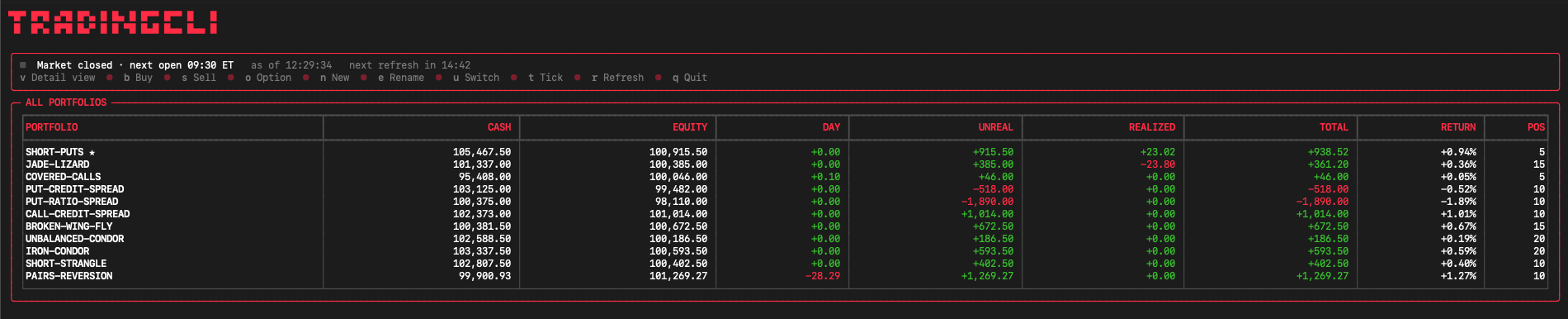 |
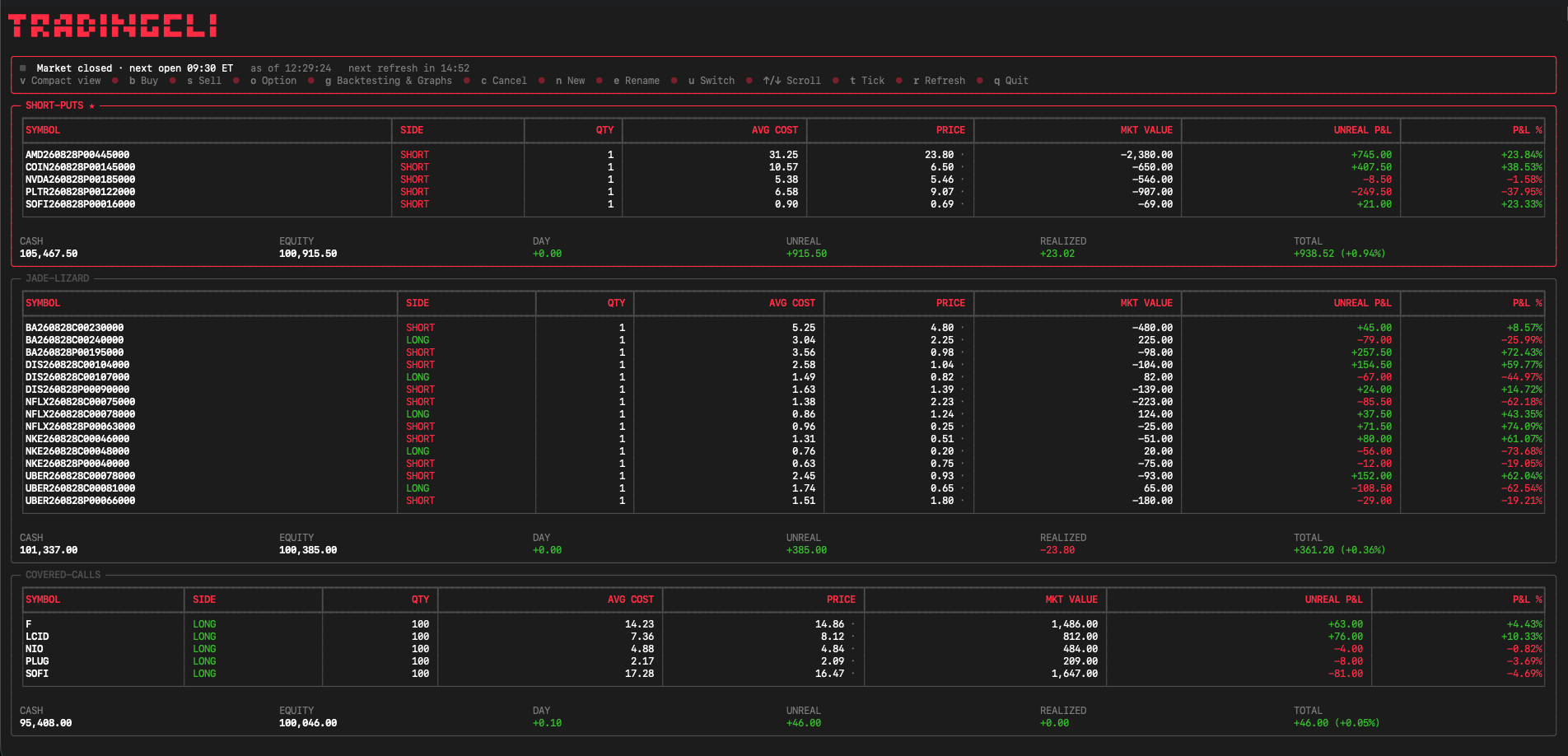 |
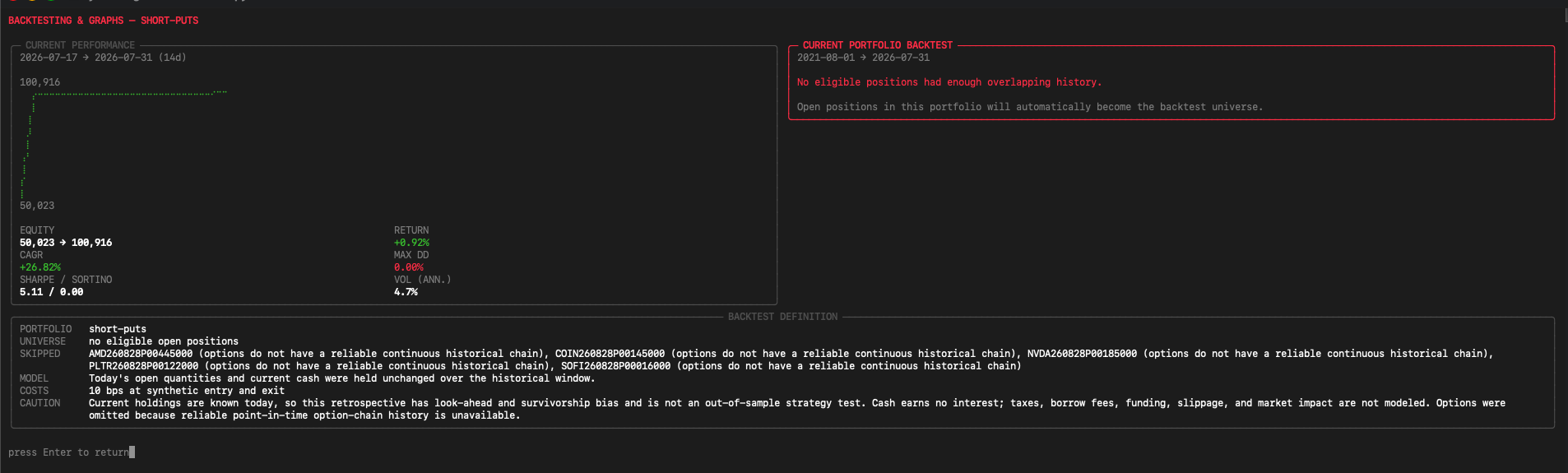
The captures come from a local paper-trading database; they contain no real portfolio or credential data.
✨ What you get
| Area | What is included |
|---|---|
| ⚡ Fast terminal UX | ~20 ms median startup, persistent quote cache, offline-first dashboard |
| 💼 Portfolio simulation | Multiple accounts, deposits, withdrawals, P&L, time-weighted returns |
| 🧾 Advanced orders | Market, limit, stop, stop-limit, trailing, bracket, OCO, OTO, multi-leg options |
| 🌍 Instruments | Equities, ETFs, crypto, FX, futures and equity options |
| 🧪 Research | Current-holdings backtests, walk-forward tests, portfolio optimization |
| 🔔 Local operations | Alerts, reports, quote streaming, scheduling, backups, encrypted copies |
| 🤖 Agent ready | Local stdio MCP server with core, advanced and compatibility profiles |
| 🛡️ Durable storage | SQLite WAL, fixed precision, 56 data guards, migration backups, 0600 files |
🤖 For AI agents
The usual way to let an agent practise trading is a hosted paper API such as Alpaca's: signup, API keys, and a network round trip per order. TradingCLI does the same job with a local SQLite file — no keys to leak, no rate limits, and prices you can pin so a run replays exactly, which a live API cannot do.
PAPERTRADE_DB=./agent-sandbox.db tradingcli-mcp
→ docs/agents.md — the full comparison, the safety rails (narrow tool catalog, idempotency keys, engine-enforced risk limits, audit trail), and how to wire up an MCP client.
📚 Documentation
| Guide | What's in it |
|---|---|
| Commands | Orders, options, market data, ledger, risk, alerts, backups — the full CLI reference |
| AI agents | MCP server, tool profiles, and using this instead of a hosted paper API |
| Configuration | Environment variables, storage model, schema and migrations |
| Architecture | Design decisions |
| Changelog | Release history |
📊 Backtesting
Press g in the dashboard to open Backtesting & Graphs. It puts the
selected portfolio's live performance curve next to a backtesting.py backtest
of the same holdings, reporting return, CAGR, volatility, Sharpe, Sortino,
costs and maximum drawdown. The universe comes only from that account's open
positions; another account's names never leak in. Pick a window on open (6m,
1y, 2y, 5y, 10y, max, or an exact number of days).
[!WARNING] Read the backtest for what it is. It answers one narrow question: how today's open quantities and current cash would have performed if held unchanged over the chosen history. Because today's holdings are already known, it carries look-ahead and survivorship bias — it is not an out-of-sample strategy test. It uses adjusted daily Yahoo prices, skips options (reliable point-in-time option-chain history does not exist) and treats futures as continuous series with no roll costs.
🛡️ Safety
TradingCLI never places live brokerage orders, and Yahoo Finance is not an exchange-grade feed. Do not use it as the sole source for financial decisions, and do not expose its stdio MCP server as an unauthenticated network service.
Fetching prices, news, history and option chains sends held, pending or
watchlisted symbols to Yahoo Finance through yfinance. See
SECURITY.md for the local-data and network privacy model.
🧑💻 Development
uv sync --locked --extra dev
uv run python run_tests.py
ruff check .
The runner discovers every test_*.py contract and executes each one in an
isolated subprocess and temporary database. GitHub Actions runs the same checks
on Python 3.10 and 3.13.
Contributions are welcome — see CONTRIBUTING.md. Security reports should follow SECURITY.md, not a public issue.
📄 License
Released under the MIT License.
Install Tradingcli in Claude Desktop, Claude Code & Cursor
unyly install tradingcliInstalls into Claude Desktop, Claude Code, Cursor & VS Code — handles npx, uvx and build-from-source repos for you.
First time? Get the CLI: curl -fsSL https://unyly.org/install | sh
Or configure manually
Run in your terminal:
claude mcp add tradingcli -- uvx --from git+https://github.com/ryanrodrigues25200525-svg/tradingcli tradingcliStep-by-step: how to install Tradingcli
FAQ
Is Tradingcli MCP free?
Yes, Tradingcli MCP is free — one-click install via Unyly at no cost.
Does Tradingcli need an API key?
No, Tradingcli runs without API keys or environment variables.
Is Tradingcli hosted or self-hosted?
Self-hosted: the server runs locally on your machine via the install command above.
How do I install Tradingcli in Claude Desktop, Claude Code or Cursor?
Open Tradingcli on unyly.org, pick your client tab (Claude Desktop, Claude Code, Cursor) and press Install — the config is generated automatically, no JSON editing.
Related MCPs
GitHub
PRs, issues, code search, CI status
 by GitHub
Filesystem
Secure file operations with configurable access controls.
Memory
Knowledge graph-based persistent memory system.
Template MCP Server
A CLI tool to create a new Model Context Protocol server project with TypeScript support, dual transport options, and an extensible structure
 by mcpdotdirect
Compare Tradingcli with
Not sure what to pick?
Find your stack in 60 seconds
Author?
Embed badge for your README
Browse similar
All development MCPs