
Try Mcp Location Server Demo
FreeNot checkedThis project demonstrates a Model Context Protocol (MCP) server for managing locations using .NET 8 and the ModelContextProtocol library.

About
This project demonstrates a Model Context Protocol (MCP) server for managing locations using .NET 8 and the ModelContextProtocol library.
README
This project demonstrates a Model Context Protocol (MCP) server for managing locations using .NET 8 and the ModelContextProtocol library.
Quick Start
Clone and Run
- Clone the repository:
git clone https://github.com/nisalgunawardhana/Try-mcp-location-server-demo.git cd LocationServer - Restore dependencies:
dotnet restore - Run the server:
dotnet run --project LocationServer.csproj - (Optional) Use with VS Code Copilot Chat:
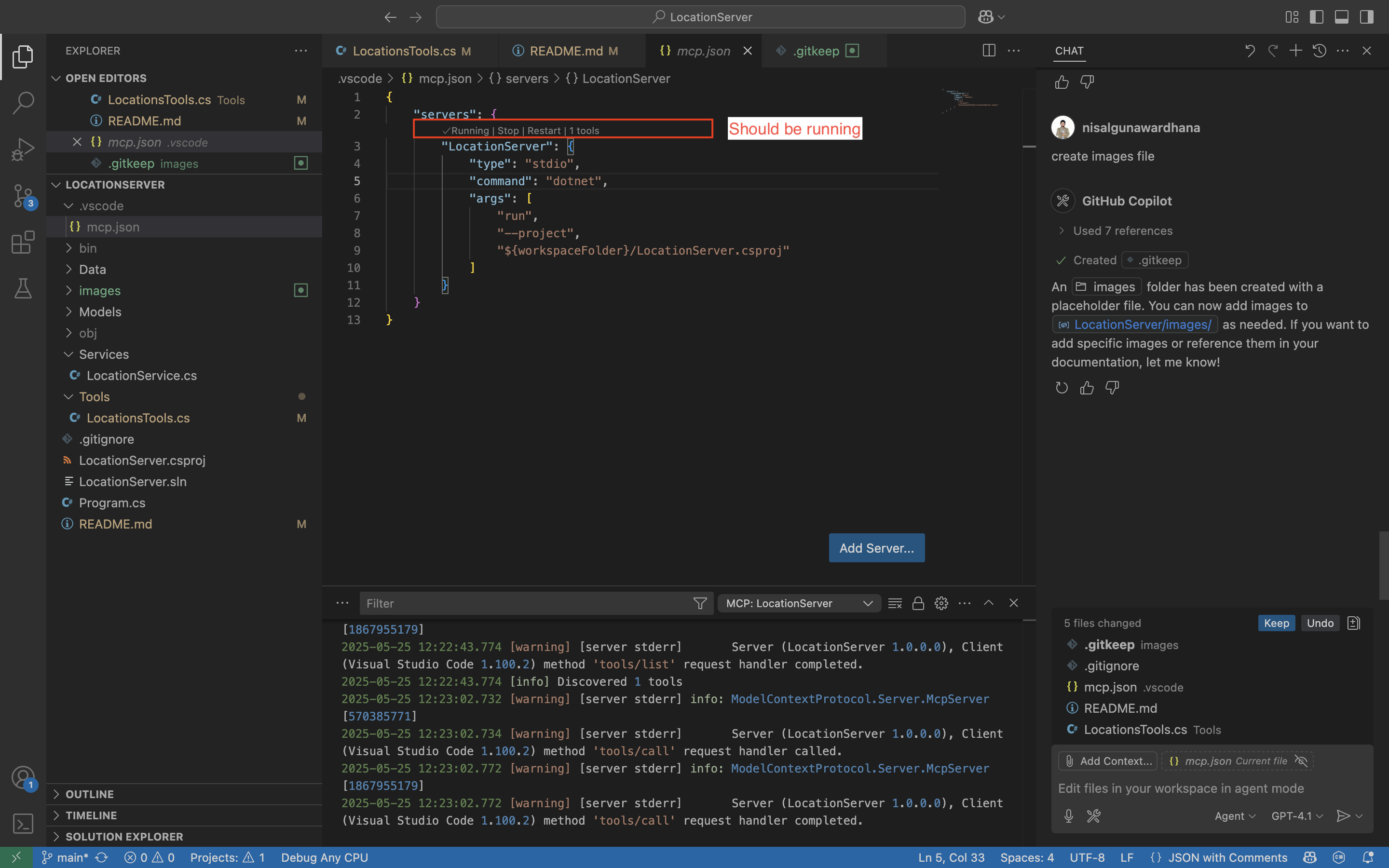
Open this folder in VS Code.
Ensure
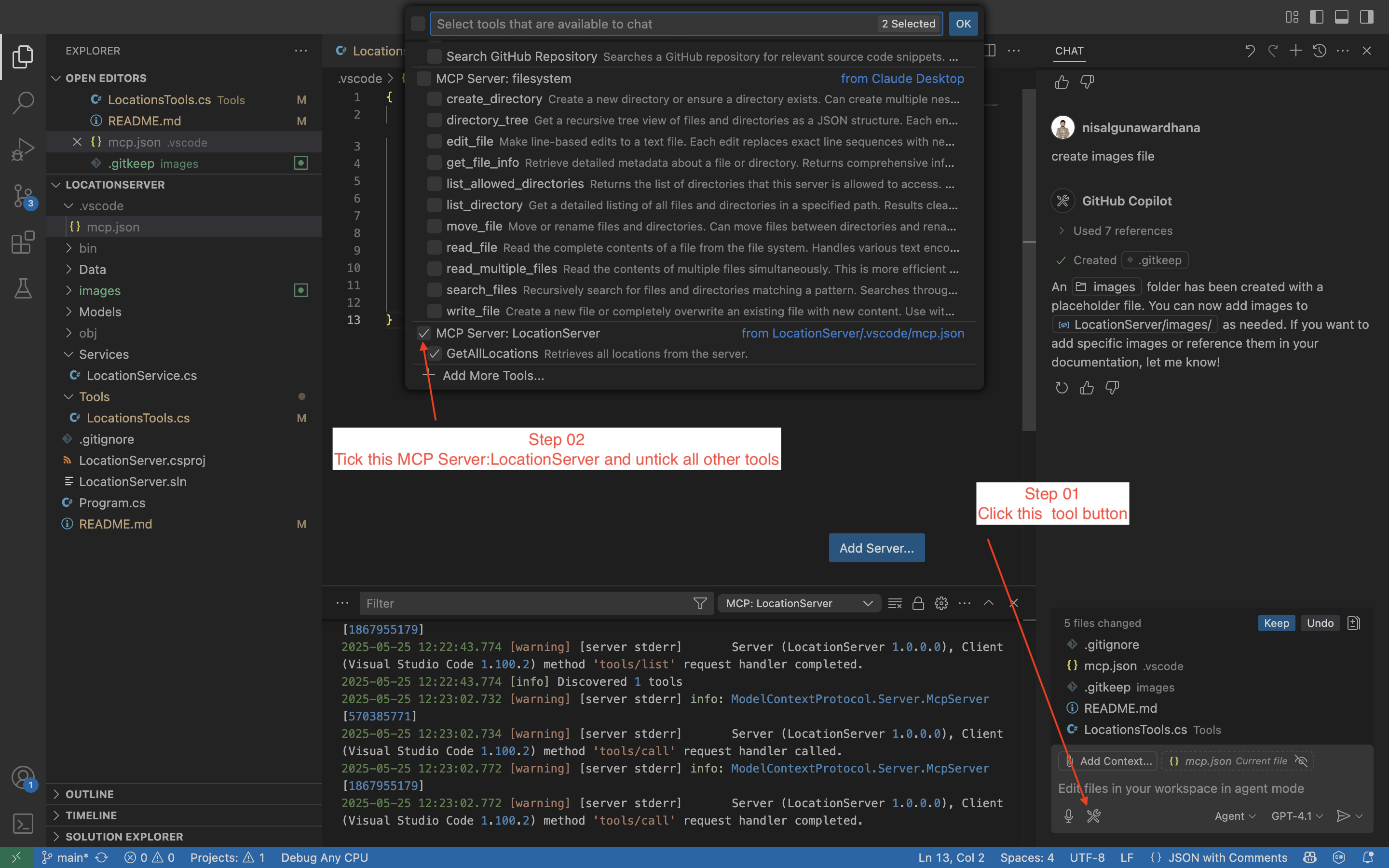
.vscode/mcp.jsonexists and is configured (see below).- Start a chat session:
- In Copilot Chat, just type:
Can you retrieve all locations from the server - Copilot Chat will use the MCP tool to fetch all locations.
- In Copilot Chat, just type:
What is MCP?
Model Context Protocol (MCP) is an open protocol for interacting with AI models and tools in a structured, language-agnostic way. MCP enables clients (like VS Code Copilot Chat) to discover, invoke, and interact with server-side tools and models using a standard interface. This makes it easy to build, test, and extend AI-powered tools and services.
Why MCP?
- Standardization: Unified way to expose and consume tools/models.
- Interoperability: Works with any MCP-compatible client (e.g., VS Code Copilot Chat).
- Extensibility: Add new tools easily by annotating methods/classes.
- Automation: Enables advanced workflows and automation in editors and other clients.
Project Structure
Models/Location.cs- Location modelServices/LocationService.cs- Service for managing locationsData/locations.json- Data file with 50 real locationsTools/LocationsTools.cs- MCP tools for location operationsProgram.cs- Entry point and server setup
Tasks & Tools (Demo)
This demo exposes the following MCP tools for use in Copilot Chat or any MCP client:
- GetAllLocations: Retrieve all locations from the server.
- GetLocationById: (Not yet implemented) Retrieve a location by its ID. You can add this tool by creating a static method in
Tools/LocationsTools.csand annotating it with[McpServerTool]. - AddLocation: (Not yet implemented) Add a new location to the server. To enable this, define a static method in
Tools/LocationsTools.csand use the[McpServerTool]attribute.
Adding More Tools
To add new tools, create static methods in Tools/LocationsTools.cs and annotate them with [McpServerTool].
Connect with Me
Follow me on social media for more sessions, tech tips, and giveaways:
- LinkedIn — Professional updates and networking
- Twitter (X) — Insights and announcements
- Instagram — Behind-the-scenes and daily tips
- GitHub — Repositories and project updates
- YouTube — Video tutorials and sessions
Feel free to connect and stay updated!
License
This project is licensed under the MIT License. See the LICENSE file for details.
from github.com/nisalgunawardhana/Try-mcp-location-server-demo
Installing Try Mcp Location Server Demo
This server has no published package — it is built from source. Open the repository and follow its README.
▸ github.com/nisalgunawardhana/Try-mcp-location-server-demoFAQ
Is Try Mcp Location Server Demo MCP free?
Yes, Try Mcp Location Server Demo MCP is free — one-click install via Unyly at no cost.
Does Try Mcp Location Server Demo need an API key?
No, Try Mcp Location Server Demo runs without API keys or environment variables.
Is Try Mcp Location Server Demo hosted or self-hosted?
Self-hosted: the server runs locally on your machine via the install command above.
How do I install Try Mcp Location Server Demo in Claude Desktop, Claude Code or Cursor?
Open Try Mcp Location Server Demo on unyly.org, pick your client tab (Claude Desktop, Claude Code, Cursor) and press Install — the config is generated automatically, no JSON editing.
Related MCPs
GitHub
PRs, issues, code search, CI status
 by GitHub
Filesystem
Secure file operations with configurable access controls.
Memory
Knowledge graph-based persistent memory system.
Template MCP Server
A CLI tool to create a new Model Context Protocol server project with TypeScript support, dual transport options, and an extensible structure
 by mcpdotdirect
Compare Try Mcp Location Server Demo with
Not sure what to pick?
Find your stack in 60 seconds
Author?
Embed badge for your README
Browse similar
All development MCPs