
Tychi Wallet
FreeNot checkedSelf-custody wallet MCP server for Arbitrum, enabling local key signing and wallet management via tools; supports chat for balances, sends, and policy.

About
Self-custody wallet MCP server for Arbitrum, enabling local key signing and wallet management via tools; supports chat for balances, sends, and policy.
README
npm beta node mcp chain custody website license
Give your AI agent a wallet — onboard, hold funds, send, and pay under policy.
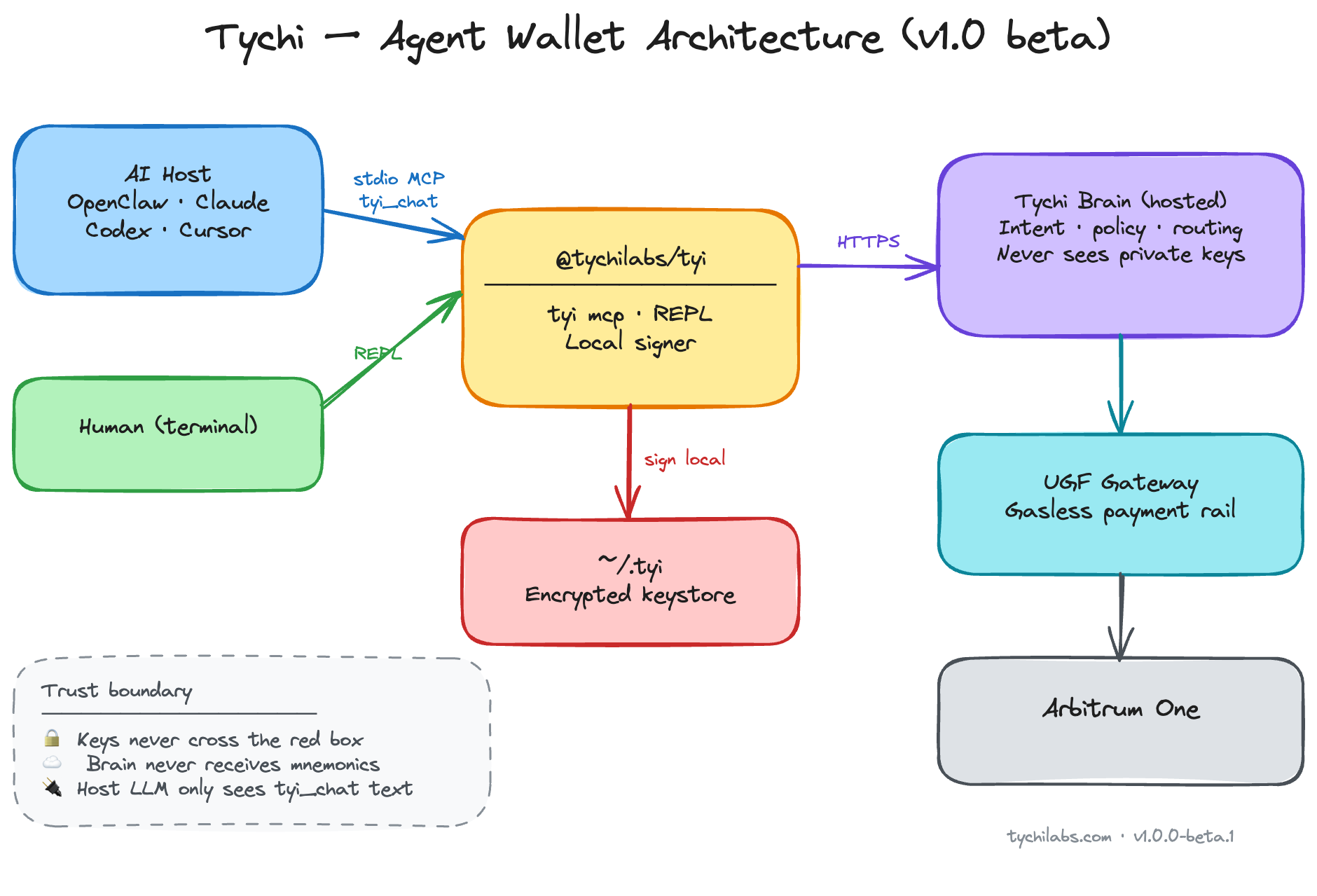
Agent-native MCP server (stdio) for Cursor and other hosts. Nine tools: routing (tyi_route), readiness (tyi_status), onboarding, fast wallet lifecycle (create / import / switch), and tyi_chat for balances, sends, and policy-gated payments on Arbitrum One. Private keys encrypted in ~/.tyi on the operator machine; signing never leaves the device. Hosted Tychi brain parses intent and runs the LLM — configure TYCHI_BRAIN_URL (HTTPS recommended; see SECURITY.md).
Agents → @tychilabs/[email protected] · Humans → @tychilabs/tyi
What it does
- Agent routing —
tyi_routemaps intent → correct tool (avoids slow misuse oftyi_chat) - Readiness gate —
tyi_statuschecks mode before any wallet action - Onboarding —
tyi_onboard+tyi_onboard_schemafor first-time setup (password, LLM provider, API key) - Wallet lifecycle —
tyi_create_wallet,tyi_import_wallet,tyi_switch_wallet(fast, no brain loop) - Agent chat —
tyi_chatfor balances, sends, transfers, payments, policy, limits, history - Multi-wallet — create, import, switch active wallet from one keystore
- Policy caps — spend limits enforced before signing
- Local signing — private keys in memory on operator machine only
- Gasless routing — UGF payment rails for cross-chain gas settlement
- Audit log — local activity trail in
~/.tyi - Reset —
tyi_resetwipes local data when operator confirms
Beta ships on Arbitrum One (chain id 42161) — EVM balances, sends, and UGF gasless payments. More chains in registry; Solana/Sui import supported.
Arbitrum One
Onchain agent wallet on Arbitrum One — self-custody, local signing, UGF gas routing today:
| Roadmap | What it unlocks |
|---|---|
| Automation | Policy-gated agents — recurring sends, triggers, scheduled flows |
| Trading | Spot swaps across Arbitrum liquidity — agent quotes, operator confirms |
| Lending | Supply on Arbitrum money markets — yield without leaving keystore |
| Borrowing | Collateralized borrow — cap-enforced, fully self-custodial |
Agent flow (mandatory)
tyi_route → tyi_status
  → direct tool (onboard / create / import / switch / reset)   ← FAST
  → tyi_chat (balance / send / pay / policy only)              ← SLOW
Never call tyi_chat when tyi_status.ready is false.
Import seed or private key → tyi_import_wallet only (never via tyi_chat).
Tools
| Tool | Use when |
|---|---|
tyi_route |
First — intent → tool map |
tyi_status |
Session start — ready? what's missing? |
tyi_onboard_schema |
Field schema before onboard |
tyi_onboard |
First setup or LLM-only setup |
tyi_create_wallet |
New wallet by name |
tyi_import_wallet |
Import mnemonic or privkey (EVM / Solana / Sui) |
tyi_switch_wallet |
Change active wallet |
tyi_reset |
Wipe ~/.tyi (confirm: true) |
tyi_chat |
Balance, send, pay, transfer, policy, limits |
Install
Pin the release (do not use floating @beta in production):
npx @tychilabs/[email protected]
npx @tychilabs/[email protected] --tools
Security
See SECURITY.md — trust model, brain transport (HTTP beta endpoint), sensitive tools, supply-chain pinning. No install scripts.
MCP host config
Repo includes .mcp.json (Open Plugins) for Cursor Directory. Set TYI_PASSWORD and TYCHI_BRAIN_URL in host env (HTTPS brain recommended).
{
  "mcpServers": {
    "tychi": {
      "command": "npx",
      "args": ["@tychilabs/[email protected]"],
      "env": {
        "TYI_PASSWORD": "<from tyi_onboard>",
        "TYCHI_BRAIN_URL": "<https brain URL — required>"
      }
    }
  }
}
Beta default if unset in code: http://hosted_brain.tychilabs.com — use HTTPS self-host or trusted network only.
OpenClaw:
openclaw mcp set tychi '{"command":"npx","args":["@tychilabs/[email protected]"],"env":{"TYI_PASSWORD":"<password>","TYCHI_BRAIN_URL":"<https brain URL>"}}'
openclaw mcp reload
Onboarding modes
| Mode | Meaning |
|---|---|
fresh |
No wallet — run tyi_onboard |
llm_only |
Wallet exists, no LLM key — onboard LLM fields only |
ready |
OK for tyi_chat |
Operator provides (never invent): keystore password, LLM provider + API key, optional mnemonic for import.
Prefer MCP env for TYI_PASSWORD over chat after onboard.
| Field | Prompt |
|---|---|
password |
Keystore password for ~/.tyi → later TYI_PASSWORD in MCP env |
agent_name |
Agent name (default Tychi) |
llm_provider |
anthropic | gemini | openai | groq |
llm_api_key |
Provider API key (validated, stored encrypted on brain) |
mnemonic |
Optional import (fresh only) |
Remove integration + data
tyi_resetwith{ "confirm": true }— wipes~/.tyi- Remove
TYI_PASSWORDfrom MCP env - OpenClaw:
openclaw mcp unset tychithenopenclaw mcp reload
Errors
| Symptom | Action |
|---|---|
not_ready on chat |
Run onboard flow |
TYI_PASSWORD env required |
Set env after onboard; reload host |
no_llm_key / missing llm_key |
tyi_onboard llm_only |
partial install |
tyi_reset then fresh onboard |
fetch failed on brain |
Set TYCHI_BRAIN_URL explicitly; use HTTPS self-host or beta http://hosted_brain.tychilabs.com |
Environment
| Variable | Required | Default |
|---|---|---|
TYI_PASSWORD |
After onboard | — |
TYCHI_BRAIN_URL |
Recommended | http://hosted_brain.tychilabs.com (beta; prefer HTTPS override) |
TYI_DATA_DIR |
No | ~/.tyi |
KEYSTORE_PASSWORD |
Alias | same as TYI_PASSWORD |
Links
- Website: https://tychilabs.com
- npm: https://www.npmjs.com/package/@tychilabs/tyi-mcp
- GitHub: https://github.com/TychiWallet/tyi-mcp
- Human CLI: https://www.npmjs.com/package/@tychilabs/tyi
License
Apache License 2.0 — see LICENSE. Runtime dependency: @tychilabs/tyi.
Install Tychi Wallet in Claude Desktop, Claude Code & Cursor
unyly install tychi-wallet-mcpInstalls into Claude Desktop, Claude Code, Cursor & VS Code — handles npx, uvx and build-from-source repos for you.
First time? Get the CLI: curl -fsSL https://unyly.org/install | sh
Or configure manually
Run in your terminal:
claude mcp add tychi-wallet-mcp -- npx -y @tychilabs/tyi-mcpFAQ
Is Tychi Wallet MCP free?
Yes, Tychi Wallet MCP is free — one-click install via Unyly at no cost.
Does Tychi Wallet need an API key?
No, Tychi Wallet runs without API keys or environment variables.
Is Tychi Wallet hosted or self-hosted?
Self-hosted: the server runs locally on your machine via the install command above.
How do I install Tychi Wallet in Claude Desktop, Claude Code or Cursor?
Open Tychi Wallet on unyly.org, pick your client tab (Claude Desktop, Claude Code, Cursor) and press Install — the config is generated automatically, no JSON editing.
Related MCPs
Gmail
Read, send and search emails from Claude
 by Google
Slack
Send, search and summarize Slack messages
 by Slack
Runbear
No-code MCP client for team chat platforms, such as Slack, Microsoft Teams, and Discord.
Discord Server
A community discord server dedicated to MCP by [Frank Fiegel](https://github.com/punkpeye)
Compare Tychi Wallet with
Not sure what to pick?
Find your stack in 60 seconds
Author?
Embed badge for your README
Browse similar
All communication MCPs