
Unity Super
FreeNot checkedAn MCP server providing 15 tools for Unity projects, including Unity Gaming Services LiveOps (Economy, Cloud Save, Cloud Code), build-size and bloat analysis, a

About
An MCP server providing 15 tools for Unity projects, including Unity Gaming Services LiveOps (Economy, Cloud Save, Cloud Code), build-size and bloat analysis, and store-compliance checks.
README
Unity Super MCP
One MCP server for Unity Gaming Services LiveOps, build-size analysis, and store compliance.
License: MIT Node 18+ TypeScript MCP Unity
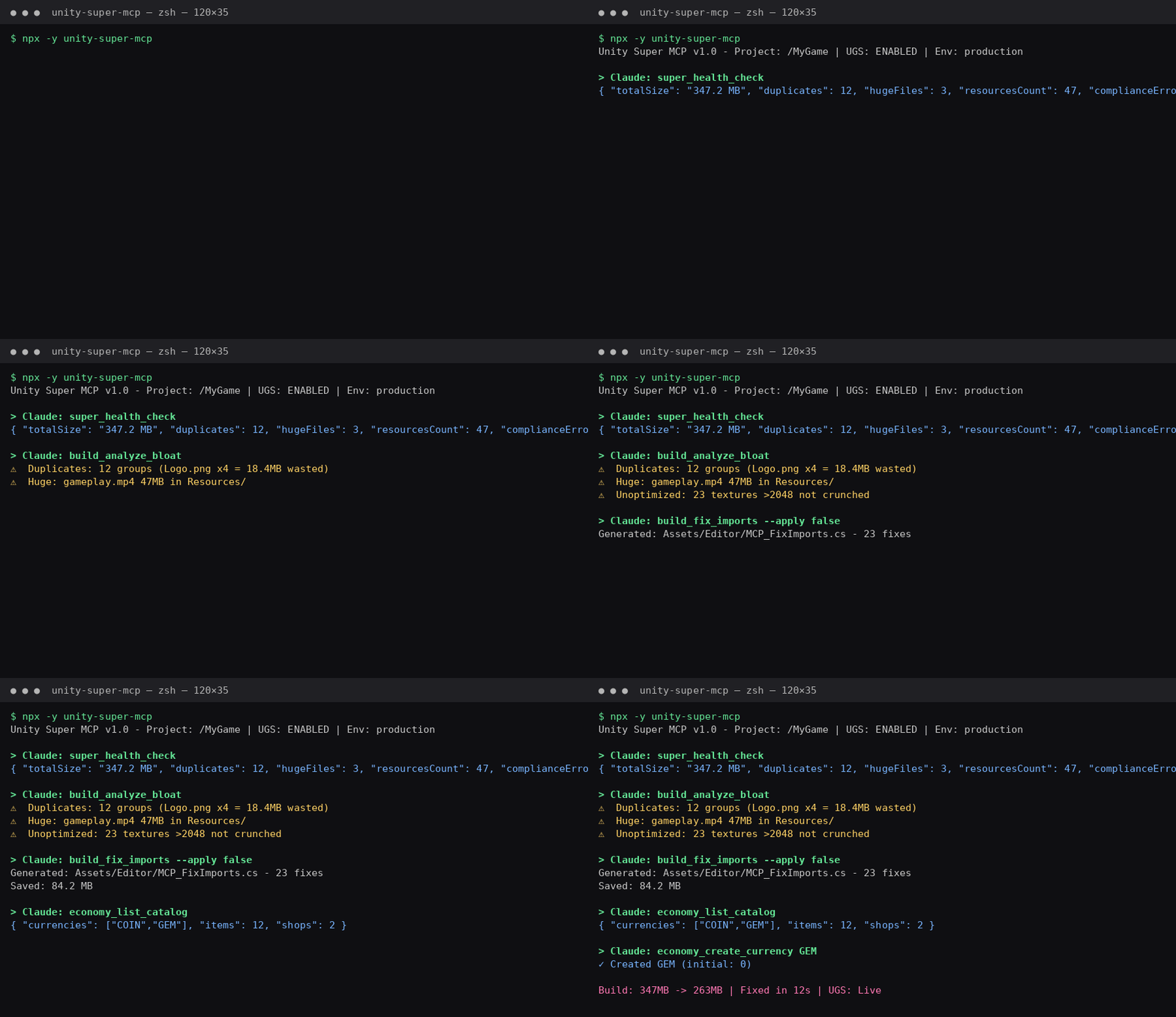
An MCP server that gives an AI agent 15 tools over a Unity project: Unity Gaming Services LiveOps (Economy, Cloud Save, Cloud Code), build-size and bloat analysis, and store-compliance checks — one install instead of four.
Why this exists (read me first). This was built in a single sitting to win a bet — whether an agent could usefully drive UGS end-to-end. This is the receipt. I build MCP servers and agent infrastructure; I am not a game developer and this is not a pivot into games. It's here as a demonstration of MCP tool design, not a maintained product.
Built entirely through a text-only chat with a mobile AI assistant (no file uploads, no IDE), then verified: the server type-checks clean and boots. Treat it as a reference implementation.
Install
npx -y unity-super-mcp
Client config — Claude / Cursor / Windsurf
{
  "mcpServers": {
    "unity-super": {
      "command": "npx",
      "args": ["-y", "unity-super-mcp"],
      "env": {
        "UNITY_PROJECT_PATH": "/path/to/MyGame",
        "UNITY_PROJECT_ID": "your-project-id",
        "UNITY_SERVICE_KEY_ID": "your-key-id",
        "UNITY_SERVICE_SECRET": "your-secret",
        "UNITY_ENV_ID": "production"
      }
    }
  }
}
No UGS credentials? Set only UNITY_PROJECT_PATH and you still get the 7 build/compliance tools. The UGS tools report "not configured" instead of failing.
Tools
🎮 UGS LiveOps (8)
| Tool | What it does |
|---|---|
ugs_get_project_info |
Project + environment readout |
economy_list_catalog |
List currencies, items, purchases |
economy_create_currency |
Create a currency |
economy_create_item |
Create an inventory item |
economy_create_shop |
Create a shop with items and costs |
cloudsave_get_player_data |
Read a player's Cloud Save data |
cloudcode_list_modules |
List deployed Cloud Code modules |
cloudcode_deploy_module |
Deploy a Cloud Code module |
📦 Build & Ship (7)
| Tool | What it does |
|---|---|
super_health_check |
Run this first — fans the core checks out in parallel, returns a summary + next actions |
build_get_last_report |
Top largest assets, size by extension, total project size |
build_analyze_bloat |
Duplicates, oversized files, Resources/ abuse, unoptimized textures |
build_fix_imports |
Generates a C# editor script for texture-import fixes (or edits .meta directly with apply=true) |
assets_find_orphans |
Unreferenced-asset heuristic |
build_check_compliance |
Android target SDK, iOS, StreamingAssets bloat |
Notes
super_health_checkis the intended entry point: one call, whole-project readout.assets_find_orphansis heuristic — verify withAssetDatabase.GetDependenciesbefore deleting anything.- Requires Node 18+.
License
MIT. Do what you like with it.
Install Unity Super in Claude Desktop, Claude Code & Cursor
unyly install unity-super-mcpInstalls into Claude Desktop, Claude Code, Cursor & VS Code — handles npx, uvx and build-from-source repos for you.
First time? Get the CLI: curl -fsSL https://unyly.org/install | sh
Or configure manually
Run in your terminal:
claude mcp add unity-super-mcp -- npx -y unity-super-mcpFAQ
Is Unity Super MCP free?
Yes, Unity Super MCP is free — one-click install via Unyly at no cost.
Does Unity Super need an API key?
No, Unity Super runs without API keys or environment variables.
Is Unity Super hosted or self-hosted?
Self-hosted: the server runs locally on your machine via the install command above.
How do I install Unity Super in Claude Desktop, Claude Code or Cursor?
Open Unity Super on unyly.org, pick your client tab (Claude Desktop, Claude Code, Cursor) and press Install — the config is generated automatically, no JSON editing.
Related MCPs
GitHub
PRs, issues, code search, CI status
 by GitHub
Filesystem
Secure file operations with configurable access controls.
Memory
Knowledge graph-based persistent memory system.
Template MCP Server
A CLI tool to create a new Model Context Protocol server project with TypeScript support, dual transport options, and an extensible structure
 by mcpdotdirect
Compare Unity Super with
Not sure what to pick?
Find your stack in 60 seconds
Author?
Embed badge for your README
Browse similar
All development MCPs