
Vibe Design Local
FreeNot checkedLocal-first canvas-based UI design tool with an MCP server allowing AI agents to read and write design elements directly.

About
Local-first canvas-based UI design tool with an MCP server allowing AI agents to read and write design elements directly.
README
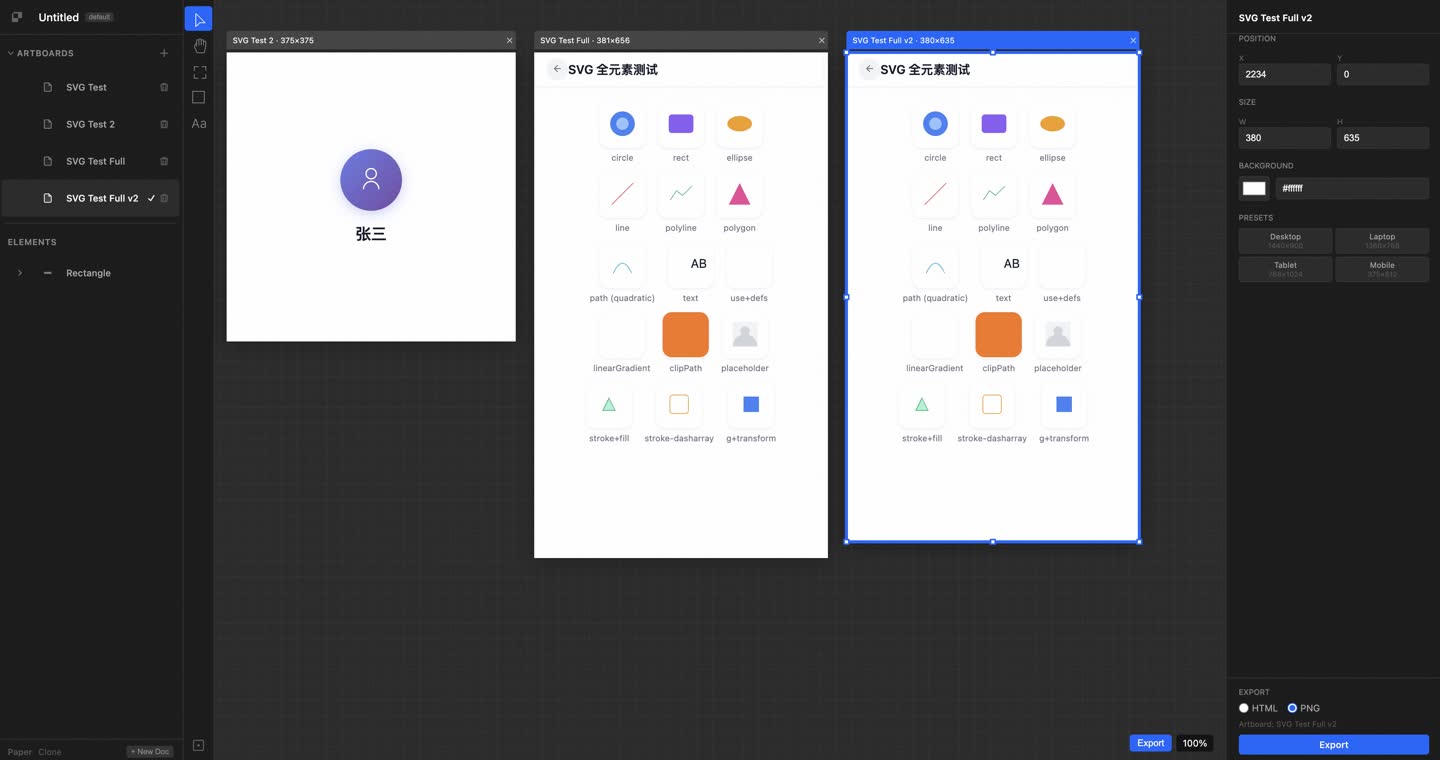
本地优先的 UI 设计工具,复刻 Paper 的核心体验。基于真实 HTML/CSS 渲染,通过 MCP 协议让 AI Agent(如 Claude Code)可以直接读写画布。
运行方式
1. 启动后端(FastAPI + MCP Server)
cd /Users/teli/www/work/paper_clone_temp/backend
python main.py
- 后端地址:
http://127.0.0.1:3004 - MCP 端点:
POST http://127.0.0.1:3004/mcp - 健康检查:
GET http://127.0.0.1:3004/health
2. 启动前端(Vite + React)
cd /Users/teli/www/work/paper_clone_temp/frontend
npm run dev
- 前端地址:
http://localhost:5175
3. 打开浏览器
Claude Code MCP 配置
在 Claude Code 的 MCP 配置文件(通常是 ~/.claude/settings.json)中添加:
{
  "mcpServers": {
    "paper-clone": {
      "type": "http",
      "url": "http://localhost:3004/mcp"
    }
  }
}
Claude Code 会自动使用
/mcp的initialize响应做协议握手,然后通过 HTTP POST 调用 tools。 每次 MCP 调用会在请求头中传递x-paper-doc-id: default,后端据此找到对应的文档。
技术架构
┌──────────────────────────────────────────────┐
│  Claude Code / AI Agent                      │
│  (connects via MCP: 127.0.0.1:3004/mcp)     │
└──────────────┬───────────────────────────────┘
               │  HTTP POST (JSON-RPC 2.0)
               ▼
┌──────────────────────────────────────────────┐
│  Python FastAPI Backend (port 3004)          │
│  ├── MCP Server (/mcp)                       │
│  ├── Document Store (in-memory)              │
│  └── HTML Parser                             │
└──────────────┬───────────────────────────────┘
               │  HTTP API + 轮询同步
               ▼
┌──────────────────────────────────────────────┐
│  React Frontend (Vite, port 5175)            │
│  ├── Canvas (position: absolute + inline)    │
│  ├── Toolbar (Move/Pan/Frame/Rectangle/Text) │
│  ├── Layer Panel (left)                      │
│  ├── Property Panel (right)                  │
│  └── Zustand Store                          │
└──────────────────────────────────────────────┘
- 渲染:真实 HTML/CSS DOM,
position: absolute+ inline styles - 前端同步:前端每 1 秒轮询后端,拉取 AI/MCP 的修改
- MCP 通信:AI 调用 tool → 后端处理 → 前端 polling 同步状态
MCP Tools(21 个)
文档操作
get_basic_info— 获取文档基本信息create_artboard— 创建新 Artboard/页面delete_artboard— 删除 Artboardupdate_artboard— 更新 Artboard 属性(位置/尺寸/名称/背景色)save_document— 保存文档open_document— 打开 HTML 文件export_html— 导出美化 HTML
节点查询
get_tree_summary— 获取节点树摘要get_children— 获取子节点get_node_info— 获取节点详细信息get_selection— 获取当前选中节点get_screenshot— 截图数据get_computed_styles— 获取计算后样式get_jsx— 导出为 JSX 代码get_font_family_info— 获取字体信息
节点修改
write_html— 写入 HTML 创建节点duplicate_nodes— 复制节点update_styles— 更新样式set_text_content— 设置文本内容rename_nodes— 重命名节点delete_nodes— 删除节点
快捷键
| 快捷键 | 功能 |
|---|---|
V |
选择工具(Move) |
H |
平移工具(Pan) |
R |
矩形工具(Rectangle) |
T |
文本工具(Text) |
F |
Frame 工具 |
Space + 拖拽 |
平移画布 |
Cmd + = / Cmd + - |
放大 / 缩小 |
Cmd + C |
复制选中元素 |
Cmd + V |
粘贴 |
Cmd + D |
复制并偏移 |
Delete / Backspace |
删除选中元素 |
Escape |
取消选择 |
双击文本元素 |
编辑文本 |
文件结构
paper_clone_temp/
├── backend/
│   ├── main.py          # FastAPI 入口 + MCP Server (port 3004)
│   ├── document.py      # 文档存储
│   ├── parse_html.py    # HTML 解析器
│   ├── mcp_server.py    # MCP 协议处理
│   ├── mcp_stdio.js     # stdio bridge(供 MCP 客户端使用)
│   ├── handlers/
│   │   └── mcp_handler.py
│   └── requirements.txt
├── frontend/
│   ├── src/
│   │   ├── App.tsx
│   │   ├── canvas/
│   │   │   ├── Canvas.tsx
│   │   │   ├── ArtboardFrame.tsx
│   │   │   └── Element.tsx
│   │   ├── toolbar/Toolbar.tsx
│   │   ├── panels/
│   │   │   ├── LayerPanel.tsx
│   │   │   └── PropertyPanel.tsx
│   │   ├── store/
│   │   │   ├── editorStore.ts
│   │   │   └── syncManager.ts
│   │   ├── bridge/api.ts
│   │   └── types.ts
│   ├── index.html
│   ├── vite.config.ts
│   └── package.json
├── desktop/
│   └── main.py          # pywebview 桌面入口(TODO)
└── README.md
开发备注
- 端口:后端默认
3004,前端默认5175 - 前端调试:修改代码后 Vite HMR 自动热更新,无需手动刷新
- 后端调试:修改 Python 代码后需要手动重启后端
- AI 调试:每次测试前确认后端进程在运行:
lsof -i :3004 - 测试 MCP:直接 curl 测试:
curl -X POST http://127.0.0.1:3004/mcp -H "Content-Type: application/json" -d '{"method":"initialize","params":{},"id":1}'
Installing Vibe Design Local
This server has no published package — it is built from source. Open the repository and follow its README.
▸ github.com/eisneim/vibedesignlocalmcpFAQ
Is Vibe Design Local MCP free?
Yes, Vibe Design Local MCP is free — one-click install via Unyly at no cost.
Does Vibe Design Local need an API key?
No, Vibe Design Local runs without API keys or environment variables.
Is Vibe Design Local hosted or self-hosted?
Self-hosted: the server runs locally on your machine via the install command above.
How do I install Vibe Design Local in Claude Desktop, Claude Code or Cursor?
Open Vibe Design Local on unyly.org, pick your client tab (Claude Desktop, Claude Code, Cursor) and press Install — the config is generated automatically, no JSON editing.
Related MCPs
LibreOffice Tools
Enables AI agents to read, write, and edit Office documents via LibreOffice with token-efficient design. Supports multiple formats including DOCX, XLSX, PPTX, a
 by passerbyflutter
dannote/figma-use
Full Figma control: create shapes, text, components, set styles, auto-layout, variables, export. 80+ tools.
 by dannote
Logo.dev
Search and retrieve company logos by brand or domain. Customize size, format, and theme to match your design needs. Accelerate design, prototyping, and content
 by NOVA-3951
Design Inspiration Server
Searches top design platforms like Dribbble and Behance to provide UI inspiration, color palettes, and layout patterns via the Serper API. It allows users to re
 by YonasValentin
Compare Vibe Design Local with
Not sure what to pick?
Find your stack in 60 seconds
Author?
Embed badge for your README
Browse similar
All design MCPs