
Video Subtitle Overlay
FreeNot checkedLocal desktop studio for Whisper AI speech transcription, subtitle translation, OCR masking, and FFmpeg burning

About
Local desktop studio for Whisper AI speech transcription, subtitle translation, OCR masking, and FFmpeg burning
README
License: MIT CI Python 3.10+ FastAPI React
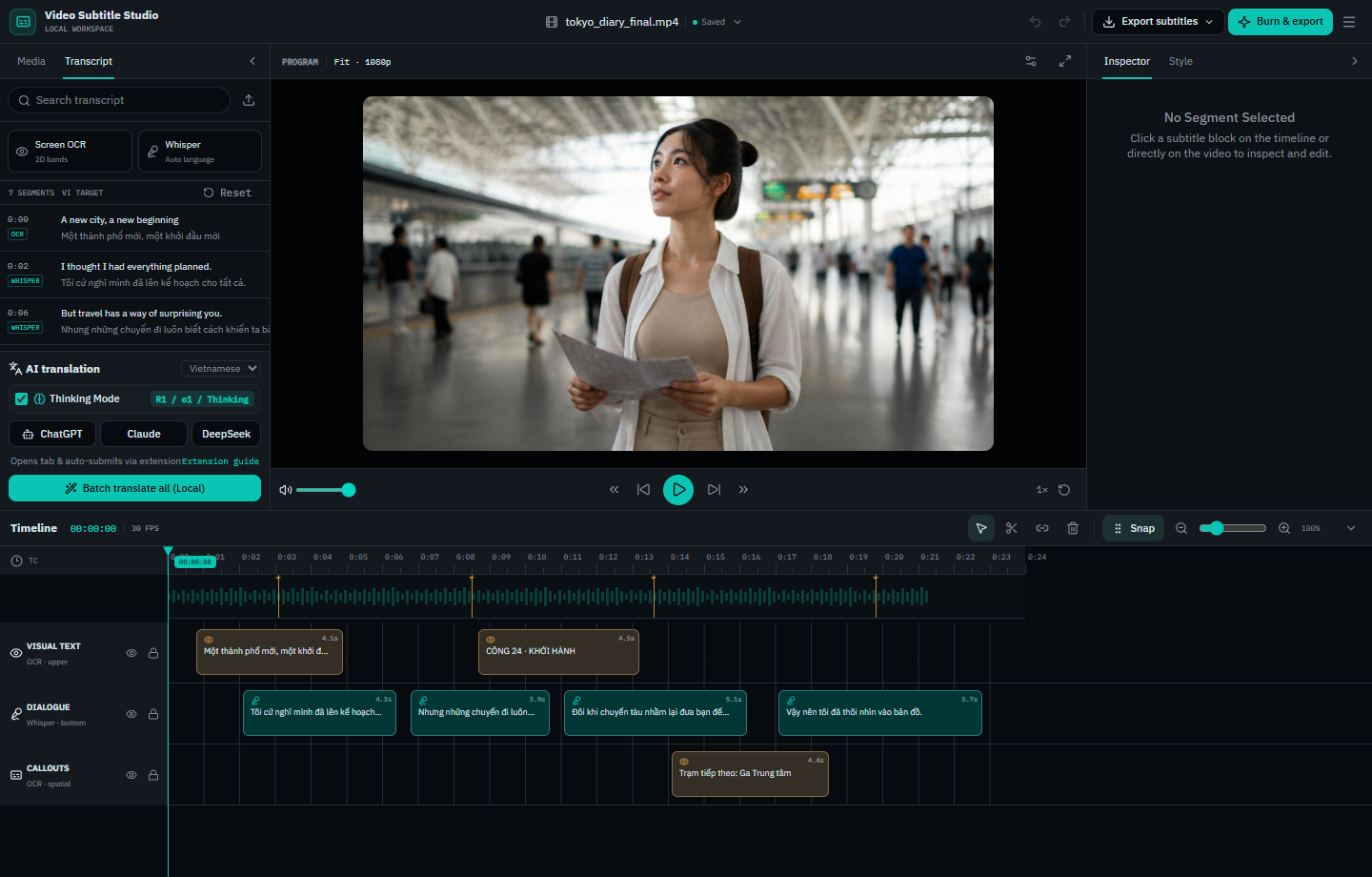
An all-in-one local desktop workspace for extracting, translating, editing, masking, and burning subtitles onto videos.
Designed for content creators, localizers, and video editors who need to translate foreign videos, replace or mask hardcoded subtitles, and export production-ready subtitled videos without relying on costly cloud APIs.
✨ Features
- 🎙️ Speech-to-Text Transcription: Powered by OpenAI Whisper (
tiny,base,small) with automatic speech detection and timestamp alignment. - 👁️ Video Screen OCR: Automatic on-screen subtitle detection and text extraction via EasyOCR for hardcoded/burned-in video text.
- 🎨 Auto Color & Style Detection: Analyzes video frames to detect existing subtitle background, outline, and text colors.
- 🎛️ Interactive Timeline Workspace:
- Multi-track timeline with zoom, playhead scrubbing, split (S), merge (M), and delete controls.
- Direct on-video drag-and-drop subtitle repositioning with smart anchors (
\an4,\an5,\an6). - Real-time visual style preview (font size, letter spacing, corner radius, padding, opacity).
- 🛡️ Clean Subtitle Masking:
- Fitted Capsule / Rounded Box: Masks underlying original subtitles with exact corner radii (Square, Subtle, Rounded, Pill).
- Full-Width Bar: Horizontal banner spanning the video.
- Text Outline: Clean floating text with drop-shadow and stroke.
- 🌐 AI Translation Bridge (No API Keys Required):
- Included Chrome/Edge extension bridges Video Subtitle Studio directly with ChatGPT, DeepSeek, Claude, and Gemini.
- Automatically types translation prompts with context rules, waits for streaming output, and syncs translations straight back to the editor.
- Built-in machine translation fallback via
deep-translator.
- 🪞 Horizontal Video Mirroring (Flip Video):
- Mirror or flip videos horizontally with a single click while automatically keeping transcript OCR boxes, subtitle coordinates, and readable translations intact.
- Seamlessly supported during timeline playback preview, ASS generation, and FFmpeg export across standard and reframed modes.
- 📱 Smart Video Auto-Reframe:
- Convert videos between TikTok / Shorts / Reels (9:16), YouTube (16:9), and native aspect ratios.
- Choose between Blurred Background duplicate, Center Crop to Fill, and Letterboxed Black Bars with TikTok UI safe-zone guides.
- 🔥 Dual-Layer ASS Vector Subtitle Burning:
- Precision vector subtitle rendering using FFmpeg and Advanced SubStation Alpha (
.ass). - Exports burned
.mp4video,.srtstandard subtitle file, and.assstyled subtitle file.
- Precision vector subtitle rendering using FFmpeg and Advanced SubStation Alpha (
- 🔌 Model Context Protocol (MCP) Server:
- Integrates with AI assistants (Claude Desktop, Cursor) through FastMCP tools (
list_videos,get_transcript,update_subtitles,render_subtitled_video).
- Integrates with AI assistants (Claude Desktop, Cursor) through FastMCP tools (
🚀 Quick Start
Prerequisites
- Python 3.10+
- FFmpeg installed and accessible in your system
PATH(Runffmpeg -versionto verify). - (Optional) Bun or Node.js if you wish to modify and rebuild the frontend.
Installation
Clone the repository:
git clone https://github.com/Loc1ran/video-subtitle-overlay.git
cd video-subtitle-overlay
Install Python dependencies:
python -m venv venv
# On Windows:
venv\Scripts\activate
# On Linux/macOS:
source venv/bin/activate

pip install -r requirements.txt
Launching the Application
Windows (1-Click): Double-click
start.bat.Cross-Platform (Terminal):
python run_app.py
Your browser will automatically open to http://localhost:8000.
🧩 Browser AI Bridge Extension Setup
To use automated browser translation with ChatGPT, Claude, DeepSeek, or Gemini without paying for API tokens:
- Open Chrome or Edge and go to
chrome://extensions(oredge://extensions). - Toggle on Developer mode in the top right.
- Click Load unpacked in the top left.
- Select the
subtitle-ai-extensiondirectory inside this repository. - In Video Subtitle Studio, extract or load subtitles, open your AI chat tab, click the extension icon, and click Start Auto-Translation.
📁 Repository Structure
video-subtitle-studio/
├── app/
│   ├── main.py             # FastAPI backend server & REST API
│   ├── transcriber.py      # Whisper speech recognition engine
│   ├── video_ocr.py        # EasyOCR screen text detector & color extractor
│   ├── translator.py       # Batch translator engine
│   ├── video_processor.py  # FFmpeg dual-layer ASS subtitle burning engine
│   └── static/             # Built production frontend assets
├── frontend/
│   ├── src/
│   │   ├── components/     # Video Subtitle Studio React components & timeline
│   │   ├── routes/         # TanStack file-based routing
│   │   └── lib/            # Utilities and prompt templates
│   ├── package.json
│   └── vite.config.ts
├── subtitle-ai-extension/  # Chrome/Edge AI translation bridge extension
├── tests/                  # Pytest unit tests (API & video processor)
├── mcp_server.py           # Model Context Protocol (MCP) server
├── requirements.txt        # Python package dependencies
├── requirements-dev.txt    # Development and testing dependencies
├── run_app.py              # Application launcher & port manager
├── start.bat               # Windows one-click launcher
├── stop.bat                # Windows server stop script
├── build_frontend.bat      # Frontend build script
└── LICENSE                 # MIT License
🧪 Running Tests
To run the automated backend test suite locally:
pip install -r requirements-dev.txt
pytest tests/ -v
To run frontend linting and build checks:
cd frontend
bun run lint
bun run build
🤝 Contributing
Contributions, issues, and feature requests are welcome! Feel free to open an issue or submit a pull request.
📄 License
This project is open-source and licensed under the MIT License.
Installing Video Subtitle Overlay
This server has no published package — it is built from source. Open the repository and follow its README.
▸ github.com/Loc1ran/video-subtitle-overlayFAQ
Is Video Subtitle Overlay MCP free?
Yes, Video Subtitle Overlay MCP is free — one-click install via Unyly at no cost.
Does Video Subtitle Overlay need an API key?
No, Video Subtitle Overlay runs without API keys or environment variables.
Is Video Subtitle Overlay hosted or self-hosted?
Self-hosted: the server runs locally on your machine via the install command above.
How do I install Video Subtitle Overlay in Claude Desktop, Claude Code or Cursor?
Open Video Subtitle Overlay on unyly.org, pick your client tab (Claude Desktop, Claude Code, Cursor) and press Install — the config is generated automatically, no JSON editing.
Related MCPs
ARA
Generate images, video and audio from any AI agent — one connector.
 by ARA
Omni Video
An MCP server that transforms LLM-enabled IDEs into professional video editors by pre-processing footage into text proxies, generating motion graphics via HTML/
 by buildwithtaza
YouTube
Transcripts, channel stats, search
 by YouTube
EverArt
AI image generation using various models.
 by modelcontextprotocol
gpu-bridge/mcp-server
Unified GPU inference API with 30 AI services (LLM, image gen, video, TTS, whisper, embeddings, reranking, OCR) as MCP tools. Pay-per-use via x402 USDC or API k
 by gpu-bridge
hamflx/imagen3-mcp
A powerful image generation tool using Google's Imagen 3.0 API through MCP. Generate high-quality images from text prompts with advanced photography, artistic,
 by hamflx
merterbak/Grok-MCP
MCP server for xAI's [Grok API](https://docs.x.ai/docs/overview) with agentic tool calling, image generation, vision, and file support.
 by merterbak
SureScaleAI/openai-gpt-image-mcp
OpenAI GPT image generation/editing MCP server.
 by SureScaleAI
YangLiangwei/PersonalizationMCP
Comprehensive personal data aggregation MCP server with Steam, YouTube, Bilibili, Spotify, Reddit and other platforms integrations. Features OAuth2 authenticati
 by YangLiangwei
AceDataCloud/MCPFlux
Flux AI image generation and editing (Black Forest Labs) via Ace Data Cloud API.
 by AceDataCloud
Compare Video Subtitle Overlay with
Not sure what to pick?
Find your stack in 60 seconds
Author?
Embed badge for your README
Browse similar
All media MCPs