
Webdev
FreeNot checkedProvides web development tools including taking screenshots and listing screens via MCP.

About
Provides web development tools including taking screenshots and listing screens via MCP.
README
An MCP server that provides useful web development tools.
Usage
Cursor
- To install in a project, add the MCP server to your
.cursor/mcp.json:
{
	"mcpServers": {
		"webdev": {
			"command": "npx",
			"args": ["webdev-mcp"],

		}
	}
}
- To install globally, add this command to your Cursor settings:
npx webdev-mcp
Windsurf
- Add the MCP server to your
~/.codeium/windsurf/mcp_config.jsonfile:
{
	"mcpServers": {
		"webdev": {
			"command": "npx",
			"args": ["webdev-mcp"]
		}
	}
}
Tools
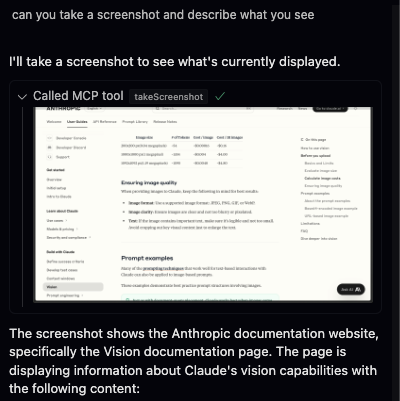
Currently, the only 2 tools are takeScreenshot and listScreens. Your agent can use the list screens tool to get the screen id of the screen it wants to screenshot.
The tool will return the screenshot as a base64 encoded string.
Tips
Make sure YOLO mode is on and MCP tools protection is off in your Cursor settings for the best experience. You might have to allow Cursor to record your screen on MacOS.
Install Webdev in Claude Desktop, Claude Code & Cursor
unyly install webdev-mcpInstalls into Claude Desktop, Claude Code, Cursor & VS Code — handles npx, uvx and build-from-source repos for you.
First time? Get the CLI: curl -fsSL https://unyly.org/install | sh
Or configure manually
Run in your terminal:
claude mcp add webdev-mcp -- npx -y webdev-mcpFAQ
Is Webdev MCP free?
Yes, Webdev MCP is free — one-click install via Unyly at no cost.
Does Webdev need an API key?
No, Webdev runs without API keys or environment variables.
Is Webdev hosted or self-hosted?
Self-hosted: the server runs locally on your machine via the install command above.
How do I install Webdev in Claude Desktop, Claude Code or Cursor?
Open Webdev on unyly.org, pick your client tab (Claude Desktop, Claude Code, Cursor) and press Install — the config is generated automatically, no JSON editing.
Related MCPs
GitHub
PRs, issues, code search, CI status
 by GitHub
Filesystem
Secure file operations with configurable access controls.
Memory
Knowledge graph-based persistent memory system.
Template MCP Server
A CLI tool to create a new Model Context Protocol server project with TypeScript support, dual transport options, and an extensible structure
 by mcpdotdirect
Compare Webdev with
Not sure what to pick?
Find your stack in 60 seconds
Author?
Embed badge for your README
Browse similar
All development MCPs