
Website Downloader (Windows)
FreeNot checkedWindows-compatible website downloader for efficient web content retrieval and storage, leveraging asynchronous processing and concurrent downloads for tasks lik

About
Windows-compatible website downloader for efficient web content retrieval and storage, leveraging asynchronous processing and concurrent downloads for tasks like web scraping and content archiving.
README
MseeP.ai Security Assessment Badge
MCP Website Downloader
Simple MCP server for downloading documentation websites and preparing them for RAG indexing.
Features
- Downloads complete documentation sites, well big chunks anyway.
- Maintains link structure and navigation, not really. lol
- Downloads and organizes assets (CSS, JS, images), but isn't really AI friendly and it all probably needs some kind of parsing or vectorizing into a db or something.
- Creates clean index for RAG systems, currently seems to make an index in each folder, not even looked at it.
- Simple single-purpose MCP interface, yup.
Installation
Fork and download, cd to the repository.
uv venv
./venv/Scripts/activate
pip install -e .
Put this in your claude_desktop_config.json with your own paths:
   "mcp-windows-website-downloader": {
     "command": "uv",
     "args": [
       "--directory",
       "F:/GithubRepos/mcp-windows-website-downloader",
       "run",
       "mcp-windows-website-downloader",
       "--library",
       "F:/GithubRepos/mcp-windows-website-downloader/website_library"
     ]
   },
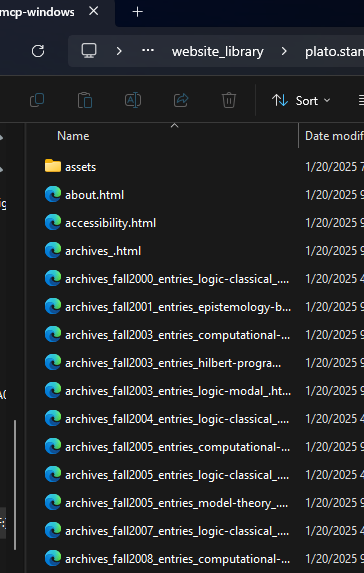
Other Usage you don't need to worry about and may be hallucinatory lol:
- Start the server:
python -m mcp_windows_website_downloader.server --library docs_library
- Use through Claude Desktop or other MCP clients:
result = await server.call_tool("download", {
    "url": "https://docs.example.com"
})
Output Structure
docs_library/
  domain_name/
    index.html
    about.html
    docs/
      getting-started.html
      ...
    assets/
      css/
      js/
      images/
      fonts/
    rag_index.json
Development
The server follows standard MCP architecture:
src/
  mcp_windows_website_downloader/
    __init__.py
    server.py    # MCP server implementation
    core.py      # Core downloader functionality
    utils.py     # Helper utilities
Components
server.py: Main MCP server implementation that handles tool registration and requestscore.py: Core website downloading functionality with proper asset handlingutils.py: Helper utilities for file handling and URL processing
Design Principles
Single Responsibility
- Each module has one clear purpose
- Server handles MCP interface
- Core handles downloading
- Utils handles common operations
Clean Structure
- Maintains original site structure
- Organizes assets by type
- Creates clear index for RAG systems
Robust Operation
- Proper error handling
- Reasonable depth limits
- Asset download verification
- Clean URL/path processing
RAG Index
The rag_index.json file contains:
{
  "url": "https://docs.example.com",
  "domain": "docs.example.com",
  "pages": 42,
  "path": "/path/to/site"
}
Contributing
- Fork the repository
- Create a feature branch
- Make your changes
- Submit a pull request
License
MIT License - See LICENSE file
Error Handling
The server handles common issues:
- Invalid URLs
- Network errors
- Asset download failures
- Malformed HTML
- Deep recursion
- File system errors
Error responses follow the format:
{
  "status": "error",
  "error": "Detailed error message"
}
Success responses:
{
  "status": "success",
  "path": "/path/to/downloaded/site",
  "pages": 42
}
Installing Website Downloader (Windows)
This server has no published package — it is built from source. Open the repository and follow its README.
▸ github.com/angrysky56/mcp-windows-website-downloaderFAQ
Is Website Downloader (Windows) MCP free?
Yes, Website Downloader (Windows) MCP is free — one-click install via Unyly at no cost.
Does Website Downloader (Windows) need an API key?
No, Website Downloader (Windows) runs without API keys or environment variables.
Is Website Downloader (Windows) hosted or self-hosted?
Self-hosted: the server runs locally on your machine via the install command above.
How do I install Website Downloader (Windows) in Claude Desktop, Claude Code or Cursor?
Open Website Downloader (Windows) on unyly.org, pick your client tab (Claude Desktop, Claude Code, Cursor) and press Install — the config is generated automatically, no JSON editing.
Related MCPs
GitHub
PRs, issues, code search, CI status
 by GitHub
Filesystem
Secure file operations with configurable access controls.
Memory
Knowledge graph-based persistent memory system.
Template MCP Server
A CLI tool to create a new Model Context Protocol server project with TypeScript support, dual transport options, and an extensible structure
 by mcpdotdirect
Amap Maps Mcp Server
MCP server for using the AMap Maps API
 by duxiaohui
Supabase
Database, auth and storage
 by Supabase
Everything
Reference / test server with prompts, resources, and tools.
Git
Tools to read, search, and manipulate Git repositories.
Sequential Thinking
Dynamic and reflective problem-solving through thought sequences.
Time
Time and timezone conversion capabilities.
Compare Website Downloader (Windows) with
Not sure what to pick?
Find your stack in 60 seconds
Author?
Embed badge for your README
Browse similar
All development MCPs