
Wechat Reader
FreeNot checkedMCP server for reading WeChat public account articles by reusing authenticated browser sessions, handling captchas and rate limits.

About
MCP server for reading WeChat public account articles by reusing authenticated browser sessions, handling captchas and rate limits.
README
面向 AI Agent 的微信公众号阅读工具,提供 CLI、MCP server 和 Python API,可复用用户已登录、已验证的浏览器会话。
wechat-reader 适合这样的场景:用户已经有一个真实浏览器窗口可以手动完成微信验证,而 agent 需要一个结构化、可重试、可诊断的阅读接口。

谁需要这个工具
如果你的 AI agent 或自动化流程需要可靠地读取微信公众号文章,这个工具就是为你准备的。
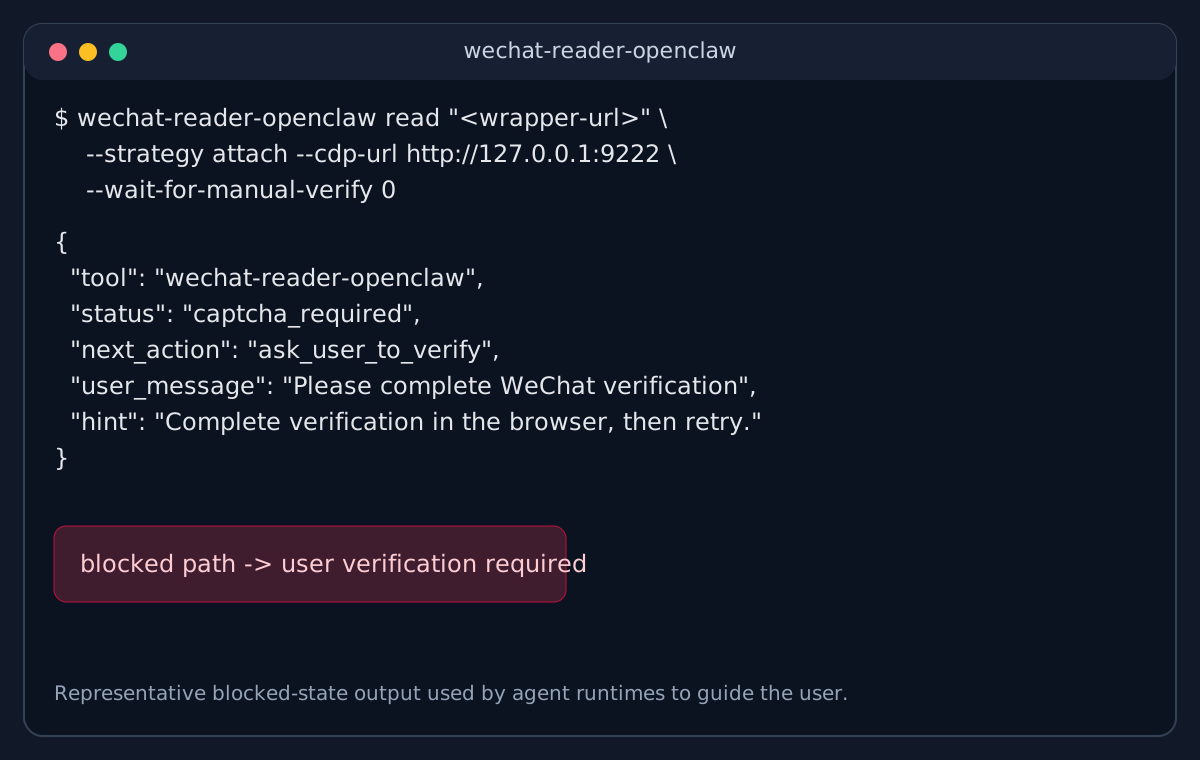
问题: 微信文章链接对程序化访问极不友好。用 curl、requests、web_fetch 直接抓取,经常拿到空白页、验证码页或登录墙——而且是静默失败,你的 agent 甚至不知道自己拿到的是垃圾。
这个工具的不同之处:
- 复用真实浏览器会话,像人一样读取文章
- 返回结构化状态(
ok、captcha_required、rate_limited),agent 知道到底发生了什么 - 需要验证时,告诉 agent 去请求用户操作——而不是静默返回无用内容
典型使用场景:
- AI agent 工作流中处理微信文章链接(摘要、翻译、知识库入库)
- 内容监控或竞品分析流水线
- 任何自动化流程中出现微信链接、需要稳定读取的场景
不适合你的情况: 偶尔读一篇微信文章——直接复制粘贴更快。这个工具是为微信链接频繁出现在自动化流程中、需要每次都能读通的场景设计的。
使用入口
wechat-reader:直接在终端里读取、打开、诊断微信文章页面wechat-reader-mcp:把同样的能力暴露给 Claude、Codex 等支持 MCP 的宿主wechat_reader:在你自己的 Python 工具里直接调用
快速开始
要求 Python 3.11+。
安装
git clone https://github.com/xiguawang/wechat-reader.git
cd wechat-reader
uv sync
uv run playwright install chromium
如果你不使用 uv,也可以退回到:
pip install -e .
python -m playwright install chromium
通过 CLI 读取文章
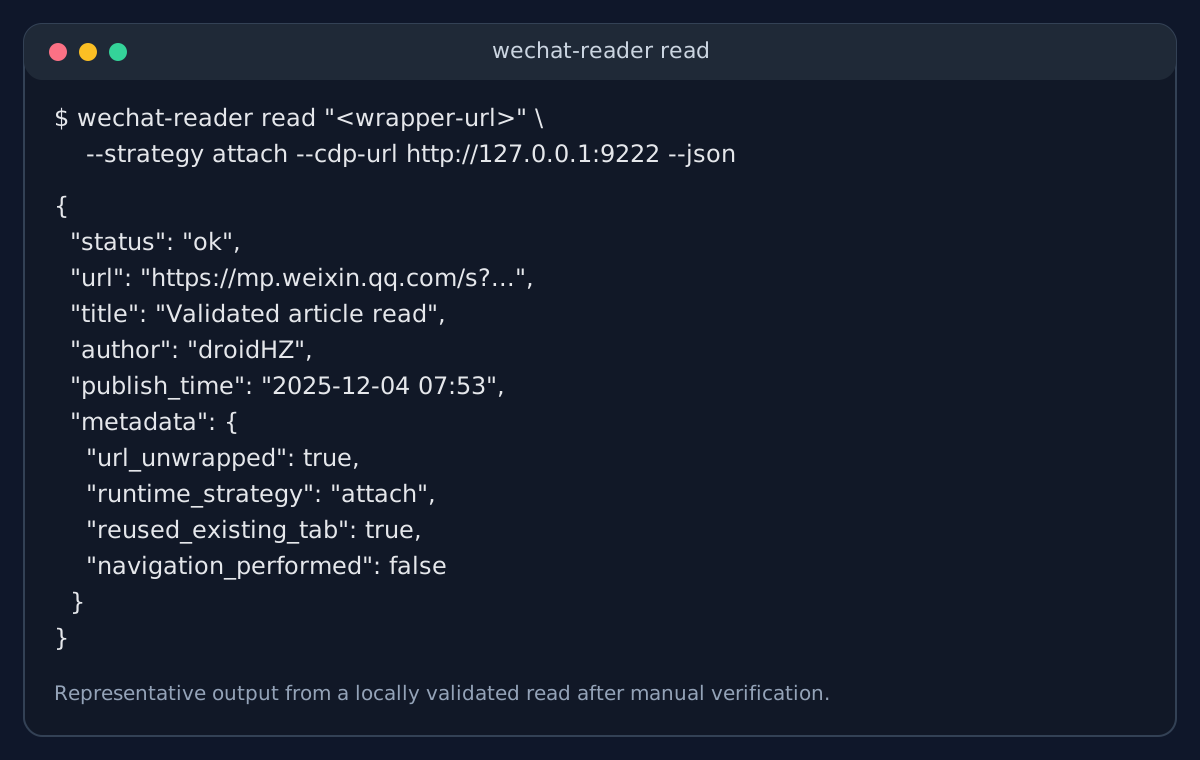
wechat-reader read "https://mp.weixin.qq.com/s?..." --json
检查本机浏览器环境
wechat-reader setup
启动 MCP Server
wechat-reader-mcp
Python API
from wechat_reader import read_article_sync

result = read_article_sync("https://mp.weixin.qq.com/s?...", strategy="auto", timeout=30)
print(result.status, result.title)
你会得到什么
attach、launch、playwright、auto四种浏览器策略ok、captcha_required、rate_limited等结构化状态- CLI 下的 JSON / Markdown 输出
- 可直接接入 agent 的 MCP server
- 可嵌入你自己工具链的 Python API
截图
验证完成后的成功读取
需要用户先完成验证的阻塞状态
MCP Server
项目内置了一个 stdio MCP server:
wechat-reader-mcp
当前暴露的 tools:
wechat_read_articlewechat_open_articlewechat_list_tabswechat_read_current_tabwechat_get_statuswechat_setup
CLI
setup
wechat-reader setup
wechat-reader setup --json
tabs
wechat-reader tabs --wechat-only
wechat-reader tabs --wechat-only --json
open
wechat-reader open "https://mp.weixin.qq.com/s?..." \
  --strategy launch \
  --channel chrome \
  --json
read
wechat-reader read "https://mp.weixin.qq.com/s?..." \
  --strategy auto \
  --timeout 30 \
  --json
如果输入的是微信验证包装链接,例如 mp/wappoc_appmsgcaptcha?...&target_url=...,工具会先解包到真实文章 URL,再做 tab 匹配和导航,避免把已验证页面重新带回验证码入口。
限制说明
wechat-reader 不是一个承诺“稳定绕过微信风控”的通用抓取器。
- 微信风控可能随时变化
- 某些链接仍然需要用户先手动完成验证
- “操作频繁”是真实运行状态,不是这个工具能彻底消除的问题
- 受限沙箱环境下,CDP attach 可能出现本地
EPERM - 移动端更适合“移动端发起,桌面端 bridge 执行”的模式
许可证
MIT
Install Wechat Reader in Claude Desktop, Claude Code & Cursor
unyly install wechat-reader-mcpInstalls into Claude Desktop, Claude Code, Cursor & VS Code — handles npx, uvx and build-from-source repos for you.
First time? Get the CLI: curl -fsSL https://unyly.org/install | sh
Or configure manually
Run in your terminal:
claude mcp add wechat-reader-mcp -- uvx --from git+https://github.com/xiguawang/wechat-reader wechat-readerFAQ
Is Wechat Reader MCP free?
Yes, Wechat Reader MCP is free — one-click install via Unyly at no cost.
Does Wechat Reader need an API key?
No, Wechat Reader runs without API keys or environment variables.
Is Wechat Reader hosted or self-hosted?
Self-hosted: the server runs locally on your machine via the install command above.
How do I install Wechat Reader in Claude Desktop, Claude Code or Cursor?
Open Wechat Reader on unyly.org, pick your client tab (Claude Desktop, Claude Code, Cursor) and press Install — the config is generated automatically, no JSON editing.
Related MCPs
Playwright
Browser automation, scraping, screenshots
 by Microsoft
Puppeteer
Browser automation and web scraping.
 by modelcontextprotocol
opentabs-dev/opentabs
Plugin-based MCP server + Chrome extension that gives AI agents access to web applications through the user's authenticated browser session. 100+ plugins with a
 by opentabs-dev
robhunter/agentdeals
1,500+ developer infrastructure deals, free tiers, and startup programs across 54 categories. Search deals, compare vendors, plan stacks, and track pricing chan
 by robhunter
Compare Wechat Reader with
Not sure what to pick?
Find your stack in 60 seconds
Author?
Embed badge for your README
Browse similar
All browse MCPs