
Xiaohongshu Mcp Readonly
FreeNot checked只读 Xiaohongshu / RedNote MCP Server,支持 GitHub Copilot CLI、Claude Code、Codex 和 Cursor;本机运行、网页扫码登录、浏览器复用和请求超时。

About
只读 Xiaohongshu / RedNote MCP Server,支持 GitHub Copilot CLI、Claude Code、Codex 和 Cursor;本机运行、网页扫码登录、浏览器复用和请求超时。
README
简体中文 | English
这是一个只跑在本机的只读 MCP Server,支持小红书和 RedNote。可以接入 GitHub Copilot CLI、Claude Code、Codex CLI 和 Cursor,用 AI Agent 搜索公开 笔记、读取评论和查看用户主页。
[!IMPORTANT] 这里只开放 6 个只读工具。不能发笔记、评论、回复、点赞、收藏,也不能读取通知 或删除 Cookie。平台仍然可能记录自动化浏览器的登录、搜索和浏览行为。
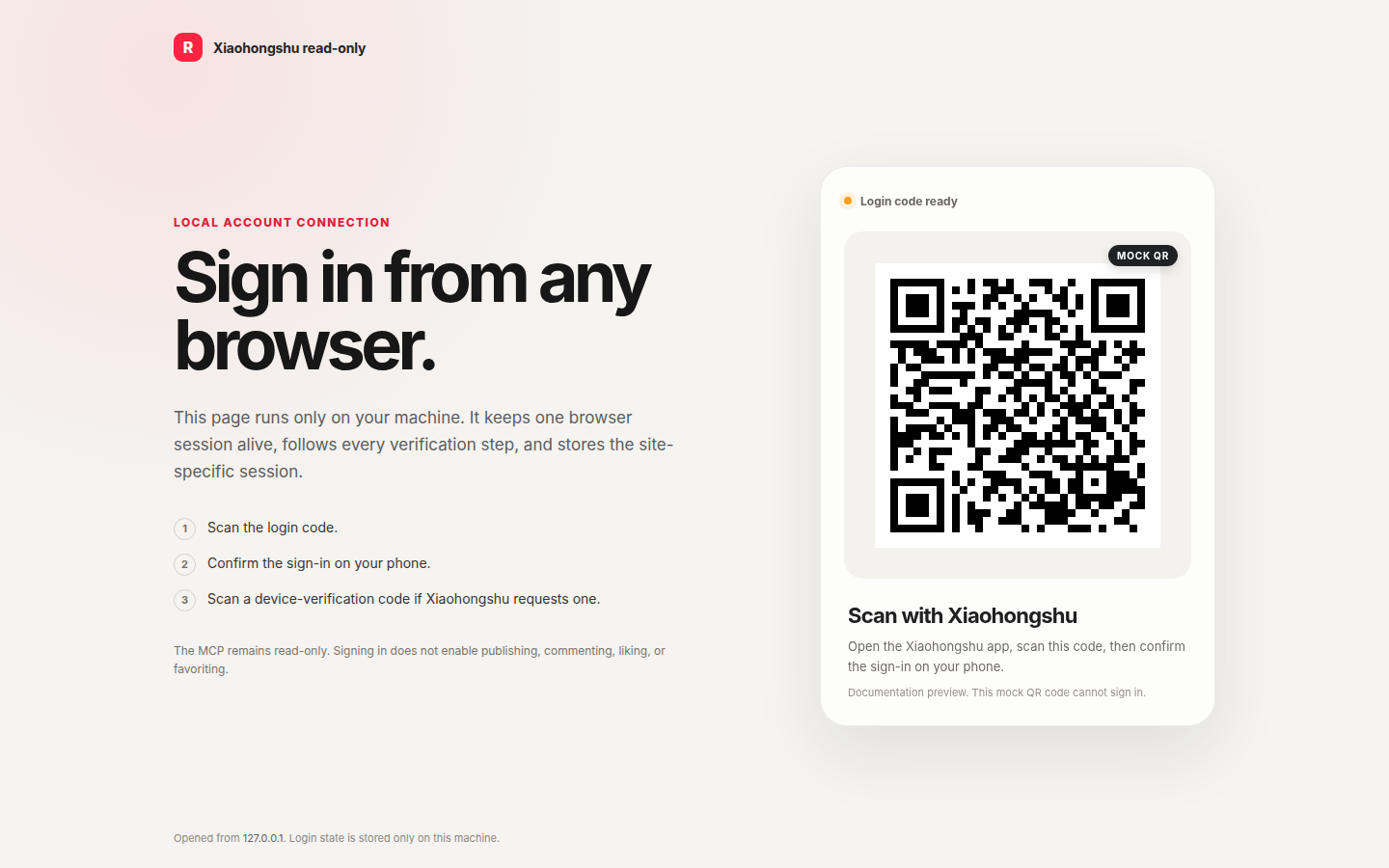
图里的二维码只是示意,不能登录,也不包含真实账号信息。实际登录页只在本机的
http://127.0.0.1:18060/login打开。
快速开始
需要 Go 1.25.13 或更高版本。建议使用专门的测试账号。
Linux 上有 systemd 用户会话时:
git clone https://github.com/sinmentis/xiaohongshu-mcp-readonly.git
cd xiaohongshu-mcp-readonly
./scripts/setup-local --site rednote --agent copilot
海外 RedNote 账号用 --site rednote,中国大陆小红书账号用
--site xiaohongshu。--agent 也可以设为 claude、codex 或 none。
脚本会完成编译、安装和启动,并按需注册 MCP 服务。
然后打开:
http://127.0.0.1:18060/login
在 Copilot CLI 里运行 /mcp,然后直接说:
用 xiaohongshu-readonly 检查一下我有没有登录。
服务会自动选择项目浏览器、系统 Chromium 或 Playwright Chromium。也可以设置
XHS_BROWSER_BIN,只使用自己管理的浏览器。项目浏览器下载会校验仓库固定的
SHA256。
MCP 工具
| 工具 | 用途 |
|---|---|
check_login_status |
检查当前账号是否已经登录。 |
get_login_qrcode |
获取登录或设备验证二维码。 |
list_feeds |
读取首页推荐。 |
search_feeds |
搜索公开笔记。 |
get_feed_detail |
读取笔记、媒体信息和评论。 |
user_profile |
读取公开用户资料和可见笔记。 |
运行时要知道
- 浏览器操作会排队执行,默认最多等 1 分钟。
- 两次操作之间至少间隔 30 秒,并带少量随机延迟。
- 每个操作都有服务端超时,卡住会返回错误,不会无限等。
- 评论读取有数量和滚动速度限制,不适合无人值守的批量采集。
- MCP 同时返回结构化数据、稳定错误码和下一步操作,旧客户端仍可读取文本结果。
- 笔记和用户结果包含不带访问 token 的
sourceUrl,可以用于引用原始页面。 - 出问题先看
curl http://127.0.0.1:18060/health。
详细配置和排查: Copilot CLI · 其他 AI Agent · 故障排查 · HTTP 接口 · 架构 · 安全模型 · 开发和提交代码
安全与说明
Cookie 文件包含完整登录状态,请当成密码,不要上传、分享或写进日志。服务只监听 本机地址并检查 Host、Origin 和 JSON POST,但同一用户运行的本机进程仍在信任 范围内。安全问题请通过 GitHub Security Advisories 私下报告。
这是 xpzouying/xiaohongshu-mcp 的非官方修改版,与小红书、RedNote 及其运营方无关。使用者需要自行承担账号、 数据、访问频率和合规责任。
项目使用 Apache License 2.0。上游来源、协议和署名见 LICENSE、NOTICE 和 docs/upstream.md。
Installing Xiaohongshu Mcp Readonly
This server has no published package — it is built from source. Open the repository and follow its README.
▸ github.com/sinmentis/xiaohongshu-mcp-readonlyFAQ
Is Xiaohongshu Mcp Readonly MCP free?
Yes, Xiaohongshu Mcp Readonly MCP is free — one-click install via Unyly at no cost.
Does Xiaohongshu Mcp Readonly need an API key?
No, Xiaohongshu Mcp Readonly runs without API keys or environment variables.
Is Xiaohongshu Mcp Readonly hosted or self-hosted?
Self-hosted: the server runs locally on your machine via the install command above.
How do I install Xiaohongshu Mcp Readonly in Claude Desktop, Claude Code or Cursor?
Open Xiaohongshu Mcp Readonly on unyly.org, pick your client tab (Claude Desktop, Claude Code, Cursor) and press Install — the config is generated automatically, no JSON editing.
Related MCPs
GitHub
PRs, issues, code search, CI status
 by GitHub
Filesystem
Secure file operations with configurable access controls.
Memory
Knowledge graph-based persistent memory system.
Template MCP Server
A CLI tool to create a new Model Context Protocol server project with TypeScript support, dual transport options, and an extensible structure
 by mcpdotdirect
Amap Maps Mcp Server
MCP server for using the AMap Maps API
 by duxiaohui
Supabase
Database, auth and storage
 by Supabase
Everything
Reference / test server with prompts, resources, and tools.
Git
Tools to read, search, and manipulate Git repositories.
Sequential Thinking
Dynamic and reflective problem-solving through thought sequences.
Time
Time and timezone conversion capabilities.
Compare Xiaohongshu Mcp Readonly with
Not sure what to pick?
Find your stack in 60 seconds
Author?
Embed badge for your README
Browse similar
All development MCPs