
Yutori
FreeNot checkedMCP server enabling web monitoring, deep research, and browser automation through Yutori's web agentic technology.

About
MCP server enabling web monitoring, deep research, and browser automation through Yutori's web agentic technology.
README
MCP tools and skills for web monitoring, deep research, and browser automation — powered by Yutori's web agentic tech.
You can use it with Claude Code, Codex, Cursor, VS Code, ChatGPT, OpenClaw, and other MCP hosts.
Features
Capabilities:
- Scouting — Monitor the web continuously for anything you care about at a desired frequency
- Research — Run one-time deep web research tasks
- Browsing — Automate websites with an AI navigator
Workflow skills (for clients that support slash commands):
- /yutori-scout — Set up continuous web monitoring
- /yutori-research — Deep web research (async, 5–10 min)
- /yutori-browse — Browser automation
- /yutori-competitor-watch — Competitor monitoring template
- /yutori-api-monitor — API/changelog monitoring template
Installation
Requirements
If you don't already have uv installed, install it (it includes uvx):
curl -LsSf https://astral.sh/uv/install.sh | sh
Or with Homebrew:
brew install uv
Python 3.10 or higher is required (uv manages this automatically for most installs).
For the quickstart below, Node.js is also required (for npx).
AI agent install (recommended)
Paste this into Claude Code, Codex, Cursor, Windsurf, or another coding agent:
Use https://yutori.com/api/llms.txt and set up Yutori for me.
Manual quick install
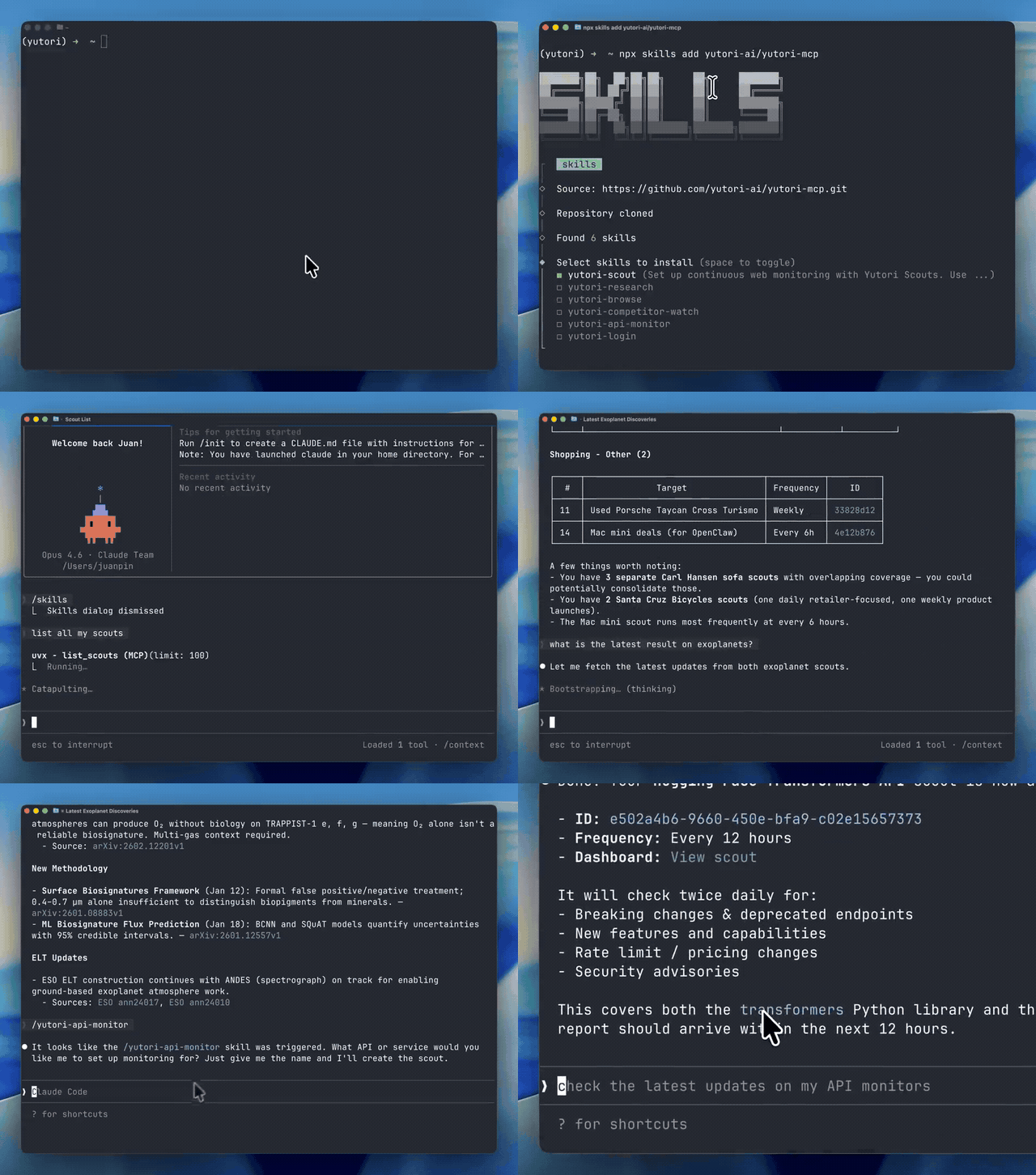
Run in terminal:
uvx yutori-mcp loginThis will open Yutori Platform in your browser and save your API key locally.
Or, manually add your API key
Go to (https://platform.yutori.com) and add your key to the config file:
mkdir -p ~/.yutori
cat > ~/.yutori/config.json << 'EOF'
{"api_key": "yt-your-api-key"}
EOF
Install MCP using add-mcp (requires Node.js):
npx add-mcp "uvx yutori-mcp"Pick the clients you want to configure.
Install workflow skills using skills.sh (requires Node.js):
npx skills add yutori-ai/yutori-mcp -gAdds slash-command shortcuts like
/yutori-scout,/yutori-research, and more.-ginstalls them at user scope. Omit-gif you want a project-local install instead.To list or remove skills later:
npx skills ls -g
npx skills remove -g yutori-login
Restart the tool you are using.
Manual per-client install
Claude Code
Plugin (Recommended) - Includes MCP tools + workflow skills
Type these commands in Claude Code's input (not in a terminal):
/plugin marketplace add yutori-ai/yutori-mcp
/plugin install yutori@yutori-plugins
This installs both the MCP tools and workflow skills:
Skill Description /yutori-scoutSet up continuous web monitoring with comprehensive queries /yutori-researchDeep web research workflow (async, 5-10 min) /yutori-browseBrowser automation tasks /yutori-competitor-watchQuick competitor monitoring template /yutori-api-monitorAPI/changelog monitoring template Already have the MCP server installed? Remove it first to avoid duplicate configurations:
claude mcp remove yutori -s user   # if installed at user scope
claude mcp remove yutori -s local  # if installed at local/project scope
To uninstall the plugin later:
/plugin uninstall yutori@yutori-plugins -s userMCP Only (if you prefer not to use the plugin)
claude mcp add --scope user yutori -- uvx yutori-mcpThe server reads your API key from
~/.yutori/config.json(set up viauvx yutori-mcp login).
Claude Desktop
Add to your claude_desktop_config.json:
{
  "mcpServers": {
    "yutori": {
      "command": "uvx",
      "args": ["yutori-mcp"]
    }
  }
}
The server reads your API key from ~/.yutori/config.json.
For setup details, see the Claude Desktop MCP install guide.
Cursor
Click the button to install:

Or install manually:
Go to Cursor Settings → MCP → Add new MCP Server, then add:
{
  "mcpServers": {
    "yutori": {
      "command": "uvx",
      "args": ["yutori-mcp"]
    }
  }
}
The server reads your API key from ~/.yutori/config.json.
See the Cursor MCP guide for setup details.
VS Code
Click the button to install:


Or install manually:
code --add-mcp '{"name":"yutori","command":"uvx","args":["yutori-mcp"]}'
The server reads your API key from ~/.yutori/config.json.
ChatGPT
Open ChatGPT Desktop and go to Settings -> Connectors -> MCP Servers -> Add server.
{
  "mcpServers": {
    "yutori": {
      "command": "uvx",
      "args": ["yutori-mcp"]
    }
  }
}
The server reads your API key from ~/.yutori/config.json.
For setup details, see the OpenAI MCP guide.
Codex
MCP Server:
codex mcp add yutori -- uvx yutori-mcpOr add to
~/.codex/config.toml:[mcp_servers.yutori] command = "uvx" args = ["yutori-mcp"]The server reads your API key from
~/.yutori/config.json.Skills (optional, for workflow guidance):
Install skills using
$skill-installerinside Codex:$skill-installer install https://github.com/yutori-ai/yutori-mcp/tree/main/.agents/skills/yutori-scout $skill-installer install https://github.com/yutori-ai/yutori-mcp/tree/main/.agents/skills/yutori-research $skill-installer install https://github.com/yutori-ai/yutori-mcp/tree/main/.agents/skills/yutori-browse $skill-installer install https://github.com/yutori-ai/yutori-mcp/tree/main/.agents/skills/yutori-competitor-watch $skill-installer install https://github.com/yutori-ai/yutori-mcp/tree/main/.agents/skills/yutori-api-monitorOr manually copy skills to your user directory (use
-Lso symlinks are dereferenced and real files are copied):git clone https://github.com/yutori-ai/yutori-mcp /tmp/yutori-mcp cp -rL /tmp/yutori-mcp/.agents/skills/* ~/.agents/skills/To uninstall manually copied skills, delete the matching directories from
~/.agents/skills/. When updating this way, remove old Yutori skill directories first, sincecp -rLwill not delete renamed or removed skills.Restart Codex after installing skills.
Skill Command Description Scout $yutori-scoutSet up continuous web monitoring Research $yutori-researchDeep web research (async, 5-10 min) Browse $yutori-browseBrowser automation with AI navigator Competitor Watch $yutori-competitor-watchQuick competitor monitoring template API Monitor $yutori-api-monitorAPI/changelog monitoring template See the Codex Skills docs for more on skills.
OpenClaw
Follow the Quickstart above:
- Install skills and MCP for OpenClaw (and optionally other tools) via skills.sh:
When prompted, choose which Yutori skills to install and select OpenClaw as the tool.npx skills add yutori-ai/yutori-mcp
Gemini CLI
Add to ~/.gemini/settings.json. If you already have mcp or mcpServers, merge these keys into your existing config:
{
  "mcp": {
    "allowed": ["yutori"]
  },
  "mcpServers": {
    "yutori": {
      "command": "uvx",
      "args": ["yutori-mcp"]
    }
  }
}
The server reads your API key from ~/.yutori/config.json.
Add "yutori" to mcp.allowed if you already list other MCPs there. For more details, see the Gemini CLI MCP settings guide.
Run with pip
Install the package to run the MCP server (e.g. for custom or self-hosted setups):
pip install yutori-mcp
Tools
See TOOLS.md for the full tool reference — Scout, Research, and Browsing tools with parameters, examples, and response formats.
Development
Setup
git clone https://github.com/yutori-ai/yutori-mcp
cd yutori-mcp
pip install -e ".[dev]"
Testing
pytest
Running locally
yutori-mcp login    # authenticate (one-time)
yutori-mcp          # run the server (or: python -m yutori_mcp.server)
Debugging with MCP Inspector
npx @modelcontextprotocol/inspector yutori-mcp
API Documentation
For full API documentation, visit docs.yutori.com.
License
Apache 2.0
Install Yutori in Claude Desktop, Claude Code & Cursor
unyly install yutori-mcpInstalls into Claude Desktop, Claude Code, Cursor & VS Code — handles npx, uvx and build-from-source repos for you.
First time? Get the CLI: curl -fsSL https://unyly.org/install | sh
Or configure manually
Run in your terminal:
claude mcp add yutori-mcp -- uvx yutori-mcpFAQ
Is Yutori MCP free?
Yes, Yutori MCP is free — one-click install via Unyly at no cost.
Does Yutori need an API key?
No, Yutori runs without API keys or environment variables.
Is Yutori hosted or self-hosted?
A hosted option is available: Unyly runs the server in the cloud, no local setup required.
How do I install Yutori in Claude Desktop, Claude Code or Cursor?
Open Yutori on unyly.org, pick your client tab (Claude Desktop, Claude Code, Cursor) and press Install — the config is generated automatically, no JSON editing.
Related MCPs
Playwright
Browser automation, scraping, screenshots
 by Microsoft
Puppeteer
Browser automation and web scraping.
 by modelcontextprotocol
opentabs-dev/opentabs
Plugin-based MCP server + Chrome extension that gives AI agents access to web applications through the user's authenticated browser session. 100+ plugins with a
 by opentabs-dev
robhunter/agentdeals
1,500+ developer infrastructure deals, free tiers, and startup programs across 54 categories. Search deals, compare vendors, plan stacks, and track pricing chan
 by robhunter
Compare Yutori with
Not sure what to pick?
Find your stack in 60 seconds
Author?
Embed badge for your README
Browse similar
All browse MCPs