
Zaragoza Tram
FreeNot checkedProvides real-time tram arrival estimations and station listings for Zaragoza's public transportation system through the DNDzgz API.

About
Provides real-time tram arrival estimations and station listings for Zaragoza's public transportation system through the DNDzgz API.
README
This is an MCP (Model Context Protocol) server that provides information about the Zaragoza tram system, including real-time tram arrival estimations and station information using the DNDzgz API.
Installation
- Clone the repository:
git clone https://github.com/danilat/mcp-dndzgz.git
cd mcp-dndzgz
- Install dependencies:
npm install
Running the Application
Add a the environment variable with a valid google maps api key and run it with the http transport
GOOGLE_MAPS_API_KEY=your-api-key npm start:http
The server will start you should configure yout MCP client to connect.
Or start the server using stdio trasport:
Configure in your MCP client using npx, for example:
{
    "mcpServers": {
      "dndzgz": {
        "command": "npx @dndzgz/mcp",
        "env": {
          "GOOGLE_MAPS_API_KEY": "your-api-key"
        }
      }
    }
}
The server will start and connect to the MCP server.
Available Tools
The server provides the following tools:
zaragoza-tram-estimations: Get real-time arrival estimations for a specific tram station- Parameters:
station(number): ID of the tram station
- Returns: JSON with estimated arrival times for both directions
- Parameters:
zaragoza-tram-stations: Get a list of all tram stations in Zaragoza- Parameters:
latitude(number): Latitude to sort stations by proximitylongitude(number): Longitude to sort stations by proximity
- Returns: JSON with station information including location, name, and ID
- Parameters:
zaragoza-bus-stops: Get all bus stops in Zaragoza- Parameters:
latitude(number): Latitude to sort stops by proximitylongitude(number): Longitude to sort stops by proximity
- Returns: JSON with bus stop locations, names, IDs, and lines
- Parameters:
zaragoza-bus-estimations: Get real-time arrival estimations for a specific bus stop- Parameters:
stop(number): ID of the bus stop
- Returns: JSON with estimated arrival times for each line serving that stop
- Parameters:
zaragoza-bizi-stations: Get all Bizi stations in Zaragoza (public bicycle rental service)- Parameters:
latitude(number): Latitude to sort stations by proximitylongitude(number): Longitude to sort stations by proximity
- Returns: JSON with Bizi station locations, names, and IDs
- Parameters:
zaragoza-bizi-estimations: Get real-time availability of bikes and free slots in a Bizi station- Parameters:
station(number): ID of the Bizi station
- Returns: JSON with bikes and parking slot availability
- Parameters:
google-maps-link: Get a Google Maps link for a specific location- Parameters:
latitude(number): Latitude of the locationlongitude(number): Longitude of the location
- Returns: Google Maps URL showing the specified location
- Parameters:
geolocation-from-address: Get the geolocation (latitude and longitude) from an address and the formatted address that was found- Parameters:
address(string): The address to geolocate (e.g., "Plaza de San Francisco, Zaragoza, Spain")
- Returns: JSON with latitude, longitude, confidence level, and formatted address
- Parameters:
Dependencies
- @modelcontextprotocol/sdk: ^1.9.0
Example
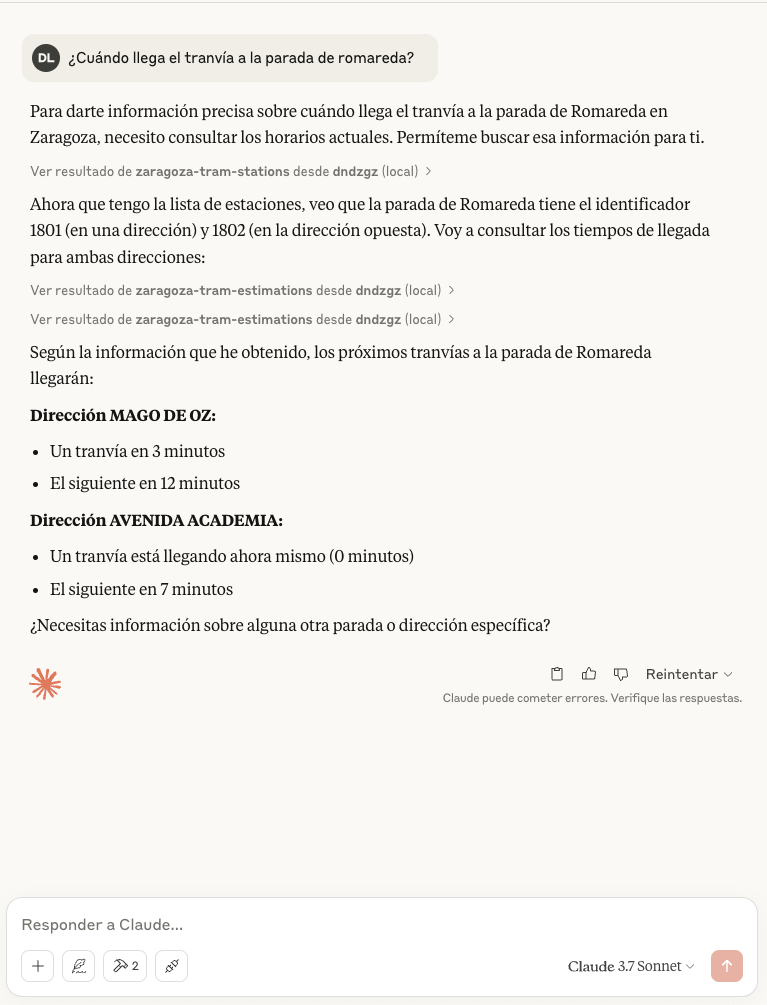
There is an screenshot with example using Claude Desktop
Installing Zaragoza Tram
This server has no published package — it is built from source. Open the repository and follow its README.
▸ github.com/danilat/mcp-dndzgzFAQ
Is Zaragoza Tram MCP free?
Yes, Zaragoza Tram MCP is free — one-click install via Unyly at no cost.
Does Zaragoza Tram need an API key?
No, Zaragoza Tram runs without API keys or environment variables.
Is Zaragoza Tram hosted or self-hosted?
Self-hosted: the server runs locally on your machine via the install command above.
How do I install Zaragoza Tram in Claude Desktop, Claude Code or Cursor?
Open Zaragoza Tram on unyly.org, pick your client tab (Claude Desktop, Claude Code, Cursor) and press Install — the config is generated automatically, no JSON editing.
Related MCPs
GitHub
PRs, issues, code search, CI status
 by GitHub
Filesystem
Secure file operations with configurable access controls.
Memory
Knowledge graph-based persistent memory system.
Template MCP Server
A CLI tool to create a new Model Context Protocol server project with TypeScript support, dual transport options, and an extensible structure
 by mcpdotdirect
Compare Zaragoza Tram with
Not sure what to pick?
Find your stack in 60 seconds
Author?
Embed badge for your README
Browse similar
All development MCPs