
Zephyr
FreeNot checkedEnables reading test cases and test steps from Zephyr Scale using the Zephyr Scale API.

About
Enables reading test cases and test steps from Zephyr Scale using the Zephyr Scale API.
README
Agentic test generation for eZRX+ — converts Zephyr Scale test cases into Playwright integration tests using Claude Code or Codex.
What this repo does
- Runs a Zephyr Scale MCP server to fetch test cases and steps.
- Runs a code-review-graph MCP server to index the frontend codebase for token-efficient context loading.
- Provides a
/write-integration-testcommand that Claude Code reads from.claude/commands/— no global config needed.
All generated tests are written into datasource/frontend/ (a local clone of
the frontend repo). Nothing is installed or modified in the real frontend repo.
Requirements
- Node.js 20.6 or later
- Python 3.10 or later with
code-review-graphinstalled:pip install code-review-graph - Claude Code CLI or Codex CLI
- Git Bash or WSL on Windows
Setup (first time)
1. Clone and enter the repo
git clone <repository-url>
cd zephyr-test-zuellig-agentic
2. Create .env
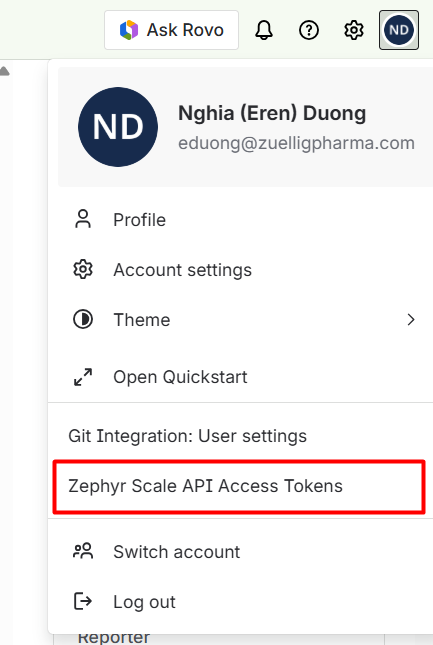
Get a Zephyr Scale API token:
- Sign in to Jira.
- Open profile menu → Zephyr Scale API Access Tokens.
- Create a token and copy it.
Then:
cp .env.example .env
Fill in the values:
ZEPHYR_API_TOKEN=your-zephyr-api-token
FRONTEND_REPO_URL=https://github.com/your-org/frontend.git
.env is gitignored — do not commit your token.
3. Run setup
./setup.sh
This will:
- Clone
FRONTEND_REPO_URLintodatasource/frontend/ - Build the code-review-graph index for the frontend
- Build the Zephyr MCP server from source
- Generate
.mcp.jsonfor Claude Code project-level MCP
4. Open in Claude Code
Open the zephyr-test-zuellig-agentic/ folder in Claude Code (not datasource/frontend/).
Claude Code auto-loads .mcp.json — both MCP servers start automatically.
Verify:
/mcp
Both zephyr and code-review-graph should show as connected.
Daily usage
Write a test from a Zephyr TC
/write-integration-test EZRX-T10000
Claude will:
- Fetch the TC name, objective, and steps from Zephyr
- Search the codebase graph for relevant page objects and similar specs
- Generate the spec file (and any new page object methods / locators needed)
- Run
tsc --noEmitandplaywright test --listto verify
Generated files land in datasource/frontend/integration_test/. Commit and push from there.
Update the graph after local changes
When you edit files in datasource/frontend/ and want Claude to see the changes:
./update-graph.sh
Pull latest frontend + update graph
git -C datasource/frontend pull --ff-only
./update-graph.sh
Troubleshooting
.mcp.json missing — run ./setup.sh to regenerate it.
datasource/frontend missing — run ./setup.sh to clone the frontend repo.
MCP not connected — restart Claude Code after setup.sh completes, then check /mcp.
ZEPHYR_API_TOKEN error — make sure .env exists and ZEPHYR_API_TOKEN is set.
code-review-graph not found — run pip install code-review-graph.
Development
npm run typecheck
npm run build
Zephyr MCP source is in src/; compiled output goes to build/.
from github.com/Sotatek-NghiaDuong2/zephyr-test-zuellig-agentic
Install Zephyr in Claude Desktop, Claude Code & Cursor
unyly install zephyr-mcpInstalls into Claude Desktop, Claude Code, Cursor & VS Code — handles npx, uvx and build-from-source repos for you.
First time? Get the CLI: curl -fsSL https://unyly.org/install | sh
Or configure manually
Run in your terminal:
claude mcp add zephyr-mcp -- npx -y github:Sotatek-NghiaDuong2/zephyr-test-zuellig-agenticFAQ
Is Zephyr MCP free?
Yes, Zephyr MCP is free — one-click install via Unyly at no cost.
Does Zephyr need an API key?
No, Zephyr runs without API keys or environment variables.
Is Zephyr hosted or self-hosted?
A hosted option is available: Unyly runs the server in the cloud, no local setup required.
How do I install Zephyr in Claude Desktop, Claude Code or Cursor?
Open Zephyr on unyly.org, pick your client tab (Claude Desktop, Claude Code, Cursor) and press Install — the config is generated automatically, no JSON editing.
Related MCPs
GitHub
PRs, issues, code search, CI status
 by GitHub
Filesystem
Secure file operations with configurable access controls.
Memory
Knowledge graph-based persistent memory system.
Template MCP Server
A CLI tool to create a new Model Context Protocol server project with TypeScript support, dual transport options, and an extensible structure
 by mcpdotdirect
Compare Zephyr with
Not sure what to pick?
Find your stack in 60 seconds
Author?
Embed badge for your README
Browse similar
All development MCPs