
Zotero Fulltext
FreeNot checkedMCP server that grants AI tools read-only access to a Zotero library via search, citekey lookup, and on-demand fulltext retrieval, with low token usage and supp

About
MCP server that grants AI tools read-only access to a Zotero library via search, citekey lookup, and on-demand fulltext retrieval, with low token usage and support for Claude Code, Claude Desktop, and Codex.
README
Access your Zotero library with your favorite AI tool.
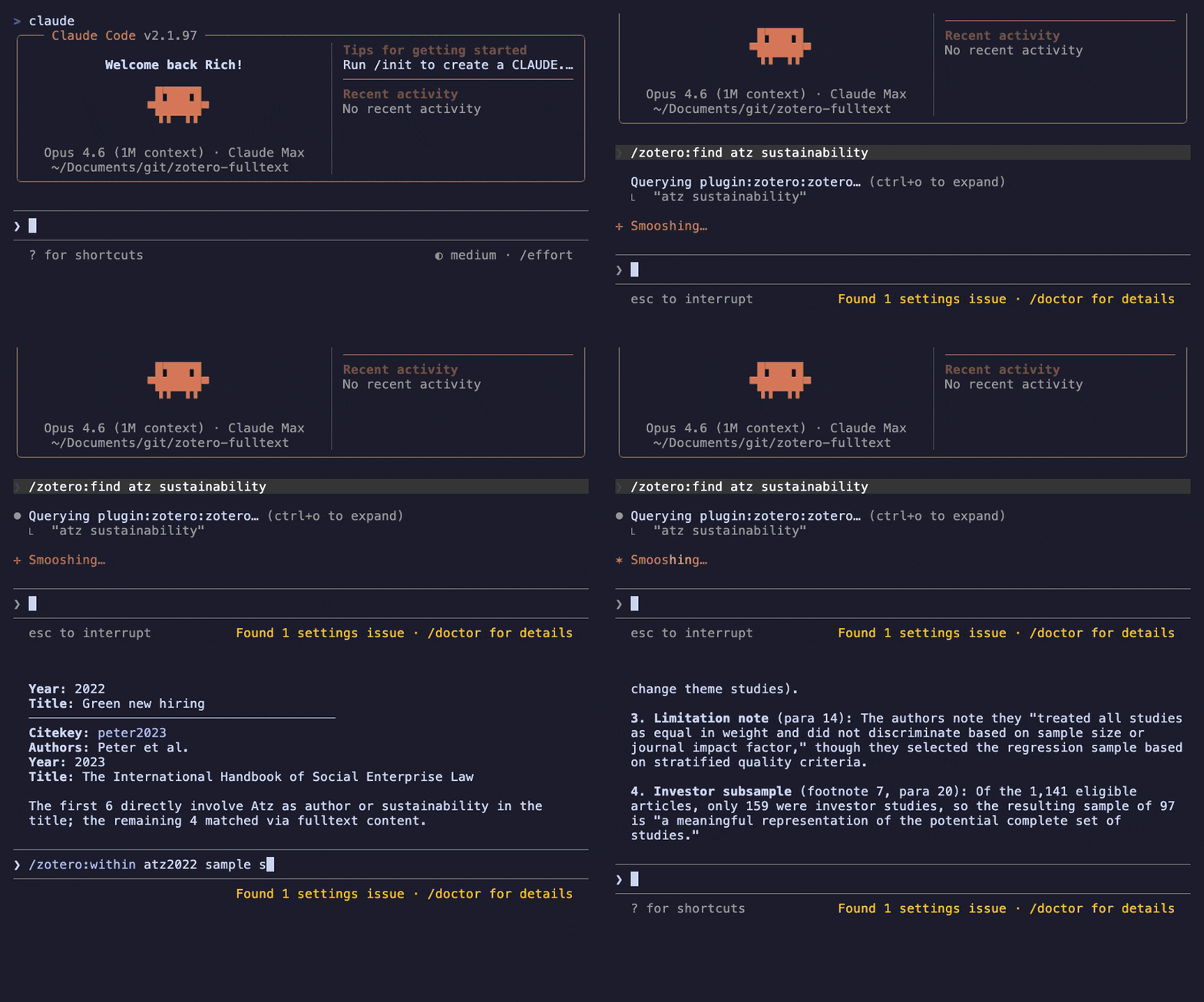
This MCP server for Zotero 8+ gives Claude and Codex access to your library via search and citekeys. It talks directly to Zotero's local API and aims to keep token usage low. Fulltext is fetched only on demand.
Quick Start
- Make sure Zotero 8+ is running with the local API enabled (Settings → Advanced → "Allow other applications on this computer to communicate with Zotero").
- Install the Claude Code plugin:
/plugin marketplace add statzhero/zotero-fulltext
/plugin install zotero@zotero-fulltext
- Run
/mcpto confirm the server is connected, then try a slash command:
/zotero:find sustainability reporting
Also works with Claude Desktop, Codex, and as a standalone MCP server without slash commands.
Commands
The Claude Code plugin provides four slash commands:
| Command | What it does |
|---|---|
/zotero:find <query> |
Search the whole library |
/zotero:lookup <citekey> |
Exact citekey metadata lookup |
/zotero:read <citekey> |
Numbered fulltext paragraphs |
/zotero:within <citekey> <query> |
Search inside one paper's fulltext |
find searches the whole library. lookup is lightweight metadata confirmation. read returns the actual paper text. within searches only one item's indexed fulltext.
Without the plugin, all the same functionality is available through the MCP tools directly (see Tools).
Installation
Claude Code (plugin with slash commands)
/plugin marketplace add statzhero/zotero-fulltext
/plugin install zotero@zotero-fulltext
This installs the MCP server and slash commands. Run /mcp to confirm the server is connected.
Claude Desktop
Requires uv (install with brew install uv or curl -LsSf https://astral.sh/uv/install.sh | sh).
Open Claude Desktop → Settings → Developer → Edit Config, and add:
{
  "mcpServers": {
    "zotero": {
      "type": "stdio",
      "command": "uvx",
      "args": ["zotero-fulltext"]
    }
  }
}
Save the file, then fully quit and reopen Claude Desktop (closing the window is not enough). Open a new chat and confirm the server is available.
Codex (plugin with skills)
Note: The Codex plugin marketplace is still rolling out. The install flow below may change.
codex plugin marketplace add statzhero/zotero-fulltext
codex plugin install zotero
This installs the MCP server and four skills (find, lookup, read, within).
Codex (manual MCP only)
Requires uv (install with brew install uv or curl -LsSf https://astral.sh/uv/install.sh | sh).
Add to ~/.codex/config.toml:
[mcp_servers.zotero]
command = "uvx"
args = ["zotero-fulltext"]
Restart Codex, then run codex mcp list to verify the server appears.
Design
The server is intentionally simple and read-only. It relies on Zotero's own search index rather than building a second one.
- Startup builds a metadata index mapping citekeys to items and attachments.
- Library changes are tracked with Zotero version headers and incremental sync.
- Fulltext is fetched only on demand and cached in memory (TTL/LRU).
- All outputs are bounded by default: 10 search hits, 80 paragraphs with a character budget, 20 fulltext matches.
- Item results include
item_uriandfulltext_uriso clients can attach standardzotero://...resources directly. - Creator roles (author, editor, translator, etc.) are preserved and grouped in results.
- If a lookup finds no citekey, it returns
found=false. If a search finds nothing, it returnsresults=[]. There is no web fallback.
Tools
The server exposes five MCP tools. The slash commands above are convenience wrappers.
lookup(citekey)
Exact citekey lookup. Citekeys are resolved in order:
- Native Zotero 8
citationKey - Legacy Better BibTeX
Citation Key:line inExtra - Deterministic generated fallback
If an item later gains a real citekey, the generated key is kept as an alias.
search(query, collection?, tag?, limit?)
Searches Zotero with qmode=everything, collapses attachment hits to parent items, and ranks exact citekey matches first.
collections()
Lists collections in the current library.
fulltext(citekey, offset?, limit?)
Fetches indexed attachment fulltext, splits it into numbered paragraphs, and returns a bounded slice (default: 80 paragraphs). Large extracted paragraphs are split into smaller chunks, and each response has a soft character budget. If the response includes truncated=true, request the same citekey again with offset=next_offset to continue reading.
Fulltext responses include paging metadata:
| Field | Meaning |
|---|---|
paragraph_count |
Total available paragraph chunks for the item |
returned_count |
Number of paragraph chunks in this response |
returned_chars |
Approximate text characters returned |
max_chars |
Character budget used for this response |
truncated |
Whether more paragraph chunks remain |
next_offset |
Offset to pass into the next fulltext call, or null when complete |
fulltext_search(citekey, query, before?, after?, limit?)
Searches within a single item's paragraphized fulltext and returns matching paragraphs with surrounding context.
Environment Variables
By default the server connects to a local personal library with no authentication. Set these variables to change that:
| Variable | Default | Description |
|---|---|---|
ZOTERO_LIBRARY_TYPE |
user |
user for personal libraries, group for group libraries |
ZOTERO_LIBRARY_ID |
0 |
Zotero user or group ID (required for group libraries) |
ZOTERO_API_KEY |
— | API key for authenticated or remote access |
ZOTERO_API_BASE_URL |
http://127.0.0.1:23119/api |
Base URL for the Zotero API |
ZOTERO_MAX_PARAGRAPH_CHARS |
1800 |
Maximum characters per returned fulltext chunk |
ZOTERO_MAX_FULLTEXT_CHARS |
60000 |
Soft character budget for each fulltext response; continue with next_offset |
Example for a group library in Claude Code:
{
  "mcpServers": {
    "zotero": {
      "type": "stdio",
      "command": "zotero-fulltext",
      "env": {
        "ZOTERO_LIBRARY_TYPE": "group",
        "ZOTERO_LIBRARY_ID": "12345"
      }
    }
  }
}
Related Projects
Other MCP servers for Zotero, with different design goals:
- 54yyyu/zotero-mcp — Feature-rich: read-write operations, optional semantic search via ChromaDB, Web API support. Heavier dependencies.
- kujenga/zotero-mcp — Minimal read-only server with Web API support via pyzotero. No citekey resolution or in-document search.
- kaliaboi/mcp-zotero — Cloud-only (Zotero Web API). Metadata browsing, no fulltext.
To remove an existing Zotero MCP server before switching:
claude mcp remove zotero
Or delete the zotero entry from .mcp.json / claude_desktop_config.json / ~/.codex/config.toml manually.
Requirements
- Zotero 8+ with the local API enabled
- Python 3.11+
- Better BibTeX (optional but recommended)
License
MIT • Ulrich Atz (ulrichatz)
Install Zotero Fulltext in Claude Desktop, Claude Code & Cursor
unyly install zotero-fulltextInstalls into Claude Desktop, Claude Code, Cursor & VS Code — handles npx, uvx and build-from-source repos for you.
First time? Get the CLI: curl -fsSL https://unyly.org/install | sh
Or configure manually
Run in your terminal:
claude mcp add zotero-fulltext -- uvx zotero-fulltextFAQ
Is Zotero Fulltext MCP free?
Yes, Zotero Fulltext MCP is free — one-click install via Unyly at no cost.
Does Zotero Fulltext need an API key?
No, Zotero Fulltext runs without API keys or environment variables.
Is Zotero Fulltext hosted or self-hosted?
Self-hosted: the server runs locally on your machine via the install command above.
How do I install Zotero Fulltext in Claude Desktop, Claude Code or Cursor?
Open Zotero Fulltext on unyly.org, pick your client tab (Claude Desktop, Claude Code, Cursor) and press Install — the config is generated automatically, no JSON editing.
Related MCPs
GitHub
PRs, issues, code search, CI status
 by GitHub
Filesystem
Secure file operations with configurable access controls.
Memory
Knowledge graph-based persistent memory system.
Template MCP Server
A CLI tool to create a new Model Context Protocol server project with TypeScript support, dual transport options, and an extensible structure
 by mcpdotdirect
Compare Zotero Fulltext with
Not sure what to pick?
Find your stack in 60 seconds
Author?
Embed badge for your README
Browse similar
All development MCPs