
Agentcore Tip
БесплатноНе проверенA Zero-Trust Model Context Protocol (MCP) broker bridging Amazon Bedrock AgentCore to AWS Lake Formation using Trusted Identity Propagation (TIP).

Описание
A Zero-Trust Model Context Protocol (MCP) broker bridging Amazon Bedrock AgentCore to AWS Lake Formation using Trusted Identity Propagation (TIP).
README
Integration gap (November 2026): AWS does not provide a native Amazon Bedrock AgentCore-to-IAM Identity Center integration for end-to-end Trusted Identity Propagation to Lake Formation. This solution fills that gap. If AWS introduces native integration in the future, the underlying data-permission model can remain unchanged: it is independent of the agentic flow, with user- and group-level data authorization enforced by Lake Formation, subject to the broker's IAM and session-policy limits.
A Zero-Trust Model Context Protocol (MCP) Broker bridging Amazon Bedrock AgentCore to AWS Lake Formation using Trusted Identity Propagation (TIP).
AgentCore-TIP-MCP-Broker is a deterministic policy enforcement point (PEP) for carrying a user's identity from an authenticated agent session to AWS data services. It is designed to keep identity exchange, session state, and data access under explicit policy controls rather than granting an agent ambient data permissions.
Video demo
Watch the AgentCore-TIP-MCP-Broker demo on YouTube
Showcase repository: Lakehouse Claims Agent MVP.
Security model
- Private M2M path: In the intended deployment, Plane B runs on AWS Fargate behind a private API Gateway with IAM authorization. AWS infrastructure verifies the signed request; the broker does not implement custom Python SigV4 or presigned-URL verification.
- Opaque session handoff: MCP tools accept an opaque
session_ref, not raw IDP bearer tokens or AWS access keys. Identity ingestion and data-plane execution are separate flows. - Short-lived, scoped access: The broker uses AWS STS credentials for downstream calls and applies least-privilege policy to the requested data scope.
- Read-only SQL validation: SQL validation is performed with
sqlglot; only supported read-onlySELECT/WITHqueries should reach the data plane. - No model calls in the PEP: The broker is a deterministic gateway. LLM reasoning belongs in the Bedrock AgentCore client/agent.
The private API Gateway and Fargate boundary are deployment requirements, not resources created by the IAM examples in this repository. Adapt the supplied IAM templates and deployment guidance to your AWS account and network.
Architecture
Bedrock AgentCore
    |
    | IAM-authenticated request
    v
Private API Gateway
    |
    v
 Lambda
    |
    v
Fargate PEP ( Plane B MCP execution)
    |
    | short-lived, down-scoped AWS credentials
    v
Athena + Lake Formation / Glue / S3 Access Grants
The identity provider token is used only in the identity-ingestion flow. After establishing the identity context, the agent-to-PEP tool handoff uses the opaque session reference. AWS-managed IAM authorization protects the private M2M ingress; do not expose the Fargate service directly.
Example end-to-end integration flow
The following diagram illustrates the broker integrated with a claims-data application. It is an example deployment; this repository's intended M2M ingress is a private API Gateway with IAM authorization. AWS validates the signed request at the gateway before routing it to the PEP.
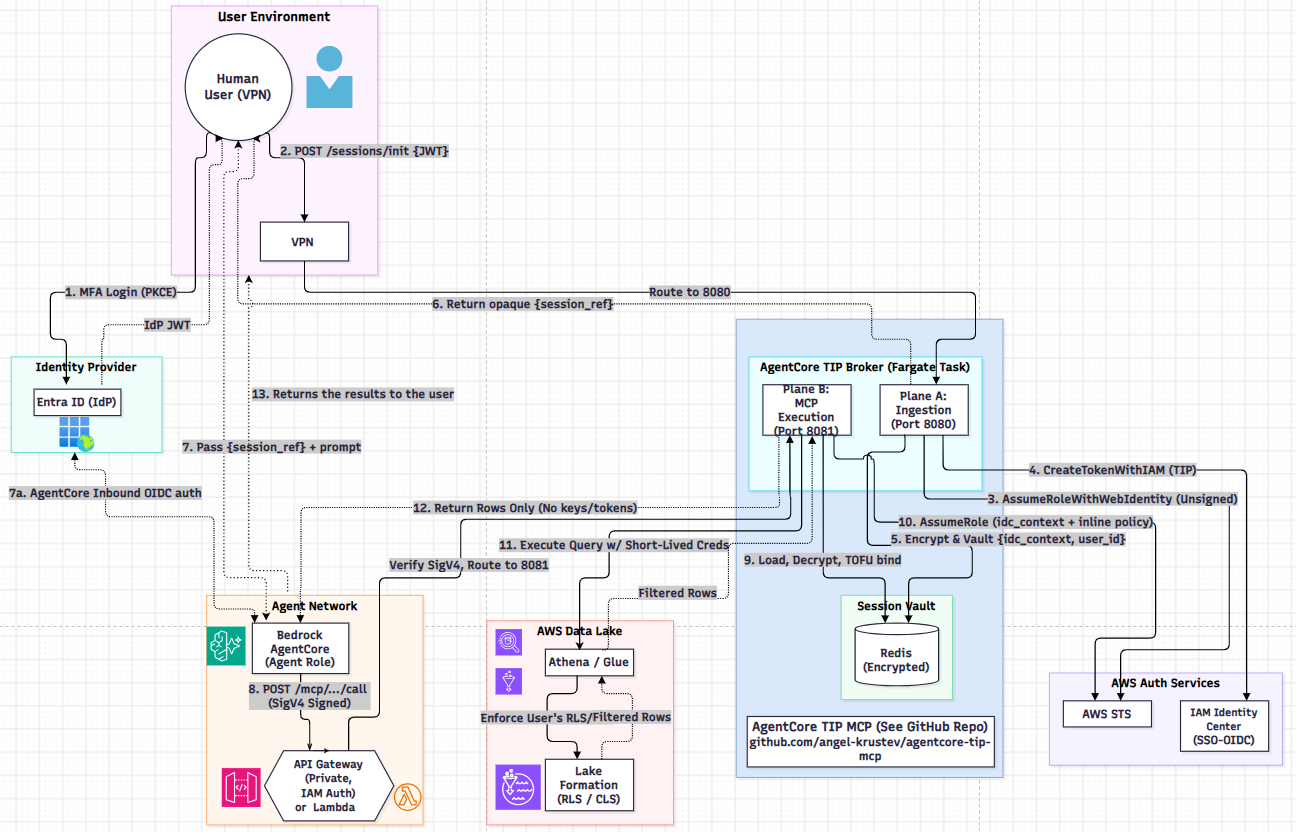
The diagram labels 13 flow steps, with an additional inbound-authentication step marked 7a:
MFA login: The user signs in to Entra ID with PKCE and receives an identity-provider JWT.
Initialize the session: The application posts the JWT to
/sessions/initthrough the VPN load balancer.Assume the web identity: The broker uses the identity-provider token with AWS STS
AssumeRoleWithWebIdentityto establish the user's AWS identity.Create the TIP token: The broker calls
CreateTokenWithIAMto obtain the Trusted Identity Propagation token.Encrypt and vault the session context: The broker encrypts and stores the identity-center context and user ID in the session vault.
Return the opaque session reference: The broker returns
session_refto the user environment; the JWT is not passed to the agent.Send the prompt to the agent: The user environment passes
session_refand the prompt to the Bedrock AgentCore agent.7a. Authenticate inbound to AgentCore: AgentCore performs inbound OIDC authentication for the agent request. Recommendation: use a different audience for AgentCore than for PEP session initialization, even when both are for the same app.
Call the MCP endpoint: The agent sends a SigV4-signed MCP request through private API Gateway & Proxy Lambda. AWS validates IAM authorization at the gateway, which routes the request to Plane B on port 8081.
Load and bind the session: Plane B loads and decrypts the session data from the encrypted Redis vault, then binds the session to the first agent role (TOFU).
Assume the scoped role: The broker assumes an AWS role using the identity-center context and inline policy.
Execute the query: The broker queries Athena/Glue using short-lived credentials. Lake Formation enforces the user's row-level security and filters.
Return authorized rows: Only filtered rows, without keys or tokens, are returned from the data layer.
Return results to the user: The results are returned to the user environment.
Repository layout
agentcore_tip/— PEP runtime, identity strategies, SQL guard, and AWS integrations.agentcore-tip-client/— optional OIDC client package.iam/— Terraform and CloudFormation IAM examples, including Project tags.docs/— architecture, integration, and deployment guidance..github/workflows/— ARM64 ECR build/test and manual image-promotion workflows.
The IAM templates cover identity and data-plane roles; they are not a complete API Gateway, VPC, ECS/Fargate, or CloudTrail deployment.
Requirements
- Python 3.10 or newer for local development.
- AWS account access configured for your deployment environment.
- Entra ID, IAM Identity Center, and the target account's IAM OIDC provider configured for TIP. Complete the Entra ID and AWS identity setup prerequisites before deploying the broker.
- AWS services and permissions appropriate to your workload (for example, Bedrock, Athena, Lake Formation, Glue, and S3).
The container workflow builds a Linux ARM64 image with Python 3.12.
Local development
Create and activate a virtual environment, then install the project dependencies:
python -m venv .venv
source .venv/bin/activate
python -m pip install -e .
The default distribution is pure Python.
On Windows, activate with .venv\Scripts\Activate.ps1.
Configure the required values for your environment using .env.example as a reference. Do not commit credentials, tokens, account-specific secrets, or populated .env files.
Start the PEP locally:
python -m agentcore_tip.core.pep_server
Run the unit tests offline:
python -m pytest
Unit tests should use mocks or Botocore stubs and must not require ambient AWS credentials or live identity-provider tokens.
AWS infrastructure and deployment
Review the architecture and deployment topologies.
Follow the Entra ID and AWS identity setup guide to configure the identity prerequisites and required IAM role inputs for your account. The Terraform and CloudFormation examples tag supported resources with
Project: AgentCore-TIP-MCP-Broker.Deploy the broker in a private network. Restrict its ingress to private API Gateway with IAM authorization, and run it as a non-root Fargate task.
Configure the GitHub Actions OIDC role and the repository secret
AWS_ROLE_ARN.Create the private ECR repositories, if needed, using the default AWS profile:
./scripts/setup-ecr-repos.shPush to
mainto run the ECR build/test workflow. It builds and pushes an ARM64 test image. Use the manual ECR Promote workflow only after validating the test image.
The setup script defaults to AWS CLI profile default and region us-east-1; set AWS_PROFILE or AWS_REGION to override those values. ECR images are private by default. Publishing source code publicly does not make the container image public.
Configuration and operations
See .env.example for supported environment variables. Set only values required by your deployment and source credentials through AWS-managed identity mechanisms rather than embedding them in environment files.
The supplied ECR workflows use GitHub Actions OIDC for AWS credentials and do not require long-lived AWS keys in GitHub secrets. The AWS role must be narrowly scoped to the specific repositories and actions required by the workflow.
License
Apache-2.0. See LICENSE.
Установка Agentcore Tip
У этого сервера нет опубликованного пакета — он собирается из исходников. Открой репозиторий и следуй инструкции в README.
▸ github.com/angel-krustev/agentcore-tip-mcpFAQ
Agentcore Tip MCP бесплатный?
Да, Agentcore Tip MCP бесплатный — установка в пару кликов через Unyly без оплаты.
Нужен ли API-ключ для Agentcore Tip?
Нет, Agentcore Tip работает без API-ключей и переменных окружения.
Agentcore Tip — hosted или self-hosted?
Self-hosted: сервер запускается локально на твоей машине командой из раздела установки.
Как установить Agentcore Tip в Claude Desktop, Claude Code или Cursor?
Открой Agentcore Tip на unyly.org, выбери вкладку своего клиента (Claude Desktop, Claude Code, Cursor) и нажми Install — конфиг сгенерируется автоматически, без правки JSON.
Похожие MCP
GitHub
PRs, issues, code search, CI status
 автор: GitHub
Filesystem
Secure file operations with configurable access controls.
Memory
Knowledge graph-based persistent memory system.
Template MCP Server
A CLI tool to create a new Model Context Protocol server project with TypeScript support, dual transport options, and an extensible structure
 автор: mcpdotdirect
Server Sequential Thinking
MCP server for sequential thinking and problem solving
 автор: GitHub Actions

Unyly Deploy
Deploy sites and MCP servers to Unyly straight from your AI agent
 автор: Unyly
Amap Maps Mcp Server
MCP server for using the AMap Maps API
 автор: duxiaohui
PayMCP
Lightweight payments layer for MCP servers: turn tools into paid endpoints with a two-line decorator. [PyPI](https://pypi.org/project/paymcp/) · [npm](https://w
 автор: blustAI
Server For Power BI
Enables exploring Microsoft Fabric / Power BI workspaces and semantic models, and executing ad-hoc DAX queries.
 автор: Mitsubishi-Fuso
Gpt Image 2 Mcp
RunAPI GPT Image 2 MCP server for image generation: create tasks, poll results, and check pricing across 1 model from Claude Code, Codex, Cursor, and VS Code.
 автор: runapi-ai
Compare Agentcore Tip with
Не уверен что выбрать?
Найди свой стек за 60 секунд
Автор?
Embed-бейдж для README
Похожее
Все в категории development