
ASCII Table Server
БесплатноНе проверенMCP server for generating properly aligned ASCII, Unicode box-drawing, and Markdown tables, with correct width measurement for Thai, Pali, and CJK characters us

Описание
MCP server for generating properly aligned ASCII, Unicode box-drawing, and Markdown tables, with correct width measurement for Thai, Pali, and CJK characters using wcwidth.
README
Beautiful tables in terminal code blocks AND as polished images — with native Thai, Pali, Roman, CJK, and emoji support.
+------------+------------------+--------+----------------------+
| Pali       | Roman            | Type   | Meaning              |
+------------+------------------+--------+----------------------+
| ปฏิจจสมุปฺปาท | paṭiccasamuppāda | Dhamma | Dependent origination |
| กามจฺฉนฺท    | kāmacchanda      | Nīvaraṇa | Sensual desire       |
| อวิชฺชา      | avijjā           | Kilesa | Ignorance            |
+------------+------------------+--------+----------------------+
Thai + Roman + numbers → pixel-perfect alignment, every row.
🌐 Try it in your browser! → ASCII Table → Image Generator
Paste CSV, pick a style, export as PNG / SVG / Grid / Box / Pipe. Thai + emoji ready. No install needed.
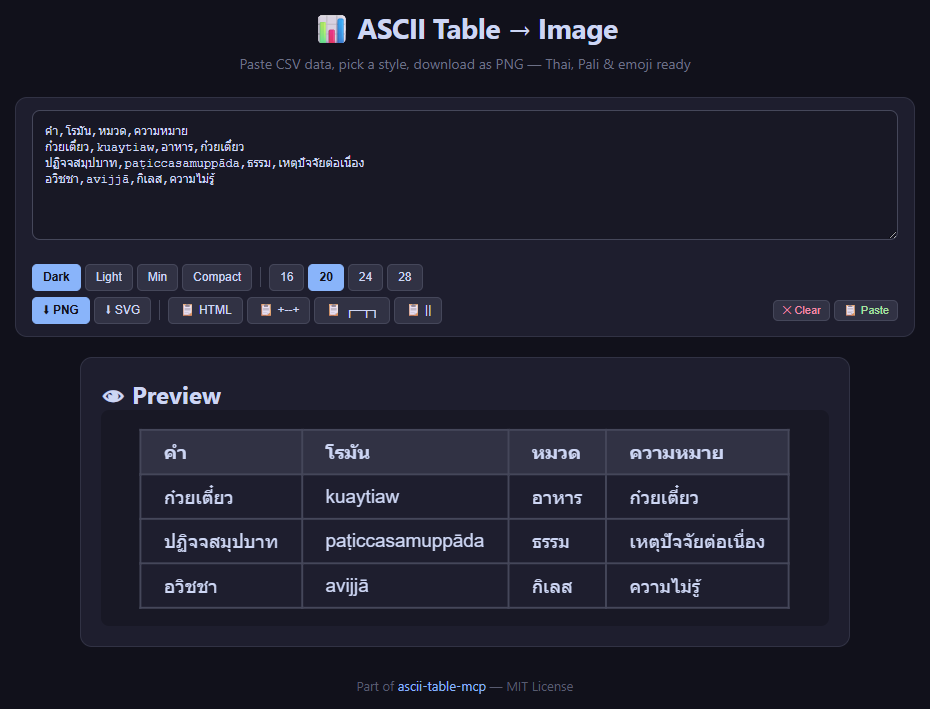
Why this exists: Most ASCII table libraries use len() in Python, which counts combining marks (like Thai tone marks, Devanagari vowel signs) as separate characters. This breaks alignment for any language with zero-width characters. This server uses wcwidth — the same library terminals use — so columns line up correctly, on every platform.
Features
- 9 table formats:
grid(+--+),box(┌─┬─┐),pipe(| | |),safe,html,png,svg+ more - 10 grid sub-styles:
mysql,separated,compact,gfm,reddit,rounded,rst,box,unicode,dots— inspired by ozh/ascii-tables - Auto-format: auto-detects numeric columns (right-align) and centers headers
- Thai / Pali / CJK / emoji: zero-width combining marks (ิ, ี, ฺ, ◌̱, etc.) align perfectly
- Safe width mode: extra padding for platforms where zero-width marks ≠ zero (Discord, browser code blocks)
- Direct PNG export: headless Playwright renders styled HTML → cropped PNG with Noto Sans Thai — perfect for Discord/Telegram
- Direct SVG export: vector SVG with embedded HTML (foreignObject) — zoomable, embeddable
- 4 polished HTML styles:
dark,light,minimal,compact - CSV / TSV / JSON input: convert from any data source
- Debug tools:
analyze_table,debug_table,validate_table_text— find and fix alignment issues
Direct PNG Export — One Step to a Gorgeous Table Image
For Discord, Telegram, Slack, or any place that can't render a proper monospace Thai table, use export_png to generate a cropped PNG directly — no browser, no manual screenshot, no crop step.
| Style | Preview | Best for |
|---|---|---|
dark |
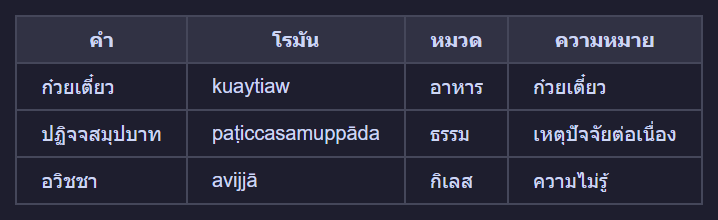 |
Discord / Telegram dark mode |
light |
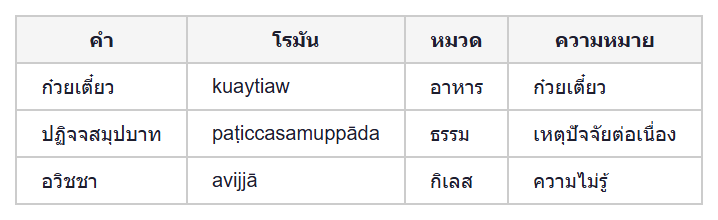 |
Documentation, PDF |
minimal |
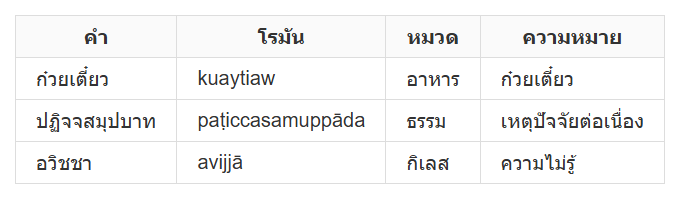 |
Blog posts, websites |
compact |
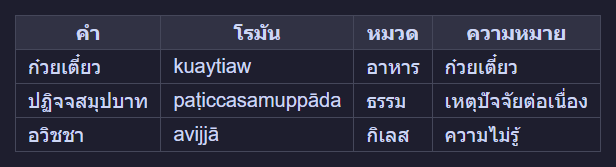 |
Dense data, narrow screens |
{
  "headers": ["Pali", "Roman", "Type", "Meaning"],
  "rows": [
    ["กมฺม", "kamma", "Noun", "action"],
    ["ญาณ", "ñāṇa", "Wisdom", "direct knowing"]
  ],
  "style": "dark"
}
Output: a .png file cropped to just the table — send it with MEDIA:<path> in Discord/Telegram.
Direct SVG Export — Vector That Scales
Use export_svg for images that need to be zoomed, embedded, or edited.
{
  "headers": ["Term", "Translation"],
  "rows": [["กมฺม", "Kamma"], ["ธมฺม", "Dhamma"]],
  "style": "dark"
}
SVG is HTML-backed (foreignObject) with Noto Sans Thai — renders sharp at any size.
Supported Formats
Quick Start
uvx (no install)
uvx --from git+https://github.com/dhammawatthumpra-coder/ascii-table-mcp ascii-table-mcp
pip install
git clone https://github.com/dhammawatthumpra-coder/ascii-table-mcp.git
cd ascii-table-mcp
pip install -e .
python -m ascii_table_mcp
Register with any MCP client
Claude Desktop:
{
  "mcpServers": {
    "ascii-table": {
      "command": "python",
      "args": ["-m", "ascii_table_mcp"]
    }
  }
}
Hermes:
hermes mcp add ascii-table --command "python -m ascii_table_mcp"
MCP Tools
make_table — The main event
| Parameter | Type | Default | Description |
|---|---|---|---|
headers |
list[str] |
— | Column headers |
rows / data |
list[list[str]] |
— | Data rows |
fmt |
str |
"grid" |
"grid", "box", "pipe", "safe", "html" |
style |
str |
"mysql" |
One of 10 grid styles or 4 HTML styles |
auto_format |
bool |
true |
Right-align numbers, center headers |
safe_width |
bool |
false |
Extra padding for Discord/browser |
Example with style="separated":
{
  "headers": ["Product", "Price", "Qty"],
  "rows": [
    ["Noodle Soup", "45", "3"],
    ["Fried Rice", "55", "2"]
  ],
  "fmt": "grid",
  "style": "separated"
}
+============+======+=======+
|  Product   | Price |  Qty  |
+============+======+=======+
+------------+------+-------+
| Noodle Soup |   45 |     3 |
+------------+------+-------+
| Fried Rice  |   55 |     2 |
+------------+------+-------+
Notice: auto_format=true right-aligns Price and Qty columns, centers headers.
make_table_from_csv
{
  "csv_text": "Name,Role,Score\nAlice,Admin,95\nBob,User,87",
  "fmt": "grid"
}
make_table_from_json
{
  "json_data": "[[\"Term\",\"Meaning\"],[\"Kamma\",\"Action\"],[\"Dhamma\",\"Truth\"]]",
  "fmt": "box"
}
export_png — Direct PNG export
Render table as cropped PNG via headless Playwright.
| Parameter | Type | Default | Description |
|---|---|---|---|
headers |
list[str] |
— | Column headers |
rows / data |
list[list[str]] |
— | Data rows |
style |
str |
\"dark\" |
\"dark\", \"light\", \"minimal\", \"compact\" |
font_size |
int |
24 |
Font size in px |
{
  "headers": ["คำบาลี", "Roman"],
  "rows": [["กมฺม", "kamma"], ["ธมฺม", "dhamma"]],
  "style": "dark"
}
→ Returns file path to cropped PNG. Send with MEDIA:<path>.
export_svg — Direct SVG export
Render table as vector SVG (foreignObject with styled HTML).
Same parameters as export_png. Returns file path to .svg.
Debug tools
debug_table— shows exact char positions with drift analysisanalyze_table— validates column alignment in+--+tablesvalidate_table_text— structural check: column count, border alternation, format detection
Thai Character Width: The Problem This Solves
Discord, browser code blocks, and some terminals don't respect Unicode zero-width combining marks.
Characters like ิ ี ื ู ฺ each take up width=1 on screen, but wcwidth says they're width=0.
len("ก๋วยเตี๋ยว")   → 10  ← Python counts combining marks
wcwidth("ก๋วยเตี๋ยว") → 7   ← Reality: only 7 visible column positions
Solution: safe_width=True
When enabled, the renderer uses len() (counts every character as width 1) instead of wcwidth, then adds padding for each combining mark:
{
  "headers": ["Name", "Price"],
  "rows": [["ก๋วยเตี๋ยว", "45"]],
  "fmt": "grid",
  "safe_width": true
}
+----------------+------+
|      Name      | Price |
+----------------+------+
| ก๋วยเตี๋ยว     |   45 |
+----------------+------+
Without safe_width (discord will misalign):
+------------+------+
|    Name    | Price |
+------------+------+
| ก๋วยเตี๋ยว |   45 |  ← column drifts right by 3 chars
+------------+------+
Future: Per-Character Width Database
wcwidth and len() are both approximations. A future plan is to build a lookup table of actual display widths for each Thai character on major platforms (Windows Discord, macOS Discord, Linux terminal) for 100% guaranteed alignment.
Grid Styles Reference
| Style | Top border | Header sep | Data sep | Bottom | Notes |
|---|---|---|---|---|---|
mysql |
+--+ |
+--+ |
+--+ |
+--+ |
default |
separated |
+==+ |
+==+ |
+--+ |
+--+ |
bold header separator |
compact |
none | --- |
none | none | frameless |
gfm |
none | |--| |
none | none | GitHub Flavored Markdown |
reddit |
none | --|-- |
none | none | Reddit tables |
rounded |
.--. |
:+: |
none | '--' |
rounded corners |
rst |
+==+ |
+--+ |
+==+ |
+==+ |
reStructuredText |
box |
┌┬┐ |
├┼┤ |
├┼┤ |
└┴┘ |
Unicode box-drawing |
unicode |
╔╦╗ |
╠╬╣ |
╠╬╣ |
╚╩╝ |
double-line |
dots |
┌┬┐ |
├┼┤ |
none | └┴┘ |
no row separators |
Format comparison
| Format | Example | Best for |
|---|---|---|
grid |
+----+----+ |
Terminal, code review, GitHub |
box / safe |
┌────┬────┐ |
Presentation, formal docs |
pipe |
| | | |
Markdown-native |
grid + safe_width |
+------+----+ |
Discord, browser (zero-width ≠ 0) |
png |
<image> |
Direct export — Discord/Telegram/chat apps |
svg |
<vector> |
Vector — zoomable, embeddable |
CLI Usage
# CSV args → grid
python -m ascii_table_mcp.generate_table --grid 'Name,Age' 'Alice,30' 'Bob,25'

# TSV pipe → grid
printf 'Name\tAge\nAlice\t30\n' | python -m ascii_table_mcp.generate_table --tsv --grid

# JSON
python -m ascii_table_mcp.generate_table --json '{"headers":["A","B"],"rows":[["1","2"]]}' --grid
+-------+-----+
| Name   | Age |
+-------+-----+
| Alice  | 30  |
| Bob    | 25  |
+-------+-----+
Architecture
ascii-table-mcp/
├── ascii_table_mcp/
│   ├── __init__.py       # MCP server entry (FastMCP) — 9 tools
│   ├── generate_table.py # Core rendering engine + HTML + PNG + SVG
│   └── thaiwidth.py      # Thai-aware display width
├── server.py             # Thin CLI wrapper
├── table_to_image.py     # HTML → screenshot helper (legacy)
├── table_screenshot.py   # HTML generator (legacy)
├── requirements.txt      # mcp + wcwidth
├── pyproject.toml         # uv/pip packaging
├── ascii-table-mcp.bat   # Windows launcher
├── LICENSE               # MIT
├── README.md             # This file (English)
├── README_TH.md          # Thai documentation
├── GUIDE_TH.md           # Thai user guide
├── GUIDE_EN.md           # English user guide
└── examples/
    ├── ex_dark.png
    ├── ex_light.png
    ├── ex_minimal.png
    └── ex_compact.png
Why wcwidth Instead of len()?
len("กมฺม")      → 4  ❌ (counts the dot-below as a character)
wcswidth("กมฺม") → 3  ✅ (dot-below is zero-width)
Using len() for table layout:
+----------+-----------+   ← border width 8
| Pali     | Roman     |   ← "กมฺม" = 4 chars → padding 4 → total 9 ❌
+----------+-----------+
Using wcwidth:
+---------+-----------+
| Pali    | Roman     |   ← "กมฺม" = width 3 → padding 5 → total 8 ✅
+---------+-----------+
Related Projects
- ozh/ascii-tables — original table style system
- dmarsters/ascii-art-mcp — decorative ASCII art
- schachmat/wego — Go terminal weather (go-runewidth)
- wcwidth — Python wcwidth implementation
License
MIT — free for personal and commercial use.
Установка ASCII Table Server
У этого сервера нет опубликованного пакета — он собирается из исходников. Открой репозиторий и следуй инструкции в README.
▸ github.com/dhammawatthumpra-coder/ascii-table-mcpFAQ
ASCII Table Server MCP бесплатный?
Да, ASCII Table Server MCP бесплатный — установка в пару кликов через Unyly без оплаты.
Нужен ли API-ключ для ASCII Table Server?
Нет, ASCII Table Server работает без API-ключей и переменных окружения.
ASCII Table Server — hosted или self-hosted?
Self-hosted: сервер запускается локально на твоей машине командой из раздела установки.
Как установить ASCII Table Server в Claude Desktop, Claude Code или Cursor?
Открой ASCII Table Server на unyly.org, выбери вкладку своего клиента (Claude Desktop, Claude Code, Cursor) и нажми Install — конфиг сгенерируется автоматически, без правки JSON.
Похожие MCP
GitHub
PRs, issues, code search, CI status
 автор: GitHub
Filesystem
Secure file operations with configurable access controls.
Memory
Knowledge graph-based persistent memory system.

Unyly Deploy
Deploy sites and MCP servers to Unyly straight from your AI agent
 автор: Unyly
Amap Maps Mcp Server
MCP server for using the AMap Maps API
 автор: duxiaohui
PayMCP
Lightweight payments layer for MCP servers: turn tools into paid endpoints with a two-line decorator. [PyPI](https://pypi.org/project/paymcp/) · [npm](https://w
 автор: blustAI
Server For Power BI
Enables exploring Microsoft Fabric / Power BI workspaces and semantic models, and executing ad-hoc DAX queries.
 автор: Mitsubishi-Fuso
Template MCP Server
A CLI tool to create a new Model Context Protocol server project with TypeScript support, dual transport options, and an extensible structure
 автор: mcpdotdirect
Supabase
Database, auth and storage
 автор: Supabase
Everything
Reference / test server with prompts, resources, and tools.
Compare ASCII Table Server with
Не уверен что выбрать?
Найди свой стек за 60 секунд
Автор?
Embed-бейдж для README
Похожее
Все в категории development