
@Aws/Ftr Eval
БесплатноНе проверенAutomates the AWS Foundational Technical Review (FTR) partner self-assessment by evaluating SOC 2 and WAFR reports against defined controls, returning structure

Описание
Automates the AWS Foundational Technical Review (FTR) partner self-assessment by evaluating SOC 2 and WAFR reports against defined controls, returning structured PASS/FAIL decisions with reasoning.
README
An MCP server and interactive CLI that automates the AWS Foundational Technical Review (FTR) partner self-assessment process. It evaluates partner-submitted compliance documents (SOC 2 Type II reports and WAFR reports) against defined checks and returns structured PASS/FAIL decisions with reasoning.
Architecture
The system connects partner-submitted PDF reports to Amazon Bedrock for LLM-powered evaluation. A Model Context Protocol (MCP) server exposes evaluation tools to AI assistants, while a standalone CLI provides a guided terminal workflow. Both paths share a common evaluation engine backed by Bedrock, SOC 2 and WAFR check registries, and calibration guides that shape scoring decisions.
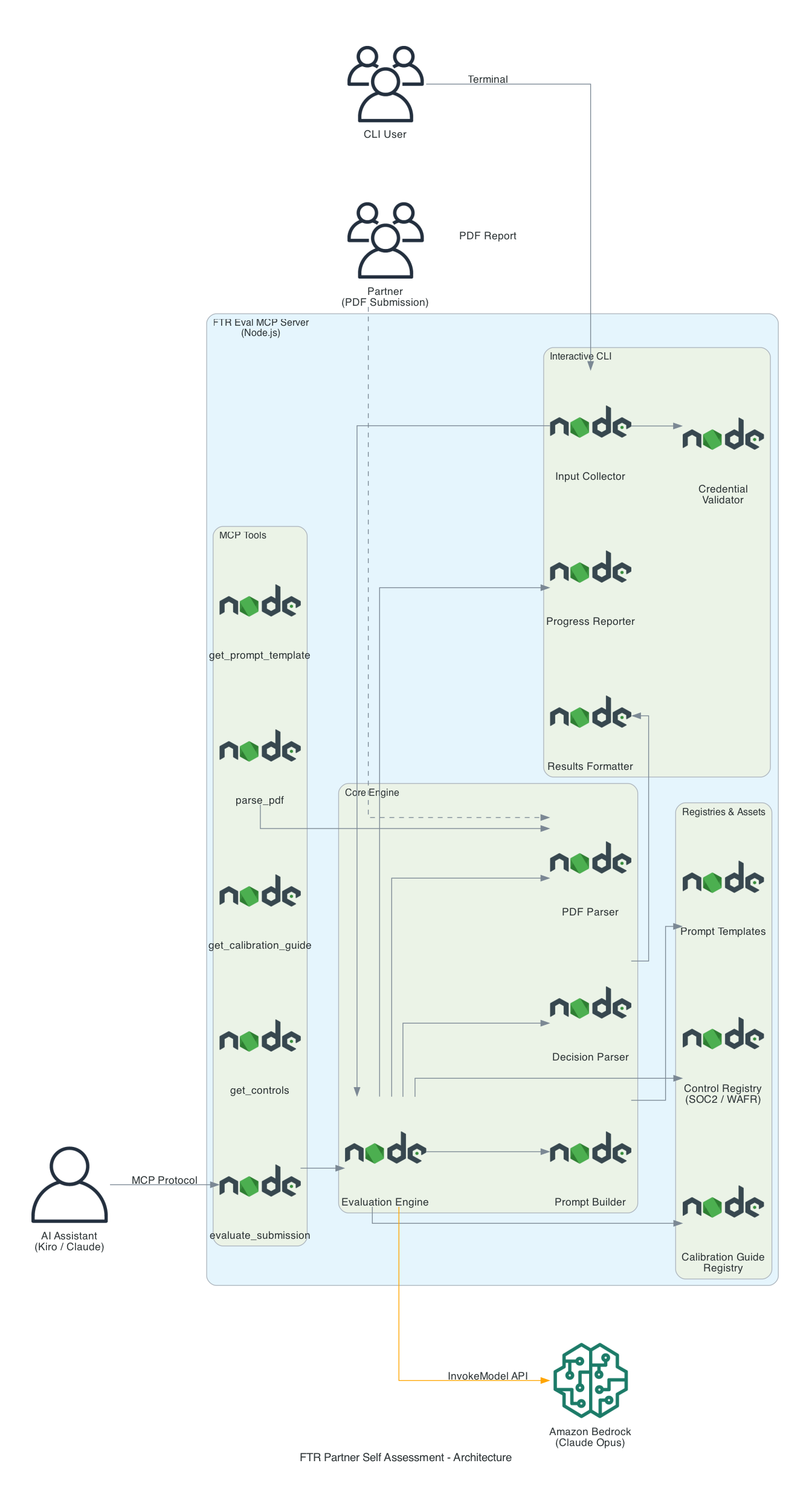
Overview
Partners seeking AWS validation must submit evidence for two distinct review tracks:
| Track | Document Required | Checks Evaluated |
|---|---|---|
| SOC 2 | SOC 2 Type II Report | SOC-001 through SOC-005 |
| WAFR | AWS Well-Architected Framework Review Report | WAFR-FTR-001 through WAFR-FTR-006 |
This package provides three ways to evaluate submissions:
- MCP Server — Exposes evaluation tools to AI assistants (Kiro, Claude, etc.) via the Model Context Protocol
- Interactive CLI — A terminal-based evaluation workflow with guided prompts, progress spinners, and color-coded results
- Kiro Power — A native Kiro IDE integration that loads calibration criteria directly into chat, no server or CLI required
Installation
Option 1 — Standalone Binary (no Node.js required)
Download the binary for your platform from the GitHub Releases page:
| Platform | File |
|---|---|
| macOS (Apple Silicon) | ftr-eval-mcp-macos-arm64 |
| macOS (Intel) | ftr-eval-mcp-macos-x64 |
| Linux x64 | ftr-eval-mcp-linux-x64 |
| Linux ARM64 | ftr-eval-mcp-linux-arm64 |
| Windows x64 | ftr-eval-mcp-win-x64.exe |
macOS / Linux — make the binary executable and run it:
chmod +x ftr-eval-mcp-macos-arm64
./ftr-eval-mcp-macos-arm64 evaluate
Windows — run it directly:
ftr-eval-mcp-win-x64.exe evaluate
Option 2 — Build from Source (requires Node.js >= 18)
Clone the repository and build locally:
git clone https://github.com/aws-samples/sample-ftr-self-assessment-mcp.git
cd sample-ftr-self-assessment-mcp
npm install
npm run build
npm link          # optional — registers 'ftr-eval-mcp' as a global command
Then run via Node directly:
node dist/server.js evaluate
node dist/server.js serve
Prerequisites
- AWS credentials configured (for Bedrock access)
- Node.js >= 18.0.0 (build from source only — not required for standalone binaries)
Node.js 22 is recommended. If you use nvm, switch to it before building:
nvm use 22
If Node.js 22 is not yet installed:
nvm install 22
nvm use 22
Configuration
The server uses sensible defaults out of the box. Override via environment variables or CLI flags:
| Environment Variable | CLI Flag | Default | Description |
|---|---|---|---|
FTR_AWS_REGION |
--region |
us-east-1 |
AWS region for Bedrock API calls |
FTR_BEDROCK_MODEL |
--model |
global.anthropic.claude-opus-4-6-v1 |
Bedrock model ID |
FTR_TRANSPORT |
--transport |
stdio |
MCP transport: stdio or http |
FTR_PORT |
--port |
3000 |
Port for HTTP transport |
FTR_LOG_LEVEL |
N/A | info |
Log level: debug, info, warn, error |
Resolution order (highest priority first): CLI flags → Environment variables → Defaults
Example with a custom region:
FTR_AWS_REGION=us-west-2 ftr-eval-mcp
Or in your MCP config:
{
  "mcpServers": {
    "ftr-eval-mcp": {
      "command": "node",
      "args": ["dist/server.js", "serve"],
      "env": {
        "FTR_AWS_REGION": "eu-west-1"
      }
    }
  }
}
MCP Config Levels
You can register this MCP server at different levels depending on your needs:
| Level | Config Path | Scope |
|---|---|---|
| Workspace | <project>/.[IDE]/settings/mcp.json |
Only available when this specific project is open |
| User (global) | ~/.[IDE]/settings/mcp.json |
Available across all workspaces for the current user |
Precedence: Workspace config overrides user config. If the same server is defined at both levels, the workspace-level definition wins when that project is open. Outside that workspace, the user-level config applies.
When to use each level:
- Workspace — Best when developing or testing the server locally. The config lives with the project and won't affect other workspaces.
- User — Best when the server is stable and you want it available everywhere without per-project setup.
Example workspace config (.kiro/settings/mcp.json):
{
  "mcpServers": {
    "ftr-eval-mcp": {
      "command": "node",
      "args": ["/path/to/dist/server.js", "serve"],
      "disabled": false,
      "autoApprove": ["get_prompt_template", "parse_pdf", "evaluate_submission"]
    }
  }
}
The autoApprove array lists tool names that the AI assistant can invoke without prompting for confirmation. Tools not in this list require manual approval before each execution.
Usage
MCP Server Mode (default)
Start the MCP server for use with AI assistants:
ftr-eval-mcp
With options:
ftr-eval-mcp serve --transport stdio --region us-east-1 --model <bedrock-model-id>
Interactive CLI Mode
Launch the guided evaluation workflow:
ftr-eval-mcp evaluate
This will prompt you to:
- Select a report type (SOC 2 or WAFR)
- Enter the path to your PDF report
- Choose a specific check or evaluate all
Non-Interactive Mode
For scripting and CI/CD pipelines:
ftr-eval-mcp evaluate --report-type wafr --file ./path/to/report.pdf
Evaluate a single check:
ftr-eval-mcp evaluate --report-type soc2 --file ./report.pdf --control-id SOC-001
CLI Options
ftr-eval-mcp evaluate --help

Options:
  --report-type <type>   Report type: soc2 or wafr
  --file <path>          Path to the PDF report file
  --control-id <id>      Specific control ID to evaluate (optional)
  --region <region>      AWS region (default: us-east-1)
  --model <modelId>      Bedrock model ID
MCP Tools
When running as an MCP server, the following tools are exposed:
| Tool | Description |
|---|---|
parse_pdf |
Parse a PDF file and extract text content |
get_controls |
Get check definitions for a report type |
get_calibration_guide |
Get the calibration guide for a report type |
evaluate_submission |
Evaluate a PDF submission against checks |
get_prompt_template |
Get the FTR evaluation prompt template |
Development
Build
npm run build
Run Tests
npm test
Run Locally (without installing globally)
npm run build
node dist/server.js evaluate
Build Standalone Binaries
npm run build:binaries
This produces platform-specific executables in binaries/ for macOS (ARM/x64), Linux (x64/ARM), and Windows (x64).
Project Structure
src/
├── server.ts                  # Entry point: commander routing (serve/evaluate)
├── cli.ts                     # CLI orchestrator (evaluation workflow)
├── cli/
│   ├── input-collector.ts     # Interactive prompts and flag validation
│   ├── credential-validator.ts # AWS credential check via STS
│   ├── progress-reporter.ts   # Spinner and progress display (ora)
│   └── results-formatter.ts   # Color-coded results output (chalk)
├── config.ts                  # Configuration resolution
├── engine/
│   ├── evaluation-engine.ts   # Core evaluation orchestration
│   ├── bedrock-client.ts      # Amazon Bedrock API client
│   ├── prompt-builder.ts      # LLM prompt construction
│   └── decision-parser.ts     # Parse LLM responses into decisions
├── parsers/
│   └── pdf-parser.ts          # PDF text extraction
├── registries/
│   ├── control-registry.ts    # Check definitions
│   └── calibration-guide-registry.ts # Calibration guides
├── tools/                     # MCP tool registrations
│   ├── evaluate-submission.ts
│   ├── get-calibration-guide.ts
│   ├── get-controls.ts
│   ├── get-prompt-template.ts
│   └── parse-pdf.ts
├── types.ts                   # Shared TypeScript types
└── assets/
    ├── calibration-guides/    # SOC 2 and WAFR calibration guides
    ├── controls/              # Check definition files
    └── prompts/               # LLM prompt templates
Kiro Power Tool
This project also includes a Kiro power at .kiro/powers/ftr-self-assessment/ for direct use within the Kiro IDE. The steering files load automatically and give Kiro full calibration criteria to evaluate FTR submissions in chat.
Checks Reference
SOC 2 Checks
| Check | Description |
|---|---|
| SOC-001 | SOC 2 Type II report must be active (issued within the last 12 months) |
| SOC-002 | Auditor opinion must be exactly "Unqualified" |
| SOC-003 | AWS must be listed as an in-scope cloud provider |
| SOC-004 | The partner's specific solution must appear in the audit scope |
| SOC-005 | Both Security AND Availability Trust Service Categories must be present |
WAFR Checks
| Check | Description |
|---|---|
| WAFR-FTR-001 | Review must be completed within 12 months |
| WAFR-FTR-002 | Zero active High-Risk Issues (HRIs) in the Security pillar |
| WAFR-FTR-003 | Zero active High-Risk Issues (HRIs) in the Operational Excellence pillar |
| WAFR-FTR-004 | Zero active High-Risk Issues (HRIs) in the Reliability pillar |
| WAFR-FTR-005 | Partner's solution must be identifiable in the WAFR workload name or description |
| WAFR-FTR-006 | Report must contain all required sections (Workload properties, Lens overview, Improvement plan, Lens details) |
Key Rules
- Expired reports (SOC 2 or WAFR older than 12 months) always FAIL
- SOC 2 Type I does not qualify; must be Type II
- Submitting a WAFR report for a SOC 2 check (or vice versa) FAILS immediately
- Only active (open/unresolved) HRIs cause failure — resolved HRIs are ignored
- Medium-Risk Issues (MRIs) never cause failure regardless of count or status
Exit Codes
| Code | Meaning |
|---|---|
| 0 | Evaluation completed (regardless of PASS/FAIL), or user cancelled |
| 1 | Error: AWS credentials not configured, invalid inputs, or system error |
Contributing
See CONTRIBUTING for guidelines on bug reports, pull requests, and the code of conduct.
Security
See CONTRIBUTING for information on reporting security issues.
License
This library is licensed under the MIT-0 License. See the LICENSE file.
Установка @Aws/Ftr Eval
У этого сервера нет опубликованного пакета — он собирается из исходников. Открой репозиторий и следуй инструкции в README.
▸ github.com/aws-samples/sample-ftr-self-assessment-mcpFAQ
@Aws/Ftr Eval MCP бесплатный?
Да, @Aws/Ftr Eval MCP бесплатный — установка в пару кликов через Unyly без оплаты.
Нужен ли API-ключ для @Aws/Ftr Eval?
Нет, @Aws/Ftr Eval работает без API-ключей и переменных окружения.
@Aws/Ftr Eval — hosted или self-hosted?
Self-hosted: сервер запускается локально на твоей машине командой из раздела установки.
Как установить @Aws/Ftr Eval в Claude Desktop, Claude Code или Cursor?
Открой @Aws/Ftr Eval на unyly.org, выбери вкладку своего клиента (Claude Desktop, Claude Code, Cursor) и нажми Install — конфиг сгенерируется автоматически, без правки JSON.
Похожие MCP
GitHub
PRs, issues, code search, CI status
 автор: GitHub
Filesystem
Secure file operations with configurable access controls.
Memory
Knowledge graph-based persistent memory system.
Template MCP Server
A CLI tool to create a new Model Context Protocol server project with TypeScript support, dual transport options, and an extensible structure
 автор: mcpdotdirect
Amap Maps Mcp Server
MCP server for using the AMap Maps API
 автор: duxiaohui
Supabase
Database, auth and storage
 автор: Supabase
Everything
Reference / test server with prompts, resources, and tools.
Git
Tools to read, search, and manipulate Git repositories.
Sequential Thinking
Dynamic and reflective problem-solving through thought sequences.
Time
Time and timezone conversion capabilities.
Compare @Aws/Ftr Eval with
Не уверен что выбрать?
Найди свой стек за 60 секунд
Автор?
Embed-бейдж для README
Похожее
Все в категории development