
C4 Architect
БесплатноНе проверенLocal MCP server for TypeScript/TSX architecture analysis, C4 diagrams, source evidence, and interactive HTML with PNG/SVG exports.

Описание
Local MCP server for TypeScript/TSX architecture analysis, C4 diagrams, source evidence, and interactive HTML with PNG/SVG exports.
README
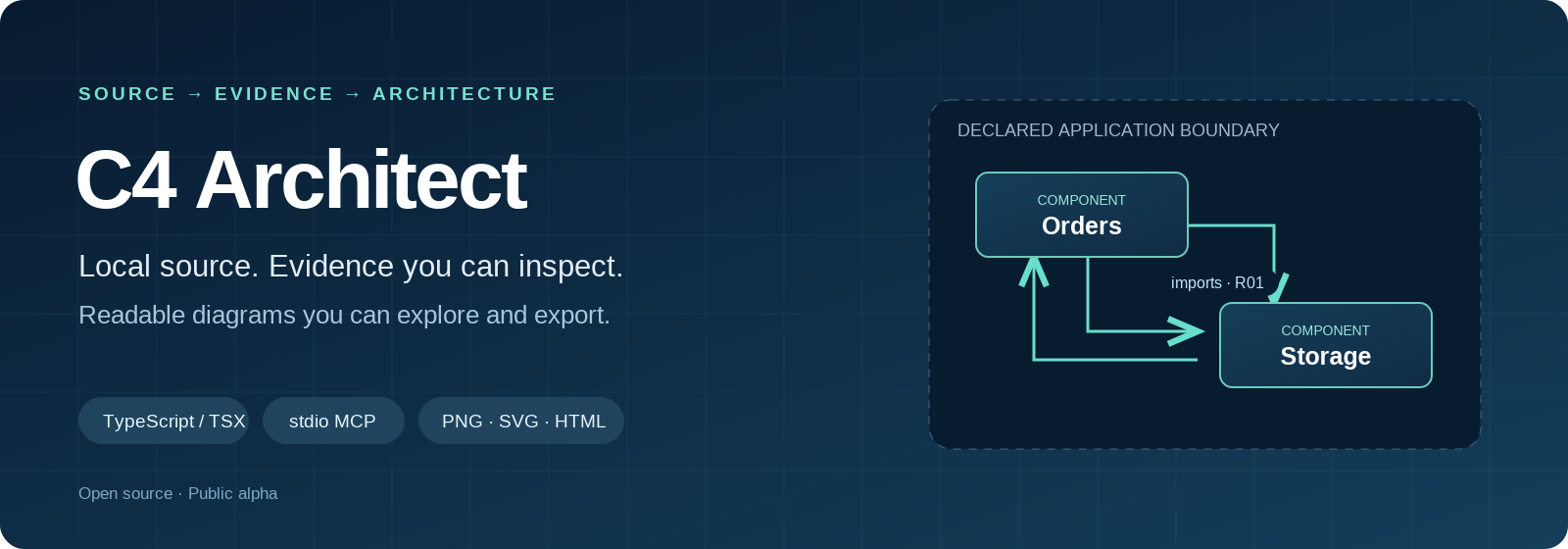
C4 Architect
Explore a TypeScript codebase without pasting the whole repository into a prompt.
C4 Architect is a local Model Context Protocol server that turns source imports into a versioned dependency graph, lets you review and name its architectural boundaries, and produces compact C4 diagrams. Use it from Codex, Claude Code, Claude Desktop, or another client that supports local MCP servers over stdio.
Published alpha · 0.2.0-alpha.12 · TypeScript / TSX · Local parsing · MIT licensed
Get started · npm package · See the diagrams · Contribute · Roadmap
What changed in this PR?
Try the PR review skill in Codex with this repository, or replace the PR URL with your own.
Use
$what-changed-in-this-pron https://github.com/zrack/c4-architect-mcp/pull/16. Show me the dependencies it added or removed insrc, draw the focused diagram, and link each arrow to its import.
PR #16 added ten internal dependencies when it introduced explain-this-file. Follow R06 from the CLI and R08 from the MCP server. Both import the same renderer. The report matches every arrow to its source line and identifies the two type-only imports. Read the Markdown report for all ten added dependencies.
Explain this file
Use $explain-this-file on
NoteEditor.tsxin./src. What imports it, and what does it import? Show me the focused diagram and the source lines for both directions.
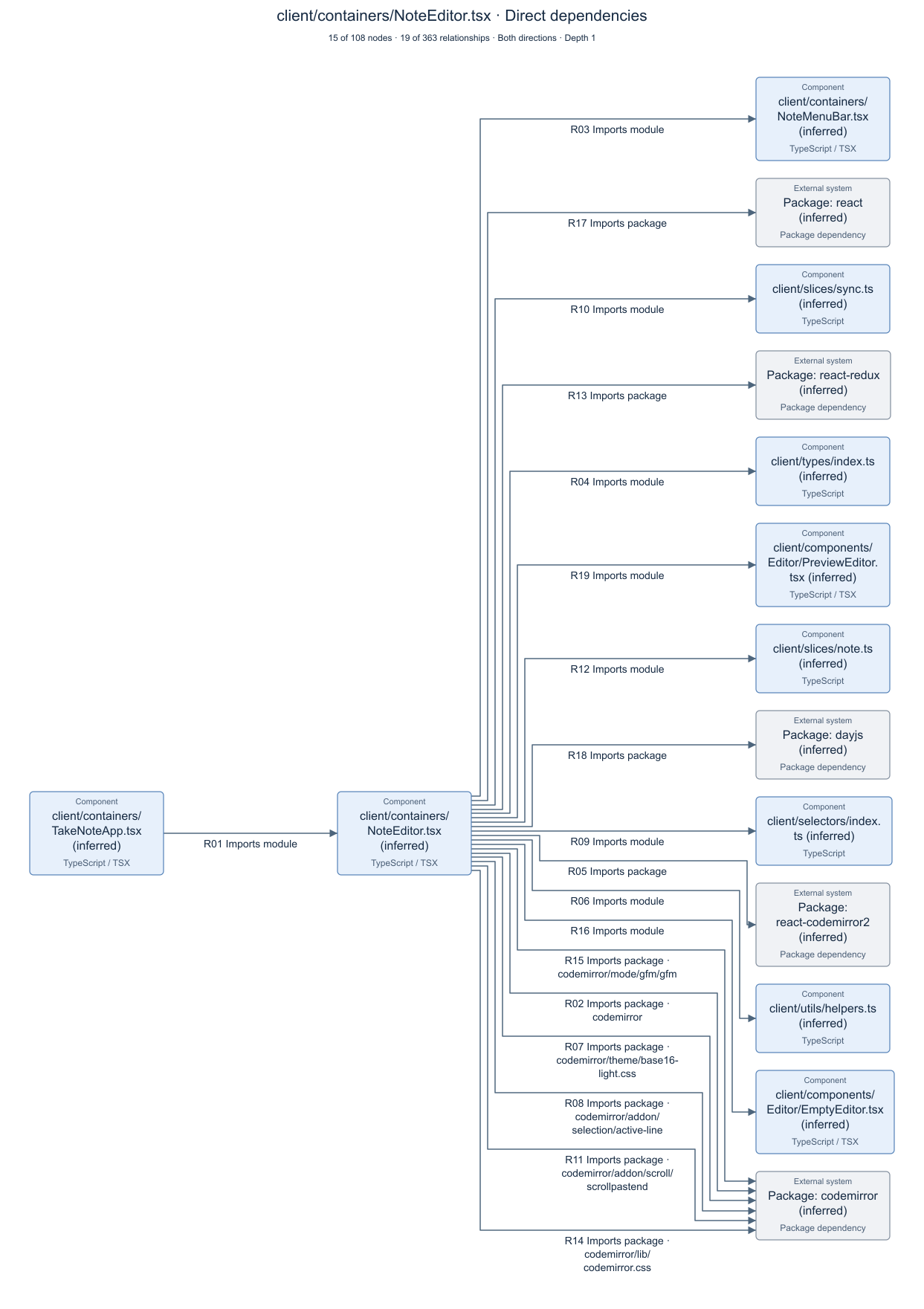
Try this prompt in a TakeNote checkout, or substitute a file from your own TypeScript project. On TakeNote's src snapshot, the skill narrows 108 nodes and 363 relationships to 15 nodes and 19 relationships. Two arrows show where the editor fits.
- Incoming · R01.
TakeNoteApp.tsximportsNoteEditor. Read the import on line 11 - Outgoing · R19.
NoteEditor.tsximportsPreviewEditor. Read the import on line 12
The editor has one direct importer and 18 outgoing import statements. Ten of those statements reference packages whose installed files were unavailable in the clean checkout. The report lists every import and identifies those ten locations. Read the generated report · Open the full-size diagram
Try it on your project or reproduce the TakeNote example
From your project root, choose a TypeScript or TSX file under src and run the CLI with Node.js 22 or 24. The command writes a Markdown report and a focused PNG to output/.
npx -y [email protected] explain-file ./src NoteEditor.tsx --out output/NoteEditor.md
To use the prompt in Codex on macOS or Linux, install the package once and link its bundled skill. Then start a chat in the project you want to inspect.
npm install -g [email protected]
mkdir -p "$HOME/.agents/skills"
ln -s "$(npm root -g)/c4-architect-mcp/.agents/skills/explain-this-file" "$HOME/.agents/skills/explain-this-file"
With the MCP server connected, you can also copy the installed package’s .agents/skills/explain-this-file folder into your project's .agents/skills/ directory. Read the skill
To reproduce the diagram above, use a clean checkout of the pinned TakeNote revision before installing its dependencies. Run this from the TakeNote root to include commit-pinned GitHub source links in the report.
npx -y [email protected] explain-file ./src NoteEditor.tsx --out output/NoteEditor.md \
  --github-repo taniarascia/takenote --commit e0eddbb9a21ae4cf4c4c7c183f29cfd666e08331 --source-root src
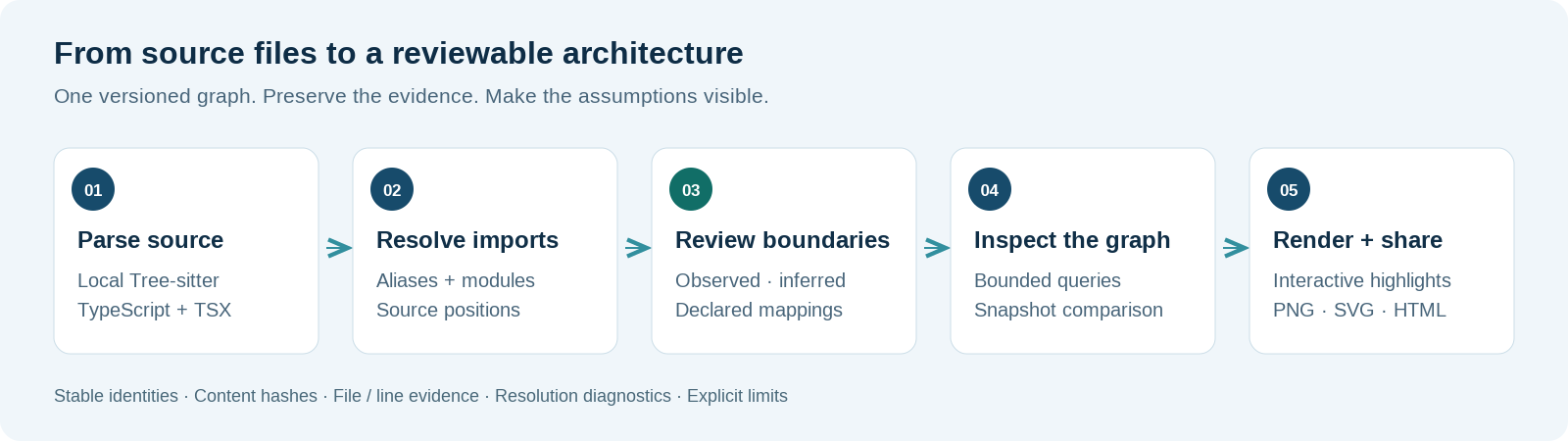
Start with evidence
An import is evidence of a code dependency. It does not, by itself, prove that two modules are separately deployed services, that an SDK call uses a particular protocol, or that a data flow is secure.
C4 Architect keeps that distinction visible. Source locations and content hashes support observed dependencies. Naming heuristics remain inferences. A separate boundary configuration records the systems, containers, and components that a person has declared. Rescanning the source preserves those declarations.
The result is a starting point for application and solution architecture review. Runtime behavior, organization structure, and enterprise architecture still need other evidence.
| Available in this alpha | Purpose |
|---|---|
| Local Tree-sitter analysis | Extract TypeScript and TSX dependencies without an LLM parsing the source files. |
| Versioned graph and source evidence | Save a graph for review, with source locations, file hashes, and analysis diagnostics. |
| Explicit boundary mapping | Give systems, containers, and components stable names through a separate configuration file. |
| Summary, neighborhood queries, and comparison | Inspect a saved graph without returning the entire graph every time. |
| Context, Container, and Component diagrams | Render a graph projection or a graph supplied by the caller. |
| Deployment, Dynamic, System Landscape, and Code diagrams | Render explicit nodes and relationships supplied by the caller. |
| Compact PNG, SVG, and interactive HTML | Trace orthogonal connections, inspect relationship labels, and export a selected view. |
Export native shapes, nested deployment groups, and connector labels that you can edit in Draw.io. Editable Draw.io export
Export a Structurizr DSL workspace with up to four views of the same model. Structurizr DSL export
Preview a diagram bundle as an Azure DevOps Wiki page and publish it with its PNG attachments. Preview and publish a wiki page
Cross-repository mapping, additional languages, and assisted threat modeling are planned. Roadmap
C4 diagrams
Trail Notes examples
Start with the whole system, then zoom in as far as the question requires. These diagrams use the same fictional trail journal app. Select a preview to open the full-size PNG, or download its JSON to render it yourself. C4 model diagram guide
Static structure
| 1. Context | 2. Container |
|---|---|
| See who uses Trail Notes and the system it depends on. | Zoom into the web app, Notes API, and database. |
| Trail Notes Context diagram | Trail Notes Container diagram |
| Download Context JSON | Download Container JSON |
| 3. Component | 4. Code |
|---|---|
| Follow a timed-out note submission and see who owns the retry. | See how the repository returns the original note ID or rejects a changed draft. |
| Trail Notes Component diagram | Trail Notes Code diagram |
| Component JSON · Retry with the same request · All Component source links | Code JSON · Return the existing note · All Code source links |
The first save commits before the simulated timeout. The retry returns the same note ID and leaves one stored note. Run the TypeScript sample · See the timeout in source
For a Component example based on a real scan, follow the App.tsx → CaseWorkspace.tsx import in the ReplayCase alpha.5 diagram.
Supporting views
Use these views to show the wider landscape, a sequence of interactions, or where the software runs.
| System Landscape | Dynamic | Deployment |
|---|---|---|
| Place Trail Notes in the wider set of people and systems. | Follow the five steps for submitting a note. | See which hosts run the web app, API, and database. |
| Trail Notes System Landscape diagram | Trail Notes Dynamic diagram | Trail Notes Deployment diagram |
| Download System Landscape JSON | Download Dynamic JSON | Download Deployment JSON |
Deployment comparison
The left view places the app and database on separate hosts. The right view shows the equipment at an illustrative visitor center and traces traffic from a field tablet through the firewall to the two servers.
README deployment JSON · Physical deployment JSON
Download any example JSON and run render-diagram from the folder where you saved it. This command renders the Context example.
npx -y [email protected] render-diagram trail-notes-context.json --out TRAIL-NOTES.md
Open TRAIL-NOTES.html to explore the diagram.
Get started
Use Node.js 22 or 24 and npm. Run the pinned alpha without a checkout:
npx -y [email protected] --help
The examples pin 0.2.0-alpha.12 for a repeatable setup. c4-architect-mcp@alpha follows the prerelease channel and currently selects 0.2.0-alpha.12. npm's latest tag remains on 0.2.0-alpha.1, the initial prerelease. There is no stable release yet.
The server communicates over stdio; starting it without a subcommand waits for an MCP client rather than opening a browser page or an HTTP port. The following configurations let your client start it through npx.
Codex
Add this to ~/.codex/config.toml, or use the MCP server settings in the Codex desktop app:
[mcp_servers.c4-architect]
command = "npx"
args = ["-y", "[email protected]"]
You can also register it from the Codex CLI:
codex mcp add c4-architect -- npx -y [email protected]
Reconnect the server after configuration changes. See the official Codex MCP setup guide.
Claude Code
claude mcp add --transport stdio c4-architect -- npx -y [email protected]
Use /mcp to inspect the connection. See the official Claude Code MCP documentation.
Claude Desktop
Open Settings → Developer → Edit Config and merge this entry with your existing mcpServers configuration:
{
  "mcpServers": {
    "c4-architect": {
      "command": "npx",
      "args": ["-y", "[email protected]"]
    }
  }
}
Completely restart Claude Desktop after saving. For Windows JSON paths, use forward slashes or escape each backslash. See the official local MCP server setup guide.
These are local stdio configurations. Verify the connection in your chosen client. If a desktop app cannot find npx, use the executable's absolute path. On Windows, a client that cannot launch npx directly can use command: "cmd" with args: ["/c", "npx", "-y", "[email protected]"].
Optional global installation
npm install -g [email protected]
c4-architect-mcp --help
With a global installation, use c4-architect-mcp as the MCP command with no arguments, or use it in place of the pinned npx command below. Use an absolute executable path if your desktop client's PATH differs from your terminal's.
Use the CLI directly
You can analyze and render without an MCP client:
npx -y [email protected] analyze /absolute/path/to/project/src --level Component --out /absolute/path/to/project/architecture.graph.json --summary
npx -y [email protected] summary /absolute/path/to/project/architecture.graph.json
npx -y [email protected] render /absolute/path/to/project/architecture.graph.json --out /absolute/path/to/project/ARCHITECTURE.md
Replace /absolute/path/to/project with your project's location. Open the generated ARCHITECTURE.html beside the Markdown to explore the diagram.
For explicit compiler settings, add --tsconfig /absolute/path/to/tsconfig.json to analyze. The nearest tsconfig.json is otherwise discovered and read as data. Boundary configuration is loaded only when --config is supplied. The CLI also provides query, diff, and review commands. Use --help for their options.
Run from a checkout or try the sample
Clone the repository to contribute, inspect the source, or try the included synthetic order-service example:
git clone https://github.com/zrack/c4-architect-mcp.git
cd c4-architect-mcp
npm ci
npm test
node dist/index.js analyze examples/order-service/src --level Component --config examples/c4-architect.config.json --out output/order-service.graph.json --summary
node dist/index.js render output/order-service.graph.json --out output/ORDER-SERVICE.md
npm test builds dist/index.js and runs the automated tests. Open output/ORDER-SERVICE.html to explore the sample. To connect an MCP client to your checkout, use node as the command and the absolute path to dist/index.js as its only argument. After changing TypeScript, run npm run build and reconnect the server to load the new code.
Analyze a project
Ask your connected client:
Use c4-architect to analyze
/absolute/path/to/project/srcat the Component level. Save the graph to/absolute/path/to/project/architecture.graph.jsonand return a summary. Review the diagnostics and inferred boundaries, then userender_architecture_graphto save/absolute/path/to/project/ARCHITECTURE.md.
The analysis tool accepts:
{
  "targetDir": "/absolute/path/to/project/src",
  "c4Level": "Component",
  "outputPath": "/absolute/path/to/project/architecture.graph.json",
  "responseMode": "summary"
}
responseMode: "summary" saves the complete graph locally and returns counts and status, keeping it out of the model's context until needed. It requires outputPath. The default "graph" mode returns the graph.
Use absolute paths: an MCP client's working directory may differ from the repository you want to analyze. Check diagnostics before treating a missing edge as an absent dependency. Static analysis cannot resolve every computed import or establish every runtime connection.
The current parser covers .ts and .tsx, excluding declaration files, dependency/build/output directories, and symlink trees. It uses one nearest or explicitly supplied tsconfig.json per scan; nested project configurations are not orchestrated automatically. Static imports, re-exports, and literal import() / require() dependencies are supported; computed dependencies and parse problems remain visible through diagnostics.
Existing CSS, SVG, and other local assets found through relative imports, paths aliases, or baseUrl produce an UNSUPPORTED_MODULE_TYPE diagnostic. The graph contains the TypeScript/TSX dependencies. An unresolved specifier that matches a configured alias produces an UNRESOLVED_IMPORT diagnostic.
To name architectural boundaries, supply configPath explicitly. The example configuration demonstrates the format:
{
  "schemaVersion": "1.0",
  "system": { "id": "shop", "label": "Shop" },
  "defaultContainer": {
    "id": "application",
    "label": "Application",
    "technology": "TypeScript / Node.js"
  },
  "components": [
    { "id": "orders", "label": "Order orchestration", "paths": ["orders"] },
    { "id": "payments", "label": "Payments", "paths": ["payments"] }
  ]
}
paths are literal file or directory prefixes relative to targetDir, not globs. Give a component a containerId when mapping it into an explicitly configured container. Ambiguous matches are rejected. Unmapped files use the default container, which is inferred unless you configure it. Keep this configuration separate from the generated graph.
{
  "targetDir": "/absolute/path/to/project/src",
  "c4Level": "Component",
  "configPath": "/absolute/path/to/project/c4-architect.config.json",
  "tsconfigPath": "/absolute/path/to/project/tsconfig.json",
  "outputPath": "/absolute/path/to/project/architecture.graph.json",
  "responseMode": "summary"
}
Inspect before drawing
| Tool | Input | Result |
|---|---|---|
analyze_architectural_boundaries |
targetDir, c4Level; optional configPath, tsconfigPath, outputPath, responseMode |
A saved graph, full response, or compact summary at the requested C4 level. |
get_architecture_summary |
graphPath |
A compact overview of a saved graph and its diagnostics. |
query_architecture_graph |
graphPath; optional nodeId, search, direction, maxDepth, maxNodes, maxEdges, maxBytes, includeEvidence |
A bounded neighborhood or search, with truncation reported. |
compare_architecture_graphs |
beforePath, afterPath; optional limit, maxBytes |
Change counts and bounded details for snapshots at the same C4 level. |
render_architecture_graph |
graphPath; optional title, outputPath, focus, format |
Render a saved graph or a focused neighborhood. Use format: "drawio" for editable XML. |
render_c4_mermaid |
title, c4Level, nodes, relationships, optional outputPath |
Mermaid source and a compact server-rendered PNG; saved SVG, PNG, HTML, and Markdown when requested. |
render_c4_drawio |
Authored diagram fields and an optional outputPath ending in .drawio |
Editable Draw.io XML, with a file when requested. |
render_structurizr_dsl |
input with an authored diagram or workspace bundle and an optional outputPath ending in .dsl |
Structurizr DSL with Context, Container, Component, or Deployment views. |
publish_to_ado_wiki |
input with title, optional description, and diagrams, plus outputDir. For publishing, add publish: true and target. |
Local Azure DevOps Wiki preview with PNG attachments, and optional publication. |
publish_to_confluence |
The same diagram bundle and outputDir. For publishing, add publish: true and a Confluence Cloud target. |
Local Confluence preview, storage XHTML, and PNG attachments, with optional publication. |
publish_to_notion |
The same diagram bundle and outputDir. For publishing, add publish: true and target: { parentPageId }. |
Local Notion preview, page manifest, and PNGs. Publishing creates a child page with native image blocks. |
Queries default to direction: "both", maxDepth: 1, maxNodes: 25, maxEdges: 50, and maxBytes: 16000. Source evidence is opt-in. Start with a summary, then search for a component or request its incoming or outgoing dependencies. Smaller views are usually easier to review than a complete repository drawing.
Render a saved graph directly:
{
  "graphPath": "/absolute/path/to/project/architecture.graph.json",
  "outputPath": "/absolute/path/to/project/ARCHITECTURE.md"
}
For caller-supplied graphs, render_c4_mermaid remains available. To adapt an analysis projection manually, preserve its nodes and convert its edges:
const relationships = analysis.edges.map(edge => ({
  from: edge.source,
  to: edge.target,
  label: edge.label,
  technology: edge.protocol === "unknown" ? undefined : edge.protocol,
}));
Source analysis produces Context, Container, and Component graphs. The corresponding renderer levels are C4Context, C4Container, and C4Component. Do not invent a protocol when the analysis has no evidence for it.
Render authored architecture views
All seven C4 views can render explicit nodes and relationships. Use render_c4_mermaid with the diagram fields and an optional outputPath, or save the same diagram as JSON and run npx -y [email protected] render-diagram diagram.json --out DIAGRAM.md. Both entry points produce Mermaid source, PNG, SVG, and interactive HTML alongside the Markdown when given an output path.
c4Level |
What to supply |
|---|---|
C4Code |
Code elements such as Class, Interface, Function, and Type, with relationships that describe calls, implementations, or dependencies. |
C4Landscape |
People and software systems across the scope, with relationships between them. |
C4Dynamic |
Participants as nodes and interactions in execution order in relationships. The renderer numbers the interactions in that order. |
C4Deployment |
DeploymentNode nodes for hosts or environments. Set parentId on the software instances or nested deployment nodes inside them. Relationships connect instances or deployment nodes that have no children. |
This deployment diagram places an API and its data store on the same host.
{
  "title": "Orders on the application host",
  "c4Level": "C4Deployment",
  "nodes": [
    { "id": "host", "label": "Application host", "type": "DeploymentNode" },
    { "id": "api", "label": "Orders API", "type": "Container", "parentId": "host" },
    { "id": "db", "label": "Orders database", "type": "ContainerDb", "parentId": "host" }
  ],
  "relationships": [{ "from": "api", "to": "db", "label": "Reads and writes orders" }]
}
Export editable Draw.io diagrams
Save the input as physical-deployment.json and run the export command from the same directory. Trail Notes physical deployment JSON
npx -y [email protected] render-drawio physical-deployment.json --out trail-notes.drawio
Use File → Open from → Device to open the file in Draw.io. Drag a deployment group by its header to move its contents together. Double-click a group title or a relationship label to edit it. Connectors remain attached to their shapes as you move them. Draw.io editor
The same command also accepts a saved architecture graph. For MCP, send an authored diagram to render_c4_drawio, or set format: "drawio" on render_architecture_graph to export a saved graph or its focused neighborhood. Use a .drawio extension for the output path.
Trail Notes in Draw.io
Use the page tabs at the bottom of the editable file to switch views. Select any screenshot to open it full size. Download the editable four-page Draw.io file
| Context | Container |
|---|---|
| Trail Notes Context open in Draw.io | Trail Notes Container open in Draw.io |
| Component | Physical Deployment |
|---|---|
| Trail Notes Component open in Draw.io | Trail Notes Physical Deployment open in Draw.io |
Export a Structurizr DSL workspace
The Trail Notes workspace has four views of the same system. The Component view scopes the retry flow to the Notes API. Physical Deployment places instances of the web app, API, and database on the visitor center hardware.
Save the input as structurizr-workspace.json and run the export command from the same directory. Trail Notes workspace input
npx -y [email protected] render-structurizr structurizr-workspace.json --out workspace.dsl
Point Structurizr Local at the output directory and use its diagram selector to switch views. Java or Docker is only needed to run the Structurizr viewer or validator. Structurizr Local quickstart
The CLI and MCP tool accept an authored diagram or a workspace bundle with one diagram per level. A bundle uses shared node IDs, systemId for the software system, and componentContainerId for the Component view's container. Use deploymentInstanceOf to map deployment nodes that represent software instances to their logical IDs. The Trail Notes bundle maps browser to web and database to db.
Trail Notes in Structurizr
Open the editable workspace in Structurizr Local and use the diagram selector to switch views. Select any screenshot to open it at full size. Download the editable workspace.dsl
| Context | Container |
|---|---|
| Trail Notes Context open in Structurizr | Trail Notes Container open in Structurizr |
| Component | Physical Deployment |
|---|---|
| Trail Notes Component open in Structurizr | Trail Notes Physical Deployment open in Structurizr |
Publish to Azure DevOps Wiki
Save the input as structurizr-workspace.json and run the command from the same directory to preview the four Trail Notes diagrams. The preview writes index.html, page.md, and the PNG attachments locally. Open index.html in a browser. Trail Notes input
npx -y [email protected] publish-ado-wiki structurizr-workspace.json --out trail-notes-wiki
To publish, supply an existing Azure DevOps Services wiki and a page path. Set either AZURE_DEVOPS_BEARER_TOKEN to a Microsoft Entra access token for Azure DevOps or AZURE_DEVOPS_EXT_PAT to a PAT with Wiki (Read & write) access in the process environment. The preview command works without credentials. Azure DevOps authentication
npx -y [email protected] publish-ado-wiki structurizr-workspace.json \
  --out trail-notes-wiki --publish \
  --organization YOUR_ORG --project YOUR_PROJECT --wiki YOUR_WIKI --page /Trail-Notes
The MCP tool uses target: { organization, project, wiki, pagePath } and publish: true for the same operation. The publisher creates a dedicated page or updates an intact page it previously generated. Updates use Azure DevOps page versions to guard against concurrent edits. The Wiki API writes attachments separately before saving the page, so an interrupted attempt can leave uploaded PNGs behind. Wiki page API · Wiki attachments API
Trail Notes wiki preview
The local preview shows Context, Container, Component, and Physical Deployment on one page. Select the screenshot to open it at full size. Download the generated Markdown
Full Trail Notes Azure DevOps Wiki preview showing all four diagrams
Publish to Confluence Cloud
Save the Trail Notes input as structurizr-workspace.json and run the preview command from the same directory. Open trail-notes-confluence/index.html and select a diagram to see its PNG at full size. The directory also contains page.storage.xhtml, the page body sent to Confluence, and four PNG attachments. Trail Notes input
npx -y [email protected] publish-confluence structurizr-workspace.json --out trail-notes-confluence
To publish, set CONFLUENCE_EMAIL and CONFLUENCE_API_TOKEN in the CLI or MCP server environment. The Atlassian account needs permission to create or update the page and upload attachments. Supply your Cloud site origin and numeric space ID. Add --cloud-id for a scoped API token with read:page:confluence, write:page:confluence, read:attachment:confluence, read:content-details:confluence, and write:attachment:confluence. Atlassian API tokens
npx -y [email protected] publish-confluence structurizr-workspace.json \
  --out trail-notes-confluence --publish --site https://YOUR_SITE.atlassian.net --space-id 123456
Use --parent-id to create a child page, or reuse the returned ID with --page-id to update a dedicated page created by C4 Architect. For MCP, call publish_to_confluence with target: { site, spaceId } and publish: true. The target accepts the optional fields parentId, pageId, and cloudId.
The publisher creates a placeholder page so Confluence can accept attachments before the page body is saved. If a publish is interrupted, check the reported page and retry with its ID. The publisher reuses matching attachments and uses the current published page version to reject a conflicting update. Use a separate page for manual editing and collaborative drafts. Confluence pages API · Confluence attachments API
Trail Notes Confluence preview
The local preview shows Context, Container, Component, and Physical Deployment on one page. Select the screenshot to open it at full size. The preview command above generates the PNGs referenced by the XHTML. Download page.storage.xhtml
Full Trail Notes Confluence preview showing all four diagrams
Publish to Notion
Save the Trail Notes input as structurizr-workspace.json and run the preview command from the same directory. Open trail-notes-notion/index.html and select a diagram to see its PNG at full size. The output also contains a page.json manifest and the four PNGs. Trail Notes input
npx -y [email protected] publish-notion structurizr-workspace.json --out trail-notes-notion
To publish, share the parent page with a Notion connection that has Insert content access. Set NOTION_API_TOKEN in the CLI or MCP server environment. Supply the parent page ID as a UUID with or without hyphens. Notion authorization and page access
npx -y [email protected] publish-notion structurizr-workspace.json \
  --out trail-notes-notion --publish --parent-page-id YOUR_PARENT_PAGE_ID
For MCP, use publish_to_notion with target: { parentPageId } and publish: true. Each publish creates a new child page in the workspace after all PNGs upload. The publisher uses direct uploads up to 20 MiB per PNG, subject to the workspace's own limit. If Notion cannot confirm page creation, check the parent page before retrying. Notion file limits · Notion guidance for timed-out writes
Trail Notes Notion preview
The local preview shows Context, Container, Component, and Physical Deployment on one page. Select the screenshot to open it at full size. The preview command above generates the PNGs referenced by the manifest. Download page.json
Full Trail Notes Notion preview showing all four diagrams
Focus a diagram on one node
Both TakeNote diagrams use the same source snapshot. On the right, focusing on NoteEditor.tsx and its direct neighbors reduces the view from 108 nodes and 363 arrows to 15 nodes and 19 arrows. Follow TakeNoteApp.tsx → NoteEditor.tsx → PreviewEditor.tsx to see the difference.
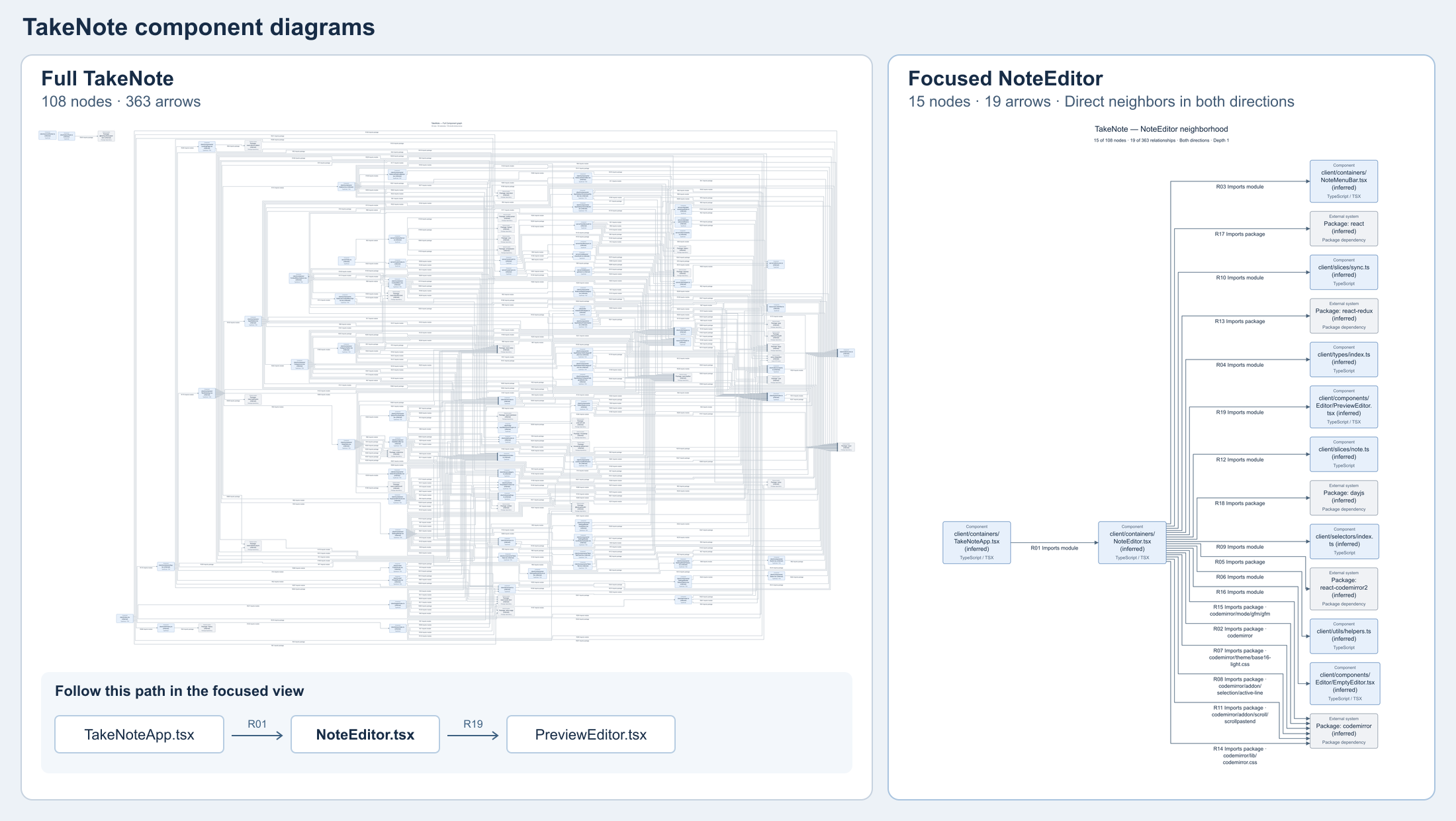
Full-size TakeNote comparison PNG
Use query --search to find the exact node ID for a focused diagram. These commands use the graph from the checkout example and show the outgoing dependencies of Order orchestration.
npx -y [email protected] query output/order-service.graph.json --search "Order orchestration" --depth 0
npx -y [email protected] render output/order-service.graph.json --node component:orders --direction outgoing --out output/ORDER-SERVICE.outgoing.md
With --node, render defaults to both directions, depth 1, 25 nodes, and 50 relationships. Use --direction incoming or --direction outgoing to trace one direction. Set --depth, --nodes, and --edges to adjust the view. The diagram caption shows how much of the saved graph is included. The render result reports omitted nodes and relationships and whether a node or relationship limit was reached.
The focused Markdown relationship table and interactive HTML details show up to three source locations per relationship. Use the saved graph for the full evidence.
For MCP, pass focus to render_architecture_graph. Find the ID with query_architecture_graph using search.
{
  "graphPath": "/absolute/path/to/project/architecture.graph.json",
  "outputPath": "/absolute/path/to/project/ARCHITECTURE.orders.md",
  "focus": {
    "nodeId": "component:orders",
    "direction": "outgoing",
    "maxDepth": 1,
    "maxNodes": 25,
    "maxEdges": 50
  }
}
Review architecture changes for a pull request
With Node.js 22 or 24 and Git installed, link the packaged skill on macOS or Linux:
npm install -g [email protected]
mkdir -p "$HOME/.agents/skills"
ln -s "$(npm root -g)/c4-architect-mcp/.agents/skills/what-changed-in-this-pr" "$HOME/.agents/skills/what-changed-in-this-pr"
Start a new Codex chat in your repository and try this prompt.
Use $what-changed-in-this-pr on zrack/c4-architect-mcp#16. Show me which dependencies it added or removed and link each arrow to the import.
The skill compares committed TypeScript and TSX snapshots. Its focused diagram shows only changed relationships. Numbered arrows link to source in the interactive view and match the rows in the Markdown report. Additions point to the PR head, removals to the base. Skill instructions
PR #16 added ten dependencies when it introduced explain-this-file. Follow each arrow to the import that introduced it. Read the PR #16 report · View the focused diagram
Pass review two saved graphs at the same C4 level and scan scope. Use each revision's boundary configuration if the pull request changes how files are assigned to components.
npx -y [email protected] review base.graph.json head.graph.json --out PR-ARCHITECTURE.md
The report separates dependency changes, declared boundaries, and file reassignments from ordinary source edits. It lists source locations and flags partial scans. The focused diagram uses the head snapshot for an added or changed dependency and the base snapshot when dependencies were only removed. Keep the diagram files beside the Markdown when sharing the report.
For links to exact GitHub source lines, pass each checkout's full commit SHA to analyze --commit when saving its graph. Then specify the repository and scan root for the report. Both snapshots must use the same repository-relative source root. The root defaults to . for a scan of the entire repository.
npx -y [email protected] review base.graph.json head.graph.json --out PR-ARCHITECTURE.md \
  --github-repo OWNER/REPO --source-root src
Partial scans list unresolved import locations and specifiers for both revisions. The report shows up to 25 locations per snapshot, with changes to the unresolved imports listed first.
Run the review in GitHub Actions
Open Actions → PR architecture review → Run workflow, choose the default branch, and enter the pull request number. The manual workflow compares Component snapshots at the PR's base and head commits without running their code. The source directory defaults to src.
For each revision, the workflow stages dependencies from its manifest and v3 npm lockfile in a separate directory. It uses the public npm registry with integrity checks and disables scripts. If a lockfile is missing, uses workspaces or other unsupported dependency sources, or the install fails, the workflow scans that revision without staged dependencies and reports any unresolved imports.
Download the pr-<number>-architecture-review-<attempt> artifact from the run and extract it before opening PR-ARCHITECTURE.md. Keep the focused diagram files beside the report so its links work. If there is no changed neighborhood to render, the artifact contains only the report.
Select Post an architecture review summary to the pull request when starting the workflow to share the dependency counts, scan status, and artifact link in a PR comment. The setting defaults to off. Readers with repository access can download the Markdown report and any focused diagram files after signing in to GitHub, while the artifact is available. Re-running the workflow updates that run's comment.
Use the workflow in another repository
Save this caller as .github/workflows/architecture-review.yml on your repository's default branch. Open Actions → Architecture review → Run workflow in that repository. Enter the PR number and a directory tracked in both revisions, or use . to scan the repository root. The report and any focused diagram appear in the calling repository's run artifacts.
name: Architecture review
on:
  workflow_dispatch:
    inputs:
      pr_number:
        description: Pull request number
        type: string
        required: true
      source_root:
        description: Repository-relative source directory
        type: string
        default: src

permissions:
  contents: read
  pull-requests: read

jobs:
  review:
    uses: zrack/c4-architect-mcp/.github/workflows/pr-architecture-review-report.yml@bbac6eea276202a284af02267eca5075c7293cda
    with:
      pr_number: ${{ inputs.pr_number }}
      source_root: ${{ inputs.source_root }}
If your repository restricts reusable workflows, allow the pinned uses reference in its Actions settings. To offer opt-in comments, call pr-architecture-review.yml at the same commit instead, grant the calling job pull-requests: write, and pass a Boolean post_comment input. Its default is false, and the scan job still uses read-only permissions.
Example output from PR #4
With commenting enabled, the workflow posted this summary on the PR that introduced the review command. View the original comment on PR #4
Component architecture review
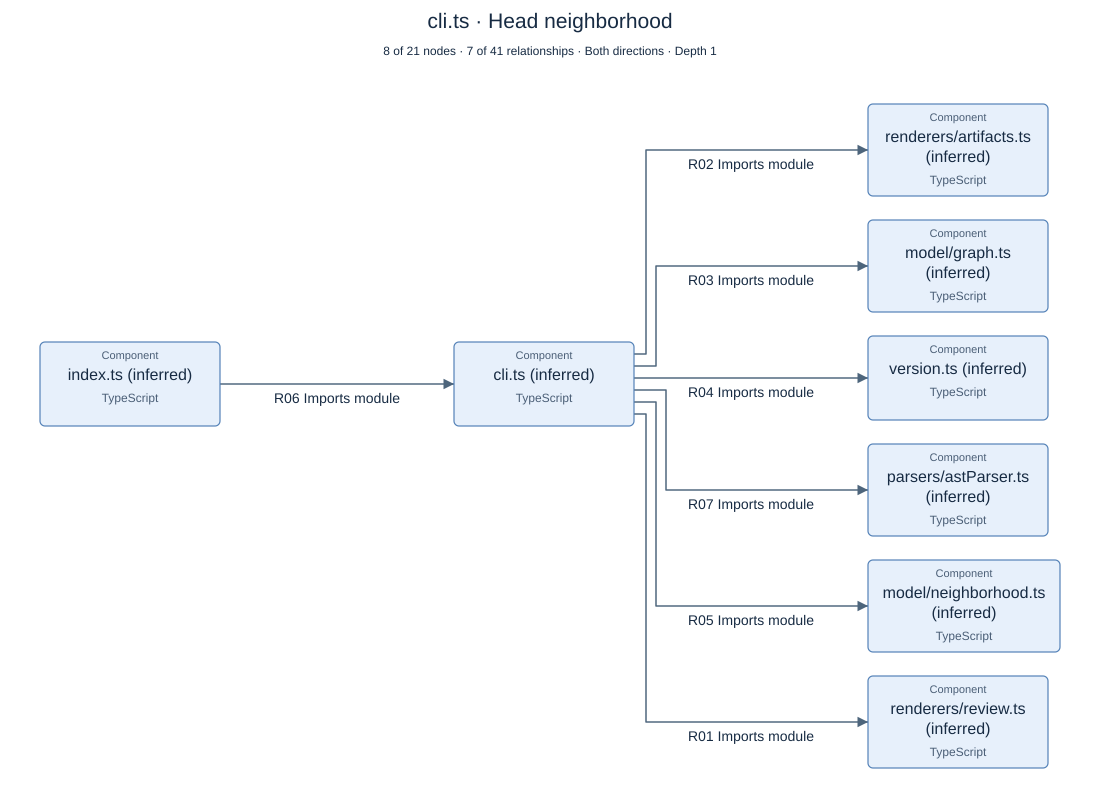
55419ce→4b39e25· Base scan complete · Head scan completeDependencies · 3 added, 0 removed, 0 changed.
The focused view shows the immediate neighbors of cli.ts. Follow R01 to trace the new import of renderers/review.ts.
Read the Markdown report · Open the full-size PNG · View the Actions run
Read the diagram
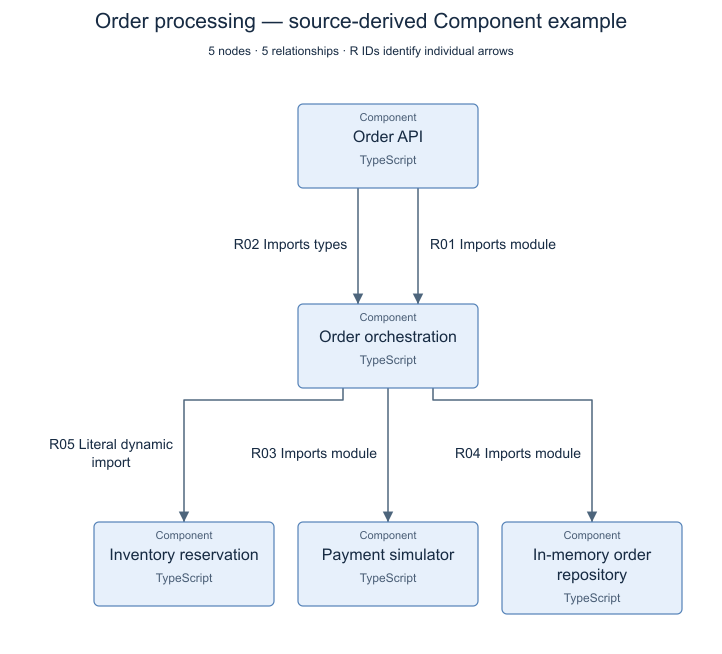
Five declared components and five source-observed dependencies from the checked-in order-service example. The application is synthetic; the dependencies come from its actual source imports.
The server computes the image layout with ELK, compares horizontal and vertical arrangements, and reserves space for the wrapped labels it draws. PNG and SVG rendering do not require a browser at runtime. Mermaid remains a compatible source export; a client's Mermaid layout may differ from the server image.
The saved graph preserves the system/container hierarchy. Context, Container, and Component images show parent-container and inferred-boundary information in node descriptions. Authored Deployment diagrams can show nested hosts. Inspect those descriptions in the interactive view.
Saving ARCHITECTURE.md also writes ARCHITECTURE.svg, ARCHITECTURE.png, and ARCHITECTURE.html beside it. The Markdown shows the PNG, links to the interactive view, includes a relationship table, and retains the Mermaid source in a collapsed section.
Explore the larger 20-node renderer example
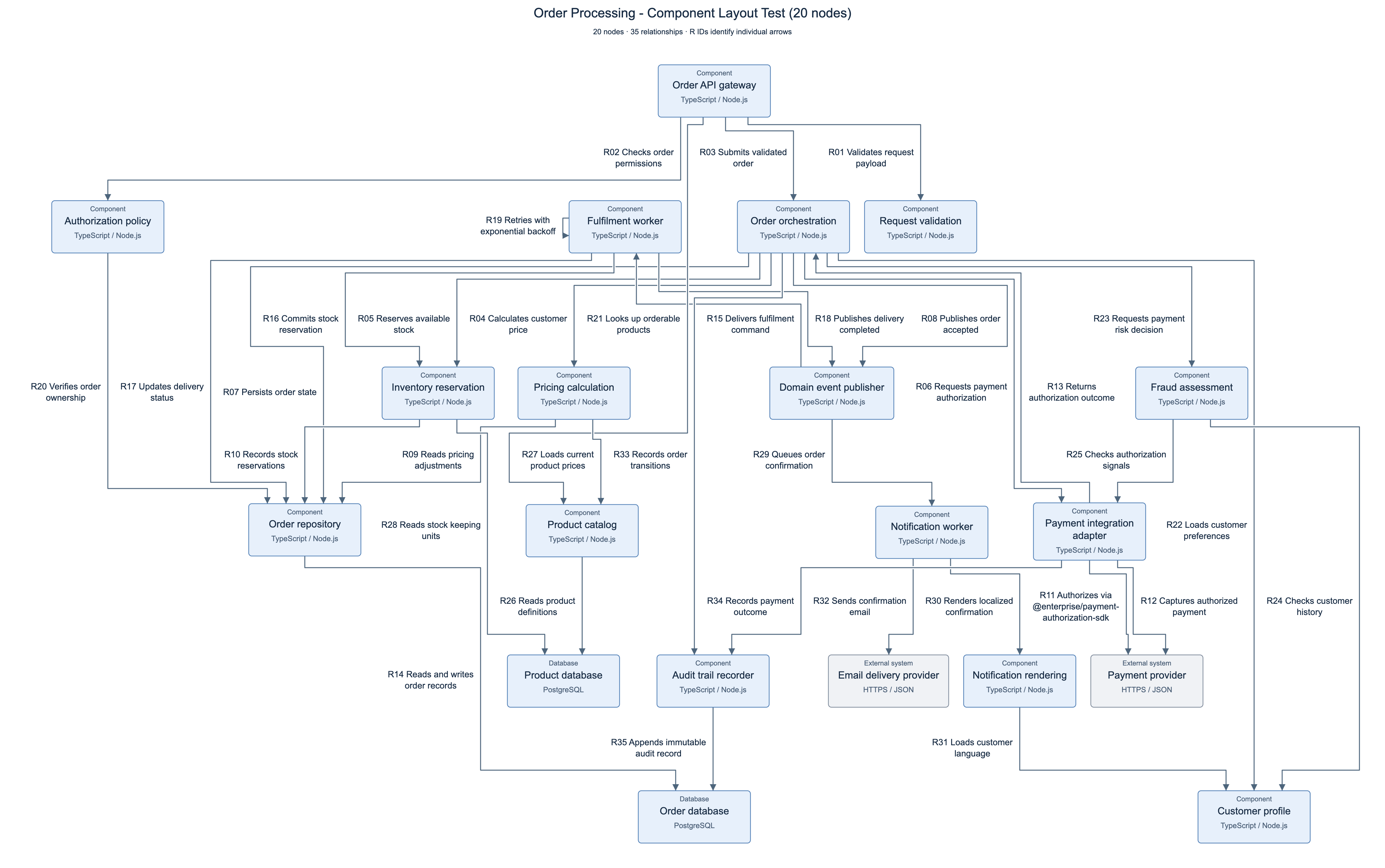
This separate stress fixture has 20 nodes and 35 relationships, including branching, cycles, shared dependencies, and long labels. Its connections are authored test data rather than extracted source dependencies.
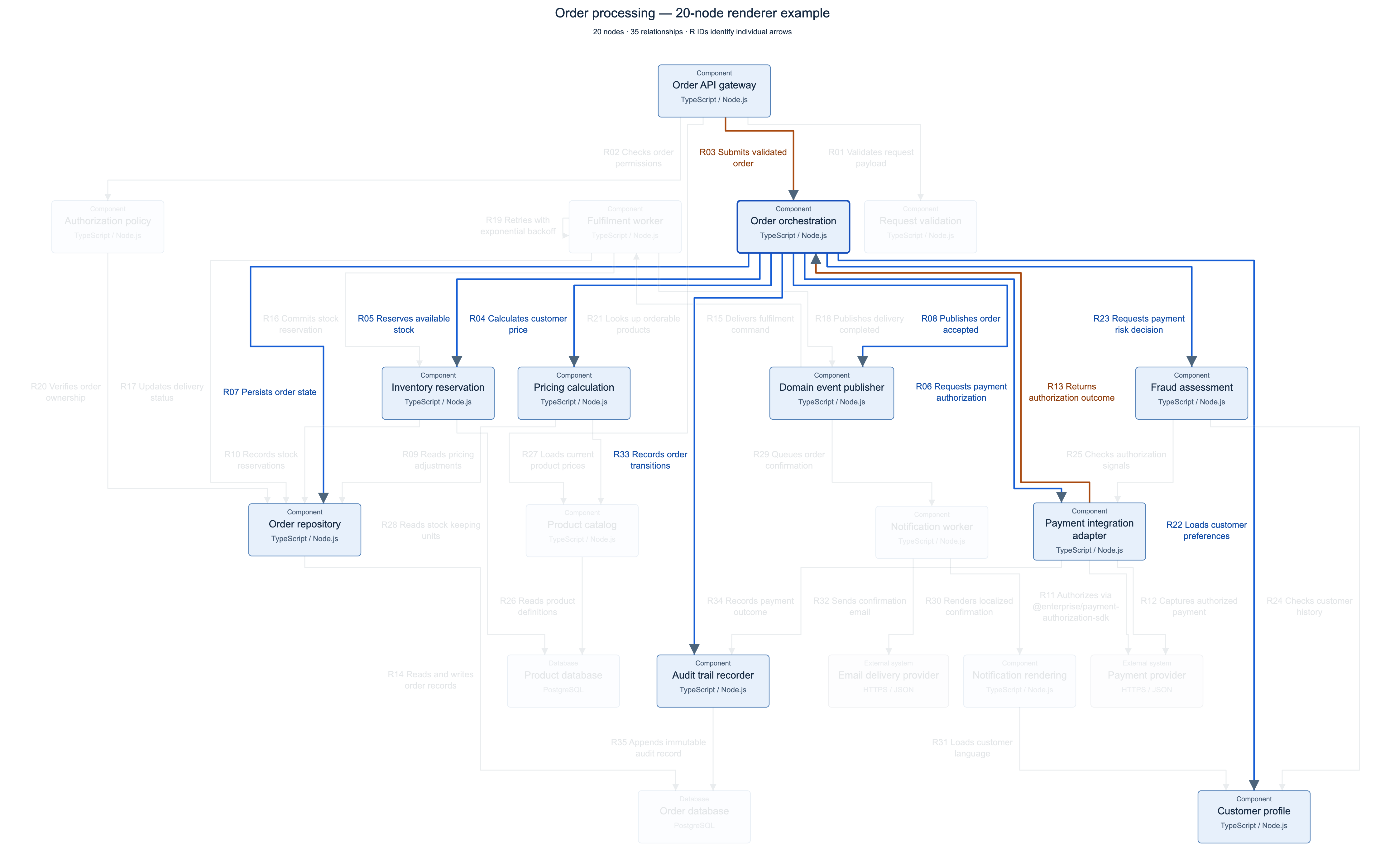
The 20-node stress fixture with Order orchestration selected, saved through the interactive view's export buttons.
Full-size selected PNG · Scalable selected SVG
Select a component to highlight outgoing connections in blue and incoming connections in brown. Other routes fade. Select a relationship ID to isolate that route and inspect its full label. Zoom, keyboard selection, Escape, and Show all help you move between details and the complete picture.

Export PNG and Export SVG preserve the current selection and connection highlighting across the full diagram, regardless of zoom or scroll position. PNG exports at twice the diagram's natural dimensions; SVG remains scalable. The self-contained HTML works as a local file without contacting the MCP server or an external service.
Automatic layout cannot make every graph readable at every size. Crossings can remain, and a large full-graph image may need zoom. Use selection and bounded graph queries to follow a particular change or dependency.
See image provenance and regeneration instructions to reproduce these examples.
Local execution and data
The parser reads local source files and does not call an LLM API. Generated diagrams and their interaction code are self-contained. Your MCP client receives the tool results, and its own settings determine whether those results are sent to a model or another service. Review those settings before analyzing private source.
Analysis is static; it does not run the analyzed application's code. Output options write the requested graph and diagram files. See SECURITY.md for the security scope and reporting process.
Develop and verify
From a repository checkout:
npm ci
npm test
npm run test:package
npm run test:layout
The regular tests cover parsing, graph contracts, graph operations, rendering, and MCP behavior. The package check exercises a packed installation. The layout check uses real browser geometry and downloads against synthetic 12-node and 20-node fixtures. It checks labels, routes, arrowheads, compactness, highlighting, keyboard controls, and selection-aware PNG/SVG exports.
The layout check uses installed Google Chrome by default. To use Playwright Chromium:
npx playwright install chromium
C4_BROWSER_CHANNEL=chromium npm run test:layout
For PowerShell, set $env:C4_BROWSER_CHANNEL = "chromium" before running the test. Browser reports and generated fixtures are written under output/playwright/component-scale/. These checks cover the included cases, not every possible graph topology.
The CI workflow configures tests on Node.js 22 and 24 across Linux, macOS, and Windows, plus a Chromium layout job. See the GitHub Actions runs for results.
Build this with us
Useful contributions start with a concrete case: an import that resolves incorrectly, a boundary that is hard to express, or a diagram whose route is difficult to follow. Small, sanitized fixtures are especially valuable.
- Report a bug: include a minimal input, expected result, diagnostics, and a screenshot for rendering problems.
- Improve analysis: add source evidence and a regression fixture; keep observed facts separate from inference.
- Improve diagrams: test the actual SVG and exported images, including selected views.
- Design an extension: discuss its graph contract before adding a new language, renderer, or publisher.
- Improve documentation: try the setup on your platform and client, and report the exact versions used.
Read CONTRIBUTING.md, the Code of Conduct, and the roadmap. Public API details may change during the alpha; preserve a copy of important graph snapshots and boundary configurations.
License
C4 Architect is available under the MIT License. You may use, modify, and redistribute it, including commercially, subject to the license terms. Dependency licenses and attribution requirements remain applicable; see NOTICE and third-party notices.
Установка C4 Architect
У этого сервера нет опубликованного пакета — он собирается из исходников. Открой репозиторий и следуй инструкции в README.
▸ github.com/zrack/c4-architect-mcpFAQ
C4 Architect MCP бесплатный?
Да, C4 Architect MCP бесплатный — установка в пару кликов через Unyly без оплаты.
Нужен ли API-ключ для C4 Architect?
Нет, C4 Architect работает без API-ключей и переменных окружения.
C4 Architect — hosted или self-hosted?
Self-hosted: сервер запускается локально на твоей машине командой из раздела установки.
Как установить C4 Architect в Claude Desktop, Claude Code или Cursor?
Открой C4 Architect на unyly.org, выбери вкладку своего клиента (Claude Desktop, Claude Code, Cursor) и нажми Install — конфиг сгенерируется автоматически, без правки JSON.
Похожие MCP
GitHub
PRs, issues, code search, CI status
 автор: GitHub
Filesystem
Secure file operations with configurable access controls.
Memory
Knowledge graph-based persistent memory system.

Unyly Deploy
Deploy sites and MCP servers to Unyly straight from your AI agent
 автор: Unyly
Template MCP Server
A CLI tool to create a new Model Context Protocol server project with TypeScript support, dual transport options, and an extensible structure
 автор: mcpdotdirect
Server Sequential Thinking
MCP server for sequential thinking and problem solving
 автор: GitHub Actions
Amap Maps Mcp Server
MCP server for using the AMap Maps API
 автор: duxiaohui
PayMCP
Lightweight payments layer for MCP servers: turn tools into paid endpoints with a two-line decorator. [PyPI](https://pypi.org/project/paymcp/) · [npm](https://w
 автор: blustAI
demo
demo — MCP server via Smithery
 автор: yoojoohans-jpg
Server For Power BI
Enables exploring Microsoft Fabric / Power BI workspaces and semantic models, and executing ad-hoc DAX queries.
 автор: Mitsubishi-Fuso
Compare C4 Architect with
Не уверен что выбрать?
Найди свой стек за 60 секунд
Автор?
Embed-бейдж для README
Похожее
Все в категории development