
Federal Contracting Tools
БесплатноНе проверенEight MCP servers covering SAM.gov, USASpending.gov, GSA CALC+, eCFR, and Federal Register for U.S. federal contracting work.

Описание
Eight MCP servers covering SAM.gov, USASpending.gov, GSA CALC+, eCFR, and Federal Register for U.S. federal contracting work.
README
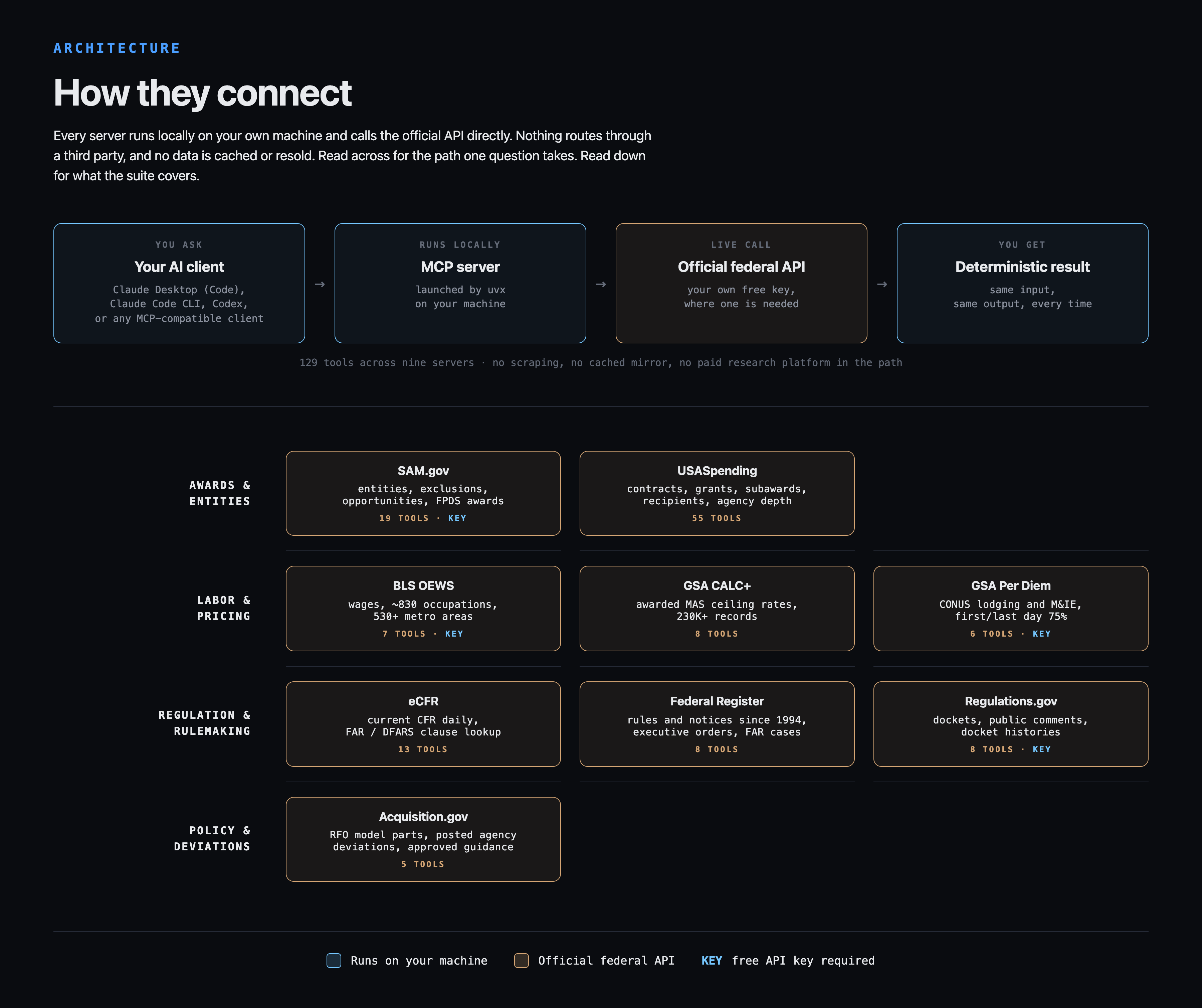
Eight free and open source MCP servers for federal contracting data and policy tracking. SAM.gov, USASpending, GSA CALC+, BLS OEWS, per diem, eCFR, Federal Register, and Regulations.gov, exposed as 124 deterministic tool calls.
Your assistant queries the real APIs instead of recalling what it thinks the FAR says. Same input, same output, every time.
Website: 1102tools.com
The fastest install: hand this PDF to your AI
Download the universal setup guide (PDF), then drop it into Claude, ChatGPT (Codex), Gemini (Antigravity), Copilot, DeepSeek Harness, Grok, Cursor, opencode, or LibreChat and say what you want installed. The AI reads the guide and walks you through every step: free API keys, the exact config for your platform, restart, verify. If 35 pages is more than your chat will accept, paste in just the section for your platform; every option is written to stand alone. Part 9 is troubleshooting built from errors I actually hit while executing every major install path for real.
Download the prompt guide (PDF): what to ask once the servers are in. Competitor intelligence, bid decisions, recompete timing, and pricing, centered on when SAM.gov is the answer and when USASpending beats it. Every prompt pattern was run against the live servers before publishing.
1.0.0 is out (August 2026)
All eight servers move to 1.0.0 together. This is the first stable release of the suite, and the largest update since it launched. Every package is now marked Production/Stable, tested on Python 3.10 through 3.14, and versioned in lockstep so you never have to work out which combination you are running.
Rebuilt on v2 of the MCP Python SDK
The MCP Python SDK, the library every one of these servers is built on, released version 2.0 in July. It renamed its high-level server class from FastMCP to MCPServer and removed the old module entirely. All eight servers have been migrated and re-verified against it.
Nothing changed for you as a user. Same 124 tools, same parameters, same responses. The dependency is now bounded at mcp>=2.0.0,<3, so the next major SDK release produces a clean error at install time instead of a crash at startup.
Two problems this release fixes, and both were affecting people
BLS wage lookups were returning empty results. When BLS published its May 2025 OEWS estimates this spring, it withdrew the 2024 series. bls-oews-mcp still defaulted to 2024, so any wage query that did not pass an explicit year came back with no values, which is indistinguishable from a privacy-suppressed cell. There was no error and no warning. The default is now 2025, and detect_latest_year() will confirm the current year at any time.
If you pulled wage figures for an IGCE between roughly April and August 2026, re-check them.
Fresh installs were failing outright. Every 0.x package declared mcp>=1.0.0 with no upper limit. When SDK 2.0.0 published on July 28, new installs resolved to it and died immediately with ModuleNotFoundError: No module named 'mcp.server.fastmcp'. Existing installs were unaffected, but anyone installing for the first time in that window hit a wall. Bounding the requirement fixes it permanently.
Apologies to anyone who lost time to either one.
Claude Desktop .mcpb bundles are discontinued
The double-click bundles are gone. They could not be signed in a way Claude Desktop recognizes, so every install showed an untrusted-developer prompt with no way to clear it, and the bundle re-resolved its dependencies on every launch rather than pinning them, which made it the install path most exposed to the failure above. The config block in Install does the same job with fewer moving parts. Existing bundle installs keep working until removed, but will not receive updates.
Verified before shipping
4,715 regression tests across the eight servers, with pass counts identical to the pre-migration baseline, plus a live protocol handshake against each server confirming all 124 tools register. Per-server detail is in each changelog.md.
The eight MCPs
All source lives under servers/<name>/. Each server is self-contained: code, tests, per-server README with a copy-paste config block.
Procurement data
- sam-gov-mcp: SAM.gov entity registration, exclusions, opportunities, contract awards (FPDS replacement), federal hierarchy, FFATA subawards
- usaspending-gov-mcp: federal contract, award, FFATA subaward, recipient, agency, and Treasury federal account data
- gsa-calc-mcp: GSA CALC+ awarded NTE hourly rates from MAS contracts (230K+ records)
- bls-oews-mcp: BLS OEWS market wage data across ~830 occupations and 530+ metros
- gsa-perdiem-mcp: federal travel lodging and M&IE rates for all CONUS
Regulatory and policy tracking
- ecfr-mcp: current CFR text updated daily, FAR / DFARS / agency supplement lookups
- federal-register-mcp: proposed rules, final rules, notices, executive orders, FAR cases
- regulations-gov-mcp: federal rulemaking dockets, public comments, comment period tracking
Combined: 124 deterministic tool calls, 4,715 regression tests, 8 audit programs, roughly 350 bugs fixed during hardening.
Install
Requires Python 3.10+ and uv. MCP is an open standard: these servers run in any MCP client, not just Claude. Every install path was executed and verified in August 2026 on eleven platforms: Claude Desktop, Claude Code, Codex Desktop and CLI, Gemini via Antigravity, GitHub Copilot CLI, DeepSeek Harness, Grok Build, Cursor, opencode, and LibreChat.
1. Register the free API keys you need. BLS, api.data.gov (covers Per Diem and Regulations.gov), SAM.gov. USASpending, GSA CALC+, eCFR, and Federal Register need no key.
2. Add the servers you want to your client config. Most clients take the same mcpServers JSON block and differ only in where the config file lives (for Claude Desktop it is ~/Library/Application Support/Claude/claude_desktop_config.json on macOS, %APPDATA%\Claude\claude_desktop_config.json on Windows). The universal setup guide has the exact file path and format for all eleven platforms, including the Codex TOML form.
{
  "mcpServers": {
    "ecfr": {
      "command": "uvx",
      "args": ["--refresh-package", "ecfr-mcp", "--from", "ecfr-mcp", "ecfr-mcp"]
    },
    "sam-gov": {
      "command": "uvx",
      "args": ["--refresh-package", "sam-gov-mcp", "--from", "sam-gov-mcp", "sam-gov-mcp"],
      "env": { "SAM_API_KEY": "your-key-here" }
    }
  }
}
The --refresh-package flag tells uv to check PyPI for a newer release each time your client launches the server, so fixes and new tools arrive automatically. Without it, uv keeps serving whatever version it first cached. It adds a moment of network time at startup; if your platform enforces a short MCP startup timeout, raise it (the setup guide covers this per platform).
3. Restart the client. Each server's README has its own block with the correct package name and environment variable.
Docker images and a Smithery config ship with each server for hosted or containerized setups.
If you are pinned to mcp 1.x and cannot move, stay on the 0.x line of each package.
Repo layout
federal-contracting-mcps/
├── servers/
│   ├── bls-oews-mcp/
│   ├── ecfr-mcp/
│   ├── federal-register-mcp/
│   ├── gsa-calc-mcp/
│   ├── gsa-perdiem-mcp/
│   ├── regulations-gov-mcp/
│   ├── sam-gov-mcp/
│   └── usaspending-gov-mcp/
├── license
└── readme.md
Each server directory ships its own pyproject.toml, source, regression tests, Dockerfile, and testing record.
Companion repo
federal-contracting-skills: Claude Skills that orchestrate these MCPs into complete acquisition deliverables: SOW/PWS Builder, three IGCE Builders (FFP, LH/T&M, Cost-Reimbursement), OT Project Description Builder, OT Cost Analysis.
MCPs handle data. Skills handle deliverables.
Why MCPs (and not skills for the API calls)
- Deterministic. MCP servers execute tested Python. Claude does not generate API-call code on the fly. Same input, same output.
- Low context cost. Tool schemas are ~100 tokens each. The deprecated API-data skills cost 500-1000 lines of context per run.
- Production-hardened. Each MCP went through 3-6 audit rounds with live testing against its production API.
- Cross-client. MCP is an open standard. The same servers were executed and verified on eleven platforms in August 2026, from Claude Desktop and Claude Code to Codex, Antigravity, Copilot, Cursor, opencode, and LibreChat.
Website
License
MIT
Author
Built by James Jenrette, lead systems analyst and contracting officer. Independently developed and not endorsed by any federal agency.
Установка Federal Contracting Tools
У этого сервера нет опубликованного пакета — он собирается из исходников. Открой репозиторий и следуй инструкции в README.
▸ github.com/1102tools/federal-contracting-mcpsFAQ
Federal Contracting Tools MCP бесплатный?
Да, Federal Contracting Tools MCP бесплатный — установка в пару кликов через Unyly без оплаты.
Нужен ли API-ключ для Federal Contracting Tools?
Нет, Federal Contracting Tools работает без API-ключей и переменных окружения.
Federal Contracting Tools — hosted или self-hosted?
Self-hosted: сервер запускается локально на твоей машине командой из раздела установки.
Как установить Federal Contracting Tools в Claude Desktop, Claude Code или Cursor?
Открой Federal Contracting Tools на unyly.org, выбери вкладку своего клиента (Claude Desktop, Claude Code, Cursor) и нажми Install — конфиг сгенерируется автоматически, без правки JSON.
Похожие MCP
GitHub
PRs, issues, code search, CI status
 автор: GitHub
Filesystem
Secure file operations with configurable access controls.
Memory
Knowledge graph-based persistent memory system.
Template MCP Server
A CLI tool to create a new Model Context Protocol server project with TypeScript support, dual transport options, and an extensible structure
 автор: mcpdotdirect
Amap Maps Mcp Server
MCP server for using the AMap Maps API
 автор: duxiaohui
Supabase
Database, auth and storage
 автор: Supabase
Everything
Reference / test server with prompts, resources, and tools.
Git
Tools to read, search, and manipulate Git repositories.
Sequential Thinking
Dynamic and reflective problem-solving through thought sequences.
Time
Time and timezone conversion capabilities.
Compare Federal Contracting Tools with
Не уверен что выбрать?
Найди свой стек за 60 секунд
Автор?
Embed-бейдж для README
Похожее
Все в категории development