
Godot Studio
БесплатноНе проверенControl a live Godot editor with 120+ tools for creating scenes, editing scripts, wiring signals, and managing game assets.

Описание
Control a live Godot editor with 120+ tools for creating scenes, editing scripts, wiring signals, and managing game assets.
README

Godot AI
Godot AI connects Claude Code, Claude Desktop, Codex, Hermes Agent, and other MCP clients to a live Godot editor. Its 46 tools and 120+ operations let AI assistants build scenes, edit nodes and scripts, wire signals, and configure UI, materials, animation, particles, cameras, and environments.

Built in ~2 hours with Godot AI, without hand-written code or image generation — source
Quick Start
Requirements
- Godot 4.7+ within the 4.x line for Godot AI v4
- uv, which provides
uvxfor the Python server - An MCP client
1. Install or update
New project: choose a published version from
GitHub Releases and follow its
verification and installation instructions. The add-on belongs at
your-project/addons/godot_ai/, with plugin.cfg inside that directory.
Use the release's requirements and package—not a source snapshot copied over
an existing installation.
Existing installation: click Update in the Godot AI dock when an update is offered. The final signed v3 release supports a one-click migration to v4; Godot restarts once and owned, supported client entries are migrated automatically. Do not extract a new add-on over the old tree. See the v3 → v4 migration guide for compatibility and recovery.
For development from source, use the contributor setup.
2. Enable the plugin
In Godot: Project → Project Settings → Plugins → Godot AI.
The plugin starts the MCP server and shows connection status in the Godot AI
dock. If it is missing from the plugin list, check that the file is at
addons/godot_ai/plugin.cfg, not addons/plugin.cfg.
3. Connect your MCP client
In the dock, press Configure next to your client, or Configure all for every detected client. If the client does not notice the new configuration, restart that client.
Supported clients include Claude Code, Claude Desktop, Codex, Antigravity, Hermes Agent, DeepSeek Harness, Cursor, and VS Code. The dock lists all supported clients and provides a Run this manually fallback where needed.
Use the dock-generated command: it includes the matching version, ports,
resolver options, and excluded tool domains. V4 uses godot-ai attach over
stdio; a bare http://127.0.0.1:8000/mcp entry cannot authenticate or follow
capability rotation. Updates repin owned client entries automatically;
reconfigure after changing ports, telemetry preferences, or tool domains.
Client exceptions: Pi Coding Agent needs an MCP extension that reads
~/.pi/agent/mcp.json. Cherry Studio is not supported in v4; remove stale v3
entries in Cherry Studio itself.
Per-project configuration
CLI-configured clients default to global user scope. Set Editor Settings →
Plugins → godot_ai/mcp_client_scope to project (or local, where supported),
then press Configure again.
Configure removes existing godot-ai entries from every scope before
writing the selected one. This can modify a checked-in .mcp.json, but does not
touch other server entries. Remove affects only the selected scope.
Launch Godot from the project directory so the client CLI writes configuration
in the right place. Claude Code also requires one-time approval from claude
run inside that project.
4. Try it
- "Show me the current scene hierarchy."
- "Create a Camera3D named MainCamera under /Main."
- "Search the project for PackedScene files in ui/."
- "Run the scene test suite."
- "Build a voxel block-world game with a player, blocks to place and destroy, and save slots."

A block-world game with a save system, built from a handful of prompts — source
How it works
MCP client
  → godot-ai attach (stdio)
  → Python server (authenticated HTTP, port 8000)
  → Godot editor plugin (authenticated WebSocket, port 9500)
Both local hops use independent rotating capabilities; neither falls back to unauthenticated access. The editor WebSocket stays loopback-only. An agent in a container or on another machine runs the bridge on the editor machine over SSH; see Agents on another machine or in a container.
These controls do not protect against a compromised same-user process. Windows also does not claim isolation from other local accounts. See the security model and package trust boundaries.
Telemetry and privacy
Usage telemetry records an installation UUID, event, outcome, duration, platform, and version—not code, scene contents, or project/file names. Project-directory slugs are hashed before transmission.
Opt out with GODOT_AI_DISABLE_TELEMETRY=true or DISABLE_TELEMETRY=true.
Opt-out creates no telemetry UUID, worker, or files.
Privacy details and editor settings.
Documentation and help
Bazzite / Fedora Atomic Desktop: server exits before publishing capabilities
On Bazzite and other Fedora Atomic desktops, /home is normally a symbolic
link to /var/home (the ostree layout). Godot AI 4.0.2 and earlier refuse
every capability-directory path that passes through a link, so on such a
system the server exits with Last pending: capability_record
(#993). The next release
follows a link when it is root-owned and sits in a root-owned directory that
other accounts cannot write, which is exactly that layout; no configuration is
needed there.
On 4.0.2 or earlier, close Godot and your MCP client, then run this in a terminal as your normal user:
export GODOT_AI_CAPABILITY_DIR="$(
  realpath -m "${XDG_CONFIG_HOME:-$HOME/.config}/godot-ai/capabilities"
)"
install -d -m 700 "$GODOT_AI_CAPABILITY_DIR"
printf 'Using: %s\n' "$GODOT_AI_CAPABILITY_DIR"
Launch both Godot and your MCP client from that terminal so the backend and
godot-ai attach inherit the same directory. A desktop launcher does not
automatically inherit a terminal's export; for persistent use, set the same
canonical path in the launch environment of both applications. Keep the
directory private to your user; do not copy capability tokens into client
configuration. This workaround is for Linux; GODOT_AI_CAPABILITY_DIR is not
supported on Windows.
Reference and support
- Tools, operations, and resources
- Write and run tests for your game
- Client configuration details
- Upgrading from v3 and recovering interrupted migrations
- Changelog
- Contributing and development setup
- Discord for questions and showcases; GitHub Issues for bug reports
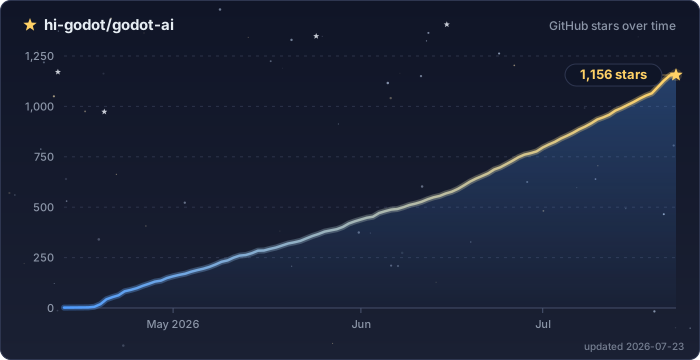
Star History
License: MIT
Установка Godot Studio
У этого сервера нет опубликованного пакета — он собирается из исходников. Открой репозиторий и следуй инструкции в README.
▸ github.com/hi-godot/godot-aiFAQ
Godot Studio MCP бесплатный?
Да, Godot Studio MCP бесплатный — установка в пару кликов через Unyly без оплаты.
Нужен ли API-ключ для Godot Studio?
Нет, Godot Studio работает без API-ключей и переменных окружения.
Godot Studio — hosted или self-hosted?
Self-hosted: сервер запускается локально на твоей машине командой из раздела установки.
Как установить Godot Studio в Claude Desktop, Claude Code или Cursor?
Открой Godot Studio на unyly.org, выбери вкладку своего клиента (Claude Desktop, Claude Code, Cursor) и нажми Install — конфиг сгенерируется автоматически, без правки JSON.
Похожие MCP
GitHub
PRs, issues, code search, CI status
 автор: GitHub
Filesystem
Secure file operations with configurable access controls.
Memory
Knowledge graph-based persistent memory system.
Template MCP Server
A CLI tool to create a new Model Context Protocol server project with TypeScript support, dual transport options, and an extensible structure
 автор: mcpdotdirect
Amap Maps Mcp Server
MCP server for using the AMap Maps API
 автор: duxiaohui
Supabase
Database, auth and storage
 автор: Supabase
Everything
Reference / test server with prompts, resources, and tools.
Git
Tools to read, search, and manipulate Git repositories.
Sequential Thinking
Dynamic and reflective problem-solving through thought sequences.
Time
Time and timezone conversion capabilities.
Compare Godot Studio with
Не уверен что выбрать?
Найди свой стек за 60 секунд
Автор?
Embed-бейдж для README
Похожее
Все в категории development