
IBM Storage Scale Server
БесплатноНе проверенModel Context Protocol (MCP) server for interacting with IBM Storage Scale clusters, enabling management of storage resources through natural language.

Описание
Model Context Protocol (MCP) server for interacting with IBM Storage Scale clusters, enabling management of storage resources through natural language.
README
Model Context Protocol (MCP) server for interacting with IBM Storage Scale.
[NOTE] This MCP server supports both StreamableHTTP and stdio transports. By default, it uses StreamableHTTP transport on
127.0.0.1:8000.
Installation Guide
Prerequisites
- Python 3.12 or later
- UV package manager (
curl -LsSf https://astral.sh/uv/install.sh | sh) - Node.js 22 and npx (optional, for file operations support)
curl -fsSL https://rpm.nodesource.com/setup_22.x | sudo bash -
sudo yum install -y nsolid
Installation
Clone the repository:
git clone https://github.com/IBM/ibm-storage-scale-mcp-server.git
cd ibm-storage-scale-mcp-server
Install dependencies using uv:
uv venv
source .venv/bin/activate
uv pip install .
Configure Scale connection settings:
cp config/scale_config.ini.example config/scale_config.iniEdit config/scale_config.ini with your IBM Storage Scale cluster details:
[scale_api]
hostname = your-scale-cluster.example.com
v2_port = 443
v3_port = 46443
timeout = 5.0

[authorization]
username = your-username
password = your-password
allow_insecure = true

[domain]
domain = your-domain

[ssh]
# SSH connection settings for remote CLI commands
hostname = your-scale-node.example.com
port = 22
username = your-username
password = your-ssh-password
key_path = your-ssh-key  # Alternative to password authentication
Replace the placeholder values with your actual Scale cluster credentials and connection details.
Note: The
[ssh]section is required for CLI-based tools that execute commands directly on Scale nodes (such as policy operations). You can use either password or SSH key authentication (precedence over password authentication).Start the server using uv or python:
# Using uv (default: HTTP transport on localhost:8000)
uv run scale-mcp-server
Usage Examples
# Run with HTTP transport on default port (localhost:8000)
scale-mcp-server --transport http

# Run with HTTP transport binding to all interfaces
scale-mcp-server --transport http --host 0.0.0.0

# Run with HTTP transport on custom port
scale-mcp-server --transport http --port 3000

# Run with stdio transport
scale-mcp-server --transport stdio

# Run with custom host, port, and log level
scale-mcp-server --transport http --host 0.0.0.0 --port 3000 --log-level DEBUG
Third-Party Integrations
The server supports optional third-party MCP server integrations to extend functionality beyond IBM Storage Scale management.
File Operations
The server can optionally mount the MCP filesystem server to provide local file operations alongside IBM Storage Scale management. This enables:
- Reading and writing files
- Creating and listing directories
- Moving files and directories
- Searching files with patterns
- Getting file metadata
Usage:
scale-mcp-server --transport http --filesystem-paths /path/to/dir1 /path/to/dir2
Usage and Integration
Using MCP Inspector
The MCP server can be tested directly using MCP Inspector.
Prerequisites
Follow the setup instructions from MCP Inspector.
Connecting via HTTP Transport
Start the MCP server:
scale-mcp-server --transport httpConnect MCP Inspector:
mcp-inspector http://localhost:8000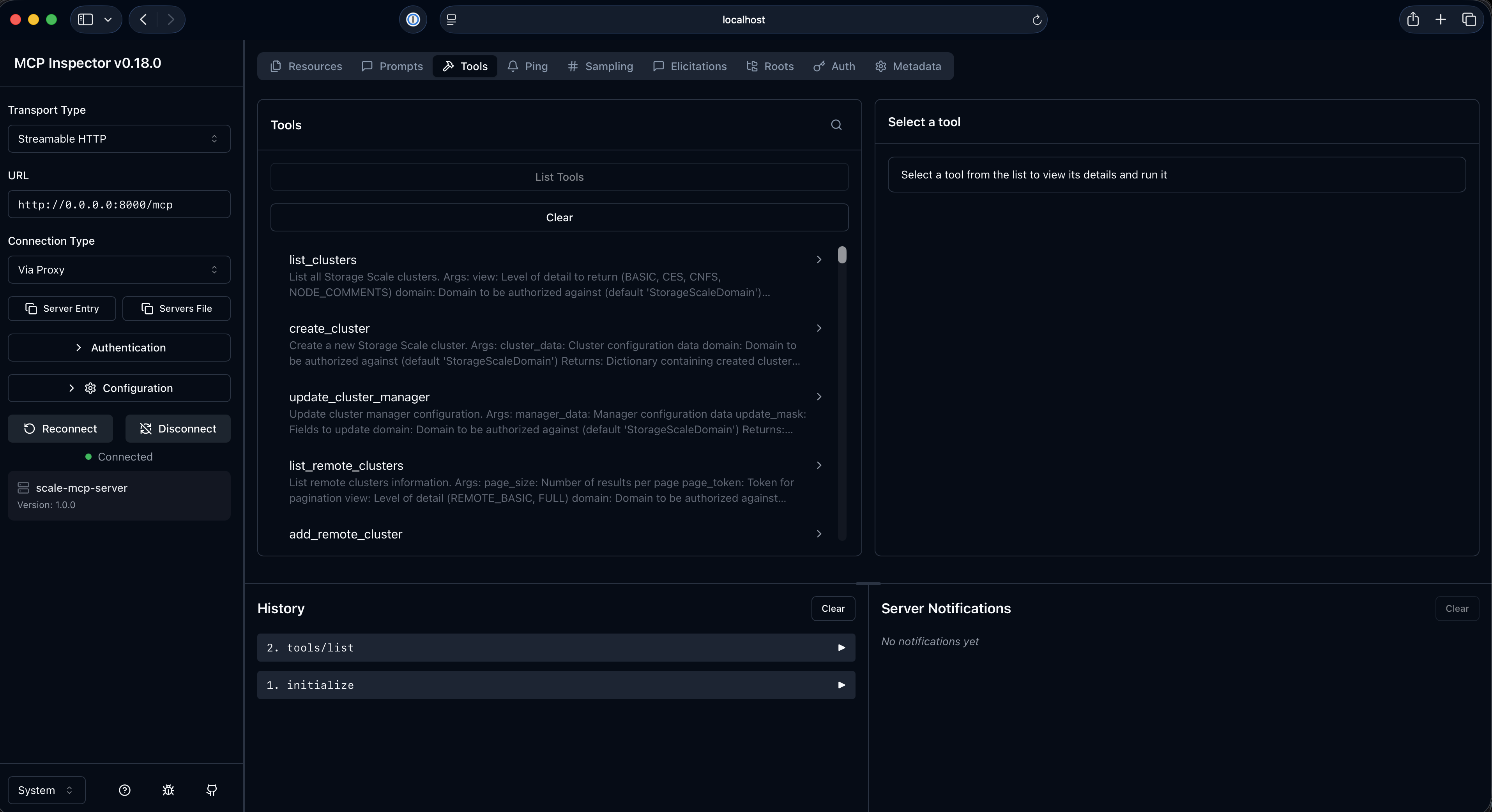
Test the server:
- MCP Inspector will open in your browser
- You can browse available tools
- Test tool calls and verify responses
Using with Agents
For a higher-level conversational interface, consider using the IBM Storage Scale Agents which are built on top of this MCP server. The agents provide an intuitive way to manage IBM Storage Scale operations through natural language interactions.
Reporting Issues and Feedback
For issues, questions, or feature requests, please open an issue in the repository.
Contributing Code
Contributions are welcome via Pull Requests. Please submit your very first Pull Request against the Developer's Certificate of Origin (DCO) located at DCO.md using your name and email address.
- Fork the repository and create a new branch for your feature or bug fix
- Make your changes following the existing code style and conventions
- Test your changes thoroughly to ensure they work as expected
- Submit a pull request with a clear description of your changes
- Sign the DCO by adding your name and email address to the DCO.md file in your pull request
Disclaimer
This software is provided "as is" without any warranties of any kind, including, but not limited to their installation, use, or performance. We are not responsible for any damage or charges or data loss incurred with their use. You are responsible for reviewing and testing any scripts you run thoroughly before use in any production environment. This content is subject to change without notice.
Установка IBM Storage Scale Server
У этого сервера нет опубликованного пакета — он собирается из исходников. Открой репозиторий и следуй инструкции в README.
▸ github.com/IBM/ibm-storage-scale-mcp-serverFAQ
IBM Storage Scale Server MCP бесплатный?
Да, IBM Storage Scale Server MCP бесплатный — установка в пару кликов через Unyly без оплаты.
Нужен ли API-ключ для IBM Storage Scale Server?
Нет, IBM Storage Scale Server работает без API-ключей и переменных окружения.
IBM Storage Scale Server — hosted или self-hosted?
Self-hosted: сервер запускается локально на твоей машине командой из раздела установки.
Как установить IBM Storage Scale Server в Claude Desktop, Claude Code или Cursor?
Открой IBM Storage Scale Server на unyly.org, выбери вкладку своего клиента (Claude Desktop, Claude Code, Cursor) и нажми Install — конфиг сгенерируется автоматически, без правки JSON.
Похожие MCP
GitHub
PRs, issues, code search, CI status
 автор: GitHub
Filesystem
Secure file operations with configurable access controls.
Memory
Knowledge graph-based persistent memory system.
Template MCP Server
A CLI tool to create a new Model Context Protocol server project with TypeScript support, dual transport options, and an extensible structure
 автор: mcpdotdirect
Amap Maps Mcp Server
MCP server for using the AMap Maps API
 автор: duxiaohui
Supabase
Database, auth and storage
 автор: Supabase
Everything
Reference / test server with prompts, resources, and tools.
Git
Tools to read, search, and manipulate Git repositories.
Sequential Thinking
Dynamic and reflective problem-solving through thought sequences.
Time
Time and timezone conversion capabilities.
Compare IBM Storage Scale Server with
Не уверен что выбрать?
Найди свой стек за 60 секунд
Автор?
Embed-бейдж для README
Похожее
Все в категории development