
LocalREPL Server
БесплатноНе проверенA locally-running Python REPL server that integrates with Claude Desktop through the Model Context Protocol, offering shell bridge, streaming, and operational m

Описание
A locally-running Python REPL server that integrates with Claude Desktop through the Model Context Protocol, offering shell bridge, streaming, and operational memory features for secure code experimentation and system automation.
README
A locally-running Python REPL server that integrates with Claude Desktop through the Model Context Protocol (MCP).
local-repl-cli skill
This repo ships an agent skill at local-repl-cli-skill/ that teaches Claude to drive modern, token-efficient CLI tools (rg, fd, ast-grep, bat, sd, jq, yq, tokei, eza, dust, procs, delta, hyperfine, watchexec, just) through the LocalREPL shell bridge — with a count-before-enumerate discipline, structured --json output, and the MCP-subprocess gotchas documented under local-repl-cli-skill/reference/.
Deploy it to ~/.claude/skills/ as a live symlink (no copying, no drift):
just deploy-skill          # symlinks ~/.claude/skills/local-repl-cli -> local-repl-cli-skill/
just check-skill-tools     # verify the expected CLI tools are installed
For a general, execution-agnostic version of this CLI knowledge (cross-platform, not tied to LocalREPL or any one MCP), see the separate AI-CLI skill in the ai_workspace.
Features
- Local REPL: Runs a Python REPL server locally
1. System Discovery Workflow
- Purpose: Methodical exploration of the full system capabilities
- Approach: Phase-by-phase discovery with comprehensive documentation
- Output: Complete system mapping and enhancement opportunities
2. Advanced Workflow Orchestration
- Purpose: Complex multi-stage workflows with dependency management
- Features: Task execution engine, error handling, performance monitoring
- Templates: Data analysis, research, multi-agent coordination workflows
3. Strategic Capability Enhancement
- Purpose: Systematic enhancement of system capabilities
- Framework: Phase 1 (Planning) → Phase 2 (Execution) → Phase 3 (Adaptation)
- Implementation: Sample agent communication and performance monitoring systems
**4. Agent Communication and Performance Monitoring
- Persistent Agent Intelligence with JSON state storage
- Empowerment Optimization Framework with energy tracking
- Advanced Memory Systems with categorization and tagging
- Workflow Orchestration capabilities
- Evolution Database tracking agent learning
- Multi-REPL Coordination for parallel processing
5. Other Advantages
Completely Local: Run Python code directly on your machine without any remote dependencies
State Persistence: Maintain state between code executions (completely local)
MCP Integration: Fully compatible with Claude Desktop through the Model Context Protocol
No API Keys: No registration or signup required
Privacy-Focused: Your code never leaves your machine if you use local models
Simple & Secure: Straightforward implementation with minimal dependencies
New Additions: See Modular-Empowerment-README.md or just try the prompts!
Potential Use Cases for LocalREPL
There are several powerful use cases for a local Python REPL integrated with Claude:
1. Interactive Learning Environment
- Perfect for teaching programming concepts with immediate feedback
- Step through algorithms with Claude explaining each part
- Build understanding iteratively without switching between tools
2. Data Analysis Workflow
- Process and analyze data with state persistence
- Incrementally build analysis pipelines with guidance from Claude
- Visualize results and refine approach without context switching
3. Secure Code Experimentation
- Experiment with sensitive code or data that shouldn't leave your machine
- Test financial algorithms, personal automation, or proprietary code
- Avoid exposing intellectual property to third-party services
4. Incremental Development
- Build solutions step-by-step with Claude's guidance
- Maintain context and state throughout development sessions
- Refine code based on immediate feedback and results
5. Local AI Integration Testing
- Test integrations with local AI models
- Process inputs and outputs for AI systems
- Build preprocessing and postprocessing pipelines
6. Automated Documentation Generation
- Generate documentation from code inspection
- Test and refine documentation examples
- Create interactive tutorials with working code examples
7. Private API Testing
- Explore internal or sensitive APIs without exposing credentials
- Build up complex API requests incrementally
- Test authentication flows and data handling
8. Local System Automation
- Control and interact with local services securely
- Build automation scripts that don't require internet access
- Test system modifications in a controlled environment
9. Continuous Computational Context
- Maintain a persistent computational environment between conversations
- Build on previous calculations without starting over
- Create complex multi-step analyses with Claude's guidance
10. Educational Demonstrations
- Create interactive coding tutorials
- Demonstrate concepts with working code examples
- Allow students to experiment safely within Claude
Installation
Prerequisites
- Python 3.10 or higher
- Claude Desktop
Setup
- Clone this repository
git clone https://github.com/angrysky56/local-repl-mcp.git
Quickstart:
You can just copy this into your mcp config json edit the path to your own, and should be good to go:
{
  "mcpServers": {
    "LocalREPL": {
      "command": "uv",
      "args": [
        "--directory",
        "/absolute/path/to/local-repl-mcp",
        "run",
        "-m",
        "local_repl"
      ]
    }
  }
}
Usage
Some of these packages will take some time to install, I suggest you do this if they take too long to install:
Optional: Install additional packages you want to use in your REPL:
cd local-repl-mcp
# Using uv (recommended)
# uv .venv/bin/activate && uv pip install <required-packages>
# If you don't have uv installed, you can install it with:
# pip install uv
# Then if not made by the server activating via Claude you can create then activate the virtual environment with:
# uv venv --python 3.12 --seed
# Then you can activate the virtual environment with:
uv .venv/bin/activate
# And install the packages with:
uv add numpy pandas matplotlib scipy scikit-learn tensorflow torch torchvision torchtext torchaudio seaborn sympy requests networkx beautifulsoup4 jupyter fastapi
Once the server is installed in Claude Desktop, you can use the following tools,
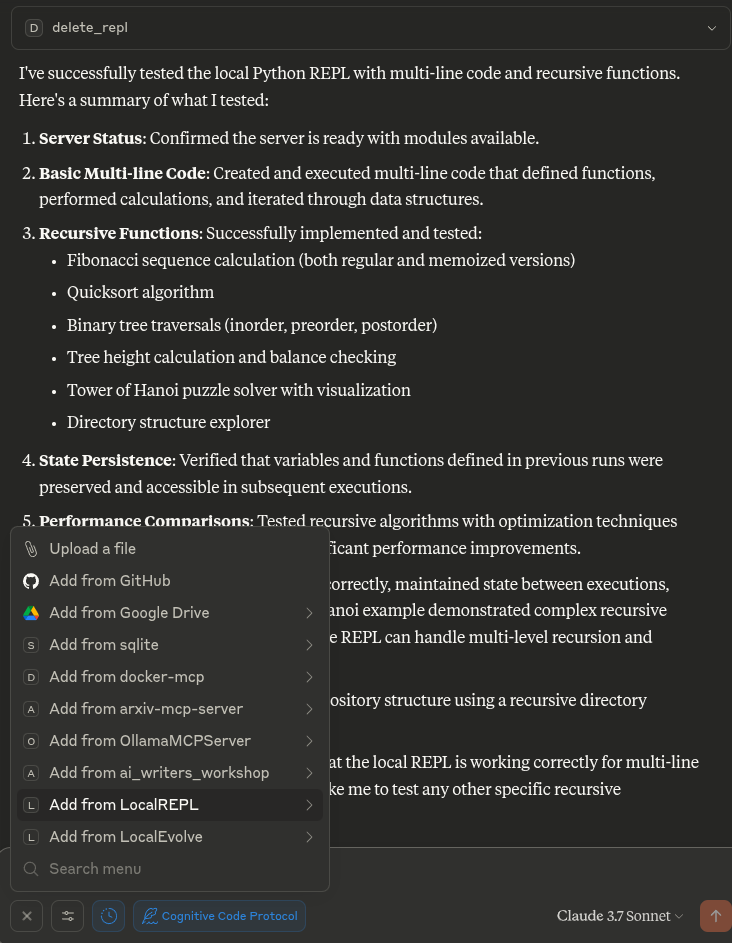
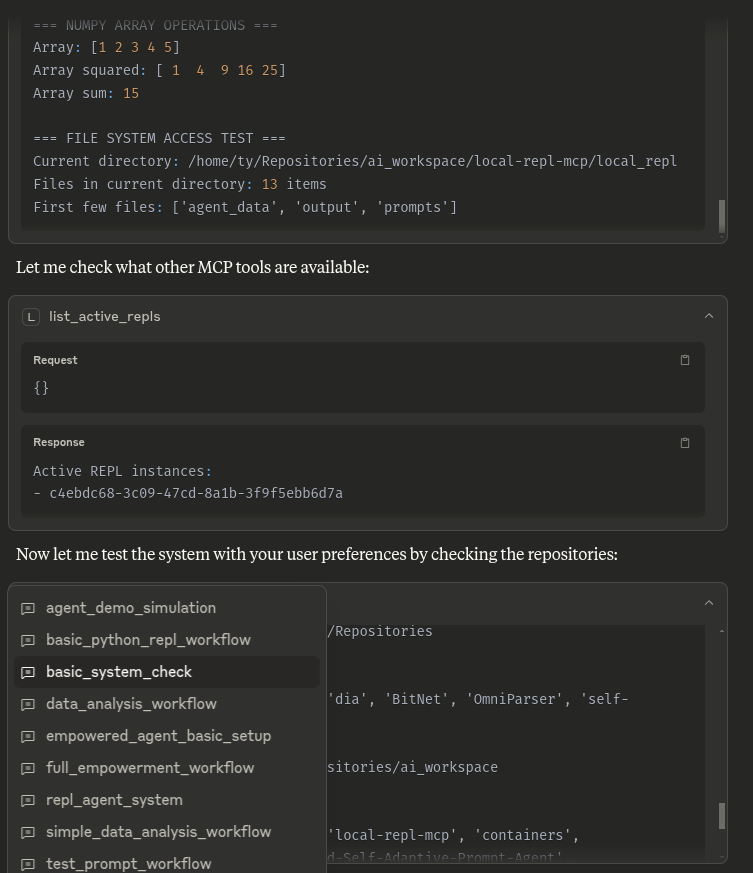
This info and much more is also available to Claude via the prompts folder and attachable by the + in the Desktop UI or /LocalREPL in others:
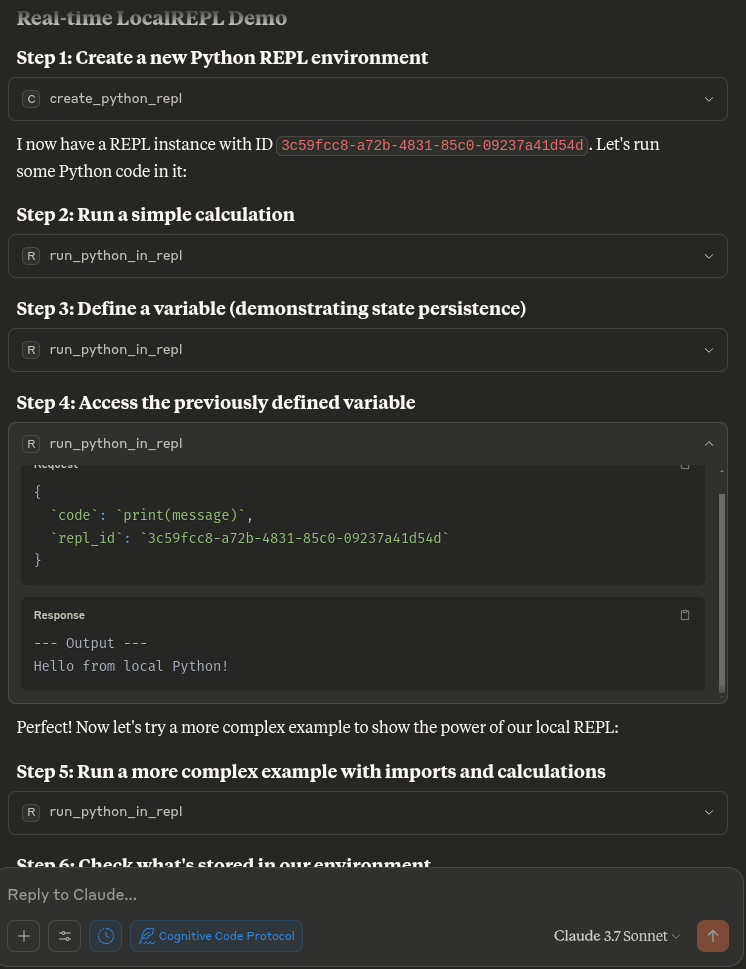
create_python_repl()- Creates a new Python REPL and returns its IDrun_python_in_repl(code, repl_id)- Runs Python code in the specified REPLlist_active_repls()- Lists all active REPL instancesget_repl_info(repl_id)- Shows information about a specific REPLdelete_repl(repl_id)- Deletes a REPL instance
Shell, Streaming, and Operational Memory (v0.2)
As of v0.2 the REPL is no longer Python-only. Three modules expand it into a full CLI orchestration layer:
Shell bridge (shell_bridge.py)
Run one-shot commands with structured output. Every call auto-logs to
evolution.db so past executions become queryable memory.
run_shell(command, repl_id, timeout_seconds=30, cwd=None, use_shell=False, env_extra=None)Returns{command, cwd, stdout, stderr, exit_code, duration_ms, timed_out, truncated_stdout, truncated_stderr}.use_shell=Trueenables pipes/redirects via/bin/sh. Blocklist refusessudo,rm -rf /,dd of=/dev/…,shutdown/reboot, fork bombs, and chained variants likeecho x && sudo poweroff.set_repl_cwd(repl_id, path)/get_repl_cwd(repl_id)- track a working directory per REPL so subsequentrun_shellcalls start there.
Streaming (streaming.py)
Long-running processes with non-blocking output drain.
spawn_shell(command, repl_id, cwd=None, use_shell=False)→ returnsproc_id(separate from OS PID to avoid reuse issues).tail_shell_output(proc_id, n_lines=50, stream='both', drain=False)- read recent lines without blocking. Usedrain=Truein polling loops so the next call sees only NEW output.send_to_shell(proc_id, input_text)- write to stdin for interactive REPLs/servers.kill_shell(proc_id, signal_name='SIGTERM')- supports SIGTERM/SIGKILL/ SIGINT/SIGHUP.wait_shell(proc_id, timeout_seconds=30)- block until exit.list_shells()/reap_exited()- inventory and cleanup.
Operational memory (evolution_memory.py)
SQLite-backed log of every shell command. Like Atuin, but queryable by the agent directly.
query_command_history(pattern=None, repl_id=None, only_failures=False, only_timeouts=False, since=None, limit=20)-patternuses SQL LIKE (%ripgrep%),sinceaccepts'1h','30m','2d', or ISO timestamps.command_stats(since=None, top_n=5)- total/pass/fail, success rate, top commands, top failures, slowest runs.tag_command(command_id, tags)- attach['flaky', 'solved']etc.forget_command(command_id)- delete rows that captured secrets.vacuum_memory(keep_last_n=5000)- cap db size.
Virtual Environment Execution (venv_exec.py)
Run Python code inside isolated virtual environments with their own packages and interpreters.
run_python_in_venv(code, venv_path, repl_id=None)- Run Python code inside a specified virtual environment path.find_venv(path=None)- Discover python virtual environments automatically.
Verify the install
After pulling these changes:
uv run python -m local_repl.doctor
Expects all 9 checks green before you restart Claude Desktop.
Note on unified server: The entry point modules
server.pyand__main__.pyhave been fully unified. The pyproject script commandlocal-repl-mcpis now 100% feature-complete, containing all REPL, shell, streaming, memory, and virtual environment execution tools!
Recommended CLI Toolchain
The shell bridge shines when paired with modern CLI utilities that produce structured, predictable output (exit codes, JSON flags, counts-first patterns). The recipes below assume Pop!_OS 24.04 / Ubuntu 24.04; other distros use the same package names with their own package manager.
Tier A — apt (one sudo command)
sudo apt update
sudo apt install -y bat git-delta hyperfine
fd / bat naming fix (no sudo). Debian/Ubuntu ship fd-find / bat as fdfind / batcat to avoid name collisions. Symlink the usual names so scripts work unchanged:
mkdir -p ~/.local/bin
ln -sf "$(which fdfind)" ~/.local/bin/fd
ln -sf "$(which batcat)" ~/.local/bin/bat
echo "$PATH" | tr ':' '\n' | grep -q '\.local/bin' && echo OK
ast-grep and nvm-installed npm binaries. If you use nvm, npm installs global binaries under ~/.nvm/versions/node/<ver>/bin/. That path is added to $PATH by shell init files, which don't fire when an MCP server launches via launchd/systemd. Symlink into ~/.local/bin so it's visible to any subprocess regardless of how the parent was started:
ln -sf "$(npm root -g)/../bin/ast-grep" ~/.local/bin/ast-grep
ast-grep --version
Tier B — user-space (no sudo)
# ast-grep: structural code search/rewrite.
npm install -g @ast-grep/cli

# tokei: per-language code statistics.
cargo install tokei

# just: self-documenting command runner via uv (no sudo, no cargo compile).
uv tool install rust-just
watchexec — prebuilt .deb (skip cargo)
Don't cargo install watchexec-cli. As of watchexec 2.5.1 the crate uses fmt::from_fn, still nightly-only on Rust 1.95 (debug_closure_helpers tracking issue #117729; stabilization PR #146099 pending). Compilation fails with error[E0658]. Use the upstream .deb instead:
WATCHEXEC_VER=2.5.1
cd /tmp
curl -fsSLO "https://github.com/watchexec/watchexec/releases/download/v${WATCHEXEC_VER}/watchexec-${WATCHEXEC_VER}-x86_64-unknown-linux-gnu.deb"
echo "9bf40f223b3651e59c99ed463c44635fa71ab3f81b69927b5343b3935a4fdb14  watchexec-${WATCHEXEC_VER}-x86_64-unknown-linux-gnu.deb" | sha256sum -c -
sudo dpkg -i "watchexec-${WATCHEXEC_VER}-x86_64-unknown-linux-gnu.deb"
For future versions, grab the matching checksum from https://github.com/watchexec/watchexec/releases/download/v<VER>/watchexec-<VER>-x86_64-unknown-linux-gnu.deb.sha256.
Verify the toolchain
for cmd in rg jq fd bat delta tokei hyperfine watchexec ast-grep just; do
  printf "%-12s " "$cmd"
  command -v "$cmd" >/dev/null && echo "✓ $($cmd --version 2>/dev/null | head -1)" || echo "✗ MISSING"
done
Ten green checkmarks = ai-cli skill has its full toolkit.
Why these specific tools
ToolReplacesAI-relevant winrggrepRespects .gitignore; --json output; blazing fastfdfindSimpler syntax, parallel walks, respects .gitignoreast-grepregex for codeMatches code by AST pattern, not text — kills "old_string not unique" edit failuresjqsed/awk on JSONSafe, predictable JSON parsingtokeiwc -l + findPer-language code stats in one call — great first-touch overviewbatcatLine numbers + git change markers give the agent immediate contextdeltadiff viewerSide-by-side, syntax-aware diffshyperfinetime ...Statistical benchmarking with JSON exportwatchexecpolling loopsReactive file-change triggers instead of pollingjustbash scriptsSelf-documenting recipes; just --list shows every task
Known gotchas
sgis notast-grep. On Debian/Ubuntusgis thesetsid/script-grep binary fromutil-linux. Use the full nameast-grep— the ast-grep team dropped thesgshortname in 2024 for this exact reason.- ast-grep pattern syntax is specific.
$$$binds to argument lists, not arbitrary bodies. To match "any function by name" usedef $NAME, notdef $NAME($$$): $$$— the latter silently returns zero matches. use_shell=Trueruns under/bin/sh, not bash. No brace expansion{a,b}, no[[ ]], no process substitution. Use POSIX sh syntax or invokebash -c '...'explicitly.rgand stdin. Ripgrep'sis_readable_stdinheuristic hangs waiting on stdin if the parent's stdin is a pipe. The shell bridge handles this by passingstdin=DEVNULLby default.stdin_inputparameter with JSON payloads. The MCP tool-call serializer auto-parses JSON-looking strings into dicts, failing Pydantic'sstrcheck. Workaround: pipe viause_shell=Truewithecho '{...}' | jq ....
Example Workflow
# First create a new REPL
repl_id = create_python_repl()

# Run some code
result = run_python_in_repl(
  code="x = 42\nprint(f'The answer is {x}')",
  repl_id=repl_id
)

# Run more code in the same REPL (with state preserved)
more_results = run_python_in_repl(
  code="import math\nprint(f'The square root of {x} is {math.sqrt(x)}')",
  repl_id=repl_id
)

# Check what variables are available in the environment
environment_info = get_repl_info(repl_id)

# When done, you can delete the REPL
delete_repl(repl_id)
Development
To run the server during development:
mcp dev server.py
Try this stuff if you need to, untested:
Create a virtual environment:
# Using uv (recommended)
uv venv --python 3.12 --seed

# Or using standard venv
python -m venv .venv
Activate the virtual environment:
# On Linux/macOS
. .venv/bin/activate

# On Windows
.venv\Scripts\activate
cd local-repl-mcp Install the package:
# Using uv
uv pip install -e .

# Using pip
pip install -e .
No idea if this works:
Run the following command to generate a configuration file for Claude Desktop:
mcp install server.py
Troubleshooting
- EPIPE errors: If you see EPIPE errors, restart the Claude Desktop application
- Missing packages: If your code requires specific packages, install them in the same virtual environment
- Connection issues: Ensure the server path in your configuration is correct
- MCP tools not appearing: Check your Claude Desktop configuration and restart the application
License
Установка LocalREPL Server
У этого сервера нет опубликованного пакета — он собирается из исходников. Открой репозиторий и следуй инструкции в README.
▸ github.com/angrysky56/local-repl-mcpFAQ
LocalREPL Server MCP бесплатный?
Да, LocalREPL Server MCP бесплатный — установка в пару кликов через Unyly без оплаты.
Нужен ли API-ключ для LocalREPL Server?
Нет, LocalREPL Server работает без API-ключей и переменных окружения.
LocalREPL Server — hosted или self-hosted?
Self-hosted: сервер запускается локально на твоей машине командой из раздела установки.
Как установить LocalREPL Server в Claude Desktop, Claude Code или Cursor?
Открой LocalREPL Server на unyly.org, выбери вкладку своего клиента (Claude Desktop, Claude Code, Cursor) и нажми Install — конфиг сгенерируется автоматически, без правки JSON.
Похожие MCP
GitHub
PRs, issues, code search, CI status
 автор: GitHub
Filesystem
Secure file operations with configurable access controls.
Memory
Knowledge graph-based persistent memory system.
Template MCP Server
A CLI tool to create a new Model Context Protocol server project with TypeScript support, dual transport options, and an extensible structure
 автор: mcpdotdirect
Compare LocalREPL Server with
Не уверен что выбрать?
Найди свой стек за 60 секунд
Автор?
Embed-бейдж для README
Похожее
Все в категории development