
Loom To Code Vibe Coding
БесплатноНе проверенPoint at your running app, say what to change, draw on it: an element-mapped brief your coding agent applies. Dev toolbar + Claude Code plugin.

Описание
Point at your running app, say what to change, draw on it: an element-mapped brief your coding agent applies. Dev toolbar + Claude Code plugin.
README
Point at your running app, say what to change, and draw on it. Your coding agent gets a brief it can apply.
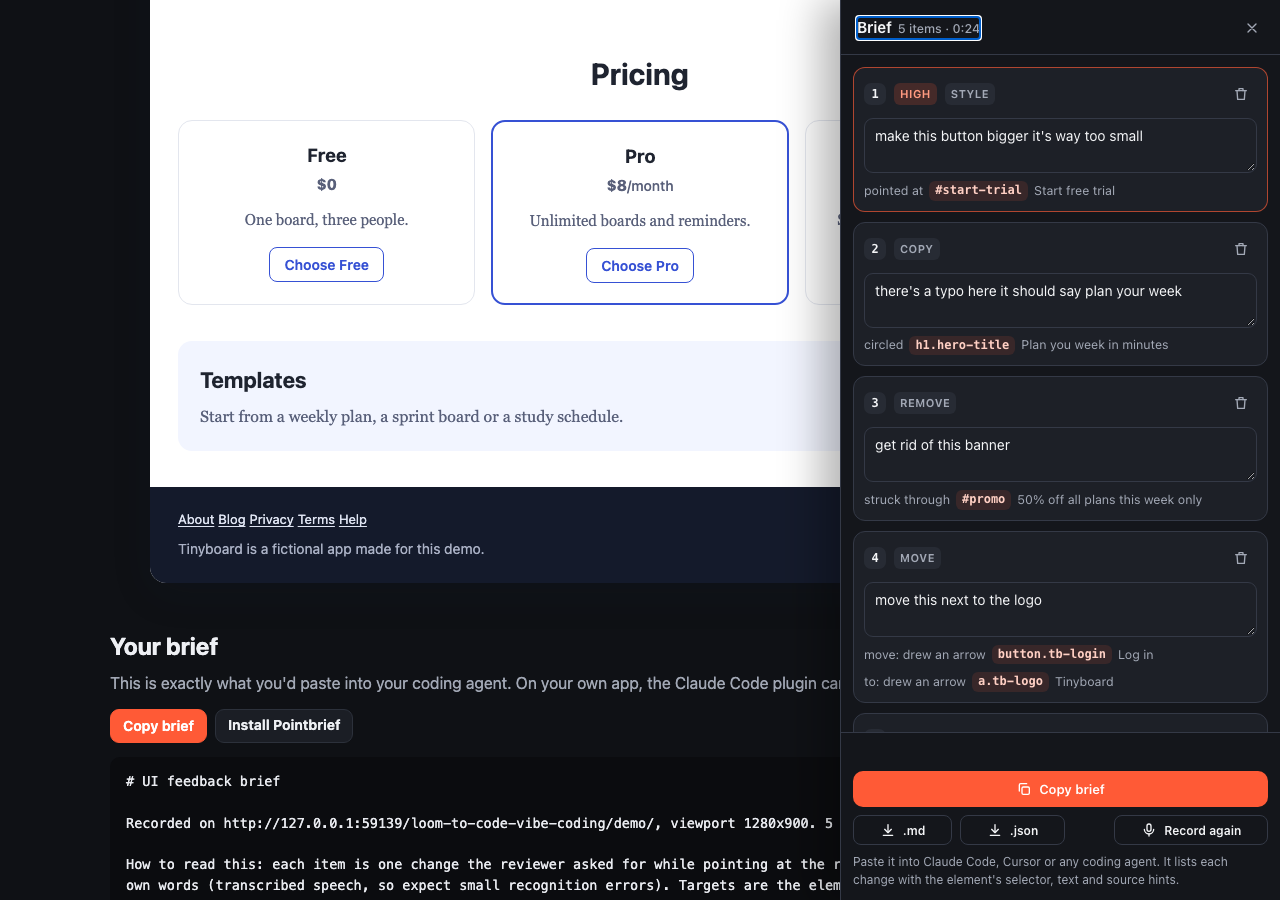
Pointbrief is a free, open-source dev toolbar and Claude Code plugin. You record over your local app the way you'd record a Loom for a developer: talk, hover and click, circle things, cross them out, draw arrows. Pointbrief records events, not video, so every sentence is tied to the exact element you were pointing at: its selector, text, current styles, and in React, Vue and Svelte dev builds, the component and source file. Press Done and you get a numbered change list that Claude Code, Cursor or any agent can apply.
Try it: https://code.screenrecordit.com/demo/ (runs in your browser, nothing uploaded)
Install
Claude Code plugin
/plugin marketplace add theguysaccount/loom-to-code-vibe-coding
/plugin install pointbrief@pointbrief
Then /pointbrief:setup adds the toolbar to your app (in development only), and after you press
Send to agent on the toolbar, /pointbrief:apply makes the changes and shows you the diff before
anything is committed. Needs Node.js 18+. From a terminal: claude plugin install pointbrief --marketplace theguysaccount/loom-to-code-vibe-coding.
Any web app (script tag)
Add one line to your app's HTML in development:
<script src="https://cdn.jsdelivr.net/gh/theguysaccount/[email protected]/plugin/toolbar/pointbrief.js" defer></script>
Then Copy brief and paste it into any agent. There's also a bookmarklet on the home page, and setups for Vite, Next.js, Nuxt and SvelteKit in the docs.
Cursor
Import this repository as a plugin (it has a .cursor-plugin/marketplace.json), or add the MCP server to
~/.cursor/mcp.json: see Cursor setup.
What a brief looks like
## 1. [HIGH] "make this button bigger it's way too small"
- Priority: high (said "way too")
- Likely kind of change: style
- Target, pointed at: `button#start-trial` "Start free trial" (button)
  - selector: `#start-trial`
  - component: `Hero` in `src/components/Hero.tsx:18` (inside App > Landing)
  - now: font-size 12px · color rgb(124, 134, 173) · padding 6px 10px
Full example: Markdown · JSON · format · JSON Schema
Privacy
No screen video, no screenshots, no account, no server. Form values and anything in
data-pointbrief-private are never read. Voice is transcribed by your browser (on the device when it
can); the toolbar says which before you start, and you can type instead. The brief leaves the page only
when you copy it, download it, or send it to the plugin on 127.0.0.1, which accepts only local pages.
Details: privacy.
Repository layout
| Path | What |
|---|---|
src/ |
The toolbar: capture (pointer.js, draw.js, speech.js), stroke recognition (shapes.js), element description (elements.js), the brief (brief.js), UI (toolbar.js) |
plugin/ |
The Claude Code / Cursor plugin: MCP server and bridge (server/server.mjs), skills, the built toolbar (toolbar/pointbrief.js) |
site/ |
The website: templates, docs in Markdown, demo app, self-test pages |
scripts/ |
Build (build.mjs, a small bundler, Markdown renderer), plugin checks, live checks, IndexNow, keep-alive |
tests/ |
Unit tests (node --test) and browser tests over the Chrome DevTools protocol |
Develop
No dependencies to install: Node.js 18+ and Google Chrome are enough.
node --test tests/unit/*.test.mjs     # unit tests
node scripts/build.mjs                # bundle the toolbar into plugin/toolbar/ and build the site into dist/
node scripts/check-plugin.mjs         # manifests, skills, versions, MCP server smoke test
node tests/e2e/run.mjs                # headless Chrome: capture, element mapping, bridge, every page
node tests/e2e/run.mjs --screens      # the same, saving screenshots to docs/screens/
python3 -m http.server -d dist 8000   # browse dist/ (paths assume /loom-to-code-vibe-coding/)
Commit plugin/toolbar/pointbrief.js with any change to src/: CI fails if it doesn't match the source.
Deploy
Pushing to main runs .github/workflows/pages.yml: tests, build, deploy to GitHub Pages, the browser
tests again on the live site, then IndexNow. A failing test stops before the deploy. The weekly
self-test, keep-alive and keys are in OPERATIONS.md.
License
MIT. Contributions welcome: open an issue first for anything large.
Установка Loom To Code Vibe Coding
У этого сервера нет опубликованного пакета — он собирается из исходников. Открой репозиторий и следуй инструкции в README.
▸ github.com/theguysaccount/loom-to-code-vibe-codingFAQ
Loom To Code Vibe Coding MCP бесплатный?
Да, Loom To Code Vibe Coding MCP бесплатный — установка в пару кликов через Unyly без оплаты.
Нужен ли API-ключ для Loom To Code Vibe Coding?
Нет, Loom To Code Vibe Coding работает без API-ключей и переменных окружения.
Loom To Code Vibe Coding — hosted или self-hosted?
Self-hosted: сервер запускается локально на твоей машине командой из раздела установки.
Как установить Loom To Code Vibe Coding в Claude Desktop, Claude Code или Cursor?
Открой Loom To Code Vibe Coding на unyly.org, выбери вкладку своего клиента (Claude Desktop, Claude Code, Cursor) и нажми Install — конфиг сгенерируется автоматически, без правки JSON.
Похожие MCP
GitHub
PRs, issues, code search, CI status
 автор: GitHub
Filesystem
Secure file operations with configurable access controls.
Memory
Knowledge graph-based persistent memory system.

Unyly Deploy
Deploy sites and MCP servers to Unyly straight from your AI agent
 автор: Unyly
Template MCP Server
A CLI tool to create a new Model Context Protocol server project with TypeScript support, dual transport options, and an extensible structure
 автор: mcpdotdirect
Server Sequential Thinking
MCP server for sequential thinking and problem solving
 автор: GitHub Actions
Amap Maps Mcp Server
MCP server for using the AMap Maps API
 автор: duxiaohui
PayMCP
Lightweight payments layer for MCP servers: turn tools into paid endpoints with a two-line decorator. [PyPI](https://pypi.org/project/paymcp/) · [npm](https://w
 автор: blustAI
demo
demo — MCP server via Smithery
 автор: yoojoohans-jpg
Server For Power BI
Enables exploring Microsoft Fabric / Power BI workspaces and semantic models, and executing ad-hoc DAX queries.
 автор: Mitsubishi-Fuso
Compare Loom To Code Vibe Coding with
Не уверен что выбрать?
Найди свой стек за 60 секунд
Автор?
Embed-бейдж для README
Похожее
Все в категории development