
Plantcv
БесплатноНе проверенEnables plant phenotyping via MCP, returning plant trait measurements along with segmentation overlays to validate mask quality, preventing unreliable outputs.

Описание
Enables plant phenotyping via MCP, returning plant trait measurements along with segmentation overlays to validate mask quality, preventing unreliable outputs.
README
plantcv-mcp is an MCP server that lets AI agents run PlantCV plant
phenotyping. It returns trait numbers and the segmentation overlay they were measured from. It
refuses to measure an empty mask or a mask that is probably the background: segment flags it,
and measure, the batch, the leaf-count and the skeleton tools refuse it
(What it refuses).
CI PyPI Python License DOI Glama
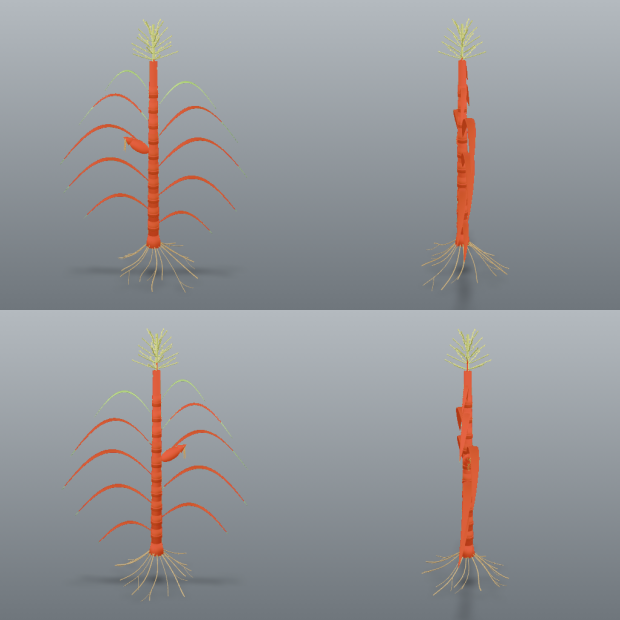
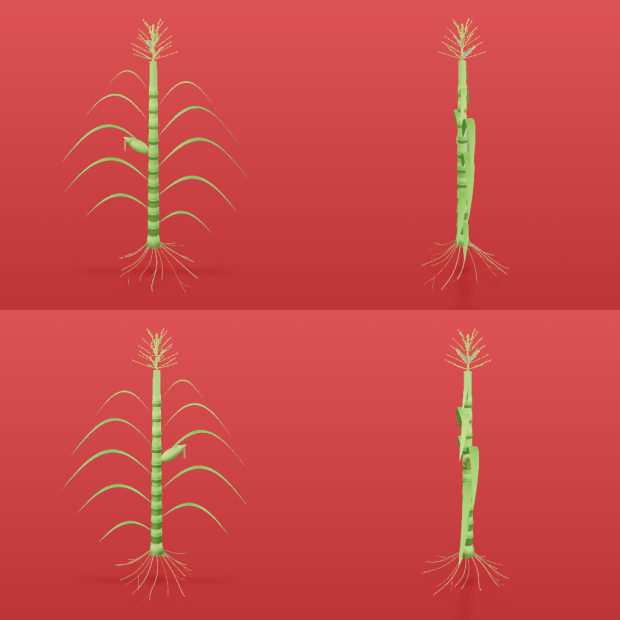
Left, channel="a", object_type="dark": the mask covers 3.1% of the frame, 9 components,
area=32427. Right, channel="s", object_type="dark": the mask covers 96.1%; it is the
background, area=1007829.
Why you get the overlay
Both images come from the same file and the same threshold method; only the channel differs. Without the picture, both runs return 17 traits with correct units and believable magnitudes. The one on the right is measuring the wall behind the plants. Red marks the measured pixels; a cyan line traces the mask's edge.
So segment() returns the overlay and diagnostics but no traits, and measure() needs the
session_id that segment() mints: no single image is measured before you are shown it. The
exception is measure_images(), which applies one recipe to up to 200 images without overlays.
Settle the recipe on one image's overlay first (the server does not check); every image still
passes the segment() guards, and one that trips a blocking guard gets no traits.
Measured with PlantCV 4.11.3 on a synthetic render (first row:
tests/fixtures/multi_specimen.png) and on photographs, each of these returns believable
numbers with correct units:
| Failure | What you get without the overlay |
|---|---|
| four-view render, whole-image ROI | 17 plausible traits describing four merged plants |
| plant clipped by the frame | size traits that are silently lower bounds |
| empty mask | 17 traits of zeros, with PlantCV reporting in_bounds=True |
Install
With uv nothing needs installing: uvx --python 3.13 plantcv-mcp fetches and
runs the current release. Otherwise:
pip install plantcv-mcp
Requires Python 3.11 to 3.13: PlantCV 4.11.3 needs SciPy below 1.16, which has no Python 3.14
wheels, so --python 3.13 keeps uvx off a 3.14 default. PlantCV and its scientific stack make the first install (or first uvx
run) slow. From a checkout: uv add /path/to/plantcv-mcp. The one optional tool,
segment_leaves_sam(), needs pip install "plantcv-mcp[sam]" (torch, torchvision,
segment-anything); without it, that tool refuses with that command and every other tool works.
Configure your MCP client
claude mcp add plantcv -- uvx --python 3.13 plantcv-mcp
Claude Desktop and other stdio hosts:
{ "mcpServers": { "plantcv": { "command": "uvx", "args": ["--python", "3.13", "plantcv-mcp"] } } }
With a pip install the command is plantcv-mcp (checkout config).
Verify with list_methods().
Flags: --root DIR (repeatable, or PLANTCV_MCP_ROOTS) confines every read, and every file
the server keeps, to your imagery: plantcv-mcp --root /data/phenotyping. --no-isolate (or
PLANTCV_MCP_ISOLATE=0) runs analyses in-process instead of in the crash-containing worker.
What the benchmark shows
Claude with the server was compared with Claude writing its own code (mostly OpenCV) in a Python environment we set up with the same PlantCV and OpenCV, on 46 measurement questions about rendered plant images, 3 runs each. A tie means the server matches that result without you building the environment. Questions right in every run, server against Claude's own code: Claude Haiku 5.5 38 against 32, Sonnet 5.5 33 against 28, Opus 5.5 42 against 44. None is separated (pre-registered; exact McNemar p = 0.15, 0.23 and 0.63), and Claude's own code was cheaper on all three models.
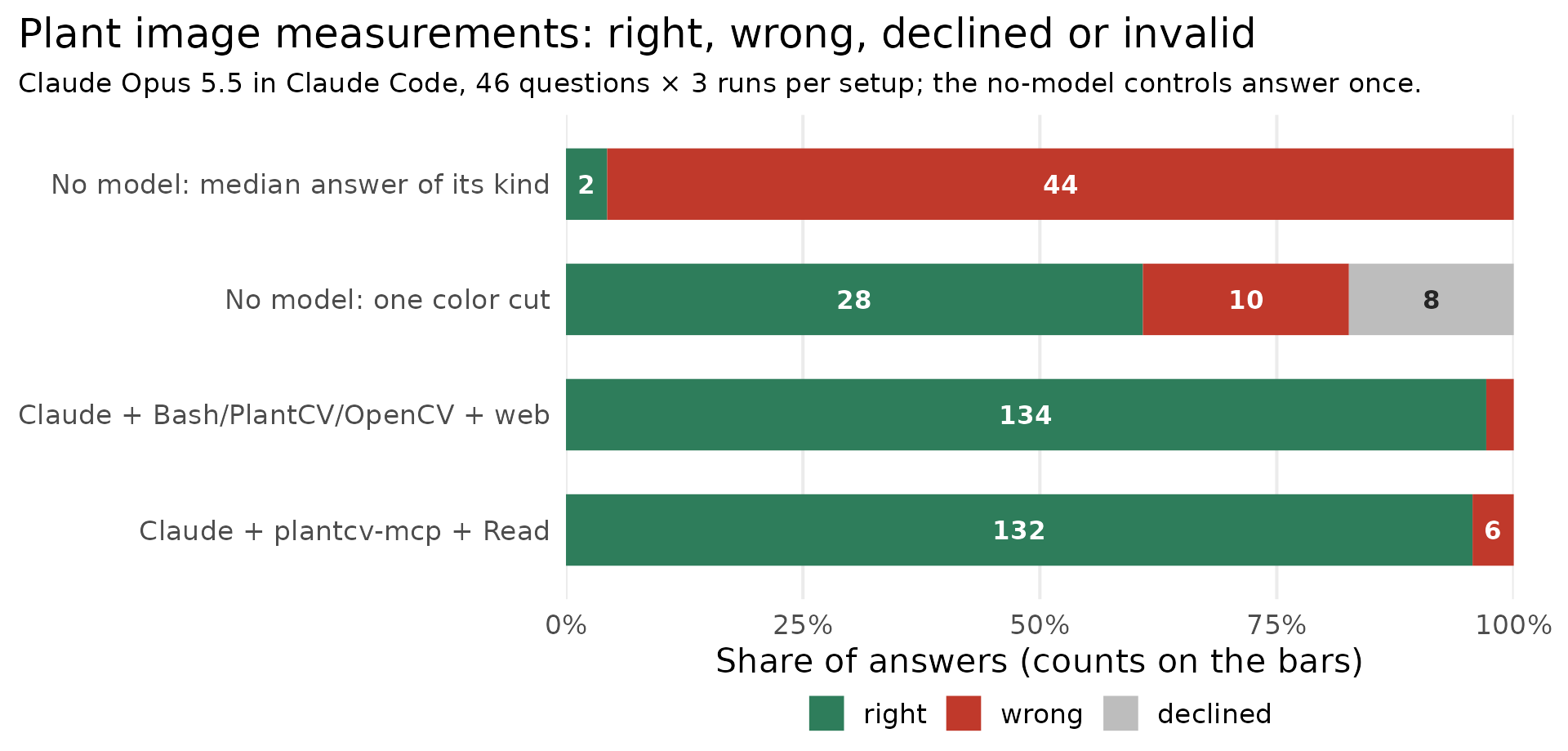
The chart is the Opus 5.5 re-run on 2026-10-18, against commit 051aff0 (unreleased then, first
released in v1.17.0), which adds several-channel segmentation rules and zoom_image: right on
97.1% of answers with its own code
and 95.7% with the server. Its own code cost $0.038 against $0.066 per answer (medians; the
intervals do not overlap). On release 1.16.1 the server was right on 86.2% against 95.7%
(p = 0.18). The images have crisp edges, so a single color cut with no model answers 28 of the
46.
We wrote the questions and ran the benchmark ourselves; an outside re-run is welcome. Method, controls and limitations: benchmarks/agent_qa; the Haiku and Sonnet runs: 2026-10-20 re-run.
Tools
| Tool | Returns |
|---|---|
suggest_segmentation |
contact sheets, and what each object_type would yield |
segment |
overlay + diagnostics + warnings, no traits |
refine |
a new session with a cleaned-up mask, plus its overlay |
measure |
traits with the mask's warnings; an empty mask raises an error |
measure_images |
one recipe across many images; traits only where valid |
measure_regions |
one row per plant in a tray, plus the numbered overlay |
measure_morphology |
leaf/stem skeleton traits + the numbered-segment overlay |
count_leaves |
an estimated leaf count by watershed + the numbered overlay |
segment_leaves_sam |
the same count from Segment Anything (optional sam extra) |
calibrate_scale_from_marker |
px_per_mm from a marker of known real size |
correct_lens_distortion |
a fisheye or wide-angle image undistorted from checkerboards |
segment_hyperspectral, measure_spectral |
an HSI session from an index threshold; index statistics |
segment_thermal, measure_thermal |
a thermal session from a °C band; °C statistics under the mask |
zoom_image |
part of an image, enlarged to look closely (not a measurement) |
crop_image |
one plant of a tray written as its own image, for the other tools |
list_methods |
channels, methods, object types, pinned PlantCV version |
Typical loop: suggest_segmentation → segment → look at the overlay → segment again
with another channel, method or polarity if it is wrong (or refine if it is nearly right) →
measure. With a ColorChecker in the frame, color_correct=true corrects colors before
segmenting and excludes the card from the mask. Parameters, an example response and the
measured facts behind each tool:
docs/GUIDE.md.
What it refuses
Each guard was added after a specific failure and names the next action. Four mask warnings
are blocking: implausible_coverage, empty_mask, fill_erased_mask and
noisy_segmentation. Which tools stop on them:
measure()raises on an empty mask (empty_mask,fill_erased_mask). It refuses a mask over half the frame (implausible_coverage) unless the mask is plant green (plant_fills_frame). A close-up of one leaf can fill the frame: passallow_implausible_coverage=trueand the traits come back with the warning attached. Onnoisy_segmentationit returns the traits with the warning. Readwarningsbefore you use its numbers.measure_images()has no overlay, so it withholds the traits of any image with a blocking warning. With a grid of two or more cells,implausible_coveragedoes not block (each cell is checked instead), and neither doesnoisy_segmentationwhen the grid explains the components.count_leaves()andsegment_leaves_sam()refuse a mask over half the frame unless it is plant green (plant_fills_frame).measure_morphology()refuses it outright; crop the photo instead.
Other warnings are advisories and travel with the numbers.
- Inverted mask (
implausible_coverage): the right-hand image above, 17 believable traits describing the wall. - Nothing selected, or
fill_sizedeleted the specimen (empty_mask,fill_erased_mask): PlantCV returns 17 zeros within_bounds=True. - Background texture (
noisy_segmentation): specks of chamber wall measured as one plant. - Several plants in one mask (
multi_specimen): usemeasure_regions(). - Wrong scale, wrong session kind, a file changed after segmentation: refused, naming the right tool.
- A lens calibration the boards do not determine, or no color card when one was asked for: refused.
Why each guard exists, and every warning code: docs/GUIDE.md#warnings-and-refusals.
Security
With no --root, the server reads any image file the host user can read and returns it to the
model. It writes these files and no others:
correct_lens_distortion:<image>_undistorted.pngnext to the input.crop_image:<image>_crop_x<x>_y<y>_w<w>_h<h>.pngnext to the input.segment_leaves_samwithdownload_checkpoint=true: the checkpoint, in its cache directory.- Short-lived temporary copies of hyperspectral and thermal inputs, deleted once decoded.
The first two replace an earlier file of the same name, so cropping the same box twice
overwrites the first crop. With output_path they write there instead, and refuse a path that
already exists. Run the server as a non-root user with --root set. Analyses run in a worker subprocess, so a native crash is a
tool error, not a dead server. Details:
docs/GUIDE.md#security-and-trust-boundary.
Attribution and license
MIT licensed. It depends on PlantCV, which is licensed under the Mozilla Public License 2.0. No PlantCV source is vendored or redistributed here; it is an ordinary runtime dependency, so the MIT license applies to this project's own files. Unofficial: not affiliated with, endorsed by, or sponsored by the Donald Danforth Plant Science Center or the PlantCV maintainers. See NOTICE.
Cite it with CITATION.cff (archived at doi:10.5281/zenodo.21713516). Changes: CHANGELOG.md.
Установка Plantcv
У этого сервера нет опубликованного пакета — он собирается из исходников. Открой репозиторий и следуй инструкции в README.
▸ github.com/musharna/plantcv-mcpFAQ
Plantcv MCP бесплатный?
Да, Plantcv MCP бесплатный — установка в пару кликов через Unyly без оплаты.
Нужен ли API-ключ для Plantcv?
Нет, Plantcv работает без API-ключей и переменных окружения.
Plantcv — hosted или self-hosted?
Self-hosted: сервер запускается локально на твоей машине командой из раздела установки.
Как установить Plantcv в Claude Desktop, Claude Code или Cursor?
Открой Plantcv на unyly.org, выбери вкладку своего клиента (Claude Desktop, Claude Code, Cursor) и нажми Install — конфиг сгенерируется автоматически, без правки JSON.
Похожие MCP
GitHub
PRs, issues, code search, CI status
 автор: GitHub
Filesystem
Secure file operations with configurable access controls.
Memory
Knowledge graph-based persistent memory system.

Unyly Deploy
Deploy sites and MCP servers to Unyly straight from your AI agent
 автор: Unyly
Template MCP Server
A CLI tool to create a new Model Context Protocol server project with TypeScript support, dual transport options, and an extensible structure
 автор: mcpdotdirect
Server Sequential Thinking
MCP server for sequential thinking and problem solving
 автор: GitHub Actions
Amap Maps Mcp Server
MCP server for using the AMap Maps API
 автор: duxiaohui
PayMCP
Lightweight payments layer for MCP servers: turn tools into paid endpoints with a two-line decorator. [PyPI](https://pypi.org/project/paymcp/) · [npm](https://w
 автор: blustAI
demo
demo — MCP server via Smithery
 автор: yoojoohans-jpg
Server For Power BI
Enables exploring Microsoft Fabric / Power BI workspaces and semantic models, and executing ad-hoc DAX queries.
 автор: Mitsubishi-Fuso
Compare Plantcv with
Не уверен что выбрать?
Найди свой стек за 60 секунд
Автор?
Embed-бейдж для README
Похожее
Все в категории development