
TranslateGemma
БесплатноНе проверенProvides local translation using Google's TranslateGemma models with support for 55 languages, multi-platform Docker deployment, and intelligent text chunking f

Описание
Provides local translation using Google's TranslateGemma models with support for 55 languages, multi-platform Docker deployment, and intelligent text chunking for long documents.
README
TranslateGemma
🌍 Local AI Translation Service with Web UI, REST API & MCP Integration
55 languages, smart chunking, streaming output. Powered by Google's TranslateGemma.
Docker Python 3.11+ License: MIT CUDA 12.4
✨ Highlights
- 🌐 Web UI - Beautiful, responsive translation interface
- 🔌 REST API - Full-featured API with streaming support
- 🤖 MCP Integration - Works with Claude Desktop & AI assistants
- 🌍 55 Languages - Full TranslateGemma language support
- 📚 Smart Chunking - Handle unlimited text length (chunk_size=100)
- ⚡ Streaming Output - Real-time translation progress
- 🐳 All-in-One Docker - 82GB image with all 6 models embedded
- 🎯 Multi-Model - 4B/12B/27B with Q4/Q8 quantization
🎬 Quick Start
Option 1: Docker All-in-One (Recommended)
# Pull the all-in-one image (82GB, includes all models)
docker pull neosun/translategemma:v1.0.0-allinone

# Run with GPU
docker run -d --gpus '"device=0"' \
  -p 8022:8022 \
  -e MODEL_NAME=27b \
  -e QUANTIZATION=8 \
  --name translategemma \
  neosun/translategemma:v1.0.0-allinone

# Access Web UI
open http://localhost:8022
Option 2: Docker with Model Download
# Pull lightweight image (10GB)
docker pull neosun/translategemma:latest

# Run (models download on first use)
docker run -d --gpus '"device=0"' \
  -p 8022:8022 \
  -v ~/.cache/translate/models:/root/.cache/translate/models \
  --name translategemma \
  neosun/translategemma:latest
Option 3: Docker Compose
# docker-compose.yml
services:
  translategemma:
    image: neosun/translategemma:v1.0.0-allinone
    container_name: translategemma
    ports:
      - "8022:8022"
    environment:
      - NVIDIA_VISIBLE_DEVICES=0
      - MODEL_NAME=27b
      - QUANTIZATION=8
      - BACKEND=gguf
      - GPU_IDLE_TIMEOUT=0
      - MAX_CHUNK_LENGTH=100
    deploy:
      resources:
        reservations:
          devices:
            - driver: nvidia
              device_ids: ["0"]
              capabilities: [gpu]
docker-compose up -d
🖥️ Web UI
Access the beautiful web interface at http://localhost:8022:
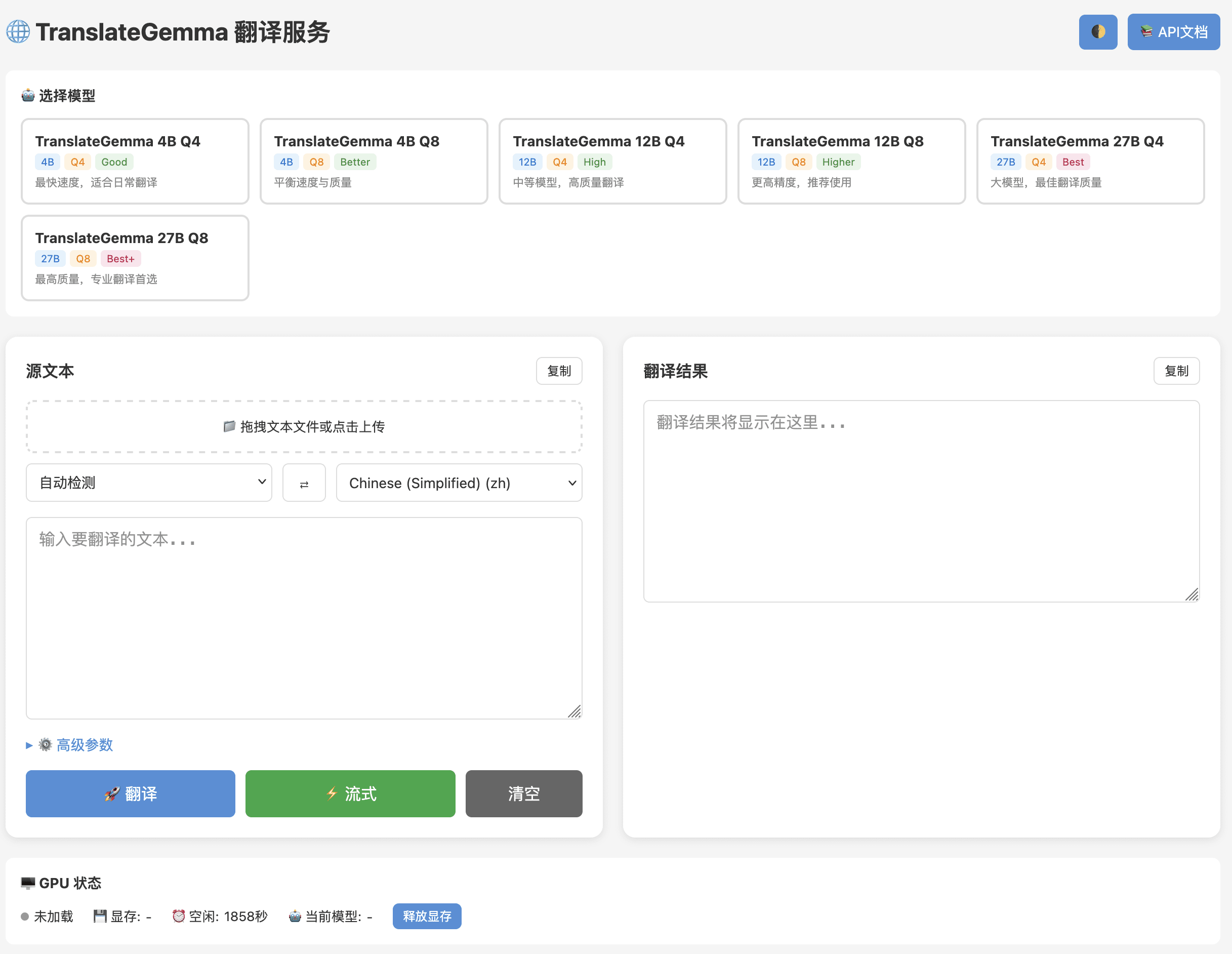
Features:
- 🎨 Dark/Light theme toggle
- 🔄 Language swap button
- 📊 Real-time translation stats
- ⚙️ Advanced parameter controls
- 📁 File upload support
- 🔥 GPU status monitoring
🔌 REST API
Translate Text
# Simple translation
curl -X POST http://localhost:8022/translate \
  -H "Content-Type: application/json" \
  -d '{"text": "Hello world", "target_lang": "zh"}'

# Response
{
  "translation": "你好,世界",
  "source_lang": "en",
  "target_lang": "zh",
  "model": "27b-Q8",
  "time_ms": 1234
}
Streaming Translation
curl -X POST http://localhost:8022/translate/stream \
  -H "Content-Type: application/json" \
  -d '{"text": "Long text here...", "target_lang": "zh"}'
API Endpoints
| Endpoint | Method | Description |
|---|---|---|
/translate |
POST | Translate text |
/translate/stream |
POST | Streaming translation |
/config |
GET | Get current config |
/models |
GET | List available models |
/languages |
GET | List supported languages |
/gpu/status |
GET | GPU memory status |
/health |
GET | Health check |
⚙️ Configuration
Environment Variables
| Variable | Default | Description |
|---|---|---|
MODEL_NAME |
27b |
Model size: 4b, 12b, 27b |
QUANTIZATION |
8 |
Quantization: 4 or 8 |
BACKEND |
gguf |
Backend: gguf, pytorch |
GPU_IDLE_TIMEOUT |
0 |
Auto-unload timeout (0=immediate) |
MAX_CHUNK_LENGTH |
100 |
Safe chunk size for completeness |
DEFAULT_OVERLAP |
0 |
Sliding window overlap (0=disabled) |
NVIDIA_VISIBLE_DEVICES |
0 |
GPU device ID |
Model Selection Guide
| Model | VRAM | Quality | Speed | Use Case |
|---|---|---|---|---|
| 4B-Q4 | ~3GB | Good | Fast | Quick translations |
| 4B-Q8 | ~5GB | Better | Fast | Daily use |
| 12B-Q4 | ~7GB | High | Medium | Balanced |
| 12B-Q8 | ~12GB | Higher | Medium | Recommended |
| 27B-Q4 | ~15GB | Best | Slow | High quality |
| 27B-Q8 | ~28GB | Best+ | Slow | Professional ⭐ |
🌍 Supported Languages (55)
| Code | Language | Code | Language | Code | Language |
|---|---|---|---|---|---|
en |
English | zh |
Chinese (Simplified) | zh-TW |
Chinese (Traditional) |
ja |
Japanese | ko |
Korean | yue |
Cantonese |
fr |
French | de |
German | es |
Spanish |
pt |
Portuguese | ru |
Russian | ar |
Arabic |
hi |
Hindi | th |
Thai | vi |
Vietnamese |
...and 40 more languages. See /languages endpoint for full list.
🐳 Docker Images
| Image | Size | Description |
|---|---|---|
neosun/translategemma:v1.0.0-allinone |
82GB | All 6 models embedded |
neosun/translategemma:latest-allinone |
82GB | Latest all-in-one |
neosun/translategemma:v1.0.0 |
10GB | Lightweight, download models |
neosun/translategemma:latest |
10GB | Latest lightweight |
📊 Technical Details
Smart Chunking
TranslateGemma truncates long texts. Our smart chunking ensures complete translations:
chunk_size=100  →  100% translation completeness
chunk_size=120  →  44% completeness (truncation)
chunk_size=150  →  44% completeness (truncation)
Key Finding: chunk_size=100 is the safe boundary for complete translations.
Context Consistency
TranslateGemma automatically maintains consistency across chunks:
- ✅ Pronouns (He/She/They)
- ✅ Terminology (NLP, AI)
- ✅ Proper nouns (Google, Microsoft)
- ✅ Gender consistency
No overlap needed for context preservation.
🛠️ Local Development
Prerequisites
- Python 3.11+
- NVIDIA GPU with CUDA 12.4+
- 16GB+ VRAM (for 27B model)
Installation
# Clone repository
git clone https://github.com/neosun100/translategemma.git
cd translategemma

# Create virtual environment
python -m venv .venv
source .venv/bin/activate

# Install dependencies
pip install -e ".[cuda]"

# Run server
uvicorn app_fastapi:app --host 0.0.0.0 --port 8022
🤖 MCP Integration
Use with Claude Desktop or other MCP-compatible AI assistants:
{
  "mcpServers": {
    "translategemma": {
      "command": "python",
      "args": ["mcp_server.py"],
      "env": {
        "TRANSLATEGEMMA_URL": "http://localhost:8022"
      }
    }
  }
}
📁 Project Structure
translategemma/
├── app_fastapi.py          # FastAPI server
├── mcp_server.py           # MCP server
├── templates/
│   └── index.html          # Web UI
├── static/
│   ├── app.js              # Frontend JS
│   └── style.css           # Styles
├── translategemma_cli/     # Core library
│   ├── translator.py       # Translation logic
│   ├── chunker.py          # Text chunking
│   ├── model.py            # Model loading
│   └── config.py           # Configuration
├── Dockerfile              # Standard image
├── Dockerfile.allinone     # All-in-one image
├── docker-compose.yml      # Compose config
└── tests/                  # Test suite
🔬 Research Findings
Our extensive testing revealed:
| Parameter | Optimal Value | Reason |
|---|---|---|
| chunk_size | 100 | 100% translation completeness |
| overlap | 0 | TranslateGemma auto-maintains context |
| quantization | Q8 | Best quality/speed balance |
See CHUNKING_RESEARCH_REPORT.md for details.
📄 License
MIT License - see LICENSE file.
Note: TranslateGemma models are subject to Google's model license.
🙏 Acknowledgments
- Google TranslateGemma - Base translation model
- llama-cpp-python - GGUF inference
- FastAPI - Web framework
⭐ Star History
📱 关注公众号

Установить TranslateGemma в Claude Desktop, Claude Code, Cursor
unyly install translategemmaСтавит в Claude Desktop, Claude Code, Cursor и VS Code — сам разбирается с npx, uvx и сборкой из исходников.
Впервые? Поставь CLI: curl -fsSL https://unyly.org/install | sh
Или настроить вручную
Выполни в терминале:
claude mcp add translategemma -- uvx translategemma-cliПошаговые гайды: как установить TranslateGemma
FAQ
TranslateGemma MCP бесплатный?
Да, TranslateGemma MCP бесплатный — установка в пару кликов через Unyly без оплаты.
Нужен ли API-ключ для TranslateGemma?
Нет, TranslateGemma работает без API-ключей и переменных окружения.
TranslateGemma — hosted или self-hosted?
Self-hosted: сервер запускается локально на твоей машине командой из раздела установки.
Как установить TranslateGemma в Claude Desktop, Claude Code или Cursor?
Открой TranslateGemma на unyly.org, выбери вкладку своего клиента (Claude Desktop, Claude Code, Cursor) и нажми Install — конфиг сгенерируется автоматически, без правки JSON.
Похожие MCP
GitHub
PRs, issues, code search, CI status
 автор: GitHub
Filesystem
Secure file operations with configurable access controls.
Memory
Knowledge graph-based persistent memory system.

Unyly Deploy
Deploy sites and MCP servers to Unyly straight from your AI agent
 автор: Unyly
Amap Maps Mcp Server
MCP server for using the AMap Maps API
 автор: duxiaohui
PayMCP
Lightweight payments layer for MCP servers: turn tools into paid endpoints with a two-line decorator. [PyPI](https://pypi.org/project/paymcp/) · [npm](https://w
 автор: blustAI
Server For Power BI
Enables exploring Microsoft Fabric / Power BI workspaces and semantic models, and executing ad-hoc DAX queries.
 автор: Mitsubishi-Fuso
Gpt Image 2 Mcp
RunAPI GPT Image 2 MCP server for image generation: create tasks, poll results, and check pricing across 1 model from Claude Code, Codex, Cursor, and VS Code.
 автор: runapi-ai
Template MCP Server
A CLI tool to create a new Model Context Protocol server project with TypeScript support, dual transport options, and an extensible structure
 автор: mcpdotdirect
Supabase
Database, auth and storage
 автор: Supabase
Compare TranslateGemma with
Не уверен что выбрать?
Найди свой стек за 60 секунд
Автор?
Embed-бейдж для README
Похожее
Все в категории development