
Wassette
БесплатноНе проверенWassette: A security-oriented runtime that runs WebAssembly Components via MCP

Описание
Wassette: A security-oriented runtime that runs WebAssembly Components via MCP
README
Wassette
A security-oriented runtime that runs WebAssembly Components via MCP
Quick Start | FAQ | Documentation | Releases | Contributing | Discord
[!WARNING] Early Development: This repository is not production ready yet. It is in early development and may change significantly.
Why Wassette?
- Convenience: Wassette makes it easy to extend AI agents with new tools, all without ever having to leave the chat window.
- Reusability: Wasm Components are generic and reusable; there is nothing MCP-specific about them.
- Security: Wassette is built on the Wasmtime security sandbox, providing browser-grade isolation of tools.
Architecture
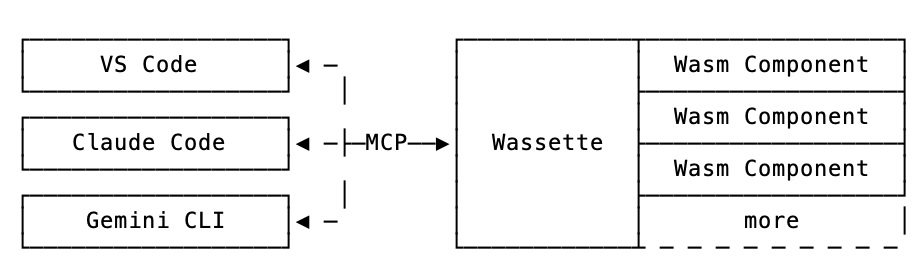
Installation
Quick start: For Linux/macOS, use our one-liner install script:
curl -fsSL https://raw.githubusercontent.com/microsoft/wassette/main/scripts/install.sh | bash
For complete installation instructions for all platforms (including Windows, Homebrew, Nix, Docker, and more), see our Installation Guide.
Using Wassette
With Wassette installed, the next step is to register it with your agent of choice. See our Quick Start guide (3 simple steps), or check the MCP Clients guide for detailed setup instructions for GitHub Copilot, Copilot CLI, Claude Code, and Codex CLI.
Once configured, you can start loading WebAssembly components. To teach your agent to tell the time, ask it to load a time component:
Please load the time component from oci://ghcr.io/microsoft/time-server-js:latest
Now that the time component is loaded, we can ask your agent to tell you the current time:
What is the current time?
The agent will respond with the current time, which is fetched from the time component running in a secure WebAssembly sandbox:
The current time July 31, 2025 at 10:30 AM UTC
Congratulations! You've just run your first Wasm Component and taught your agent how to tell time!
Demo
https://github.com/user-attachments/assets/8e5a371c-ac72-406d-859c-03833ee83963
Discord
You can join us via the #wassette channel on the Microsoft Open Source Discord:
Contributing
Please see CONTRIBUTING.md for more information on how to contribute to this project.
License
This project is licensed under the MIT License.
Trademarks
This project may contain trademarks or logos for projects, products, or services. Authorized use of Microsoft trademarks or logos is subject to and must follow Microsoft’s Trademark & Brand Guidelines. Use of Microsoft trademarks or logos in modified versions of this project must not cause confusion or imply Microsoft sponsorship. Any use of third-party trademarks or logos are subject to those third-party’s policies.
Contributors
Thanks to all contributors who are helping shape Wassette into something great.
Установка Wassette
У этого сервера нет опубликованного пакета — он собирается из исходников. Открой репозиторий и следуй инструкции в README.
▸ github.com/microsoft/wassetteFAQ
Wassette MCP бесплатный?
Да, Wassette MCP бесплатный — установка в пару кликов через Unyly без оплаты.
Нужен ли API-ключ для Wassette?
Нет, Wassette работает без API-ключей и переменных окружения.
Wassette — hosted или self-hosted?
Self-hosted: сервер запускается локально на твоей машине командой из раздела установки.
Как установить Wassette в Claude Desktop, Claude Code или Cursor?
Открой Wassette на unyly.org, выбери вкладку своего клиента (Claude Desktop, Claude Code, Cursor) и нажми Install — конфиг сгенерируется автоматически, без правки JSON.
Похожие MCP
GitHub
PRs, issues, code search, CI status
 автор: GitHub
Filesystem
Secure file operations with configurable access controls.
Memory
Knowledge graph-based persistent memory system.

Unyly Deploy
Deploy sites and MCP servers to Unyly straight from your AI agent
 автор: Unyly
Amap Maps Mcp Server
MCP server for using the AMap Maps API
 автор: duxiaohui
PayMCP
Lightweight payments layer for MCP servers: turn tools into paid endpoints with a two-line decorator. [PyPI](https://pypi.org/project/paymcp/) · [npm](https://w
 автор: blustAI
Server For Power BI
Enables exploring Microsoft Fabric / Power BI workspaces and semantic models, and executing ad-hoc DAX queries.
 автор: Mitsubishi-Fuso
Template MCP Server
A CLI tool to create a new Model Context Protocol server project with TypeScript support, dual transport options, and an extensible structure
 автор: mcpdotdirect
Supabase
Database, auth and storage
 автор: Supabase
Everything
Reference / test server with prompts, resources, and tools.
Compare Wassette with
Не уверен что выбрать?
Найди свой стек за 60 секунд
Автор?
Embed-бейдж для README
Похожее
Все в категории development