
Website Downloader (Windows)
БесплатноНе проверенWindows-compatible website downloader for efficient web content retrieval and storage, leveraging asynchronous processing and concurrent downloads for tasks lik

Описание
Windows-compatible website downloader for efficient web content retrieval and storage, leveraging asynchronous processing and concurrent downloads for tasks like web scraping and content archiving.
README
MseeP.ai Security Assessment Badge
MCP Website Downloader
Simple MCP server for downloading documentation websites and preparing them for RAG indexing.
Features
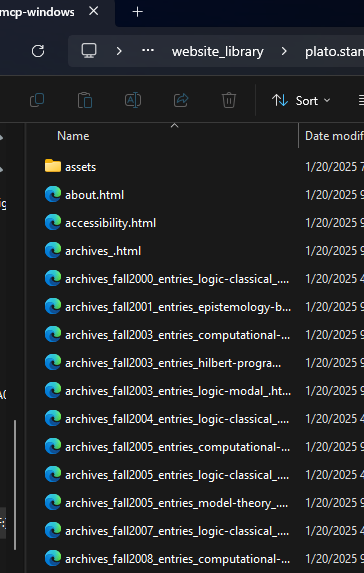
- Downloads complete documentation sites, well big chunks anyway.
- Maintains link structure and navigation, not really. lol
- Downloads and organizes assets (CSS, JS, images), but isn't really AI friendly and it all probably needs some kind of parsing or vectorizing into a db or something.
- Creates clean index for RAG systems, currently seems to make an index in each folder, not even looked at it.
- Simple single-purpose MCP interface, yup.
Installation
Fork and download, cd to the repository.
uv venv
./venv/Scripts/activate
pip install -e .
Put this in your claude_desktop_config.json with your own paths:
   "mcp-windows-website-downloader": {
     "command": "uv",
     "args": [
       "--directory",
       "F:/GithubRepos/mcp-windows-website-downloader",
       "run",
       "mcp-windows-website-downloader",
       "--library",
       "F:/GithubRepos/mcp-windows-website-downloader/website_library"
     ]
   },
Other Usage you don't need to worry about and may be hallucinatory lol:
- Start the server:
python -m mcp_windows_website_downloader.server --library docs_library
- Use through Claude Desktop or other MCP clients:
result = await server.call_tool("download", {
    "url": "https://docs.example.com"
})
Output Structure
docs_library/
  domain_name/
    index.html
    about.html
    docs/
      getting-started.html
      ...
    assets/
      css/
      js/
      images/
      fonts/
    rag_index.json
Development
The server follows standard MCP architecture:
src/
  mcp_windows_website_downloader/
    __init__.py
    server.py    # MCP server implementation
    core.py      # Core downloader functionality
    utils.py     # Helper utilities
Components
server.py: Main MCP server implementation that handles tool registration and requestscore.py: Core website downloading functionality with proper asset handlingutils.py: Helper utilities for file handling and URL processing
Design Principles
Single Responsibility
- Each module has one clear purpose
- Server handles MCP interface
- Core handles downloading
- Utils handles common operations
Clean Structure
- Maintains original site structure
- Organizes assets by type
- Creates clear index for RAG systems
Robust Operation
- Proper error handling
- Reasonable depth limits
- Asset download verification
- Clean URL/path processing
RAG Index
The rag_index.json file contains:
{
  "url": "https://docs.example.com",
  "domain": "docs.example.com",
  "pages": 42,
  "path": "/path/to/site"
}
Contributing
- Fork the repository
- Create a feature branch
- Make your changes
- Submit a pull request
License
MIT License - See LICENSE file
Error Handling
The server handles common issues:
- Invalid URLs
- Network errors
- Asset download failures
- Malformed HTML
- Deep recursion
- File system errors
Error responses follow the format:
{
  "status": "error",
  "error": "Detailed error message"
}
Success responses:
{
  "status": "success",
  "path": "/path/to/downloaded/site",
  "pages": 42
}
Установка Website Downloader (Windows)
У этого сервера нет опубликованного пакета — он собирается из исходников. Открой репозиторий и следуй инструкции в README.
▸ github.com/angrysky56/mcp-windows-website-downloaderFAQ
Website Downloader (Windows) MCP бесплатный?
Да, Website Downloader (Windows) MCP бесплатный — установка в пару кликов через Unyly без оплаты.
Нужен ли API-ключ для Website Downloader (Windows)?
Нет, Website Downloader (Windows) работает без API-ключей и переменных окружения.
Website Downloader (Windows) — hosted или self-hosted?
Self-hosted: сервер запускается локально на твоей машине командой из раздела установки.
Как установить Website Downloader (Windows) в Claude Desktop, Claude Code или Cursor?
Открой Website Downloader (Windows) на unyly.org, выбери вкладку своего клиента (Claude Desktop, Claude Code, Cursor) и нажми Install — конфиг сгенерируется автоматически, без правки JSON.
Похожие MCP
GitHub
PRs, issues, code search, CI status
 автор: GitHub
Filesystem
Secure file operations with configurable access controls.
Memory
Knowledge graph-based persistent memory system.
Template MCP Server
A CLI tool to create a new Model Context Protocol server project with TypeScript support, dual transport options, and an extensible structure
 автор: mcpdotdirect
Amap Maps Mcp Server
MCP server for using the AMap Maps API
 автор: duxiaohui
Supabase
Database, auth and storage
 автор: Supabase
Everything
Reference / test server with prompts, resources, and tools.
Git
Tools to read, search, and manipulate Git repositories.
Sequential Thinking
Dynamic and reflective problem-solving through thought sequences.
Time
Time and timezone conversion capabilities.
Compare Website Downloader (Windows) with
Не уверен что выбрать?
Найди свой стек за 60 секунд
Автор?
Embed-бейдж для README
Похожее
Все в категории development