
Addgene
БесплатноНе проверенMCP server for Addgene plasmid repository, enabling AI assistants to search, filter, and retrieve plasmid data including sequences and metadata.

Описание
MCP server for Addgene plasmid repository, enabling AI assistants to search, filter, and retrieve plasmid data including sequences and metadata.
README
Tests CI Python 3.11+ License: MIT uv
MCP (Model Context Protocol) server for Addgene - The Plasmid Repository
This server implements the Model Context Protocol (MCP) for Addgene, providing a standardized interface for accessing the world's largest repository of plasmid data. MCP enables AI assistants and agents to search, filter, and retrieve comprehensive plasmid information through structured interfaces.
The server provides direct access to Addgene's plasmid repository containing thousands of research-ready plasmids, complete with detailed metadata, sequence information, and availability data. Perfect for molecular biology research, synthetic biology, and genetic engineering applications.
The Addgene repository contains:
- Plasmid Search: Search through thousands of research plasmids with advanced filtering
- Sequence Information: Access to plasmid sequences in multiple formats (SnapGene, GenBank, FASTA)
- Metadata Access: Complete plasmid information including depositor, purpose, maps, and services
- Popular Plasmids: Access to trending and highly-cited plasmids in the research community
If you want to understand more about what the Model Context Protocol is and how to use it more efficiently, you can take the DeepLearning AI Course or search for MCP videos on YouTube.
Example Usage
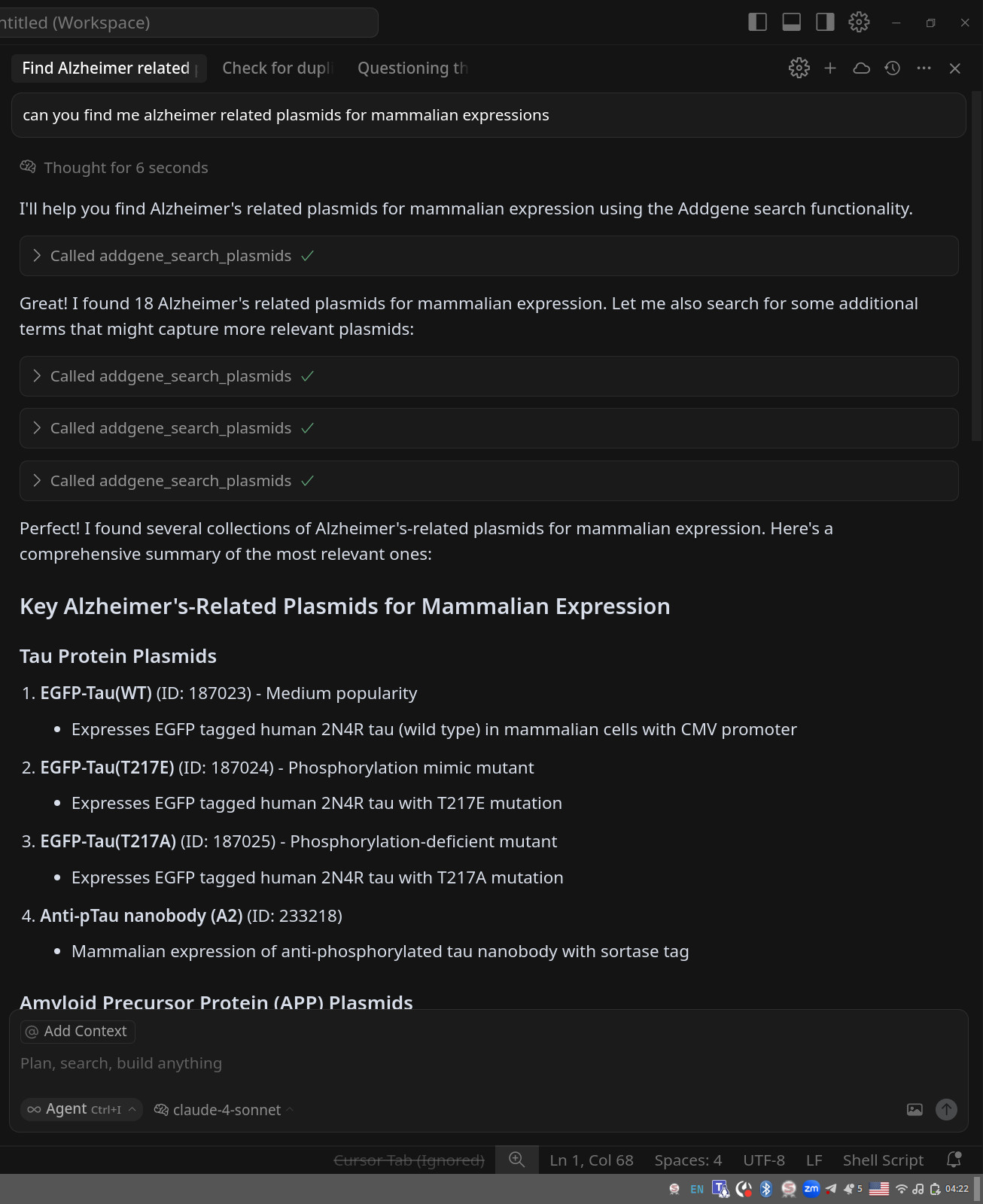
About MCP (Model Context Protocol)
MCP is a protocol that bridges the gap between AI systems and specialized domain knowledge. It enables:
- Structured Access: Direct connection to authoritative plasmid repository data
- Natural Language Queries: Simplified interaction with specialized databases
- Type Safety: Strong typing and validation through FastMCP
- AI Integration: Seamless integration with AI assistants and agents
Available Tools
This server provides three main tools for interacting with the Addgene repository:
addgene_search_plasmids(...)- Search for plasmids with comprehensive filtering optionsaddgene_get_sequence_info(plasmid_id, format)- Get sequence download information for specific plasmidsaddgene_get_popular_plasmids(page_size)- Retrieve trending and popular plasmids
Available Resources
resource://addgene_api-info- Complete API documentation and usage guidelines
Quick Start
Installing uv
# Download and install uv
curl -LsSf https://astral.sh/uv/install.sh | sh

# Verify installation
uv --version
uvx --version
uvx is a very nice tool that can run a python package installing it if needed.
Running with uvx
You can run the addgene-mcp server directly using uvx without cloning the repository:
# Run the server in streamable HTTP mode (default)
uvx addgene-mcp
Other uvx modes (STDIO, HTTP, SSE)
STDIO Mode (for MCP clients that require stdio, can be useful when you want to save files)
# Or explicitly specify stdio mode
uvx addgene-mcp stdio
HTTP Mode (Web Server)
# Run the server in streamable HTTP mode on default (3001) port
uvx addgene-mcp server

# Run on a specific port
uvx addgene-mcp server --port 8000
SSE Mode (Server-Sent Events)
# Run the server in SSE mode
uvx addgene-mcp sse
In cases when there are problems with uvx often they can be caused by cleaning uv cache:
uv cache clean
The HTTP mode will start a web server that you can access at http://localhost:3001/mcp. The STDIO mode is designed for MCP clients that communicate via standard input/output, while SSE mode uses Server-Sent Events for real-time communication.
Note: Currently, we do not have a Swagger/OpenAPI interface, so accessing the server directly in your browser will not show much useful information. To explore the available tools and capabilities, you should either use the MCP Inspector (see below) or connect through an MCP client to see the available tools.
Configuring your AI Client (Anthropic Claude Desktop, Cursor, Windsurf, etc.)
We provide preconfigured JSON files for different use cases:
- For STDIO mode (recommended): Use
mcp-config-stdio.json - For HTTP mode: Use
mcp-config.json
Configuration Video Tutorial
For a visual guide on how to configure MCP servers with AI clients, check out our configuration tutorial video for our sister MCP server (biothings-mcp). The configuration principles are exactly the same for the Addgene MCP server - just use the appropriate JSON configuration files provided above.
Inspecting Addgene MCP server
Using MCP Inspector to explore server capabilities
If you want to inspect the methods provided by the MCP server, use npx (you may need to install nodejs and npm):
For STDIO mode with uvx:
npx @modelcontextprotocol/inspector --config mcp-config-stdio.json --server addgene-mcp
For HTTP mode (ensure server is running first):
npx @modelcontextprotocol/inspector --config mcp-config.json --server addgene-mcp
You can also run the inspector manually and configure it through the interface:
npx @modelcontextprotocol/inspector
After that you can explore the tools and resources with MCP Inspector at http://127.0.0.1:6274 (note, if you run inspector several times it can change port)
Integration with AI Systems
Simply point your AI client (like Cursor, Windsurf, ClaudeDesktop, VS Code with Copilot, or others) to use the appropriate configuration file from the repository.
Copy-Pasteable Configuration for addgene-mcp
Simply copy this JSON configuration to your MCP client (Cursor, Windsurf, Claude Desktop, etc.):
{
  "mcpServers": {
    "addgene-mcp": {
      "command": "uvx",
      "args": ["addgene-mcp"],
      "env": {
        "MCP_PORT": "3001",
        "MCP_HOST": "0.0.0.0",
        "MCP_TRANSPORT": "stdio"
      }
    }
  }
}
Alternative configurations (HTTP mode, development deployment)
For HTTP mode:
File: mcp-config.json
{
  "mcpServers": {
    "addgene-mcp": {
      "url": "http://localhost:3001/mcp",
      "type": "streamable-http",
      "env": {}
    }
  }
}
For development deployment (local repository):
File: mcp-config-stdio-local.json
{
  "mcpServers": {
    "addgene-mcp": {
      "command": "uv",
      "args": ["run", "addgene-mcp"],
      "env": {
        "MCP_PORT": "3001",
        "MCP_HOST": "0.0.0.0",
        "MCP_TRANSPORT": "stdio"
      }
    }
  }
}
Configuration Notes:
uvx- For end-user deployment without cloning the repositoryuv- For development deployment when you have the repository cloned- STDIO mode - Default and recommended for most MCP clients
- HTTP mode - Alternative for clients that prefer HTTP transport
Repository setup
# Clone the repository
git clone https://github.com/longevity-genie/addgene-mcp.git
cd addgene-mcp
uv sync
Running the MCP Server
If you already cloned the repo you can run the server with uv:
# Start the MCP server locally (HTTP mode)
uv run server

# Or start in STDIO mode
uv run stdio

# Or start in SSE mode
uv run sse
Available Tools Details
addgene_search_plasmids
Search for plasmids in the Addgene repository with comprehensive filtering options.
Parameters:
query(optional): Free text search querypage_size(optional): Number of results per page (default: 50, max: 50)page_number(optional): Page number for pagination (default: 1)expression(optional): Filter by expression system ("bacterial", "mammalian", "insect", "plant", "worm", "yeast")vector_types(optional): Filter by vector typespecies(optional): Filter by speciesplasmid_type(optional): Filter by plasmid typeresistance_marker(optional): Filter by resistance markerbacterial_resistance(optional): Filter by bacterial resistancepopularity(optional): Filter by popularity level ("high", "medium", "low")has_dna_service(optional): Filter by DNA service availabilityhas_viral_service(optional): Filter by viral service availabilityis_industry(optional): Filter by industry availability
addgene_get_sequence_info
Get information about downloading a plasmid sequence.
Parameters:
plasmid_id: Addgene plasmid ID (required)format(optional): Sequence format - "snapgene", "genbank", "fasta" (default: "snapgene")
addgene_get_popular_plasmids
Get popular plasmids from Addgene repository.
Parameters:
page_size(optional): Number of results to return (default: 50, max: 50)
Data Models
PlasmidOverview
Contains comprehensive plasmid information:
id: Addgene plasmid IDname: Plasmid namedepositor: Name of the depositorpurpose: Purpose/descriptionarticle_url: Associated publication URLinsert: Insert informationtags: Tags associated with the plasmidmutation: Mutation informationplasmid_type: Type of plasmidvector_type: Vector type/usepopularity: Popularity level (high/medium/low)expression: Expression systemspromoter: Promoter informationmap_url: Plasmid map image URLservices: Available servicesis_industry: Whether available to industry
SearchResult
Contains search results and metadata:
plasmids: List of PlasmidOverview objectscount: Number of results returnedquery: Search query usedpage: Page numberpage_size: Results per pagefilters_applied: Dictionary of applied filters
SequenceDownloadInfo
Contains sequence download information:
plasmid_id: Plasmid IDdownload_url: Direct download URLformat: Sequence formatavailable: Whether sequence is available for download
Example Queries
Sample queries for common research needs
Search for CRISPR plasmids
# Search for CRISPR-related plasmids
result = await search_plasmids(query="CRISPR Cas9", page_size=50)
Find mammalian expression vectors
# Search for mammalian expression vectors
result = await search_plasmids(
    expression="mammalian",
    vector_types="expression",
    page_size=15
)
Get popular plasmids for bacterial expression
# Find popular bacterial expression plasmids
result = await search_plasmids(
    expression="bacterial",
    popularity="high",
    page_size=50
)
Search for specific gene plasmids
# Search for plasmids containing a specific gene
result = await search_plasmids(
    query="GFP fluorescent protein",
    plasmid_type="reporter"
)
Get sequence information
# Get GenBank format sequence for a plasmid
seq_info = await get_sequence_info(
    plasmid_id=12345,
    format="genbank"
)
Research Applications
Tested queries you can explore with this MCP server
Judge-Based Testing Available: We now provide comprehensive judge-based tests that evaluate the MCP server's ability to answer these research questions. See test/README_JUDGE_TESTING.md for details on running automated quality evaluation tests.
Core Functionality Tests
- Search for plasmids containing 'pLKO' and return 5 results
- Find GFP plasmids with mammalian expression and high popularity, limit to 10 results
Data Structure Validation
- Search for plasmids and validate the data structure includes required fields like ID, name, and depositor
- Find plasmids with mammalian expression system and verify the expression field contains 'mammalian'
- Search for plasmids and check if article_url and map_url fields are properly formatted when present
- Test industry vs academic availability by searching and checking is_industry boolean field
Advanced Filtering
- Search for plasmids with multiple filters: single_insert plasmid type, mammalian expression, and high popularity
- Search for CRISPR plasmids with vector_types='crispr'
- Search for lentiviral plasmids with vector_types='lentiviral'
- Search for plasmids with bacterial expression system
Sequence Information
- Get sequence information for a plasmid with ID 12345 in snapgene format
- Get sequence information for a plasmid with ID 12345 in genbank format
- Get sequence information for a plasmid with ID 12345 in fasta format
- Get popular plasmids with page size 20
Note: These queries are based on our actual test suite and represent validated functionality. Each query has been tested to ensure it properly calls the MCP functions and returns appropriate data structures.
Safety Features
- Rate limiting: Respectful scraping with appropriate delays
- Error handling: Comprehensive error handling with informative messages
- Input validation: Robust validation of all input parameters
- Retry logic: Automatic retry for network-related failures
Testing & Verification
The MCP server includes comprehensive tests for all functionality:
Running Tests
Run tests for the MCP server:
# Set testing environment and run all tests
uv run pytest -vvv -s
Test Coverage
Our test suite includes:
- Unit tests: Testing individual components and functions
- Integration tests: Testing end-to-end functionality
- Mock tests: Testing with simulated responses for consistent CI
- Filter tests: Testing all search filter combinations
- Error handling tests: Testing error conditions and edge cases
Using the MCP Inspector is optional. Most MCP clients (like Cursor, Windsurf, etc.) will automatically display the available tools from this server once configured. However, the Inspector can be useful for detailed testing and exploration.
If you choose to use the Inspector via npx, ensure you have Node.js and npm installed. Using nvm (Node Version Manager) is recommended for managing Node.js versions.
Contributing
We welcome contributions from the community! 🎉 Whether you're a researcher, developer, or enthusiast interested in molecular biology and plasmid research, there are many ways to get involved:
We especially encourage you to try our MCP server and share your feedback with us! Your experience using the server, any issues you encounter, and suggestions for improvement are incredibly valuable for making this tool better for the entire research community.
Ways to Contribute
- 🐛 Bug Reports: Found an issue? Please open a GitHub issue with detailed information
- 💡 Feature Requests: Have ideas for new functionality? We'd love to hear them!
- 📝 Documentation: Help improve our documentation, examples, or tutorials
- 🧪 Testing: Add test cases, especially for edge cases or new search patterns
- 🔍 Data Quality: Help identify and report data inconsistencies or suggest improvements
- 🚀 Performance: Optimize scraping, improve caching, or enhance server performance
- 🌐 Integration: Create examples for new MCP clients or AI systems
- 🎥 Tutorials & Videos: Create tutorials, video guides, or educational content showing how to use MCP servers
- 📖 User Stories: Share your research workflows and success stories using our MCP servers
- 🤝 Community Outreach: Help us evangelize MCP adoption in the molecular biology community
Tutorials, videos, and user stories are especially valuable to us! We're working to push the molecular biology community toward AI adoption, and real-world examples of how researchers use our MCP servers help demonstrate the practical benefits and encourage wider adoption.
Getting Started
- Fork the repository
- Create a feature branch (
git checkout -b feature/amazing-feature) - Make your changes and add tests
- Run the test suite (
TESTING=true uv run pytest) - Commit your changes (
git commit -m 'Add amazing feature') - Push to your branch (
git push origin feature/amazing-feature) - Open a Pull Request
Development Guidelines
- Follow the existing code style (we use
rufffor formatting and linting) - Add tests for new functionality
- Update documentation as needed
- Keep commits focused and write clear commit messages
- Ensure all tests pass before submitting PR
Questions or Ideas?
Don't hesitate to open an issue for discussion! We're friendly and always happy to help newcomers get started. Your contributions help advance open science and molecular biology research for everyone. 🧬✨
Known Issues
Windows Compatibility
The MCP server has not been fully tested on Windows systems. Some users have reported that searches either crash or return no results on Windows. If you encounter issues on Windows, please report them as GitHub issues with details about your Windows version and error messages.
Scraping Limitations
This MCP server relies on web scraping the Addgene website. While we implement respectful scraping practices with appropriate delays and error handling, the server's functionality depends on the current structure of the Addgene website. Changes to the website may require updates to the scraping logic.
Rate Limiting
To be respectful to Addgene's servers, we implement rate limiting. For high-volume usage, consider implementing caching or contacting Addgene about API access.
Test Coverage
While we provide comprehensive tests including mock data for CI stability, not all test cases have been validated against real-time Addgene data. Some edge cases may need additional validation.
License
This project is licensed under the MIT License.
Acknowledgments
- Addgene for maintaining the world's largest repository of plasmid data
- Model Context Protocol for the protocol specification
- FastMCP for the MCP server framework
This project is part of the Longevity Genie organization, which develops open-source AI assistants and libraries for health, genetics, and longevity research.
MCP Servers
We also develop other specialized MCP servers for biomedical research:
- gget-mcp: A powerful bioinformatics toolkit for genomics queries and analysis, wrapping the popular
ggetlibrary. - opengenes-mcp: A queryable database for aging and longevity research from the OpenGenes project.
- synergy-age-mcp: A database of synergistic and antagonistic genetic interactions in longevity from SynergyAge.
- biothings-mcp: Access to BioThings.io APIs for comprehensive gene, variant, chemical, and taxonomic data.
- pharmacology-mcp: Access to the Guide to PHARMACOLOGY database for drug, target, and ligand information.
We are supported by:
HEALES - Healthy Life Extension Society
and
IBIMA - Institute for Biostatistics and Informatics in Medicine and Ageing Research
Установить Addgene в Claude Desktop, Claude Code, Cursor
unyly install addgene-mcpСтавит в Claude Desktop, Claude Code, Cursor и VS Code — сам разбирается с npx, uvx и сборкой из исходников.
Впервые? Поставь CLI: curl -fsSL https://unyly.org/install | sh
Или настроить вручную
Выполни в терминале:
claude mcp add addgene-mcp -- uvx addgene-mcpПошаговые гайды: как установить Addgene
FAQ
Addgene MCP бесплатный?
Да, Addgene MCP бесплатный — установка в пару кликов через Unyly без оплаты.
Нужен ли API-ключ для Addgene?
Нет, Addgene работает без API-ключей и переменных окружения.
Addgene — hosted или self-hosted?
Доступен hosted-вариант: Unyly запускает сервер в облаке, локальная установка не обязательна.
Как установить Addgene в Claude Desktop, Claude Code или Cursor?
Открой Addgene на unyly.org, выбери вкладку своего клиента (Claude Desktop, Claude Code, Cursor) и нажми Install — конфиг сгенерируется автоматически, без правки JSON.
Похожие MCP
Opencode Omniroute Plugin
OpenCode plugin for the OmniRoute AI Gateway. Drives dynamic model discovery, /connect auth flow, and multi-instance OmniRoute providers via the official @openc
 автор: GitHub Actions
Roblox Studio
Enables AI coding tools to control Roblox Studio for workspace exploration, instance manipulation, and script management. It provides tools for playtesting, sce
 автор: paralov
Antigravity Drawio
MCP server that enables AI assistants to create, parse, render, and validate Draw.io diagrams programmatically.
 автор: S-SUJAN-S
Fetch
Web content fetching and conversion for efficient LLM usage.
AWS KB Retrieval
Retrieval from AWS Knowledge Base using Bedrock Agent Runtime.
 автор: modelcontextprotocol
Spring AI MCP Server
Provides auto-configuration for setting up an MCP server in Spring Boot applications.
llm-analysis-assistant
A very streamlined mcp client that supports calling and monitoring stdio/sse/streamableHttp, and can also view request responses through the /logs page. It also
 автор: xuzexin-hz
MCP-Agent
A simple, composable framework to build agents using Model Context Protocol by [LastMile AI](https://www.lastmileai.dev)
 автор: lastmile-ai
Spring AI MCP Client
Provides auto-configuration for MCP client functionality in Spring Boot applications.
mcp.natoma.ai
A Hosted MCP Platform to discover, install, manage and deploy MCP servers by [Natoma Labs](https://www.natoma.ai)
Compare Addgene with
Не уверен что выбрать?
Найди свой стек за 60 секунд
Автор?
Embed-бейдж для README
Похожее
Все в категории ai