
Agentforge
FreeNot checkedTurn rough requests into rigorously structured prompts for any coding agent. Quality-scored to ≥90/100 across 12 dimensions, calibrated on 1,000+ real coding ca

About
Turn rough requests into rigorously structured prompts for any coding agent. Quality-scored to ≥90/100 across 12 dimensions, calibrated on 1,000+ real coding cases.
README

agentforge-mcp
Stop re-explaining what you want to your AI coding agent.
Hand it one rough sentence — get back a structured, tool-tuned prompt
it can execute in one pass.
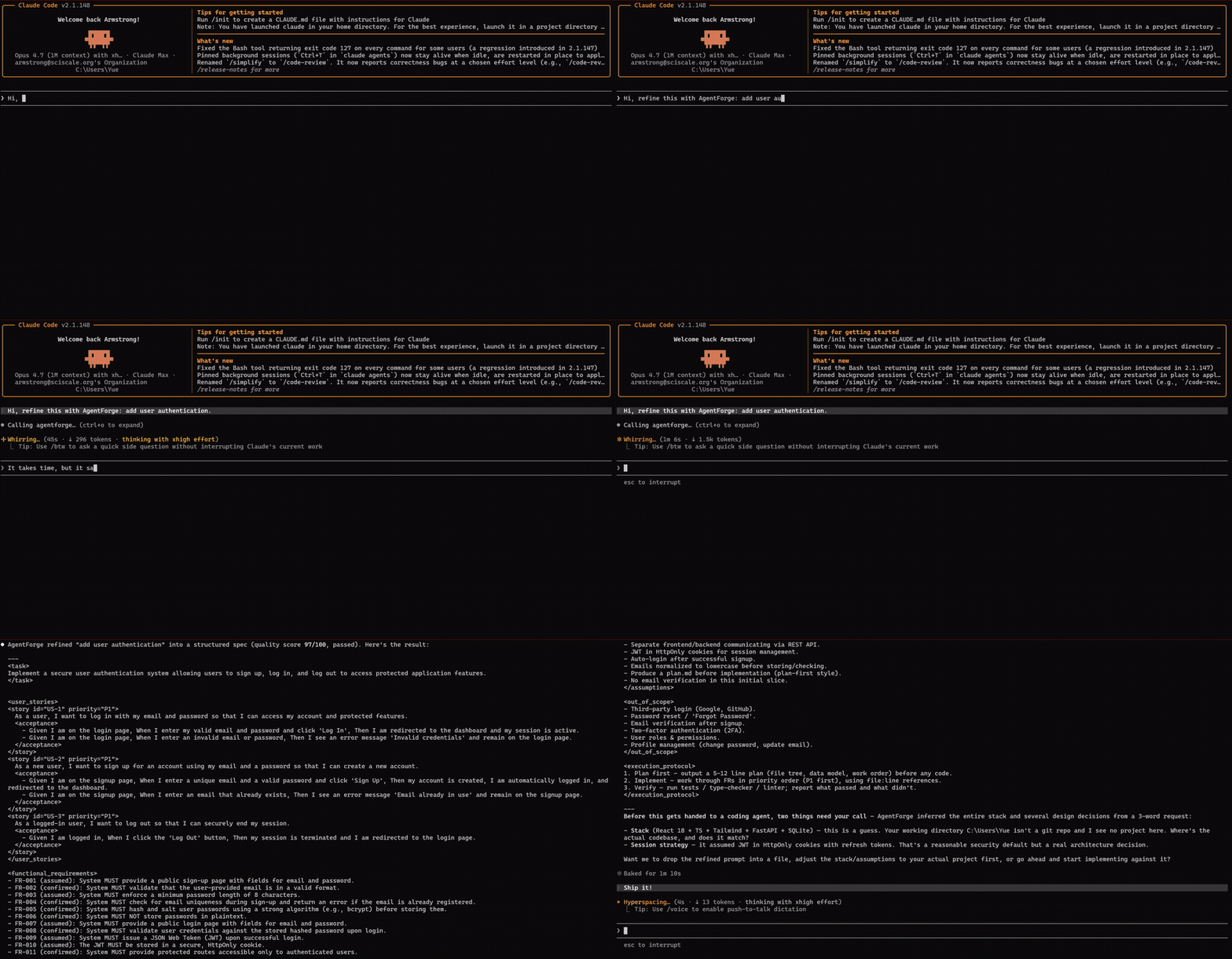
agentforge-mcp is the Model Context Protocol
server for AgentForge. One tool, one job: turn
a vague request into a sharp one.
Why
You know the loop: you ask your coding agent for something, it misreads the half you didn't spell out, you correct it, it breaks something else, you re-explain. The fix isn't a smarter agent — it's a sharper prompt.
AgentForge does the prompt engineering for you. Give it
"add a dark mode toggle that persists" and it:
- extracts the real requirements — the edge cases, the acceptance criteria, the things you'd have forgotten to mention;
- formats for your specific agent — Claude Code wants file:line references, Cursor wants directives, Aider wants tight context;
- quality-checks before returning — every prompt is scored across 12 dimensions before it leaves the engine.
Harness engineering is having a moment — but prompt engineering matters more in the coding-agent era, not less. Tested across 1,000+ real coding cases, projects with AgentForge in the loop reached a deployable state 147% faster.
Quick start
No install — it runs through npx.
1. Get an API key. Sign in at agentforge.sciscale.org, open API keys, and create one. The key is shown once — copy it.
2. Add it to your agent.
Claude Code:
claude mcp add agentforge --env AGENTFORGE_API_KEY=af_your_key -- npx -y agentforge-mcp
Cursor / Windsurf / Claude Desktop — add to your MCP config
(~/.cursor/mcp.json, ~/.codeium/windsurf/mcp_config.json, etc.):
{
  "mcpServers": {
    "agentforge": {
      "command": "npx",
      "args": ["-y", "agentforge-mcp"],
      "env": { "AGENTFORGE_API_KEY": "af_your_key" }
    }
  }
}
3. Use it. Ask your agent naturally — "refine this with AgentForge, then build it: add a dark mode toggle that persists."
The tool — agentforge_refine_prompt
| Argument | Default | |
|---|---|---|
request |
— | Your task in plain language (1–4000 chars). Rough is fine. |
target_tool |
claude-code |
claude-code, codex, cursor, aider, continue, windsurf, kimi, generic |
style |
plan-first |
plan-first, direct-edit, explore-first |
Returns the refined prompt, plus its Quality Engine score and your remaining daily usage.
Free vs Pro
| Free | Pro | |
|---|---|---|
| Refinements | 3 / day | Unlimited |
| Quality Engine | scored across 12 dimensions | scored + auto-refined until it passes ≥ 90 |
Or use the web app
Don't want to wire up an MCP server at all? The same engine — same Quality Engine, same per-account Pro — runs right in your browser at agentforge.sciscale.org. No install, no key, no config.
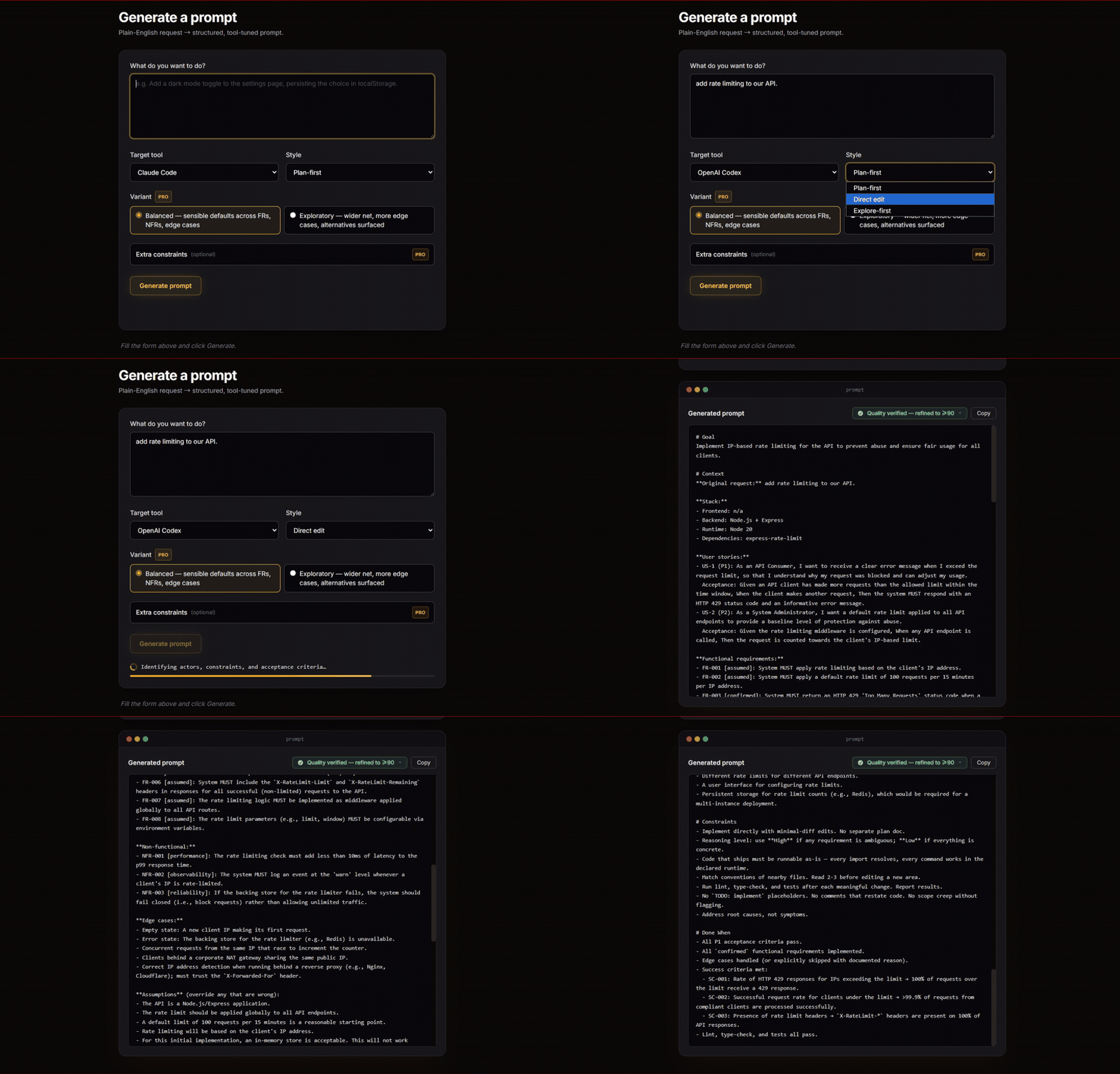
Paste a request, pick your target tool, copy the prompt — generation history and advanced modes included:
How it works
agentforge-mcp is a thin client — no engine logic ships in this package. Your
request goes to the AgentForge API, the hosted engine does the extraction,
formatting, and quality-checking, and the prompt comes back. The engine keeps
improving without you ever updating this package.
Configuration
| Variable | Default | |
|---|---|---|
AGENTFORGE_API_KEY |
— | Required. Your API key. |
AGENTFORGE_API_URL |
https://agentforge.sciscale.org/api/v1/refine |
Override the endpoint (rarely needed). |
Develop
npm install
npm run build      # tsc -> dist/
node dist/index.js # runs on stdio
License
MIT — see LICENSE.

agentforge-mcp is part of AgentForge — a SciScale studio product.
Install Agentforge in Claude Desktop, Claude Code & Cursor
unyly install agentforge-mcpInstalls into Claude Desktop, Claude Code, Cursor & VS Code — handles npx, uvx and build-from-source repos for you.
First time? Get the CLI: curl -fsSL https://unyly.org/install | sh
Or configure manually
Run in your terminal:
claude mcp add agentforge-mcp -- npx -y agentforge-mcpFAQ
Is Agentforge MCP free?
Yes, Agentforge MCP is free — one-click install via Unyly at no cost.
Does Agentforge need an API key?
No, Agentforge runs without API keys or environment variables.
Is Agentforge hosted or self-hosted?
A hosted option is available: Unyly runs the server in the cloud, no local setup required.
How do I install Agentforge in Claude Desktop, Claude Code or Cursor?
Open Agentforge on unyly.org, pick your client tab (Claude Desktop, Claude Code, Cursor) and press Install — the config is generated automatically, no JSON editing.
Related MCPs
Fetch
Web content fetching and conversion for efficient LLM usage.
AWS KB Retrieval
Retrieval from AWS Knowledge Base using Bedrock Agent Runtime.
 by modelcontextprotocol
Spring AI MCP Server
Provides auto-configuration for setting up an MCP server in Spring Boot applications.
llm-analysis-assistant
A very streamlined mcp client that supports calling and monitoring stdio/sse/streamableHttp, and can also view request responses through the /logs page. It also
 by xuzexin-hz
Compare Agentforge with
Not sure what to pick?
Find your stack in 60 seconds
Author?
Embed badge for your README
Browse similar
All ai MCPs