
Agentic RAG With Server
FreeNot checkedThe MCP server provides tools for entity extraction, query refinement, and relevance checking to enhance RAG applications by integrating with OpenAI and Gemini.

About
The MCP server provides tools for entity extraction, query refinement, and relevance checking to enhance RAG applications by integrating with OpenAI and Gemini.
README
✨ Overview
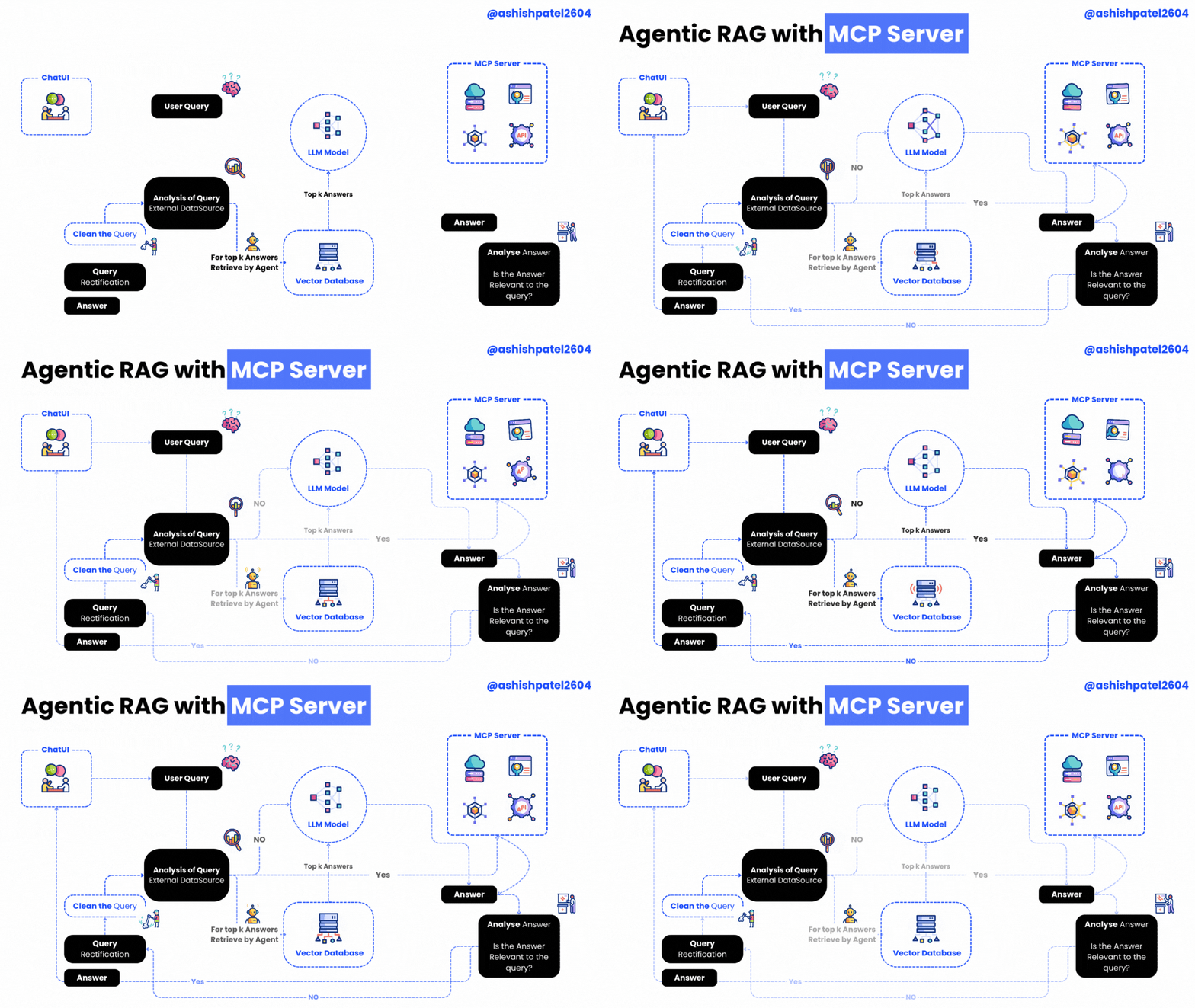
Agentic RAG with MCP Server is a powerful project that brings together an MCP (Model Context Protocol) server and client for building Agentic RAG (Retrieval-Augmented Generation) applications.
This setup empowers your RAG system with advanced tools such as:
- 🕵️♂️ Entity Extraction
- 🔍 Query Refinement
- ✅ Relevance Checking
The server hosts these intelligent tools, while the client shows how to seamlessly connect and utilize them.
🖥️ Server — server.py
Powered by the FastMCP class from the mcp library, the server exposes these handy tools:
| Tool Name | Description | Icon |
|---|---|---|
get_time_with_prefix |
Returns the current date & time | ⏰ |
extract_entities_tool |
Uses OpenAI to extract entities from a query — enhancing document retrieval relevance | 🧠 |
refine_query_tool |
Improves the quality of user queries with OpenAI-powered refinement | ✨ |
check_relevance |
Filters out irrelevant content by checking chunk relevance with an LLM | ✅ |
🤝 Client — mcp-client.py
The client demonstrates how to connect and interact with the MCP server:
- Establish a connection with
ClientSessionfrom themcplibrary - List all available server tools
- Call any tool with custom arguments
- Process queries leveraging OpenAI or Gemini and MCP tools in tandem
⚙️ Requirements
- Python 3.9 or higher
openaiPython packagemcplibrarypython-dotenvfor environment variable management
🛠️ Installation Guide
# Step 1: Clone the repository
git clone https://github.com/ashishpatel26/Agentic-RAG-with-MCP-Server.git

# Step 2: Navigate into the project directory
cd Agentic-RAG-with-MCP-Serve

# Step 3: Install dependencies
pip install -r requirements.txt
🔐 Configuration
- Create a
.envfile (use.env.sampleas a template) - Set your OpenAI model in
.env:
OPENAI_MODEL_NAME="your-model-name-here"
GEMINI_API_KEY="your-model-name-here"
🚀 How to Use
- Start the MCP server:
python server.py
- Run the MCP client:
python mcp-client.py
📜 License
This project is licensed under the MIT License.
Thanks for Reading 🙏
Installing Agentic RAG With Server
This server has no published package — it is built from source. Open the repository and follow its README.
▸ github.com/iflow-mcp/Agentic-RAG-with-MCP-Server-1FAQ
Is Agentic RAG With Server MCP free?
Yes, Agentic RAG With Server MCP is free — one-click install via Unyly at no cost.
Does Agentic RAG With Server need an API key?
No, Agentic RAG With Server runs without API keys or environment variables.
Is Agentic RAG With Server hosted or self-hosted?
A hosted option is available: Unyly runs the server in the cloud, no local setup required.
How do I install Agentic RAG With Server in Claude Desktop, Claude Code or Cursor?
Open Agentic RAG With Server on unyly.org, pick your client tab (Claude Desktop, Claude Code, Cursor) and press Install — the config is generated automatically, no JSON editing.
Related MCPs
Opencode Omniroute Plugin
OpenCode plugin for the OmniRoute AI Gateway. Drives dynamic model discovery, /connect auth flow, and multi-instance OmniRoute providers via the official @openc
 by GitHub Actions
Roblox Studio
Enables AI coding tools to control Roblox Studio for workspace exploration, instance manipulation, and script management. It provides tools for playtesting, sce
 by paralov
Antigravity Drawio
MCP server that enables AI assistants to create, parse, render, and validate Draw.io diagrams programmatically.
 by S-SUJAN-S
Fetch
Web content fetching and conversion for efficient LLM usage.
Mcp
ModelContextProtocol server for enhancing JSON Resumes
 by mcpflow.io
Vault
Bitwarden/Vaultwarden MCP server — BYOK vault access with 6 tools, Send-based reveal, TOTP, and safe agent-write
 by agbergsmann
AWS KB Retrieval
Retrieval from AWS Knowledge Base using Bedrock Agent Runtime.
 by modelcontextprotocol
Spring AI MCP Server
Provides auto-configuration for setting up an MCP server in Spring Boot applications.
llm-analysis-assistant
A very streamlined mcp client that supports calling and monitoring stdio/sse/streamableHttp, and can also view request responses through the /logs page. It also
 by xuzexin-hz
MCP-Agent
A simple, composable framework to build agents using Model Context Protocol by [LastMile AI](https://www.lastmileai.dev)
 by lastmile-ai
Compare Agentic RAG With Server with
Not sure what to pick?
Find your stack in 60 seconds
Author?
Embed badge for your README
Browse similar
All ai MCPs